ray review
Ray 2.58.0 runs Python functions as distributed tasks, keeps mutable state in actors, and places immutable results in a cluster object store. Data, Train, Tune, RLlib, and Serve add dataset execution, distributed training, search, reinforcement learning, and model serving on the same scheduler. Version 2.58 moves task-event persistence away from the GCS path, adds Delta Lake writes and hash shuffle v2 selection, finishes KV-cache-aware Serve LLM routing, expands TPU scheduling, and introduces an experimental gVisor Ray Sandbox. Its Data fixes close code-execution paths in unsafe Lance and nested-pickle reads. Our lab measurement is for 2.57.0: 209 MB installed and a 1.91-second import.
Ray 2.57.0 occupied 209 MB and took 1.91 seconds to import in our sandbox; 2.58.0 is already the current release. Adopt Ray when tasks, actors, and AI services truly share a cluster, not for a one-machine loop or a conventional job queue.
We installed it
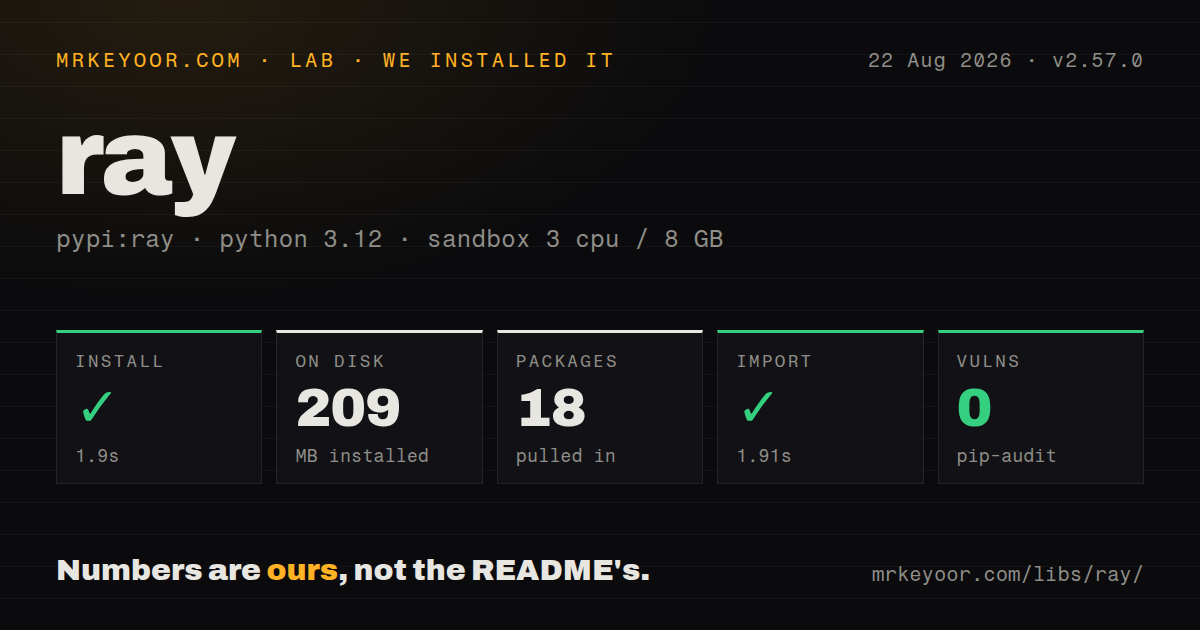
| Install | ✓ · 1.9s | 18 packages on disk · 209 MB |
| Import | ✓ | import ray in 1.91s · compiled extensions · py.typed · requires Python >=3.10 |
| Known vulns | 0 | (pip-audit) |
Answers from our run
Does ray install cleanly?
Yes. In a fresh container with an empty cache, pip install ray finished in 2 seconds, leaving 18 packages and 209 MB on disk. pip-audit reported no known vulnerabilities.
What does ray need to run?
Python >=3.10, and a platform wheel with compiled extensions. In our run import ray succeeded in 1.91s, and the package ships py.typed for type checkers.
ray or dask: which should you use?
dask: Choose it when distributed arrays, dataframes, and graphs should retain familiar PyData conventions. Ray 2.57.0 occupied 209 MB and took 1.91 seconds to import in our sandbox; 2.58.0 is already the current release.
When should you not use ray?
The workload fits one host. multiprocessing, concurrent.futures, or joblib avoids the 209 MB measured install and a local cluster lifecycle.
Use it if
- One Python driver needs to submit independent functions across several CPUs or machines and collect ObjectRef futures
- Long-lived stateful actors, placement by custom resources, and shared immutable objects are all part of the workload
- Data preparation, distributed training, tuning, and model serving should run under one scheduler and dashboard
- Kubernetes already owns operations and KubeRay can manage cluster versions, workers, and autoscaling
- The workload fits one host. `multiprocessing`, `concurrent.futures`, or joblib avoids the 209 MB measured install and a local cluster lifecycle.
- The requirement is a durable broker-backed business queue with acknowledgements and schedules. Celery is built for that job; Ray Core is compute tasks and actors.
- An existing Spark platform already owns SQL and dataframe ETL. Adding Ray introduces another scheduler and operating model.
- Closures and arguments depend on open handles or machine-local state. Ray serializes them for another worker, where those assumptions fail.
- Nobody will monitor object-store spill, process memory, pending resources, version skew, or autoscaling. GitHub currently reports 3,540 open issues and pull requests across the runtime.
Setup reality
We installed Ray 2.57.0 without cache on Python 3.12 in 1.9 seconds. It left 18 packages occupying 209 MB; import ray worked in 1.91 seconds. pip-audit found 0 known vulnerabilities. The measured metadata contained 278 direct dependency entries, the wheel shipped compiled .so files and py.typed, and it required Python >=3.10 under Apache 2.0. PyPI now serves 2.58.0, so these size and timing figures belong only to 2.57.0.
The base extra is Ray Core. Data, Train, Tune, Serve, RLlib, dashboard, and observability installs add their own packages. ray.init() can start locally without credentials. A cluster needs an address, reachable control ports, matching Ray and Python versions, and access control around its dashboard and jobs API. KubeRay moves those choices into Kubernetes resources and pinned worker images.
Every remote closure, argument, and result must serialize. Store one large immutable input with ray.put() and pass its ObjectRef. Submit all tasks before ray.get(); waiting inside the submission loop serializes the work. ray.wait() can consume early completions. Object-store overflow spills to disk, so monitor object lifetimes, node memory, and spill storage. Logical CPU and GPU declarations guide placement but do not enforce process resource limits.
Ordinary actor methods execute one at a time. Async actors and concurrency groups increase overlap, then expose shared-state races. A ray.get() timeout only ends the driver's wait; cancel the reference if the task itself should stop. Retry settings treat worker loss and user exceptions differently, so only repeat idempotent work. Version 2.58 fixes unsafe Data deserialization paths; do not feed untrusted Lance or pickle-bearing input to an older deployment.
Patterns
Own the lifecycle of a local runtime start-local-runtime
import ray

context = ray.init()
print(context.address_info['address'])

try:
    print(ray.cluster_resources())
finally:
    ray.shutdown()
With no address, `ray.init()` starts or joins a local instance. `ray.shutdown()` disconnects this driver when the work ends.
Return an ObjectRef from a task run-remote-function
import ray

@ray.remote
def square(value: int) -> int:
    return value * value

result_ref = square.remote(12)
result = ray.get(result_ref)
Calling `.remote()` submits and returns immediately with an ObjectRef; `ray.get()` blocks the driver on that result.
Fan out the full batch before waiting fan-out-task-batch
@ray.remote
def normalize(record):
    return transform(record)

refs = [normalize.remote(record) for record in records]
results = ray.get(refs)
A `ray.get()` inside the comprehension would serialize submission. Build every ObjectRef first, then wait on the collection.
Process the first available result consume-completed-tasks
pending = [work.remote(item) for item in items]

while pending:
    ready, pending = ray.wait(pending, num_returns=1)
    handle(ray.get(ready[0]))
`ray.wait()` splits ready and pending references, so a single slow task does not hold completed results behind it.
Put serialized mutable state in an actor create-stateful-actor
@ray.remote
class Counter:
    def __init__(self):
        self.value = 0

    def increment(self):
        self.value += 1
        return self.value

counter = Counter.remote()
current = ray.get(counter.increment.remote())
Normal actor calls run one at a time. Split the state or configure concurrency only after that method queue limits throughput.
Reuse one object-store value across tasks share-large-object
data_ref = ray.put(large_array)

@ray.remote
def summarize(values):
    return values.mean()

results = ray.get([summarize.remote(data_ref) for _ in range(4)])
Workers resolve the ObjectRef instead of receiving repeated driver copies. Release references promptly so the object store can reclaim memory.
Declare placement requirements for a task declare-task-resources
@ray.remote(num_cpus=2, num_gpus=1, resources={'accelerator_type:A100': 0.001})
def train_partition(partition):
    return train(partition)

ref = train_partition.remote(shard)
These quantities guide scheduling. They do not cap CPU use, resident memory, or GPU memory inside user code.
Cancel work after a driver timeout retry-and-cancel-task
@ray.remote(max_retries=2, retry_exceptions=True)
def fetch_partition(uri):
    return fetch(uri)

ref = fetch_partition.remote(source_uri)
try:
    value = ray.get(ref, timeout=30)
except ray.exceptions.GetTimeoutError:
    ray.cancel(ref, force=True)
    raise
A get timeout leaves execution alive. `retry_exceptions=True` repeats user failures too, so the operation must be safe to run again.
Discover and join an existing local cluster connect-existing-cluster
import ray

ray.init(address='auto')
print(ray.nodes())
print(ray.available_resources())
`address='auto'` requires a discoverable running cluster. Its nodes need compatible Ray and Python versions.
Apply a pandas batch transform in Ray Data transform-ray-dataset
import ray

dataset = ray.data.read_parquet('s3://example-bucket/events/')
scored = dataset.map_batches(
    score_batch,
    batch_format='pandas',
    batch_size='auto',
)
scored.write_parquet('s3://example-bucket/scored/')
Install the Data extra and provide cloud credentials through its filesystem layer. Execution starts when iteration or an output consumes the dataset.
Run a bounded Tune parameter grid run-tune-search
from ray import tune

def objective(config):
    tune.report({'loss': train_once(config['learning_rate'])})

tuner = tune.Tuner(
    objective,
    param_space={'learning_rate': tune.grid_search([0.001, 0.01, 0.1])},
)
results = tuner.fit()
Tune is an extra install. Set per-trial CPUs and GPUs or concurrent trials can oversubscribe one node.
Run two HTTP prediction replicas with Serve deploy-serve-handler
from ray import serve

@serve.deployment(num_replicas=2)
class Predictor:
    def __init__(self):
        self.model = load_model()

    async def __call__(self, request):
        payload = await request.json()
        return {'prediction': self.model(payload['input'])}

serve.run(Predictor.bind(), route_prefix='/predict')
Serve is an extra install. Each of the 2 replicas loads a model unless deployment design moves that state into another shared service.
Alternatives
| Package | Registry | Pick it when |
|---|---|---|
| dask | PyPI | Choose it when distributed arrays, dataframes, and graphs should retain familiar PyData conventions. |
| celery | PyPI | Choose it for broker-backed application jobs that need schedules, acknowledgements, and durable queue semantics. |
| joblib | PyPI | Choose it for parallel loops and function caching that remain on one host. |
| pyspark | PyPI | Choose it when Spark already owns SQL, catalogs, ETL, and large dataframe operations. |
More ai / ml guides
@modelcontextprotocol/sdk · openai · mcp · huggingface-hub · @anthropic-ai/sdk · openai · the whole shelf →
How this guide is made: grounded in the library's documentation, release notes, changelog, and issue history, on a fixed rubric — not a hands-on install of every release. The 50 most-downloaded entries are additionally install-verified in clean containers. Corrections: contact the desk.