joblib review
joblib 1.5.3 packages three local Python conveniences together. `Parallel` with `delayed` maps independent calls over processes or threads, `Memory` caches function results in a directory, and `dump()` plus `load()` persist Python objects with special support for NumPy arrays and memory mapping. Scikit-learn uses its parallel backend controls. Release 1.5.3 stops `Memory` from replacing an existing cache `.gitignore`, restricts `pre_dispatch` expression evaluation to prevent huge allocations, and vendors cloudpickle 3.1.2 for Python 3.14 interactive-class fixes. Our install was one pure-Python package with no direct dependencies.
joblib 1.5.3 installed in 0.2 seconds as a single 2 MB package with 0 audit findings, although `import joblib` took 0.57 seconds in our sandbox. Use it for local scientific parallelism, disk caching, or NumPy-aware persistence; move to a scheduler when work must survive a process or cross machines.
We installed it
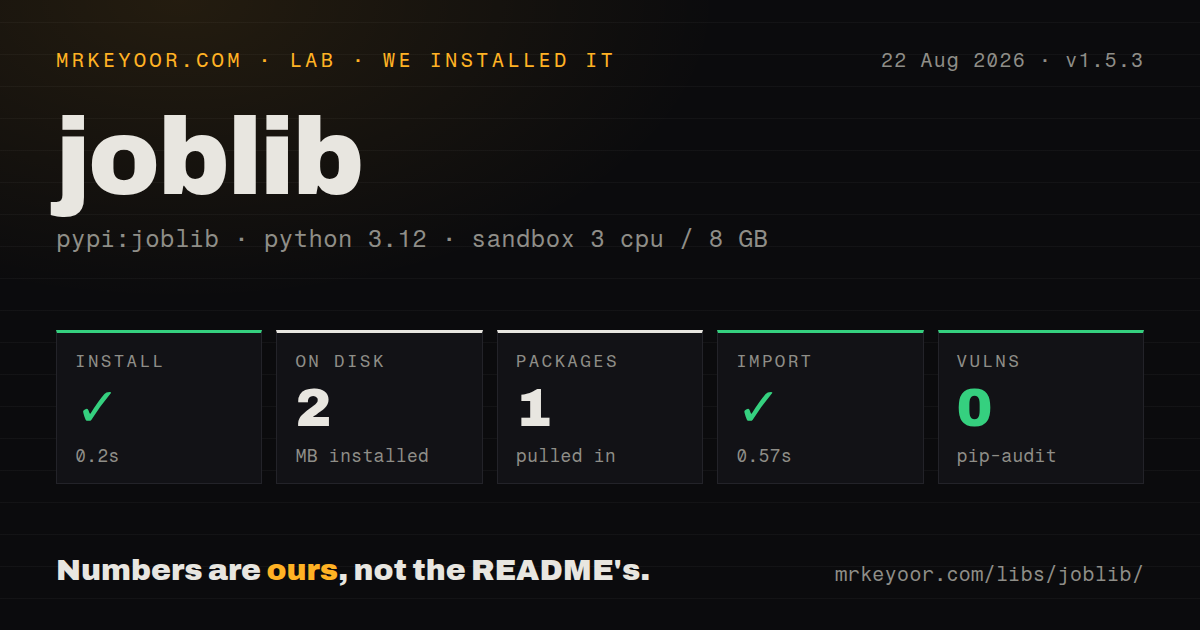
| Install | ✓ · 0.2s | 1 package on disk · 2 MB |
| Import | ✓ | import joblib in 0.57s · pure Python · requires Python >=3.9 |
| Known vulns | 0 | (pip-audit) |
Answers from our run
Does joblib install cleanly?
Yes. In a fresh container with an empty cache, pip install joblib finished in 0.2s, leaving 1 package and 2 MB on disk. pip-audit reported no known vulnerabilities.
What does joblib need to run?
Python >=3.9, and nothing compiled: it is pure Python. In our run import joblib succeeded in 0.57s.
joblib or dask: which should you use?
dask: Choose it for explicit task graphs, larger-than-memory collections, or execution across multiple machines. joblib 1.5.3 installed in 0.2 seconds as a single 2 MB package with 0 audit findings, although import joblib took 0.57 seconds in our sandbox.
When should you not use joblib?
Jobs need durable retries, schedules, dependencies, or several hosts; joblib is a synchronous local helper rather than a queue
Discussed on
Use it if
- Independent local function calls need a process or thread map with little surrounding machinery
- Repeated feature preparation should be cached on disk from the function and its arguments
- Large NumPy data should be loaded through a file-backed memory map and shared by worker processes
- You need to control parallel calls inside scikit-learn through `parallel_config()`
- Jobs need durable retries, schedules, dependencies, or several hosts; joblib is a synchronous local helper rather than a queue
- Individual tasks finish faster than process serialization and dispatch, so a plain loop or threads win
- A cache result depends on globals, mutable files, database state, or helpers absent from the arguments; `Memory` cannot infer those dependencies
- Persisted files can come from another party; `joblib.load()` follows pickle semantics and can execute code
- An asyncio handler must remain nonblocking; `Parallel` occupies its caller until results are returned or consumed
Setup reality
We installed joblib 1.5.3 in a fresh Python 3.12 Bookworm container in 0.2 seconds. The sandbox ended with 1 package using 2 MB, and pip-audit reported 0 known vulnerabilities. Joblib declares 0 direct dependencies, requires Python 3.9 or newer, and is pure Python. import joblib worked in 0.57 seconds. We found no py.typed marker, and the measured metadata did not state a license.
There are no credentials or required config files. Parallel defaults to the bundled loky process backend, so arguments and return values cross a serialization boundary. Put process-starting application code under if __name__ == '__main__':. Threads avoid that copy but only help I/O or native extensions that release the GIL; normal Python CPU loops still compete for it. Release 1.5.3 also restricts pre_dispatch arithmetic to stop oversized expressions from allocating excessive memory.
Memory derives its key from the decorated function and arguments. A changed global, file contents represented only by an unchanged path, or behavior hidden in a helper can leave a stale hit. Cache directories have no automatic fixed-size eviction. Run reduce_size() under an application-owned policy. Version 1.5.3 preserves a .gitignore already present in the cache directory, instead of overwriting local rules. Never load a cache or dump received from an untrusted source.
Large arrays sent to processes may be written to a temporary memory map. /dev/shm capacity and the selected temporary directory can shift work from RAM to slower disk or cause space failures. Processes can also start their own BLAS thread pools; use inner_max_num_threads to avoid multiplying workers by native threads. Generator return modes reduce buffered results, but the caller must keep consuming them. The API remains synchronous even when workers run concurrently.
Patterns
Map independent calls over local processes parallel-map
from joblib import Parallel, delayed

values = Parallel(n_jobs=-1)(
    delayed(transform)(item) for item in items
)
`n_jobs=-1` asks for all available CPUs. Benchmark a batch first because serialization and worker dispatch can cost more than a short `transform()` call.
Select threads for I/O or GIL-free native work prefer-threads
values = Parallel(n_jobs=8, prefer='threads')(
    delayed(fetch)(url) for url in urls
)
Threads avoid process serialization. They help network calls and compiled functions that release the GIL, while ordinary Python CPU work still runs under the interpreter lock.
Set policy around an internal Parallel call configure-library-work
from joblib import parallel_config

with parallel_config(n_jobs=4, prefer='threads'):
    model.fit(X, y)
The context affects compatible joblib calls made inside libraries such as scikit-learn. An inner call with explicit conflicting settings may take precedence, so test the actual estimator path.
Handle results in completion order stream-results
results = Parallel(n_jobs=4, return_as='generator_unordered')(
    delayed(process)(path) for path in paths
)
for result in results:
    save(result)
Unordered generation can lower result buffering and exposes fast results sooner. It gives up input ordering, and slow consumption can still leave completed values waiting in the pipeline.
Cache a deterministic feature calculation cache-function
from joblib import Memory

memory = Memory('.cache/joblib', verbose=0)

@memory.cache
def extract(path, settings, cache_version):
    return build_features(path, settings)
Include every result-changing input in the arguments. A `cache_version` is a simple way to invalidate results when hidden helper logic or external file interpretation changes.
Apply a disk budget to cached calls trim-cache
from datetime import timedelta

memory.reduce_size(
    bytes_limit='500M',
    age_limit=timedelta(days=30),
)
`Memory` does not hold itself below a fixed quota after each call. Schedule `reduce_size()` and monitor the directory on long-running systems.
Write and reload a trusted model persist-object
import joblib

joblib.dump(model, 'model.joblib')
model = joblib.load('model.joblib')
Loading can execute pickle payloads. Accept only artifacts created by a trusted build path, and record the Python and library versions needed to recreate them.
Read an uncompressed array through a memory map map-large-array
import joblib

joblib.dump(array, 'array.joblib', compress=0)
shared = joblib.load('array.joblib', mmap_mode='r')
Memory mapping applies to suitable uncompressed NumPy data. Compressed payloads must be materialized in memory, and write modes can expose shared mutation between workers.
Stop each process from opening a full BLAS pool cap-native-threads
from joblib import Parallel, delayed, parallel_config

with parallel_config(n_jobs=8, inner_max_num_threads=1):
    Parallel()(delayed(fit)(params) for params in grid)
Eight processes each starting many BLAS threads can oversubscribe the host. The inner cap limits compatible native pools inside each worker.
Fingerprint an array by content hash-object
from joblib import hash as joblib_hash

fingerprint = joblib_hash(array)
Joblib can hash NumPy arrays and other values rejected by Python's built-in `hash()`. Treat the output as a cache fingerprint, not a password or adversarial integrity primitive.
Fail when one worker result takes too long set-timeout
from joblib import Parallel, delayed

results = Parallel(n_jobs=4, timeout=30)(
    delayed(process)(item) for item in items
)
`timeout` applies when retrieving a result and is unsupported with `n_jobs=1`. It does not turn local work into a durable job that can resume after the parent exits.
Place process memory maps on a known volume choose-temp-folder
from joblib import Parallel, delayed

results = Parallel(
    n_jobs=4,
    temp_folder='/var/tmp/joblib',
    max_nbytes='10M',
)(delayed(score)(array) for array in arrays)
Arrays above `max_nbytes` can be materialized in `temp_folder` for process sharing. Confirm free space and cleanup behavior inside containers rather than assuming `/dev/shm` is large.
Alternatives
| Package | Registry | Pick it when |
|---|---|---|
| dask | PyPI | Choose it for explicit task graphs, larger-than-memory collections, or execution across multiple machines. |
| diskcache | PyPI | Choose it for process-safe disk caching with expiry and eviction when no parallel map is needed. |
| cloudpickle | PyPI | Choose it when serializing Python functions and classes is the only required feature. |
More utils guides
lru-cache · type-fest · ajv · zod · p-limit · find-up · the whole shelf →
How this guide is made: grounded in the library's documentation, release notes, changelog, and issue history, on a fixed rubric — not a hands-on install of every release. The 50 most-downloaded entries are additionally install-verified in clean containers. Corrections: contact the desk.