celery review
Celery 5.6.3 is a Python job queue for work that must leave the web process and run in one or more supervised workers. Producers send task messages through a broker, usually RabbitMQ or Redis; workers execute them, and an optional result backend keeps state or return values. It handles retries, countdowns, recurring schedules, per-queue routing, rate limits, and workflows built from chains, groups, and chords. The current patch fixes Redis failover reconnection, a Django worker recursion bug, database-backend health checks, and quadratic message growth in chained chords. Our install was pure Python but exposed a wide requirement surface and no `py.typed` marker.
Celery 5.6.3 installed in 0.4 seconds but left 16 packages and 12 MB in our sandbox, a small local cost for a system that still requires a broker and supervised workers. Choose it when routing, retries, schedules, and multi-step job graphs pay for that operational layer; choose a smaller Redis queue for ordinary background functions.
We installed it
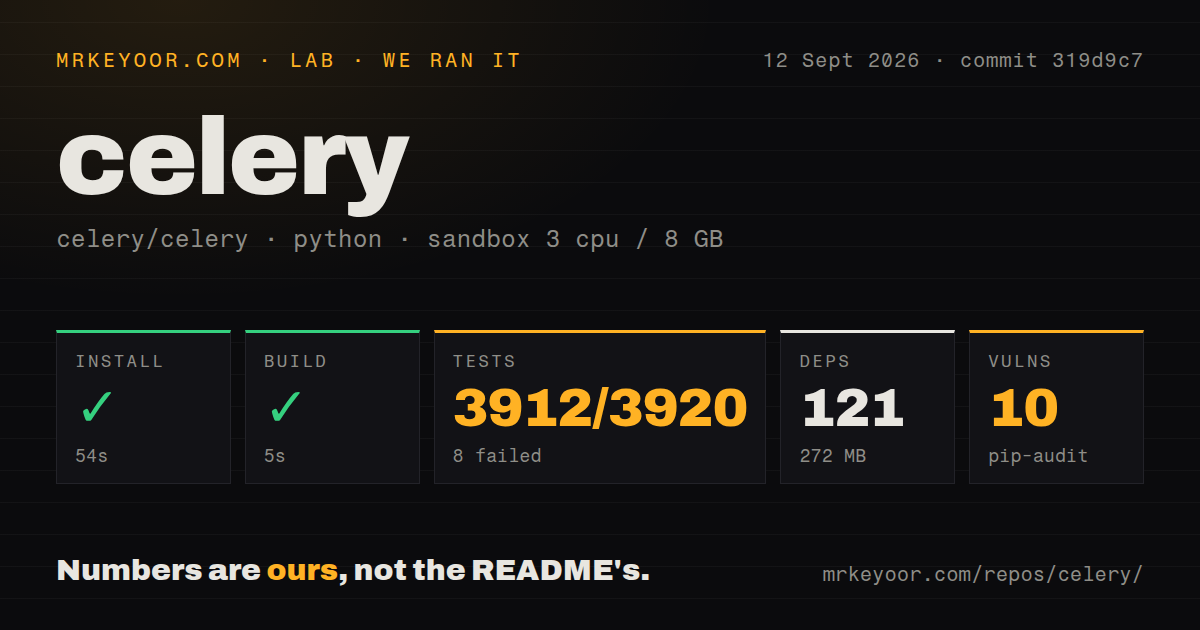
| Install | ✓ · 0.4s | 16 packages on disk · 12 MB |
| Import | ✓ | import celery in 0.07s · pure Python · requires Python >=3.9 |
| Known vulns | 0 | (pip-audit) |
Answers from our run
Does celery install cleanly?
Yes. In a fresh container with an empty cache, pip install celery finished in 0.4s, leaving 16 packages and 12 MB on disk. pip-audit reported no known vulnerabilities.
What does celery need to run?
Python >=3.9, and nothing compiled: it is pure Python. In our run import celery succeeded in 0.07s.
celery or dramatiq: which should you use?
dramatiq: Use it for broker-backed actors and automatic retries with a narrower public model. Celery 5.6.3 installed in 0.4 seconds but left 16 packages and 12 MB in our sandbox, a small local cost for a system that still requires a broker and supervised workers.
When should you not use celery?
Task functions need native asyncio execution. Celery documents prefork, eventlet, gevent, threads, and solo pools; an asyncio queue such as arq follows coroutine code more directly.
Use it if
- HTTP handlers need to hand durable Python work to processes that can continue after the request ends.
- Jobs require retry policy, routing to named queues, rate limits, delayed delivery, or a chain/group/chord workflow.
- Your operations team already knows RabbitMQ or Redis and will watch queue depth, worker failures, redelivery, and result expiry.
- A Django application needs a mature task queue with documented framework hooks and worker commands.
- Task functions need native asyncio execution. Celery documents prefork, eventlet, gevent, threads, and solo pools; an asyncio queue such as arq follows coroutine code more directly.
- One small Redis-backed queue is the entire requirement. RQ or Huey asks the team to learn fewer worker, canvas, routing, and backend concepts.
- Workers must run on Microsoft Windows. Celery's README explicitly says Windows is unsupported.
- You need remote control and worker events on SQS. Celery's broker capability table marks both features unavailable for that transport.
- The business action cannot tolerate duplicate execution. Retries, late acknowledgement, and worker loss can redeliver a task, so the task itself must be idempotent.
Setup reality
Our Celery 5.6.3 install completed in 0.4 seconds in a clean Python 3.12 Bookworm container. It left 16 packages and 12 MB on disk; pip-audit reported 0 known vulnerabilities. import celery took 0.07 seconds. The distribution is pure Python, supports Python 3.9 and newer, declares 53 direct dependencies, and lacks py.typed, so strict type-checker behavior deserves a trial in your own project.
A worker does nothing until it can reach a broker. Put the RabbitMQ or Redis URL and credentials in secret-backed environment settings. A result backend is separate and optional; configure one only when callers inspect status, read return values, or use chords. Give stored results an expiry. Leave accepted content on JSON unless every publisher is trusted, because pickle can execute Python during deserialization.
Production needs supervised celery worker processes and exactly 1 beat scheduler for periodic entries. Two beat instances can publish the same scheduled task twice. Prefork is the normal Unix pool. Eventlet, gevent, threads, and solo have different blocking and time-limit behavior. Windows is outside the supported platform list, and SQS does not provide the events or remote-control commands available with RabbitMQ and Redis.
Acknowledgement settings decide when work returns to the queue. With acks_late, a crash after the external side effect but before acknowledgement can run the task again. Prefetch may also let one worker reserve several slow jobs while another sits idle. Celery 5.6 adds worker_eta_task_limit because future ETA messages occupy worker memory. Patch 5.6.3 also fixes reconnection after Redis failover, but applications still need retry limits and idempotency keys.
Patterns
Create an app and task define-task
from celery import Celery

app = Celery(
    "jobs",
    broker="redis://localhost:6379/0",
    backend="redis://localhost:6379/1",
)

@app.task
def add(left: int, right: int) -> int:
    return left + right
`add.delay(2, 3)` publishes to the broker; calling `add(2, 3)` runs locally and bypasses the queue.
Run a worker for one app start-worker
celery -A jobs worker --loglevel=INFO --concurrency=4 --hostname=jobs@%hCelery 5 expects `-A` before the `worker` subcommand. A production supervisor must restart this long-running process.
Publish delayed work with an expiry send-delayed-task
result = build_report.apply_async(
    args=[account_id],
    countdown=30,
    expires=300,
    queue="reports",
)
Countdown and ETA messages occupy worker memory until due; Celery 5.6 adds `worker_eta_task_limit` to cap that backlog.
Retry transient timeouts retry-timeout
import requests

@app.task(
    autoretry_for=(requests.Timeout,),
    retry_backoff=True,
    retry_jitter=True,
    max_retries=4,
)
def fetch_page(url: str) -> str:
    response = requests.get(url, timeout=10)
    response.raise_for_status()
    return response.text
Keep permanent input and authentication errors out of `autoretry_for`, or the worker will spend retries on work that cannot succeed.
Protect a redelivered write acknowledge-late
@app.task(bind=True, acks_late=True, reject_on_worker_lost=True)
def capture_payment(self, order_id: str) -> None:
    gateway.capture(order_id, idempotency_key=self.request.id)
Late acknowledgement permits redelivery after worker loss. The downstream write still needs an idempotency key.
Feed one task into the next chain-results
from celery import chain

job = chain(
    download.s(url),
    parse_document.s(),
    index_document.s(document_id),
)
job.apply_async()
A mutable `.s()` signature receives the previous result as its first argument. Use `.si()` for an immutable signature that ignores it.
Run parallel tasks then a callback fan-out-chord
from celery import chord

chord(
    resize.s(image_id, width) for width in (320, 640, 1280)
)(publish_images.s(image_id))
Chords need a supported result backend and stored header results; `ignore_result=True` on those tasks breaks completion tracking.
Add a nightly beat entry schedule-task
from celery.schedules import crontab

app.conf.beat_schedule = {
    "purge-sessions": {
        "task": "jobs.purge_sessions",
        "schedule": crontab(hour=2, minute=15),
    }
}
Run exactly 1 beat scheduler for this schedule store, or duplicate schedulers can publish duplicate due tasks.
Send expensive work to a named queue route-task
app.conf.task_routes = {
    "jobs.render_video": {"queue": "media"},
}

# celery -A jobs worker -Q media --concurrency=2
A routed message remains pending when no worker consumes `media`; deploy queue coverage together with the route.
Checkpoint before the hard limit set-time-limits
from celery.exceptions import SoftTimeLimitExceeded

@app.task(soft_time_limit=55, time_limit=60)
def export_rows(batch_id: str) -> None:
    try:
        write_export(batch_id)
    except SoftTimeLimitExceeded:
        save_checkpoint(batch_id)
        raise
The hard limit terminates the worker child. Some non-prefork pools do not implement soft time limits.
Skip backend storage for fire-and-forget work drop-unused-result
@app.task(ignore_result=True)
def send_receipt(order_id: str) -> None:
    mailer.send_receipt(order_id)
Do not ignore results for a task used inside a chord or for code that calls `.get()` on its AsyncResult.
Check worker state and queue subscriptions inspect-workers
celery -A jobs status
celery -A jobs inspect active
celery -A jobs inspect reserved
celery -A jobs inspect active_queues
These remote-control commands work only with supporting brokers. Celery's broker table marks them unavailable on SQS.
Alternatives
More infra guides
semver · boto3 · opentelemetry-api · @opentelemetry/api · psutil · distro · the whole shelf →
How this guide is made: grounded in the library's documentation, release notes, changelog, and issue history, on a fixed rubric — not a hands-on install of every release. The 50 most-downloaded entries are additionally install-verified in clean containers. Corrections: contact the desk.