huggingface-hub review
`huggingface-hub` 1.28.0 is the official Python SDK and `hf` CLI for Hugging Face repositories and hosted services. It downloads individual files or revision snapshots into a shared cache, uploads commits to model, dataset, and Space repositories, searches Hub metadata, calls inference providers, submits jobs, and manages Inference Endpoints. Version 1.28 adds endpoint hardware discovery with quota and price information, engine-specific image configuration, and tensor/data parallel controls. It also removes the undocumented `INFERENCE_ENDPOINT_IMAGE_KEYS` constant and fixes Xet progress, scheduled uploads into subfolders, redirect size metadata, and false rate-limit messages.
`huggingface-hub` 1.28.0 installed in 0.7 seconds and occupied 24 MB across 15 packages in our sandbox, with typed Python APIs and no audit findings. Add it when Hugging Face repositories or hosted services are the product boundary; for your own object store, a generic storage client avoids Hub-specific tokens, revisions, and cache behavior.
We installed it
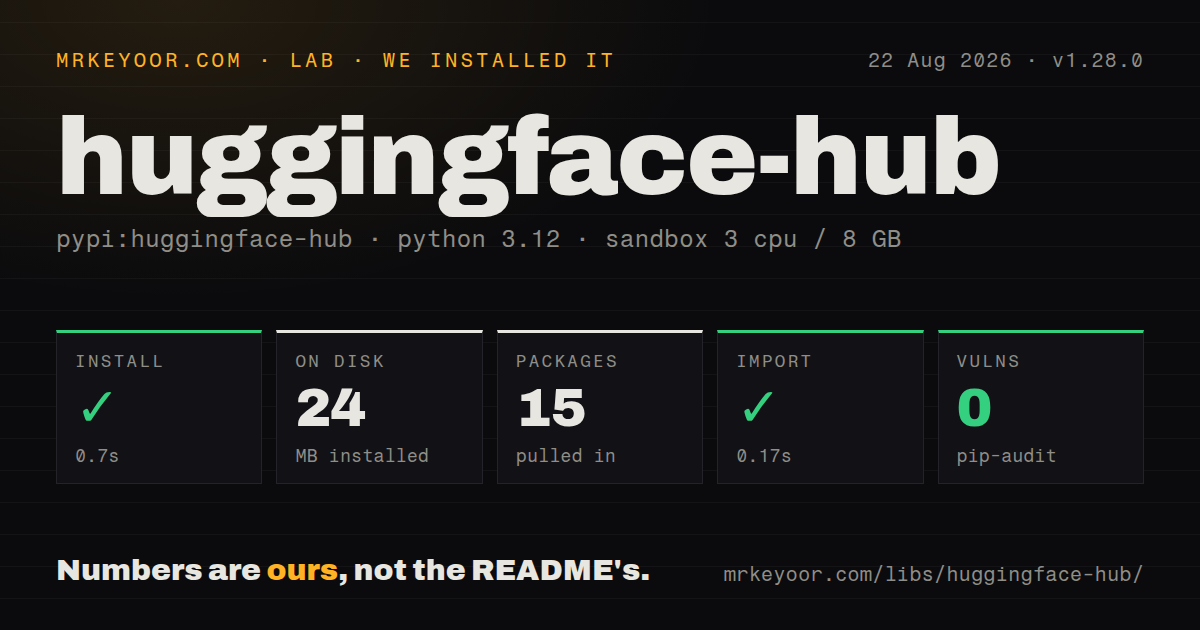
| Install | ✓ · 0.7s | 15 packages on disk · 24 MB |
| Import | ✓ | import huggingface_hub in 0.17s · pure Python · py.typed · requires Python >=3.10.0 |
| Known vulns | 0 | (pip-audit) |
Answers from our run
Does huggingface-hub install cleanly?
Yes. In a fresh container with an empty cache, pip install huggingface-hub finished in 0.7s, leaving 15 packages and 24 MB on disk. pip-audit reported no known vulnerabilities.
What does huggingface-hub need to run?
Python >=3.10.0, and nothing compiled: it is pure Python. In our run import huggingface_hub succeeded in 0.17s, and the package ships py.typed for type checkers.
huggingface-hub or kagglehub: which should you use?
kagglehub: Use it when the models and datasets are distributed through Kaggle. huggingface-hub 1.28.0 installed in 0.7 seconds and occupied 24 MB across 15 packages in our sandbox, with typed Python APIs and no audit findings.
When should you not use huggingface-hub?
Artifacts live in S3, GCS, OCI, or an internal registry and should remain provider-neutral. Hub repository IDs, revisions, tokens, and cache paths will enter application code.
Use it if
- Builds or services need a model or dataset file pinned to a Hugging Face repository revision.
- CI publishes checkpoints, cards, datasets, or Space files as one Hub commit without running Git LFS manually.
- Python code must search Hub metadata, call an inference provider, submit a hosted job, or manage an Inference Endpoint.
- Multiple projects on one machine should reuse content-addressed model blobs instead of downloading each revision separately.
- Artifacts live in S3, GCS, OCI, or an internal registry and should remain provider-neutral. Hub repository IDs, revisions, tokens, and cache paths will enter application code.
- A download helper should select the best weight format automatically. `snapshot_download` retrieves the selected repository files unless `allow_patterns` or `ignore_patterns` narrows them.
- The host has no disk-budget or cache-pruning plan. Several revisions and alternate weight formats can remain under `HF_HOME` and share blob storage.
- The code still calls removed pre-1.0 interfaces such as `Repository`, `InferenceApi`, or `huggingface-cli`. Those callers need migration before installing 1.28.
- Inference must switch among providers without exposing provider-specific task, billing, or model availability. `InferenceClient` still follows Hugging Face routing and service contracts.
Setup reality
We installed huggingface-hub 1.28.0 in a clean Python 3.12 Bookworm container in 0.7 seconds. The result was 15 packages and 24 MB on disk, and pip-audit found 0 known vulnerabilities. Metadata lists 112 direct dependencies, including conditional extras. The base is pure Python, requires Python 3.10 or newer, carries Apache-2.0, and includes py.typed. import huggingface_hub completed in 0.17 seconds.
Public repositories need no login. Private files, writes, jobs, and endpoint operations require a token through hf auth login, HF_TOKEN, or a function argument. Use a fine-grained token limited to the required namespace and action. Gated repositories add a separate approval or license-acceptance step, so a valid token can still receive HTTP 403. The CLI and Python API read the same saved login unless you pass another token.
Downloads use a content-addressed cache under HF_HOME, normally inside the user's cache directory. hf_hub_download returns a cached file path; snapshot_download may fetch a whole revision. Pin a commit and filter filename patterns for reproducible, bounded deployments. local_files_only=True and HF_HUB_OFFLINE=1 work only after the exact artifacts are cached. Use the supported cache scan and delete commands because snapshot directories can share blobs.
Uploads create repository commits. Batch related files with upload_folder or commit operations instead of issuing one commit per file. Large artifacts can use the Hub's Xet-backed transfer path, but a multi-step publish workflow still needs its own recovery logic. Version 1.28 adds list_inference_endpoints_hardware() because valid region, vendor, accelerator, type, and size choices depend on current quota. Hosted endpoints incur service charges, and multi-accelerator engines require matching parallel settings.
Patterns
Download one file at a pinned revision download-file
from huggingface_hub import hf_hub_download

path = hf_hub_download(
    repo_id="Qwen/Qwen3-0.6B",
    filename="config.json",
    revision="COMMIT_HASH",
)
The returned path normally lives in the shared cache. A commit hash is reproducible; `main` can move between runs.
Fetch selected files from a snapshot download-filtered-snapshot
from huggingface_hub import snapshot_download

folder = snapshot_download(
    "sentence-transformers/all-MiniLM-L6-v2",
    allow_patterns=["*.safetensors", "*.json", "*.txt"],
    ignore_patterns=["onnx/*"],
)
Without filters, a repository snapshot may include multiple weight formats and converted artifacts.
Read the configured Hub identity authenticate-token
# Set HF_TOKEN through the shell or secret manager.
from huggingface_hub import whoami

identity = whoami()
print(identity["name"])
Use a fine-grained token. Access to a gated repository can still require accepting its terms on the website.
List popular models for one task search-models
from huggingface_hub import list_models

for model in list_models(
    task="text-classification",
    sort="downloads",
    limit=10,
):
    print(model.id, model.downloads)
The result is lazy and paginated. Set a finite limit for request handlers and interactive commands.
Create a private model repository create-private-repo
from huggingface_hub import create_repo

repo = create_repo(
    "my-org/reranker-v2",
    repo_type="model",
    private=True,
    exist_ok=True,
)
The token needs write permission in `my-org`; repository visibility does not change permissions on local cached files.
Upload a directory as one commit upload-folder
from huggingface_hub import upload_folder

upload_folder(
    repo_id="my-org/reranker-v2",
    folder_path="release",
    commit_message="Publish evaluated checkpoint",
    ignore_patterns=["*.tmp", "logs/*"],
)
Filter logs, credentials, and temporary files before upload; the folder operation groups the remaining changes into a repository commit.
Fetch a file from a dataset repository download-dataset-file
from huggingface_hub import hf_hub_download

path = hf_hub_download(
    repo_id="org/dataset-name",
    repo_type="dataset",
    filename="data/train.parquet",
    revision="COMMIT_HASH",
)
Set `repo_type="dataset"`; the default repository type is `model`.
Call a hosted chat model call-chat-inference
from huggingface_hub import InferenceClient

client = InferenceClient(token=True)
response = client.chat.completions.create(
    model="meta-llama/Llama-3.1-8B-Instruct",
    messages=[{"role": "user", "content": "Summarize this error."}],
    max_tokens=120,
)
print(response.choices[0].message.content)
Model availability, provider routing, and charges can change independently of the package release; `token=True` uses configured Hub credentials.
Inspect local cache use scan-cache
from huggingface_hub import scan_cache_dir

cache = scan_cache_dir()
print(cache.size_on_disk)
for repo in cache.repos:
    print(repo.repo_id, repo.size_on_disk)
Delete through supported cache tools so shared blobs and snapshot references remain consistent.
Refuse network access for a download require-cached-file
path = hf_hub_download(
    repo_id="Qwen/Qwen3-0.6B",
    filename="config.json",
    revision="COMMIT_HASH",
    local_files_only=True,
)
The call raises when the exact file and revision are absent. Populate the deployment cache before enabling offline mode.
Discover allowed endpoint hardware list-endpoint-hardware
from huggingface_hub import list_inference_endpoints_hardware

for item in list_inference_endpoints_hardware(vendor="aws", region="eu-west-1"):
    print(item.instance_type, item.instance_size, item.price_per_hour)
Version 1.28 adds this API. Results reflect the namespace's current quota and service availability, so query them before constructing deployment flags.
Authenticate and download with the current CLI use-cli
hf auth whoami
hf download Qwen/Qwen3-0.6B config.json --revision COMMIT_HASH --local-dir ./model
hf cache ls
The current executable is `hf`; examples using `huggingface-cli` refer to the pre-1.0 command surface.
Alternatives
| Package | Registry | Pick it when |
|---|---|---|
| kagglehub | PyPI | Use it when the models and datasets are distributed through Kaggle. |
| boto3 | PyPI | Use it when your team owns the S3 bucket, IAM policy, lifecycle, and artifact naming. |
| fsspec | PyPI | Use it for a filesystem-style abstraction across several object stores without Hub repository semantics. |
More ai / ml guides
@modelcontextprotocol/sdk · openai · mcp · @anthropic-ai/sdk · openai · tiktoken · the whole shelf →
How this guide is made: grounded in the library's documentation, release notes, changelog, and issue history, on a fixed rubric — not a hands-on install of every release. The 50 most-downloaded entries are additionally install-verified in clean containers. Corrections: contact the desk.