openai review
openai 3.3.1 is OpenAI's official Python client for its REST, server-sent streaming, Realtime, file, pagination, and webhook APIs. It exposes matching synchronous and asyncio clients, TypedDict request shapes, Pydantic response objects, service-specific exceptions, request IDs, retries, and configurable transports. Responses is the primary generation interface in the current README, while Chat Completions remains supported. Release 3.3.1 updates dependencies with published security fixes; 3.3.0 added named data-residency endpoints. Our Python 3.12 import succeeded, but this client still requires a remote API and credentials.
openai 3.3.1 installed in 1.1 seconds and occupied 22 MB across 14 packages in our sandbox, with 0 pip-audit findings. Use it for a Python 3.10+ service committed to OpenAI's typed APIs; use a vendor-neutral layer or local inference when provider portability or offline execution is the requirement.
We installed it
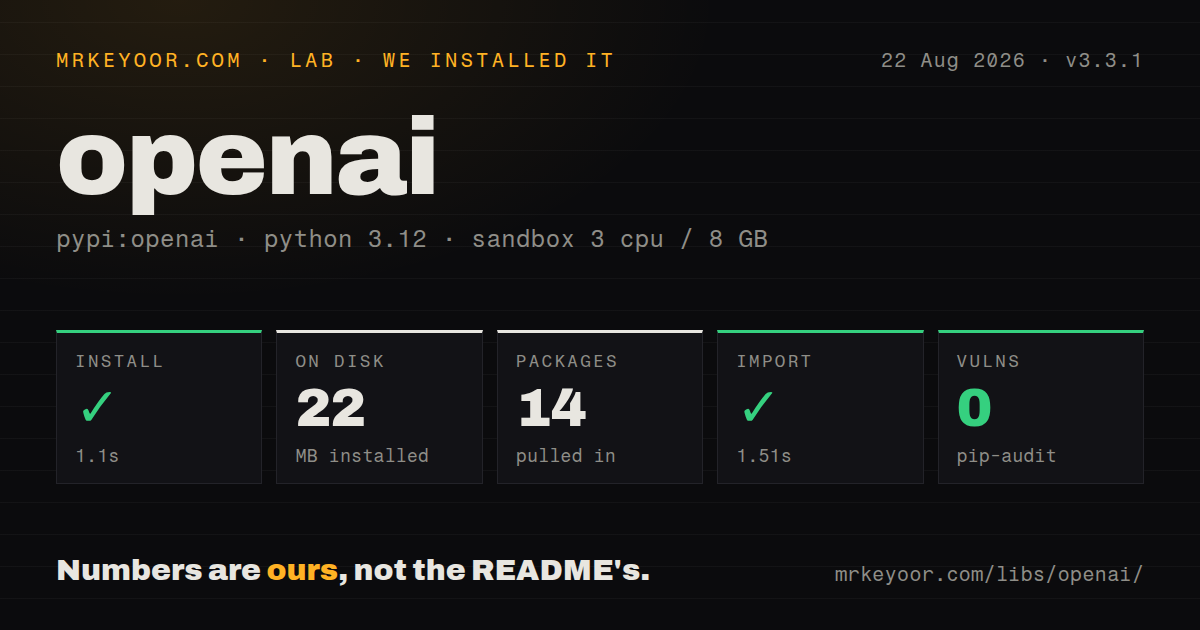
| Install | ✓ · 1.1s | 14 packages on disk · 22 MB |
| Import | ✓ | import openai in 1.51s · pure Python · py.typed · requires Python >=3.10 |
| Known vulns | 0 | (pip-audit) |
Answers from our run
Does openai install cleanly?
Yes. In a fresh container with an empty cache, pip install openai finished in 1 seconds, leaving 14 packages and 22 MB on disk. pip-audit reported no known vulnerabilities.
What does openai need to run?
Python >=3.10, and nothing compiled: it is pure Python. In our run import openai succeeded in 1.51s, and the package ships py.typed for type checkers.
openai or anthropic: which should you use?
anthropic: Use it when a Python 3.10 service targets Anthropic and needs that provider's official types. openai 3.3.1 installed in 1.1 seconds and occupied 22 MB across 14 packages in our sandbox, with 0 pip-audit findings.
When should you not use openai?
The program must run models offline; openai 3.3.1 is an HTTP client and includes no model weights
Discussed on
- hnOpenAI's board has fired Sam Altman5,710 points
- hnGoogle “We have no moat, and neither does OpenAI”2,455 points
- hnDiscovery of a new OpenAI agent message board2,301 points
- hnOpen models by OpenAI2,124 points
- hnWe have reached an agreement in principle for Sam to return to OpenAI as CEO1,980 points
Use it if
- A Python 3.10+ service is committed to OpenAI APIs and wants generated request and response types
- Responses streaming, structured output, files, webhooks, or Realtime need one provider-specific client
- Sync and asyncio applications should use the same resource names and exception families
- Production logs need API request IDs plus typed rate-limit, connection, and status failures
- The program must run models offline; openai 3.3.1 is an HTTP client and includes no model weights
- One interface must swap among several AI vendors; LiteLLM targets provider portability while this SDK follows OpenAI features
- The deployment cannot supply an API key or configured workload identity without exposing credentials
- Python 3.9 or older remains in support; version 3.3.1 requires Python 3.10+
- A custom transport still depends on the 2.x httpx stack; version 3 moved its default layer to HTTPX2 and requires migration work
Setup reality
We installed openai 3.3.1 under Python 3.12 in 1.1 seconds. The environment ended with 14 packages and 22 MB on disk, and pip-audit found 0 known vulnerabilities. The package declared 14 direct dependencies, contained pure Python, included py.typed, and imported in 1.51 seconds. It requires Python 3.10+. The measured metadata identified Apache Software License. Our How we test run did not make a billable API request.
OpenAI() normally reads OPENAI_API_KEY, while webhook verification uses OPENAI_WEBHOOK_SECRET. Keep both out of the repository and application logs. Workload identity and named data-residency endpoints need organization-side configuration; installing 14 packages does not enable either feature. Reuse a client so its connection pool survives across calls, then close it during shutdown. Put the model ID in deployment config because access and model choice can differ by environment.
The SDK retries connection errors, status 408, 409, 429, and server failures 2 times by default. One application call can therefore become 3 API attempts. Its default timeout is 10 minutes, and timeout failures can also be retried. Set tighter bounds when a queue already owns retry policy. Record response._request_id on success and APIStatusError.request_id on failure, but avoid logging prompts or authentication headers.
Responses streaming yields several event types, so filter response.output_text.delta instead of printing every event as text. AsyncOpenAI mirrors the sync surface but needs await and async iteration. Realtime error messages arrive as events and do not automatically raise an exception, while webhook validation needs the untouched request body. Version 3's HTTPX2 migration affects custom clients, transports, hooks, mocks, authentication handlers, and detailed timeout objects built for the older httpx dependency.
Patterns
Generate text with Responses create-response
from openai import OpenAI

client = OpenAI()
response = client.responses.create(
    model='gpt-5.5',
    instructions='Answer as a concise Python reviewer.',
    input='Explain mutable default arguments.',
)
print(response.output_text)
print(response._request_id)
OpenAI() reads OPENAI_API_KEY. Keep the key and sensitive input out of logs, but retain the request ID for tracing.
Call Responses from asyncio use-async-client
import asyncio
from openai import AsyncOpenAI

async def main():
    async with AsyncOpenAI() as client:
        response = await client.responses.create(model='gpt-5.5', input='Give one debugging tip.')
        print(response.output_text)

asyncio.run(main())
One AsyncOpenAI instance reuses its connection pool. The context manager closes it when this short process ends.
Print only text delta events stream-output-text
stream = client.responses.create(
    model='gpt-5.5',
    input='Write a two-sentence release note.',
    stream=True,
)
for event in stream:
    if event.type == 'response.output_text.delta':
        print(event.delta, end='', flush=True)
A version 3 Responses stream also contains lifecycle, tool, and error events. Branch on event.type before reading delta.
Validate output with Pydantic parse-typed-output
from pydantic import BaseModel

class Ticket(BaseModel):
    title: str
    priority: int

response = client.responses.parse(
    model='gpt-5.5',
    input='Printer offline; dispatch is blocked.',
    text_format=Ticket,
)
item = response.output[0].content[0]
if item.type == 'output_text' and item.parsed:
    print(item.parsed)
Check the content type and parsed value. A refusal or other output item does not create the expected Ticket instance.
Receive a function call request define-function-tool
response = client.responses.create(
    model='gpt-5.5',
    input='What is the status of order 42?',
    tools=[{
        'type': 'function', 'name': 'get_order',
        'description': 'Read one order by numeric ID',
        'parameters': {'type': 'object', 'properties': {'order_id': {'type': 'integer'}}, 'required': ['order_id'], 'additionalProperties': False},
        'strict': True,
    }],
)
The SDK never runs your function. Authorize and validate every call, then return a function_call_output in a later response.
Separate transport and status failures classify-api-errors
import openai

try:
    response = client.responses.create(model='gpt-5.5', input=prompt)
except openai.APIConnectionError as exc:
    raise RuntimeError('connection failed') from exc
except openai.RateLimitError:
    queue_for_later()
except openai.APIStatusError as exc:
    logger.error('status=%s request_id=%s', exc.status_code, exc.request_id)
    raise
APIStatusError exposes the failed request ID. Typed subclasses are safer than parsing exception message text.
Limit timeout and SDK retries bound-request-policy
client = OpenAI(timeout=30.0, max_retries=1)
response = client.responses.create(
    model='gpt-5.5',
    input='Summarize this incident.',
)
The documented defaults are a 10-minute timeout and 2 retries for selected failures. Coordinate these values with job-level retries.
Authenticate an incoming webhook verify-webhook-body
from openai import InvalidWebhookSignatureError, OpenAI

client = OpenAI()
try:
    event = client.webhooks.unwrap(raw_body, request_headers)
except InvalidWebhookSignatureError:
    return ('invalid signature', 400)
if event.type == 'response.completed':
    handle_completed(event.data)
Pass the unchanged request body. Parsing and serializing it before verification can invalidate the signature check.
Auto-fetch paginated jobs iterate-all-pages
jobs = []
for job in client.fine_tuning.jobs.list(limit=20):
    jobs.append(job)
print(len(jobs))
Iteration can issue more than 1 HTTP request as pages are consumed. Stop early when the caller only needs a few results.
Alternatives
| Package | Registry | Pick it when |
|---|---|---|
| anthropic | PyPI | Use it when a Python 3.10 service targets Anthropic and needs that provider's official types |
| google-genai | PyPI | Use it when Gemini and Google-hosted generation are the required backend |
| litellm | PyPI | Use it when switching among 2 or more model providers matters more than immediate OpenAI-specific coverage |
More ai / ml guides
@modelcontextprotocol/sdk · mcp · huggingface-hub · @anthropic-ai/sdk · openai · tiktoken · the whole shelf →
How this guide is made: grounded in the library's documentation, release notes, changelog, and issue history, on a fixed rubric — not a hands-on install of every release. The 50 most-downloaded entries are additionally install-verified in clean containers. Corrections: contact the desk.