Desktop Commander gives an MCP client full workstation reach
Desktop Commander exposes file reading and writing, recursive listings, text search, targeted edits, terminal sessions, process inspection, and program termination. It also handles Excel workbooks, PDF creation and editing, DOCX content, remote URLs, and long-running interactive commands. Claude Desktop receives richer previews for markdown, images, code, directories, and office files. The result is closer to a general workstation bridge than a simple filesystem connector.
Client coverage is broad. The README gives configurations for Claude Desktop, Claude Code, Codex, Cursor, Windsurf, VS Code, Cline, Roo Code, Gemini CLI, JetBrains, and others. Most examples launch @wonderwhy-er/desktop-commander@latest through npx. A remote option routes commands from ChatGPT or Claude web through a cloud service to a device process running on the user's machine.
Its built-in restrictions cannot contain a hostile client
The security policy is direct: Desktop Commander is a privileged local automation tool, and the connected AI client plus account are assumed trustworthy and uncompromised. The server does not decide whether a command came from the user, prompt injection, or a compromised account. It executes requests under the current user's permissions. That model may be acceptable on a disposable workstation, but it is too broad for an untrusted client on a normal laptop.
allowedDirectories applies to filesystem tools, while terminal commands can still read outside those paths. The command blocklist can be bypassed through absolute paths, substitution, or another interpreter. Symlink checks close one class of accidents, but the project labels all three controls as guardrails rather than boundaries. An open security pull request, number 399, proposes preventing an AI tool from changing blocked commands, allowed directories, and the default shell at runtime.
What happened when we ran it
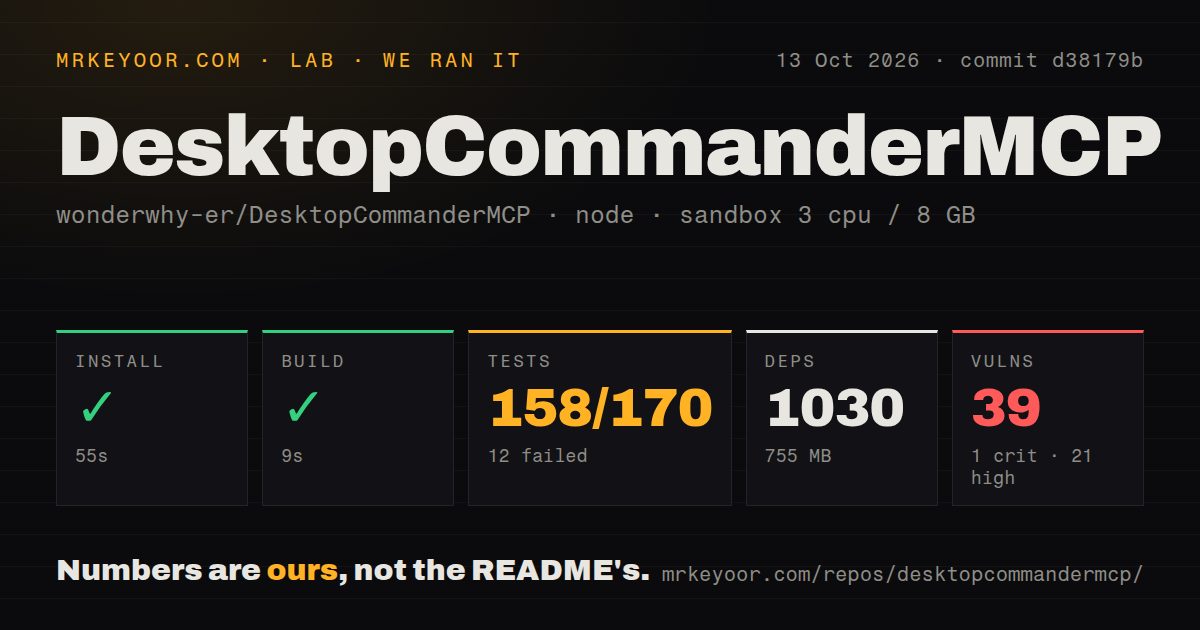
Our sandbox cloned commit 9bd8422 into a fresh, unprivileged Node 22 container with 3 CPUs, 8 GB of RAM, and no secrets. The checkout occupied 58.4 MB, contained 301 files, and held about 47,415 lines of source. It included 1 CI workflow file, a Dockerfile, and a tests directory.
The npm install did not complete within the 900-second limit. Its final visible lines were deprecation warnings for old versions of rimraf, glob, gauge, fstream, lodash.isequal, and related packages. Those warnings identify stale transitive components, but they do not explain why installation consumed the full limit. We did not receive a completed package count.
Because installation timed out, our harness did not run a build or any tests. A repository tests directory and CI file are useful maintenance signals, but they cannot substitute for a completed result in our container. The honest setup finding is therefore narrower: fresh npm preparation was not dependable under our limit, and every later verification step remained unrun.
This result resembles a current Windows report without proving the same cause. Issue 655 says an @latest plugin launch repeatedly reinstalled dependencies, missed 60-second and 120-second client limits, and left a partial npx cache when killed. Our log does not show that loop, so we cannot attribute the 900-second timeout to it. Pinning still avoids surprise upgrades during startup.
Docker is the sensible default for meaningful access
The documented Docker mode can run without host Node.js and mount selected directories into the container. Without a mount, Desktop Commander cannot reach host files. With a project folder mounted, the agent gets useful access while the rest of the filesystem stays outside the container. Persistent volumes retain tools and caches. A virtual machine or separate workstation provides another boundary when Docker is insufficient.
The README describes Docker as complete isolation and zero risk, which is too absolute for any container receiving mounts and network access. The security policy uses better language: Docker or VM isolation is the boundary, and folders should be scoped narrowly. A mounted directory can still be damaged, secrets inside it can still be read, and command output can still return to the connected model. Backups and review remain necessary.
Release v0.2.44, published July 9, 2026, fixed a dangerous write default. An omitted mode had previously allowed write_file to replace a non-empty file; the release now requires explicit append or rewrite for existing content. It also addressed multi-minute tool stalls and remote connections stuck after sleep. These fixes show active attention to failure modes that matter when an AI controls local data.
Startup and protocol reports affect client reliability
Issue 650 reports Windows cold starts between 8.4 and 12.2 seconds for version 0.2.46, with module resolution dominating the profile. Issue 645 describes much larger initialize variation that caused Claude's shared session pool to time out. Startup delay is more than a convenience problem for MCP because a client may kill the process before the server can answer its first handshake.
Automated conformance reports add another warning. Issue 653 lists 10 failed requirements against the July 28, 2026 MCP revision, including missing responses within 10 seconds and a closed official-SDK connection. Issue 654 reports 5 failures against the November 25, 2025 revision. Both reports allow that slow or flaky startup may be involved, so they should be treated as reproducible compatibility findings rather than proof that every client fails.
Telemetry and logs need an explicit policy
Telemetry is enabled by default. The privacy document says it records a persistent random identifier, platform and client versions, file extensions and sizes, base command names, durations, errors, and setup information. It says file contents, full paths, filenames, usernames, and command arguments are excluded. Google Analytics processes the events, and the stated retention period is 14 months.
Users can set telemetryEnabled to false. Local audit logs are separate and record tool calls with sanitized arguments, rotating at 10 MB. Those logs help reconstruct what an agent did, but they are also sensitive operational records and need filesystem permissions plus retention handling. Desktop Commander is worth considering only after isolation, model trust, telemetry, logging, updates, and recovery are deliberate choices.