Codenotch puts quota windows where you can see them
Codenotch draws a small pill on a screen edge and fills it with rings for coding-assistant usage. Hovering reveals the limit windows and reset times. The app can also tell when a session is working, finished, or waiting for input, then open briefly and play a sound. This is a focused answer to a familiar problem: subscription limits live in separate tools and often become visible only after work has stopped.
The provider list is broader than the name suggests. The macOS app reads Claude Code, Cursor, Codex, DeepSeek, Antigravity, local Ollama and LM Studio, plus several other services. The Windows port currently covers a smaller group. Multiple Claude and Codex profiles become separate rings when their directories follow the documented naming convention. In each case, Codenotch tries to reuse a session the original tool already owns rather than making you create another login.
Usage readings depend on interfaces vendors may change
The README is unusually direct about data quality. No supported vendor interface gives every tool a simple, stable percentage-used value. Codenotch therefore reads a mix of official endpoints, local SQLite data, CLI output, HTTP caches, language-server responses, and account files. Each adapter labels its fidelity, keeps the last good reading, and shows stale, authentication, or error states rather than substituting 0.
That approach is honest, but it is also the maintenance burden. Open issues on September 29 reported an OpenCode 1.18 storage change, renamed OpenCode 2.x database tables, and Claude /usage output that no longer contained expected limit lines. Those are not theoretical concerns. They show how a provider ring can go blank while Codenotch itself remains healthy. If a quota display controls buying or scheduling decisions, compare it with the provider's own view after upgrades.
What happened when we ran it
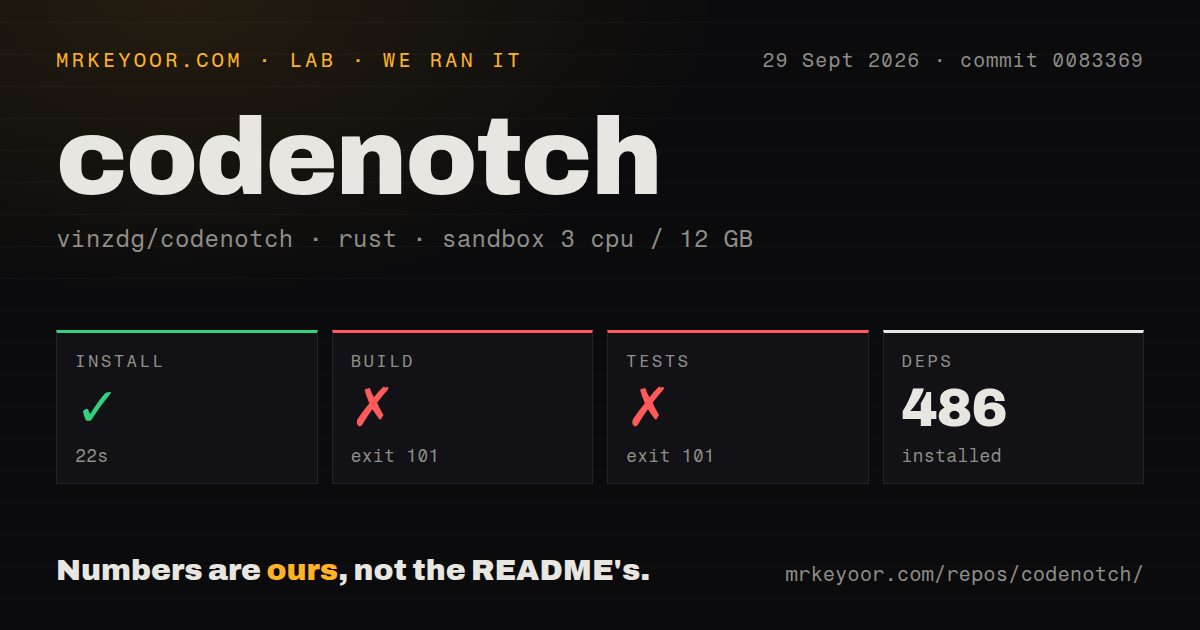
Our lab targeted the Rust project under windows/ at commit 0083369. Dependency installation succeeded in 22 seconds and resolved 486 packages. The repository checkout contained 489 files, about 122,354 lines of source, and occupied 32.3 MB. Four CI workflow files were present, while our scan found no Dockerfile and no repository-level tests directory.
The release build failed after 190 seconds with exit code 101. The supplied log tail shows two warnings for unused imports and says one previous error prevented the codenotch binary from compiling, but that earlier error is absent from the excerpt. Tests failed after 20 seconds with the same exit code. Their tail shows 3 warnings, including an unused Windows test variable, followed by the same reference to one earlier compile error. Naming a cause would be guesswork.
macOS has the finished path; Windows and Linux carry caveats
The main download is a universal macOS application for macOS 15 or later. Its DMG is signed and notarized, and Sparkle checks daily for EdDSA-signed updates. Building from source needs Xcode, XcodeGen, and create-dmg, while a local development signature is recommended so repeated keychain prompts do not return on every launch. The app can run with fixed demo readings when you do not want it touching live accounts.
Windows uses Rust, Tauri 2, and WebView2. Its installer works without administrator rights, but it is not code-signed, so SmartScreen presents a warning that users must bypass. Automatic archives use a Tauri signature when maintainers configure the key; the manual installer remains unsigned. A Windows build needs the MSVC Rust toolchain. This is a meaningful difference from the polished macOS distribution, especially in managed corporate environments.
Linux builds from the same crate but requires GTK 3, WebKitGTK 4.1, AppIndicator, OpenSSL, and other development packages. Wayland cannot place the notch directly, so the launch script forces X11 through XWayland. The README lists 4 gaps: edge dragging, seen-state and terminal focus, Antigravity credential access, and installed executable icons. Linux is usable as an ongoing port, not equivalent to the Mac application.
Read-only access still reaches sensitive local state
Codenotch says it does not send prompts, tokens, credentials, or raw provider responses to the paired phone. Pairing stays on the local network, uses a single-use code, and expires after 5 minutes. The desktop side also describes provider access as read-only where possible. Codex credentials, for example, are read without being refreshed or written, and separate profiles must be renewed through Codex itself.
Read-only does not mean low sensitivity. The app may access keychain items, OAuth sessions, CLI credential files, editor databases, or browser sessions opened inside its own web view. Some environments will reasonably reject that boundary. Review each enabled adapter, switch off providers you do not need, and expect operating-system permission prompts. A team laptop with strict endpoint controls is a different fit from a personal development machine.
Version 1.20.0 shows fast work and fast-moving dependencies
GitHub showed 2,613 stars and 44 combined open issues and pull requests on September 30, 2026. The repository was pushed that day, and v1.20.0 was published minutes earlier. Its notes added project-level allowance costs, fresher readings during active work, and Windows changes. Current pull requests included Linux desktop work and more Windows placement behavior. This is active maintenance rather than a dormant widget.
The project was created on September 5, so that activity also sits inside a short history. Provider integrations have already needed repairs as upstream tools moved their files and response formats. Codenotch earns a trial if its glanceable display changes how you manage several paid plans. Keep the original tools' usage screens as the authority, and do not assume yesterday's adapter still reads today's session format.