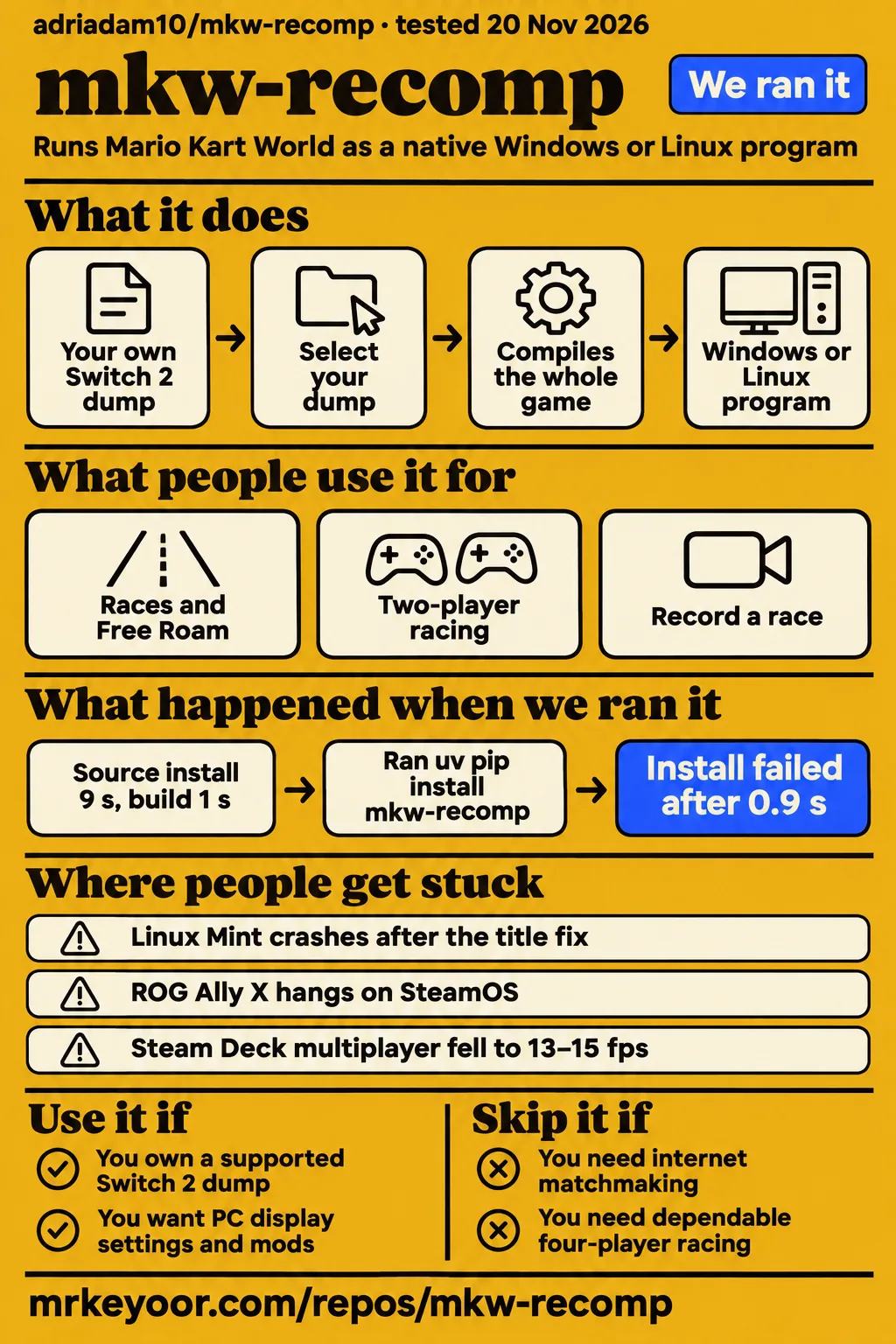

Short answer: try it for PC experimentation, keep another way to play
mkw-recomp runs Mario Kart World from your own Switch 2 dump as a native Windows or Linux program, according to the project README. Use it if you want PC display settings and mods and can work through a hardware-specific problem. Skip it if you're depending on dependable four-player racing for a game night: the Steam Deck multiplayer profile reported only 13–15 fps with four players under its particular test conditions.
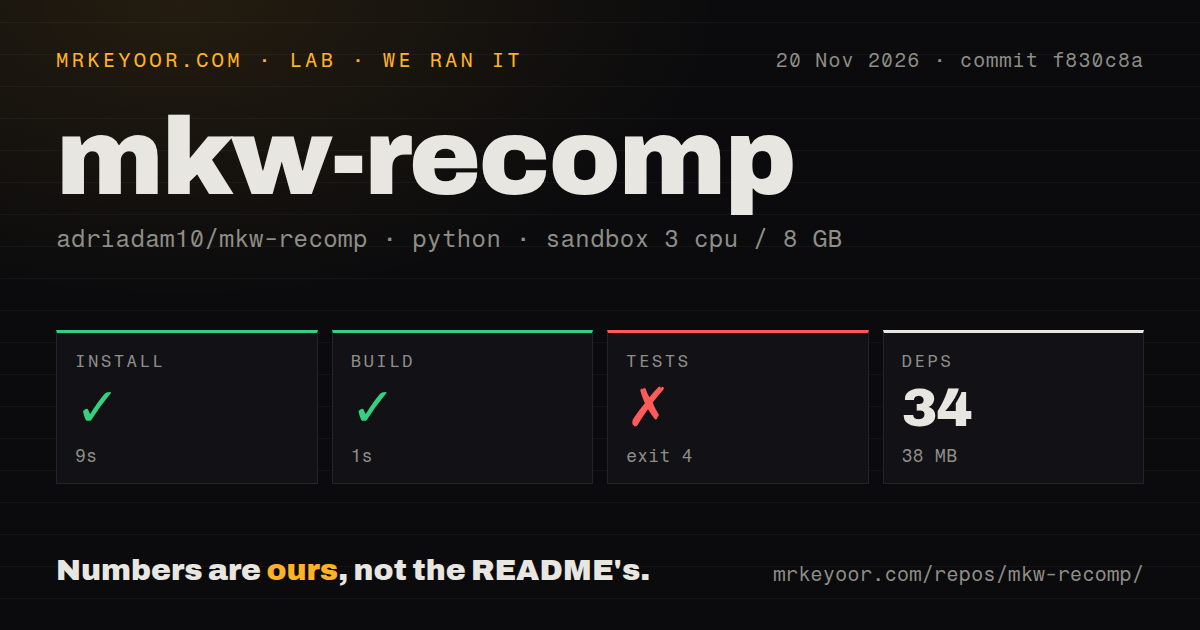
Our November 20 source harness installed dependencies in 9 seconds and completed its build step in 1 second, then pytest stopped on an unrecognized -n argument. Those checks tell you about a development environment. The recommendation to try the game comes from named players' race reports, weighed against unresolved crashes in the tracker. Our measurement boundaries are collected at the end of this review.
What people use mkw-recomp for
Players have reported races, Free Roam and local multiplayer, with sharply different results depending on the machine and session.
| Who played | What they did | What happened |
|---|---|---|
| Ordinary_Idea8964 on r/BC250Gaming | Races and Free Roam on a BC-250 with Bazzite 45 | Said it worked well, with Free Roam rarely below 40 fps. This is a player report, without a matched benchmark. Their BC-250 post describes the setup. |
| fragment_me in the same discussion | Two-player racing | Reported 30–40 fps. The comment is a separate person's experience, rather than a two-player test by the original poster. |
| Contributor flavio-silva, described in upstream release notes | Two consecutive cups on an 8 GB RTX 4070 laptop after a texture-memory fix | Upstream says both cups stayed at full speed after severe trophy-screen slowdown. The v0.1.10 release notes describe the memory fix. |
| GitHub user tlazolteolf | Revisited cups, including two-player races, on v0.1.12 | Reported far fewer slow frames on previously played cups, while occasional frame drops continued. Their follow-up in issue #138 is useful if you're comparing a first visit with a repeat session. |
The BC-250 discussion also contains a less flattering result: OddReflection2121 reported Star Cup dropping to 15–20 fps and wasn't sure whether an update caused it. You shouldn't turn the original poster's Free Roam result into a promise about every cup. Both comments belong in the picture when you're deciding whether your machine is worth trying.
The creator of the Mario Kart World PC Settings walkthrough describes a v0.1.12 race counter showing 60 FPS with frame generation off. The useful part is the method: start at original internal resolution, keep a baseline and compare changes on the same course. The recording identifies the version and settings, which gives you something more useful to copy than a frame-rate headline alone.
What happened when we ran it
| Harness step | Our recorded result | What it tells you |
|---|---|---|
| Install | Succeeded in 9 seconds; 34 dependencies recorded; 38 MB on disk | The harness's dependency step completed. |
| Build | Succeeded in 1 second | The configured build command returned success. |
| Tests | Failed, exit 4, in 1 second | Pytest rejected -n in the invocation. |
We cloned the repository in a sandbox configured with 3 CPUs, 8 GB RAM and image label ghcr.io/astral-sh/uv:python3.12-bookworm. The scan classified its tooling as Python and recorded 872 files, approximately 222,012 source lines and a 15.2 MB checkout. It found seven CI workflow files and a tests directory, with no Dockerfile detected. Those are repository observations, not the storage or hardware requirements for playing Mario Kart World.
The moment the test attempt went wrong was argument parsing. Pytest printed error: unrecognized arguments: -n, naming /work/repo/pyproject.toml as its configuration file. It exited with code 4. That log doesn't identify the package or environment change needed to fix the invocation, so adding a guessed dependency would go beyond the result. It also supplies no passing-test count.
There was a separate, earlier quickstart attempt at commit 8309bc8b83a0. We tried uv pip install mkw-recomp in a fresh virtual environment, and the resolver returned “mkw-recomp was not found in the package registry”. The attempt stopped there. Its summary incorrectly described a PyPI installation; the actual failed step and installation finding take precedence over that summary. The lab recorded successful teardown after the stopped quickstart.
These were different attempts at different commits. The missing-package error doesn't contradict the newer harness's successful dependency installation, and neither is a substitute for the README's game-launcher workflow. The supported route starts with a release ZIP or AppImage and your own dump.
Where people get stuck: a startup fix can leave a later crash
The maintainer resolved the Linux Mint reporter's original title freeze, but that reporter continued to encounter later crashes through v0.1.15 in issue #4.
| Symptom and reporter | What changed | Status in the discussion |
|---|---|---|
| Windows setup stops after compiling the last file, issue #2 | The maintainer first changed progress reporting in v0.1.3. Users still reported hangs. The v0.1.4 package then carried Zig's C runtime already built. | Maintainer identifies v0.1.4 as the fix; later notes say that fix stays in place. Setup thread. |
| Andy-Danderson's Linux Mint machine freezes at the title, issue #4 | v0.1.10 made the compute path the RADV default. RADV is the Mesa Vulkan driver used by these AMD Linux systems. | Original freeze resolved; later crashes remain open in the thread. Linux Mint follow-ups. |
| emmetmorris's SteamOS ROG Ally X hangs, issue #50 | Changing presentation mode and lifting the game's memory cap still produced hangs. | No confirmed fix in the thread; the maintainer was adding diagnostics around presentation submissions. Ally X investigation. |
| LuisFellp's RX 9070 XT loses the GPU device after getting past the title, issue #121 | Some commenters reported success with overrides or later builds. Another RX 9070 XT user ran v0.1.13 without reproducing the failure, on a different driver. | Open; those successful sessions don't settle the original report. AMD Windows investigation. |
| Menu labels mix fragments of other labels, issue #61 | EdouardSence traced the problem to stale pages in the GPU memory mirror; the maintainer assigned the fix to v0.1.11. | framilano later said the problem was fixed, despite the open issue label. Menu-text diagnosis. |
If you're looking for help, match the failure stage before copying a workaround. A compiler stall, a title-screen freeze and a device loss during racing have different histories here. Issue #2 is especially instructive: the first announced fix didn't resolve the commenters' problem, and the package change followed their reports. Its maintainer asks for logs/setup.log if setup still stops; gameplay investigations use logs/mkw.log.
Split-screen performance falls as you add players
A Steam Deck LCD profile in issue #533 reported about 43 fps for one player, 25 for two and 13–15 for four.
| Players | Reported throughput | Important condition |
|---|---|---|
| One | About 43 fps | 720p, low preset, modified v0.1.12 setup. |
| Two | 25 fps, with 20 at real game speed | Same profile; the report distinguishes throughput from normal-speed play. |
| Four | 13–15 fps | Same profile; only full CPU-clock windows counted. |
The author later explained that the original Deck had been throttling because of its fan, then posted newer single-player work after fixing the fan. That makes the initial multiplayer table useful as a warning about scaling, not a release-current Deck buying guide. The maintainer later said v0.1.14 moved pipeline-cache saves out of races while the multiplayer investigation stayed open in the same issue.
The practical decision is to test the number of players you intend to host. A single-player result on a handheld doesn't answer whether two views or four views will hold a playable rate. Upstream's v0.1.17 notes include a shadow-map skip for three- and four-player split-screen, which is a specific change rather than a new measured multiplayer result.
v0.1.17 adds optional DLSS and FSR 3.1
The v0.1.17 release, published November 21, 2026, adds DLSS and FSR 3.1 upscaling, frame generation and NVIDIA Reflex, all off by default.
Upscaling draws the scene at a lower resolution and reconstructs the displayed picture. Frame generation inserts additional pictures between rendered frames. Keep those separate when reading performance claims. The README warns that generated frames can smear fast motion and the minimap, and describes them as making motion smoother without making the game faster.
MacbookOn's X post promotes a v0.1.13 RTX 3060 laptop video with a “90+ FPS” headline. That number alone doesn't tell you how many frames the game rendered, how many were generated or whether the race ran at normal speed. For your own comparison, record all three: rendered FPS, displayed FPS and game speed. The v0.1.12 settings walkthrough's explicit generation-off baseline is a better starting point for changing one option at a time.
The contributor's testing described in the v0.1.17 release was limited to RTX 5080 time trials. The release asks users to report ghosting, wrong kart rendering, flicker, stutter and crashes with their log. Treat enabling the new graphics options as a separate experiment from getting a working default session.
Mods can execute native programs on your computer
The README says a mod's plugin/ folder can contain a native .dll or .so that runs its own program on your computer.
That deserves a different trust decision from replacing a texture. The launcher distinguishes game-file replacements in romfs/, code patches in exefs/ and native plugins. Replacements apply at the next start; code patches rebuild the game. Its GameBanana browser shows authors, licenses, screenshots and descriptions, and downloads when you ask. A listing in the launcher isn't a review of the mod's code.
Keep a separate copy of your save. Upstream warns that mods can crash the game or damage saves and asks you to name enabled mods when reporting bugs. For a first working baseline, leave mods disabled so you can tell whether an added patch changes the result. The v0.1.17 release notes also list refusal of mod archives containing links and better handling of damaged patches, specific import checks rather than a blanket safety guarantee.
mkw-recomp vs console emulation and playing on Switch 2
mkw-recomp translates the game's processor instructions ahead of time and implements its graphics interface through Vulkan, whereas traditional emulation follows a different execution route, as the README explains.
| Choice | Why it belongs in the decision | What the comparison actually supports |
|---|---|---|
| mkw-recomp | You want to try Mario Kart World with PC display controls and mods using your own dump. | Its native execution method is documented; that description alone doesn't rank performance. |
| Traditional console emulation | You're comparing ways of running console software on a PC. | The architectural distinction is real. The recompilation coverage doesn't supply a matched emulator race benchmark. |
| Playing Mario Kart World on Switch 2 | You already have the console needed for the documented dump workflow. | In the BC-250 discussion, Step1Mark hoped PC performance would eventually match or exceed the console. That was an aspiration. |
If the game itself is negotiable, SuperTuxKart is a free kart racing game, with its own races rather than Mario Kart World content. It's the more relevant alternative when your goal is simply an open-source kart racer. Dolphin runs GameCube and Wii games. Consider that project if you're looking for those older systems, including the Wii context that one setup video's transcript confuses with this project. Dolphin's stated scope doesn't make it a Switch 2 alternative.
What the other reviews get wrong
The mkwrecomp.wiki home page labels v0.1.12 the latest release, while upstream's November 21 release is v0.1.17.
That dates the reference wiki's current-release advice, rather than erasing its useful explanations. Its troubleshooting page also broadly marks AMD Linux illegal-opcode resets fixed and points to v0.1.12. Andy-Danderson's later crashes on v0.1.13 and v0.1.15 in issue #4 are a concrete reason to avoid treating that heading as a universal stability verdict.
The November 16 LavX News article, “adriadam10/mkw-recomp: Recompiles Mario Kart World for native PC play,” describes 1.8.0 ultrawide, shadow-map size and fixed-seed parity as roadmap work. The v0.1.10 notes already say those settings take effect on 1.8.0. Use the release-specific account for those features.
The setup video's transcript says Mario Kart Wii. The project's target is Mario Kart World on Switch 2; don't select a Wii dump based on that line. Older Lockergnome coverage also gives a blanket AVX2 CPU requirement. The v0.1.17 assets include mkw-recomp-0.1.17-windows-x64-noavx2.zip. That package listing changes the available choices, without proving how every older processor behaves.
Questions people ask
Download the Windows ZIP or Linux AppImage, give the launcher your own supported Mario Kart World dump and use Game files > Set up, then Play, following the README's launcher instructions.
How do I set up Mario Kart World on PC with mkw-recomp?
Use the release launcher and your own dump, rather than treating mkw-recomp as a Python package. On Linux, make the AppImage executable; on Windows, unpack the ZIP into a folder. The README asks for about 30 GB free space, a Vulkan 1.3 GPU and recommends 16 GB RAM. Select your dump on the Game files page before starting setup.
Which game versions and dump formats does mkw-recomp support?
The README lists versions 1.0.0 and 1.8.0, supplied as decrypted exefs/ and romfs/ folders or a .nup or .nx file. For 1.8.0, merge the update into the base RomFS. The troubleshooting reference explicitly excludes intermediate updates such as 1.1–1.7; those aren't substitutes for a supported dump.
Does mkw-recomp include game files, keys, or firmware?
No: the reference wiki says it includes none of those, and the README requires a copy dumped from your own console. Downloading a release supplies the launcher, not the game. The project's code license doesn't supply ownership of Nintendo's game files.
Why does first-time setup download NVIDIA tools even on AMD or Intel hardware?
The tools help translate the game's shaders, so the download isn't a requirement to own an NVIDIA GPU. The reference wiki explains that nvdisasm and ptxas generate the encoding table during setup even on AMD and Intel systems. The README also names both downloads in its launcher procedure.
Why does setup get stuck at the end of compiling the game code?
The historical Windows failure in issue #2 involved Zig building its C runtime during the final link. The maintainer's v0.1.4 fix shipped that runtime prebuilt after the v0.1.3 change left users stuck. If your setup stops there now, attach logs/setup.log; the old symptom alone doesn't identify a new failure's cause.
How long does first-time setup take?
The README says first setup takes a while because it compiles the whole game and downloads shader tools. Our one-second harness build isn't a launcher setup estimate. Budget for that additional work, but don't use a developer-command timing to plan when you can start a race.
Which settings improve race performance while preserving normal game speed?
Use the documented lower frame-rate modes or Automatic to preserve real game speed, and keep frame generation separate. In the v0.1.12 settings walkthrough, the creator starts at original internal resolution, uses F10 for the overlay and says to disable low latency if the picture stutters. Compare the same course after each change.
Why do races run in slow motion below 60 fps?
The reference wiki explains that Mario Kart World targets 60 fps and advises a lower frame-rate mode when the PC cannot hold it. The README documents real-speed 30, 20 and 15 fps modes and Automatic. Generated pictures can make output look smoother without speeding up the game simulation.
Can pipeline caches be generated ahead of time to prevent stutters?
They can't be completely filled in advance, according to the maintainer in issue #138, because the necessary combinations depend on what the game draws on your card. A pipeline is graphics-driver work prepared for a particular drawing configuration. Setup warms an initial set, while later sessions save new combinations in pipeline-keys.bin for the next start.
Why does the game stutter or drop frames when CPU and GPU utilization are low?
Low overall utilization doesn't rule out waits: the maintainer in issue #138 found waits for GPU work and suspected background driver compilation for some long freezes. Shorter freezes lacked a clear pattern. The same thread separately identified v0.1.12 Automatic-rate behavior and named a fix for v0.1.13; it didn't claim one cure for every stutter.
Why does mkw-recomp crash on the ROG Ally X running SteamOS?
The issue #50 investigation documents multiple hang paths, including presentation work after the marked GPU operations finished. Lifting the memory cap and switching presentation mode didn't eliminate them for emmetmorris. The maintainer was adding diagnostic marks, so the thread supports reporting your log rather than prescribing one proven setting.
Why do AMD Windows systems still lose the GPU device after the title-hang fix?
Getting past the title didn't eliminate LuisFellp's later device losses in issue #121. Other users reported successful overrides and later runs, but hardware, drivers and builds differed. The thread is open. Include the exact version, driver and log so your report can be compared with the successful sessions.
What we have not tested yet
We have not tested the documented launcher, a playable race or a GPU workload in either recorded lab attempt. The successful source steps and the failed PyPI quickstart aren't gameplay results. The container image label doesn't establish actual runtime or operating-system versions; those require the raw toolchain logs.
We have no controlled comparison against a console or emulator on the same course, game version, settings and frame-time method. Issue #22 explicitly cautions about unmatched 720p and 1080p runs. We also haven't checked release-current split-screen scaling, DLSS/FSR image quality across GPUs, controller behavior, mod safety, or whether v0.1.17 resolves the older crash reports on their original machines.
The Shy Guy Bazaar geometry reports in issue #72, a secondary changelog's fix attribution and v0.1.17's explicitly unconfirmed dedicated-GPU geometry fix don't support declaring every visual glitch gone. Search results also mix in October social allegations without establishing an identity link to adriadam10's repository; those allegations aren't findings about this project. The next useful lab run is the release launcher on identified hardware, followed by repeat-course races at each intended player count, with rendered FPS, generated output and game speed recorded separately.