Choose it for a Windows arcade rebuild you can tune
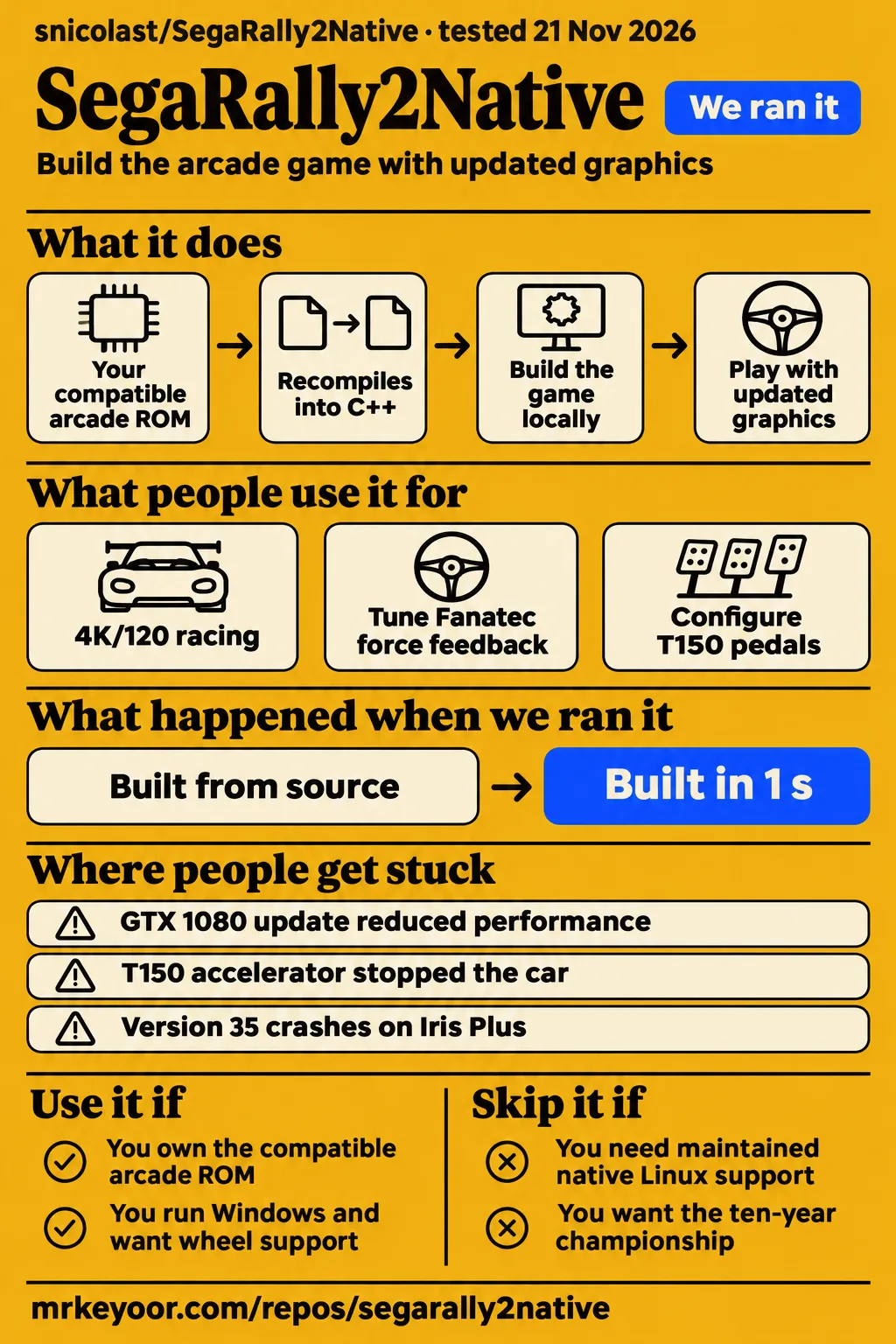
Use SegaRally2Native if you own the compatible arcade ROM, run Windows and want to adjust the replacement renderer and experimental controls. Skip it if your Linux cabinet needs a maintained native release: in issue #46, snicolast explains the Linux maintenance constraint. Our run at commit 9318541 installed the Python tooling in 5 seconds and completed its build step in 1 second, then pytest exited 5 after collecting no tests.
SegaRally2Native, presented as Nico SR2 in the English README, recompiles the arcade program into C++ on your PC. You bring the compatible game archive; the repository supplies the conversion machinery and modern Vulkan renderer. The README calls it an unofficial fan project and explicitly separates it from SEGA. Its local-build route suits a Windows player who wants this arcade release's new presentation options and accepts configuring the renderer and controls for a particular computer.
What people use SegaRally2Native for
Players report using SegaRally2Native for 4K/120 racing, Fanatec force feedback and corrected T150 pedal mapping. Those accounts describe particular devices and settings rather than a single compatibility result. The README adds true widescreen, ray-traced shadows, global illumination, reflections, replacement dust effects and keyboard or gamepad controls. Its performance instructions start with DLSS Quality on RTX cards, then disabling ray tracing, lowering the maximum frame rate or reducing render scale.
| Person and setup | Reported use and outcome |
|---|---|
| drencoss, RTX 5090 at 4K/120 | Investigated heavy GPU draw and uneven timing, then described smooth play after updates and diagnostic races in issue #14. |
| Rusty-Gere, Fanatec CSWB V2 | Confirmed wheel recognition after updating and said force feedback at 1.0 felt better in issue #33. |
| massimo2323, Thrustmaster T150 | Swapped accelerator and brake axis assignments to restore proper pedal operation in issue #33. |
| GATS-777, Simucube | Reported working steering, pedals and associated buttons, alongside separate USB device assignment problems in issue #33. |
| mrcrowley666, Logitech RS50 | Got pedals and some force feedback working through configuration edits, while reporting slow steering response near the centre in issue #68. |
The setup walkthrough presenter says they used the lowest settings because of their computer's condition. A separate graphics demonstration describes a HUD rebuilt with vector fonts and a 3D dirt-particle system. These accounts show why people approach the project differently: one concentrates on getting a playable setup, another on the replacement graphics. Both sit alongside the hardware reports rather than replacing their settings and device details.
What happened when we ran it
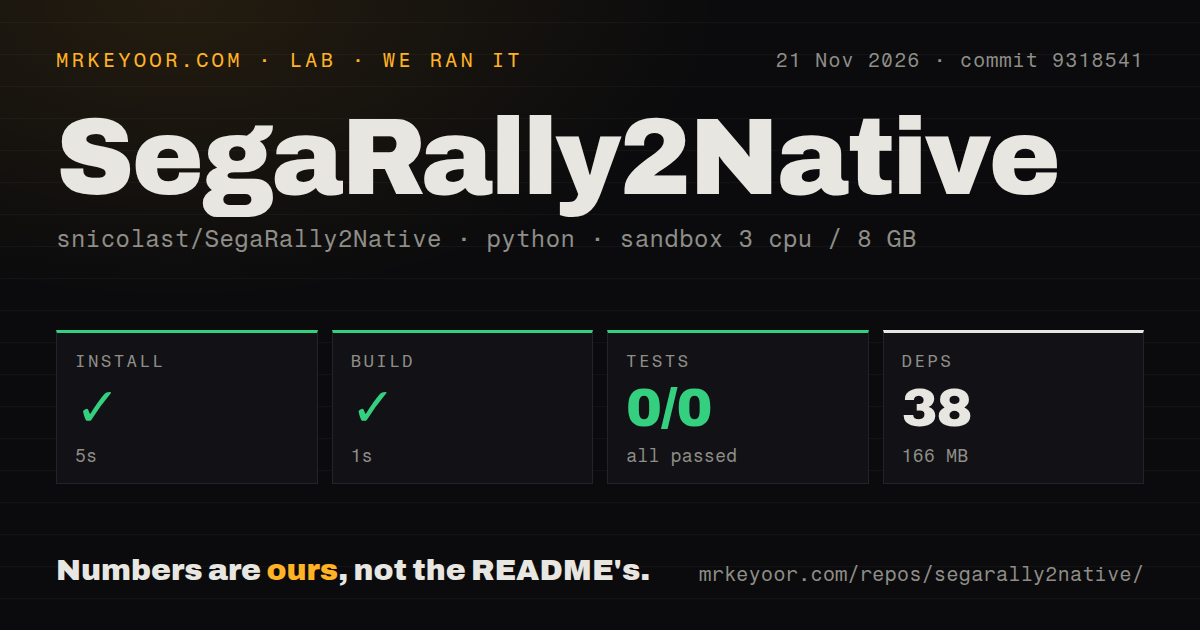
Our November 21, 2026 sandbox selected ./tools/ at commit 9318541; install succeeded, build succeeded and pytest failed with exit 5. We measured these steps in a sandbox configured with 3 CPUs, 8 GB RAM and image ghcr.io/astral-sh/uv:python3.12-bookworm. The measurement log records 0 passed and 0 failed tests out of 0, with the final line no tests ran in 0.01s.
| Step or observation | Recorded result |
|---|---|
| Install | Succeeded in 5 seconds; 38 dependencies recorded; 166 MB on disk |
| Build | Succeeded in 1 second |
| Tests | Failed, exit 5, in 2 seconds; pytest: 0 passed, 0 failed of 0 |
| Test log | no tests ran in 0.01s |
| Sandbox configuration | 3 CPUs, 8 GB RAM; image label ghcr.io/astral-sh/uv:python3.12-bookworm |
| Repository scan | 703 files, approximately 232,480 source lines, 113.9 MB checked out |
| Automation signals | 3 CI workflow files, a tests directory, no Dockerfile detected |
Installation completed before the build step returned success; pytest then found nothing to execute. The recorded tests directory and the zero collected cases are separate observations. The selected path was Python tooling, while the README describes a Windows launcher route for building and starting the game. Keeping those paths explicit preserves what the successful steps mean without treating a directory scan as evidence that an automated game test suite passed.
The November 22 desktop attempt failed its safety step because no supported Compose filename existed. The harness required one of compose.yaml, compose.yml, docker-compose.yaml or docker-compose.yml. Its wording calls this an unsafe repository, but the stated reason is that eligibility rule. The run summary separately says deployment used Docker Compose with every port bound to 127.0.0.1, and teardown reported success. The concrete failed step takes precedence over the generic deployment summary.
Where people get stuck: settings and updates change the result
In issue #14, snicolast reports 472 W with DLAA, about 330 W with DLSS Quality and 216 W with ray tracing off from drencoss's logs. He attributes the load to the added ray-traced lighting, including work performed at native resolution on every refresh. His settings advice in that investigation is DLSS Quality, a restart after changing anti-aliasing, and global illumination off to reduce the most expensive work.
The same thread separates rendering cost from frame pacing. The developer reported a main-branch fix for an image briefly stepping backward after a late game frame. He also investigated one or two 35-50 ms hitches per race that persisted with ray tracing off. Later, he associated 35-45 ms hitches with screenshot capture, while drencoss said play felt very smooth. These are distinct events in the pacing investigation, rather than one setting that explained every symptom.
| Symptom | Action supported by the thread | Reported outcome or status |
|---|---|---|
| GTX 1080 update regression from steady 60 fps to 15-20 fps | Turn ambient occlusion off | Reporter said operation recovered in #142. |
| Launcher rebuild ends with a linker error | Close the game, remove only build/cmake and build/kit, then use Rebuild |
willislim confirmed recovery in #82. |
| Intel 3D renderer initialization fails | Update for the shader texture-limit fix | Two users confirmed recovery in #13. |
| Version 35 reaches the intro/menu, then crashes on Iris Plus | Gather Event Viewer details and try the developer's diagnostic steps | The investigation was open in #158. |
The GTX 1080 report points to ambient occlusion, even with ray tracing off. The developer identified a heavier pass after an update and asked the reporter to disable it; the reporter replied that operation returned. Separately, the #82 launcher failure ended with linker command failed with exit code 1, while trimmed logs obscured useful detail. The successful rebuild instructions distinguish disposable compiled files from saves, settings and ROM data, so the recovery step is limited to those two build folders.
Wheel detection and pedal calibration are separate jobs
The README places wheel configuration under OPTIONS > WHEEL, with a step-by-step setup that binds controls by moving them. It explicitly includes pedals, a shifter or a handbrake on separate USB devices, along with force feedback, rotation and dead zone. The documented configuration file is save\wheel.ini, and set SR2_WHEEL_LOG=1 prints moved axes and buttons. These are documented instructions, separate from the earlier issue-thread interfaces.
The T150 report shows why detection and pedal mapping need separate attention. The wheel steered during races and menu selection, but a fully pressed accelerator stopped the car and the brake had no effect. The reporter changed the gas axis to 2 and the brake axis to 1, then reported normal acceleration and braking. Rusty-Gere separately confirmed that the Fanatec CSWB V2 worked after updating and that force feedback at 1.0 felt better in issue #33.
The Simucube report combined working steering, pedals and buttons with problems assigning other USB devices. The RS50 reporter got pedals working by editing wheel.ini, then obtained some force feedback by increasing ffb_strength and ffb_spring. Slow response near the steering centre persisted in that account. The developer discussed matching steering range to G HUB rotation in issue #68; that thread records a configuration discussion rather than a universal value for every wheel.
Your ROM stays your responsibility
The README requires your own srally2.zip, specifically the Sega Model 3 Step 2.0 version with files such as epr-20632.17 and the force-feedback-board file epr-20512.bin. It says other versions will not work and that build.bat identifies missing chips. The installation route requires 64-bit Windows 10/11 and a Vulkan 1.3 driver, then uses NicoLauncher to install, build, update and start the game locally.
Ray tracing has additional documented requirements: NVIDIA RTX 30 or AMD RX 7000 or newer, while DLAA and DLSS require NVIDIA RTX. The README describes the repository code as MIT with additional terms, with separate licences for bundled libraries and NVIDIA components. Its distribution warning says compiled builds and ROM-derived material may not be shared, and that the author has never published ready-to-play builds. The repository licence and ownership of the game archive are separate parts of setup.
SegaRally2Native vs Supermodel and the home editions
SegaRally2Native starts from the arcade release, while the Windows and Dreamcast home editions added the ten-year championship. GenerationAmiga describes that edition difference and explains that the native project converts the arcade program into C++. Supermodel takes the emulator route: its README identifies Sega Model 3 emulation and lists OpenGL, SDL2, Windows, Linux and macOS. Edition content and operating-system requirements therefore give readers concrete ways to choose.
| Option | Documented distinction | Choose it when |
|---|---|---|
| SegaRally2Native / Nico SR2 | Arcade recompilation with a replacement Vulkan renderer and local ROM-based build | You want this arcade release's new graphics and Windows setup. |
| Supermodel | Model 3 emulation; README lists Windows, Linux and macOS | You want emulation or need one of those listed platforms. |
| Sega Rally 2 Windows or Dreamcast home edition | Home releases added content including the ten-year championship | That championship is central to the game you want to revisit. |
Supermodel's README lists Windows, Linux and macOS. Its official project page also says automated builds are available for those platforms. By comparison, Nico SR2's README describes Windows installation through NicoLauncher and building from an owned ROM. For someone choosing an installation route, those are useful documented differences before considering graphics preferences. For someone choosing an edition, the home versions' championship mode is a more direct distinction than whether the arcade program is emulated or recompiled.
What the other reviews get wrong
Retrogamer's blanket handling-fidelity and smoothness claims need version and graphics-setting qualifications. Its overview describes driving feel as strictly identical to the arcade and output at 120 Hz, 144 Hz and beyond as ultra-smooth. In contrast, issue #14 records an earlier floaty-feeling report and the developer's subsequent reference to a road-grip fix. The thread describes handling behavior changing during development, so the overview's unconditional wording overstates what that history supports.
In issue #14, the developer reports 101-108 fps at 4K with MSAA 4X. He recommends DLSS Quality for 4K/120 because that logged MSAA configuration could not sustain 120 fps. The settings-specific result corrects the overview's unconditional smoothness claim without disputing that the project supports high-refresh output. A supported display rate is a feature; the frame rate achieved by a particular GPU and anti-aliasing setting is a separate result.
Questions people ask
The developer attributes the reported 4K/120 GPU load to ray-traced lighting and recommends DLSS Quality and global illumination off in issue #14. Other questions concern wheel detection, pedal mapping, update regressions, Intel crashes, Linux installation and telemetry. The answers below distinguish current README instructions from historical fixes and workarounds. Hardware names stay attached to their reports so that a T150 pedal correction does not become a claimed RS50 solution.
Why is SegaRally2Native using so much GPU power at 4K/120, and which settings reduce it?
Ray-traced lighting at native resolution on every refresh accounts for the reported load, according to the developer. In issue #14, he recommends DLSS Quality, restarting after the anti-aliasing change, and disabling global illumination. The README's performance sequence also includes disabling ray tracing, lowering maximum FPS or reducing render scale. Those adjustments change the rendering workload rather than the content of the arcade game being rebuilt.
Why did an update reduce performance, and can I revert to the previous version?
The GTX 1080 reporter recovered by disabling ambient occlusion after the developer identified a heavier pass introduced by an update. The issue #142 discussion connects the slowdown to that rendering work even with ray tracing off. Its practical answer is the reported ambient-occlusion workaround; the status of rollback instructions and a permanent fix is collected in the final section.
Why is my steering wheel not recognized, and where should I configure it?
The current README places wheel setup under OPTIONS > WHEEL and describes binding each control by moving it. Earlier, Rusty-Gere confirmed that updating restored recognition of a Fanatec CSWB V2 in issue #33. For a current setup, the README's controls instructions also document set SR2_WHEEL_LOG=1, which prints axis and button activity for an issue report.
Can I map separate USB pedals, a shifter and other controllers?
The README says OPTIONS > WHEEL can bind pedals, a shifter or a handbrake on their own USB device. That is the current documented interface. Earlier issue #33 reports describe separate-device assignment problems, including GATS-777's working Simucube controls alongside other USB devices they could not assign. Those historical reports describe their setups; the README supplies the current configuration instructions.
How do I fix unresponsive pedals and weak force feedback on a Logitech RS50?
The RS50 reporter got pedals working by editing wheel.ini, then obtained some force feedback by increasing ffb_strength and ffb_spring. In issue #68, the developer also discussed steering range in relation to the wheel's G HUB rotation. The reporter's account separates pedal response, force-feedback strength and slow centre response, so those symptoms should remain separate when reading the configuration advice.
Is a native Linux version planned for arcade cabinets?
snicolast expresses interest in Linux but says maintenance needs someone with a Linux machine to test updates. In issue #46, he explains that he can review contributions and check Windows, while a contributor would handle Linux. His later response names contributor-maintained scripts for Star Wars Trilogy and says Sega Rally 2 would follow that route if someone takes it on.
Could an AppImage builder support Linux installation and launcher integration?
snicolast declined the AppImage proposal even after artik clarified that it would build locally rather than distribute a finished game. The issue #46 response points instead to repository build scripts and contributor-maintained documentation as the prospective route. It also distinguishes the Windows NicoLauncher installation from work on the author's other games, leaving the AppImage idea as a proposal rather than installation instructions.
Why does SegaRally2Native fail to start on Intel graphics?
The earlier Intel renderer failure and the later Version 35 Iris Plus crash are different reports. Two users confirmed recovery in issue #13, while issue #158 describes Version 35 reaching 3D setup and then crashing during the intro/menu. For the latter, the developer requested Event Viewer details and suggested splash_screens = 0 and a launch with the DualSense disconnected as diagnostic steps.
How do I resolve a failed launcher update or rebuild?
willislim's rebuild succeeded after closing the game, deleting build/cmake and build/kit, and using Rebuild. The developer's issue #82 instructions say those folders contain compiled files and leave saves, settings and ROM data untouched. He also requested the full copied launcher log if the rebuild still failed. The confirmed recovery concerns those two folders, not deletion of the installation.
Can SegaRally2Native send telemetry to SimHub or a motion platform?
The README documents experimental UDP telemetry with DiRT Rally format at 127.0.0.1:20777 and OGS-TS multicast at 239.255.17.17:40123. In issue #140, snicolast announces that the DiRT-format prototype was merged under OPTIONS > EXPERIENCE > EXPERIMENTAL. The README's experimental section is the source for the currently documented format choices and menu location.
What data does the UDP telemetry transmit, and can it drive bass shakers?
snicolast lists speed, RPM, gear, lateral and longitudinal G-forces, controls, position, velocity, orientation and race/lap information in issue #111. That description excludes suspension, clutch and per-wheel slip, and says the car reads as stopped with 0 RPM outside a race. He suggests RPM and G-forces as potentially useful shaker inputs; receiver testing is addressed in the final section.
Can telemetry be used to add force-feedback collisions?
Issue #140 contains a collision-feedback request, while the closing response announces merged DiRT-format telemetry and moves OGS-TS discussion to another issue. The developer's closing update identifies the implemented change as telemetry under experimental options. That gives the reader a concrete feature to locate in the menu while preserving collision feedback as the separate request made in that discussion.
What we have not tested yet
Our completed sandbox run covers Python tooling at commit 9318541; the November 22 desktop attempt stopped at the Compose prerequisite. These runs provide no gameplay result or successful gameplay screenshots. The image label does not identify actual runtime or operating-system versions. We have not tested a supported Windows installation, driving accuracy against arcade hardware, GPU power, sustained frame delivery, wheels, separate USB controls or telemetry receivers. The community power figures are user-log results, not our benchmark or a cross-GPU power budget.
The unresolved hardware details include RS50 centre response, the Simagic Alpha Mini's sideways pull and force-feedback loss after about ten seconds, and the later Version 35 Iris Plus crash. The Iris Plus diagnostic suggestions have no confirmed recovery here. Issue #142 supplies an ambient-occlusion workaround, not a confirmed permanent fix or rollback procedure. Issue #14 describes replacing a second DLSS transparency-mask pass with a cheaper filter as a next update, without delivery confirmation in that discussion. The comparison sources contain no controlled performance or accuracy contest.
Telemetry output has no demonstrated motion-rig or shaker compatibility in these accounts: the README labels it untested on real hardware, and #111 explicitly says shaker software was not tested. The collision-feedback request has no announced implementation in #140. Linux has no delivery commitment in #46. We have not audited security, the update download chain, long sessions or save recovery, and the README's Windows installation completeness remains unassessed. A useful next run would record the exact Windows build and drivers, build from a compatible owned ROM, and complete a race with the intended controller.