tokenizers review
tokenizers 0.23.1 is Hugging Face's compiled Rust engine for turning text into model token IDs and mapping those IDs back to source spans. A Tokenizer joins a normalizer, pre-tokenizer, vocabulary model such as BPE or Unigram, post-processor, decoder, padding rules, and truncation rules into one serializable `tokenizer.json`. Use it directly to train vocabularies or run high-volume preprocessing; Transformers' AutoTokenizer is usually the safer entry point for an existing model. Version 0.23.1 drops Python 3.9, adds complete Python type stubs, supports free-threaded Python 3.14, adds Unigram sampling controls, and changes how newly added normalized tokens are stored.
tokenizers 0.23.1 installed in 0.5 seconds, used 34 MB across 16 packages, and returned zero audit findings in our sandbox; that trade is sensible for custom training, offsets, or batch preprocessing. Let AutoTokenizer own it when you only need the tokenizer paired with an existing Hugging Face model.
We installed it
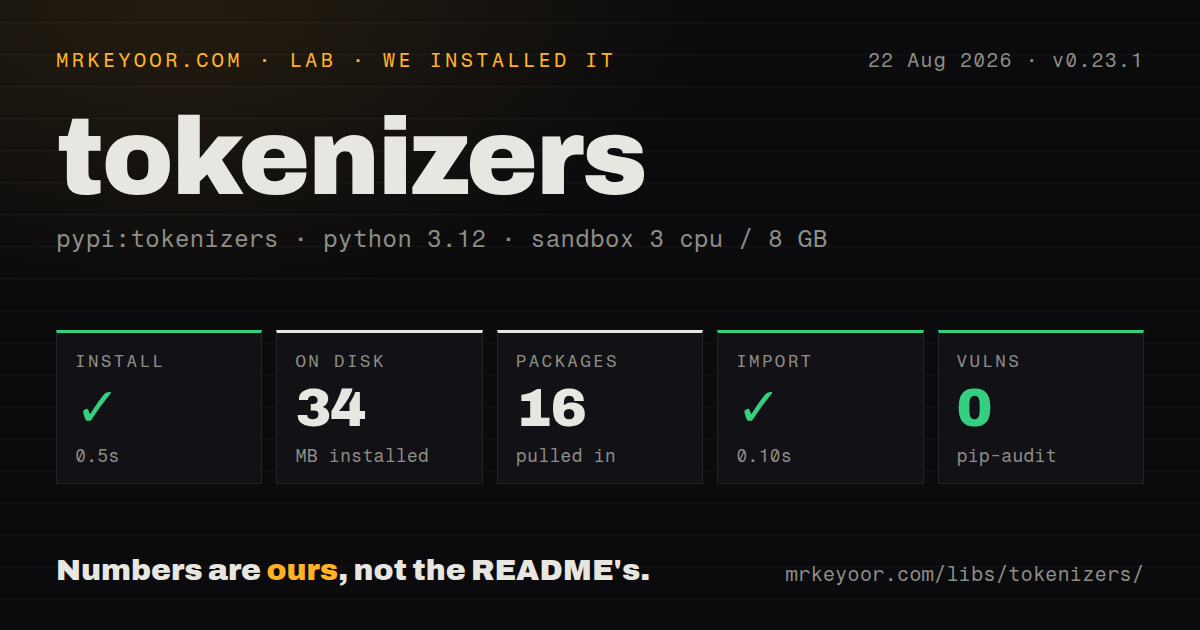
| Install | ✓ · 0.5s | 16 packages on disk · 34 MB |
| Import | ✓ | import tokenizers in 0.10s · compiled extensions · py.typed · requires Python >=3.10 |
| Known vulns | 0 | (pip-audit) |
Answers from our run
Does tokenizers install cleanly?
Yes. In a fresh container with an empty cache, pip install tokenizers finished in 0.5s, leaving 16 packages and 34 MB on disk. pip-audit reported no known vulnerabilities.
What does tokenizers need to run?
Python >=3.10, and a platform wheel with compiled extensions. In our run import tokenizers succeeded in 0.10s, and the package ships py.typed for type checkers.
tokenizers or transformers: which should you use?
transformers: Use AutoTokenizer when a pretrained model should supply its own tokenization conventions. tokenizers 0.23.1 installed in 0.5 seconds, used 34 MB across 16 packages, and returned zero audit findings in our sandbox; that trade is sensible for custom training, offsets, or batch preprocessing.
When should you not use tokenizers?
You are loading an existing Hugging Face model; AutoTokenizer supplies that model's chat template, padding side, special tokens, and slow-tokenizer fallback
Discussed on
- hnUnderstanding GPT tokenizers432 points
- hnProbably pay attention to tokenizers321 points
- hnFast Tokenizers with StringScanner (2023)51 points
- hnFinding Optimal Tokenizers29 points
- hnLet's Build the GPT Tokenizer: A Complete Guide to Tokenization in LLMs20 points
Use it if
- You need to train BPE, WordPiece, Unigram, or WordLevel vocabulary from files or an iterator
- A span task needs token-to-character and token-to-word alignment after normalization
- A preprocessing job needs batch encoding in Rust without importing the Transformers model stack
- Training and serving should exchange the full normalization, vocabulary, and post-processing pipeline as one tokenizer.json file
- You are loading an existing Hugging Face model; AutoTokenizer supplies that model's chat template, padding side, special tokens, and slow-tokenizer fallback
- You only need OpenAI token counts or encodings, because tiktoken tracks the encoding names used by those models
- Python 3.9 is still in production; tokenizers 0.23.1 declares Python 3.10 as its minimum
- Your target platform has no matching wheel and cannot compile Rust extensions during deployment
- Several callers must change padding or truncation on one shared Tokenizer instance, since those settings mutate the object
Setup reality
We installed tokenizers 0.23.1 in a clean Python 3.12 container in 0.5 seconds. Sixteen packages occupied 34 MB, and pip-audit found zero known vulnerabilities. The package reported 12 direct dependencies, included compiled .so extensions and py.typed, and required Python 3.10 or newer. import tokenizers finished in 0.10 seconds. Standard platforms receive wheels; a platform without one must build the Rust binding from source.
Tokenizer.from_pretrained() contacts the Hugging Face Hub and expects a repository containing tokenizer.json; private repositories also need a Hub token. An offline service should ship that JSON beside the model and load it with from_file(). Pin 0.23.1 in the job that creates the artifact and the service that reads it. Existing tokenizer files remain readable in this release, while saving after add_tokens() can rewrite normalized token content under the new 0.23 behavior.
The vocabulary alone is insufficient. Normalization order, pre-tokenization, special-token IDs, post-processing templates, decoder, padding side, and truncation direction must match training. Adding 2 special tokens increases the tokenizer vocabulary by 2 when both are new, so the model embedding table must be resized to the returned vocabulary size. enable_padding() and enable_truncation() modify the Tokenizer instance and are saved with it; use separate configured instances or reset them with no_padding() and no_truncation().
Rust parallel workers do not mix cleanly with a process that tokenizes and then forks. Child processes detect the inherited thread pool and disable parallelism with a warning. Set TOKENIZERS_PARALLELISM=false before forking, create the tokenizer inside each worker, or use a spawn-based process model. encode_batch() keeps batch work on the Rust side. Character offsets still need care around Unicode normalization, byte-level tokenization, and special tokens whose source span can be empty.
Patterns
Load a complete tokenizer from the Hub load-pretrained
from tokenizers import Tokenizer

tokenizer = Tokenizer.from_pretrained("bert-base-uncased")
encoding = tokenizer.encode("A quick test")
print(encoding.tokens)
print(encoding.ids)
`from_pretrained` downloads `tokenizer.json` from the Hub. Repositories that only contain legacy vocabulary files require a model-specific constructor or Transformers AutoTokenizer.
Train BPE from an iterator train-bpe
from tokenizers import Tokenizer
from tokenizers.models import BPE
from tokenizers.pre_tokenizers import Whitespace
from tokenizers.trainers import BpeTrainer

tokenizer = Tokenizer(BPE(unk_token="[UNK]"))
tokenizer.pre_tokenizer = Whitespace()
trainer = BpeTrainer(
    vocab_size=30000,
    special_tokens=["[UNK]", "[PAD]"],
)
tokenizer.train_from_iterator(text_batches, trainer=trainer)
A BPE trainer does not choose the pre-tokenizer for you. Omitting it changes where merges may occur and produces a different vocabulary.
Ship the pipeline as one JSON file save-load
tokenizer.save("tokenizer.json")

from tokenizers import Tokenizer
loaded = Tokenizer.from_file("tokenizer.json")
`tokenizer.json` stores the model and pipeline components together. Pin the reader version because newer component variants may be unknown to an older deployment.
Encode paired inputs as a batch encode-pairs
pairs = [
    ("question one", "context one"),
    ("question two", "context two"),
]
encodings = tokenizer.encode_batch(pairs)
for encoding in encodings:
    print(encoding.ids, encoding.type_ids)
Each pair is one batch item. The post-processor decides where separator tokens go and which sequence receives each type ID.
Apply fixed-length padding and truncation pad-truncate
tokenizer.enable_truncation(max_length=128, direction="right")
tokenizer.enable_padding(
    length=128,
    pad_id=tokenizer.token_to_id("[PAD]"),
    pad_token="[PAD]",
)
encodings = tokenizer.encode_batch(texts)
Both calls mutate the Tokenizer and their settings survive `save()`. Use `no_padding()` and `no_truncation()` when raw sequence lengths are needed again.
Map tokens to characters and words map-source-spans
encoding = tokenizer.encode("Hugging Face builds tokenizers")
for index, token in enumerate(encoding.tokens):
    chars = encoding.token_to_chars(index)
    word = encoding.token_to_word(index)
    print(token, chars, word)
Special tokens may map to no source span. Normalization and byte-level pre-tokenization can make a token's displayed text differ from the original character slice.
Insert chat markers and resize the model add-special-tokens
from tokenizers import AddedToken

added = tokenizer.add_special_tokens([
    AddedToken("<|user|>", normalized=False, special=True),
    AddedToken("<|assistant|>", normalized=False, special=True),
])
new_vocab_size = tokenizer.get_vocab_size()
print(added, new_vocab_size)
`add_special_tokens` returns how many entries were new. Resize the model embedding table to `get_vocab_size()` before those IDs reach the model.
Wrap one or two sequences with a template process-special-tokens
from tokenizers.processors import TemplateProcessing

tokenizer.post_processor = TemplateProcessing(
    single="[CLS] $A [SEP]",
    pair="[CLS] $A [SEP] $B:1 [SEP]:1",
    special_tokens=[
        ("[CLS]", tokenizer.token_to_id("[CLS]")),
        ("[SEP]", tokenizer.token_to_id("[SEP]")),
    ],
)
TemplateProcessing does not verify that supplied IDs match the vocabulary entries. Resolve each ID from the same tokenizer instead of copying numbers from another model.
Decode model IDs back to text decode-ids
ids = tokenizer.encode("Example text").ids
plain = tokenizer.decode(ids)
with_specials = tokenizer.decode(ids, skip_special_tokens=False)
print(plain, with_specials)
`decode` removes registered special tokens by default. Set `skip_special_tokens=False` when inspecting the exact generated ID sequence.
Enable Unigram subword sampling sample-unigram
from tokenizers import Tokenizer
from tokenizers.models import Unigram

model = Unigram(vocab=vocab, unk_id=0, nbest_size=64, alpha=0.1)
tokenizer = Tokenizer(model)
encoding = tokenizer.encode("sampling can vary")
Version 0.23.1 exposes `nbest_size` and `alpha` on Unigram. Sampling can yield different segmentations, so fix the training and evaluation policy around it.
Await batch encoding in async Python encode-async
async def tokenize_batch(tokenizer, texts):
    encodings = await tokenizer.async_encode_batch(texts)
    return [encoding.ids for encoding in encodings]
The 0.23 API provides `async_encode_batch`. It is useful in async code, while CPU capacity and application concurrency still need explicit limits.
Set thread behavior before workers fork control-fork-parallelism
import os

os.environ["TOKENIZERS_PARALLELISM"] = "false"

# Import libraries and start fork-based workers after this assignment.
from tokenizers import Tokenizer
Set the variable before tokenization or worker creation. A process that initializes the Rust thread pool and then forks causes child processes to disable parallel execution with a warning.
Alternatives
| Package | Registry | Pick it when |
|---|---|---|
| transformers | PyPI | Use AutoTokenizer when a pretrained model should supply its own tokenization conventions. |
| tiktoken | PyPI | Use it for OpenAI encoding names, token counting, and fast BPE compatible with those models. |
| sentencepiece | PyPI | Use it when a model or training recipe expects SentencePiece's native Unigram or BPE artifacts. |
More ai / ml guides
@modelcontextprotocol/sdk · openai · mcp · huggingface-hub · @anthropic-ai/sdk · openai · the whole shelf →
How this guide is made: grounded in the library's documentation, release notes, changelog, and issue history, on a fixed rubric — not a hands-on install of every release. The 50 most-downloaded entries are additionally install-verified in clean containers. Corrections: contact the desk.