transformers review
Transformers 5.16.0 is Hugging Face's Python layer for loading, running, training, and saving model architectures used by Hub checkpoints across text, vision, audio, video, and mixed inputs. Auto classes select configuration, tokenizer or processor, and model code from checkpoint metadata; `pipeline()` adds task-specific preprocessing and output conversion; `Trainer` handles the library's PyTorch training path. Version 5.16.0 adds Qwen4-Exp, GraniteSpeech5, Step3p7, and CohereCompass support. It also replaces the legacy tensor-parallel implementation with a DTensor backend and removes `image_patch_indices` from `FuyuProcessor` output.
Our Transformers 5.15.1 install took 2.4 seconds and 156 MB before any model weights or PyTorch runtime, and PyPI advanced to 5.16.0 four days later. Use it when checkpoint compatibility or model internals matter; choose a serving or embedding specialist when that narrower job defines the system.
We installed it
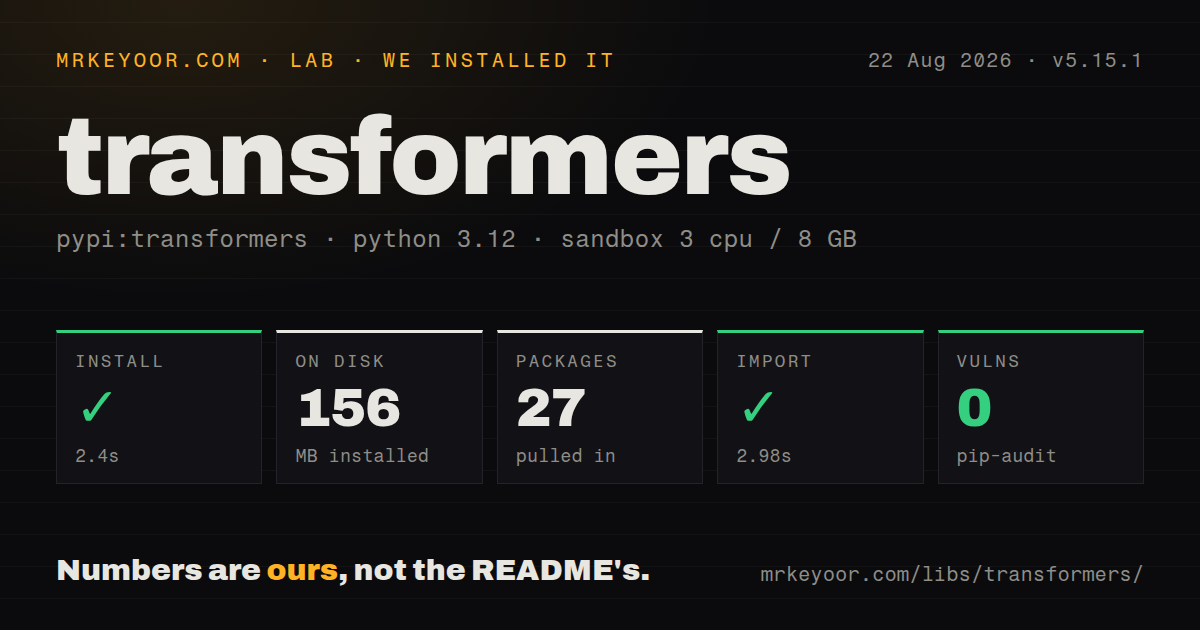

| Install | ✓ · 2.4s | 27 packages on disk · 156 MB |
| Import | ✓ | import transformers in 2.98s · pure Python · py.typed · requires Python >=3.10.0 |
| Known vulns | 0 | (pip-audit) |
Answers from our run
Does transformers install cleanly?
Yes. In a fresh container with an empty cache, pip install transformers finished in 2 seconds, leaving 27 packages and 156 MB on disk. pip-audit reported no known vulnerabilities.
What does transformers need to run?
Python >=3.10.0, and nothing compiled: it is pure Python. In our run import transformers succeeded in 2.98s, and the package ships py.typed for type checkers.
transformers or vllm: which should you use?
vllm: Use it to serve supported language models with scheduling and throughput as the primary concern. Our Transformers 5.15.1 install took 2.4 seconds and 156 MB before any model weights or PyTorch runtime, and PyPI advanced to 5.16.0 four days later.
When should you not use transformers?
Your only job is high-throughput LLM serving. Transformers defines and runs models, while vLLM adds continuous batching, request scheduling, and a serving-oriented runtime.
Discussed on
- hnTransformer architecture optimized for Apple Silicon804 points
- hnMeshGPT: Generating triangle meshes with decoder-only transformers738 points
- hnAsk HN: Can someone ELI5 transformers and the “Attention is all we need” paper?644 points
- hnTransformers from Scratch (2021)644 points
- hnBut what is a GPT? Visual intro to Transformers [video]473 points
Use it if
- A Hugging Face checkpoint documents an Auto class or pipeline path and you need its reference Python implementation.
- Research code needs model internals, generation controls, hidden states, attention backends, or custom fine-tuning.
- One project handles text, images, audio, or multimodal inputs through the processors shipped for specific model families.
- Another tool in the training, adapter, export, or serving stack expects Transformers configuration and model classes.
- Your only job is high-throughput LLM serving. Transformers defines and runs models, while vLLM adds continuous batching, request scheduling, and a serving-oriented runtime.
- You only need embeddings or reranking. `sentence-transformers` supplies pooling, similarity, evaluation, and retrieval training around that narrower task.
- The deployment target centers on GGUF and CPU or Apple Silicon inference. llama.cpp tooling has a more direct file format and runtime path.
- The chosen checkpoint requires `trust_remote_code=True` and your team cannot inspect downloaded Python. Enabling that flag executes model-repository code inside the process.
- You expect the base wheel to provide weights, PyTorch, GPU binaries, codecs, and enough memory. Our 156 MB environment only proved that package 5.15.1 installed and imported.
Setup reality
We installed Transformers 5.15.1 in a fresh Python 3.12 Bookworm container on 2026-08-22. The install finished in 2.4 seconds, left 27 packages occupying 156 MB, and pip-audit reported 0 known vulnerabilities. Metadata declared 251 direct dependencies across the base and optional feature groups. The package is pure Python, requires Python 3.10 or newer, carries py.typed, and imported in 2.98 seconds. PyPI now lists 5.16.0, so these lab figures describe 5.15.1 exactly.
The base install is not a runnable model stack. Normal PyTorch inference needs the matching extra and a PyTorch build compatible with the machine's accelerator and driver. Vision, audio, video, quantization, and training paths can add their own Python packages and system codecs. Installing every extra turns the 251 declared requirements into a difficult environment to reproduce. Choose one model path, pin it, and build that combination in CI.
from_pretrained() fetches configuration, tokenizer or processor files, and weight shards into the Hugging Face cache. Pin revision to a commit when deployments must repeat. Gated models need accepted terms and a Hub token. The Apache 2.0 library license says nothing about a checkpoint's license. trust_remote_code=True runs Python from the model repository, so review the code and lock its revision before allowing it in a service.
Runtime memory depends on the checkpoint, dtype, input length, batch size, attention backend, KV cache, and device placement. device_map='auto' may offload layers to CPU and avoid an allocation failure at the cost of latency. Quantization adds hardware and package constraints. Version 5.16.0 also changes tensor-parallel users to the DTensor interface. Production endpoints still need batching policy, length caps, timeouts, warmup, and concurrency limits outside pipeline().
Patterns
Generate text from a pinned checkpoint run-text-generation
from transformers import pipeline

generator = pipeline(
    task='text-generation',
    model='Qwen/Qwen2.5-1.5B-Instruct',
    revision=MODEL_COMMIT,
)
result = generator('Explain WSGI in one sentence.', max_new_tokens=60)
The first run downloads artifacts. A commit revision keeps a moving model branch from changing a deployed build.
Use the checkpoint's chat template format-chat-prompt
messages = [
    {'role': 'system', 'content': 'Answer in two sentences.'},
    {'role': 'user', 'content': 'What is speculative decoding?'},
]
inputs = tokenizer.apply_chat_template(
    messages,
    add_generation_prompt=True,
    return_tensors='pt',
).to(model.device)
Control tokens differ across instruct checkpoints. The tokenizer's template defines the format expected by that model.
Load a tokenizer and causal model directly load-causal-model
import torch
from transformers import AutoModelForCausalLM, AutoTokenizer

model_id = 'Qwen/Qwen2.5-1.5B-Instruct'
tokenizer = AutoTokenizer.from_pretrained(model_id, revision=MODEL_COMMIT)
model = AutoModelForCausalLM.from_pretrained(
    model_id, revision=MODEL_COMMIT, dtype=torch.bfloat16, device_map='auto'
)
Automatic device mapping needs the matching accelerator stack and can place layers on CPU when device memory is short.
Remove the prompt before decoding output decode-new-tokens
batch = tokenizer('Explain ASGI briefly.', return_tensors='pt').to(model.device)
output = model.generate(**batch, max_new_tokens=80, do_sample=False)
new_tokens = output[0, batch.input_ids.shape[1]:]
print(tokenizer.decode(new_tokens, skip_special_tokens=True))
Decoder-only generation returns the input token IDs followed by generated IDs. Slice at the input length before decoding the answer.
Pad a batch and retain its mask tokenize-batch
batch = tokenizer(
    ['short input', 'a somewhat longer input'],
    padding=True,
    truncation=True,
    max_length=512,
    return_tensors='pt',
)
outputs = model(**{key: value.to(model.device) for key, value in batch.items()})
Pass `attention_mask` with padded batches. Allowing the model to attend to padding can alter the result.
Run a text classifier classify-text
from transformers import pipeline

classifier = pipeline(
    'text-classification',
    model='distilbert/distilbert-base-uncased-finetuned-sst-2-english',
    revision=MODEL_COMMIT,
)
print(classifier(['The deploy worked.', 'The service is down.']))
Read `id2label` from the checkpoint configuration before mapping output labels to an application decision.
Transcribe audio in chunks transcribe-audio
from transformers import pipeline

transcriber = pipeline(
    'automatic-speech-recognition',
    model='openai/whisper-large-v3',
    device_map='auto',
)
result = transcriber('meeting.wav', chunk_length_s=30, batch_size=8)
Audio decoding can need extra Python and system packages. Tune chunk and batch sizes against device memory and output boundaries.
Apply an image classification checkpoint classify-image
from transformers import pipeline

classifier = pipeline(
    'image-classification',
    model='facebook/dinov2-small-imagenet1k-1-layer',
    revision=MODEL_COMMIT,
)
print(classifier('photo.jpg', top_k=5))
Install the vision dependencies expected by the processor. The checkpoint configuration defines the label vocabulary.
Request four-bit model weights load-four-bit
import torch
from transformers import AutoModelForCausalLM, BitsAndBytesConfig

quantization = BitsAndBytesConfig(
    load_in_4bit=True,
    bnb_4bit_compute_dtype=torch.bfloat16,
)
model = AutoModelForCausalLM.from_pretrained(
    MODEL_ID, revision=MODEL_COMMIT,
    quantization_config=quantization, device_map='auto'
)
This route requires bitsandbytes and supported hardware. Measure task output and latency for the chosen checkpoint after quantization.
Write model and tokenizer artifacts locally save-local-model
model.save_pretrained('./artifacts/model', safe_serialization=True)
tokenizer.save_pretrained('./artifacts/model')

reloaded = AutoModelForCausalLM.from_pretrained(
    './artifacts/model', local_files_only=True
)
Image, audio, and multimodal models may also need their processor saved. `local_files_only=True` prevents a fallback Hub request.
Require local Hugging Face artifacts force-offline-cache
import os

os.environ['HF_HUB_OFFLINE'] = '1'
os.environ['HF_HOME'] = '/models/huggingface-cache'

model = AutoModelForCausalLM.from_pretrained(
    MODEL_ID, revision=MODEL_COMMIT, local_files_only=True
)
Prefetch the config, tokenizer or processor, weight index, and every shard before enabling offline mode.
Keep downloaded model code disabled reject-remote-code
model = AutoModelForCausalLM.from_pretrained(
    MODEL_ID,
    revision=MODEL_COMMIT,
    trust_remote_code=False,
)
If this fails because a checkpoint needs custom Python, inspect that repository and pin its commit before considering execution.
Alternatives
| Package | Registry | Pick it when |
|---|---|---|
| vllm | PyPI | Use it to serve supported language models with scheduling and throughput as the primary concern. |
| sentence-transformers | PyPI | Use it for embeddings, semantic search, similarity training, and reranking. |
| llama-cpp-python | PyPI | Use it for Python access to GGUF models on llama.cpp-supported hardware. |
More ai / ml guides
@modelcontextprotocol/sdk · openai · mcp · huggingface-hub · @anthropic-ai/sdk · openai · the whole shelf →
How this guide is made: grounded in the library's documentation, release notes, changelog, and issue history, on a fixed rubric — not a hands-on install of every release. The 50 most-downloaded entries are additionally install-verified in clean containers. Corrections: contact the desk.