tabulate review
tabulate 0.10.0 turns Python rows into aligned terminal text or markup through one function. Inputs can be iterables, mappings, dataclasses, database cursors, NumPy arrays, record arrays, or pandas DataFrames. Output formats include plain columns, Unicode grids, GitHub Markdown, reStructuredText, HTML, LaTeX, Jira, and wiki syntax. Version 0.10.0 removes Python 3.7 to 3.9 support, replaces the `PRESERVE_STERILITY` global with a call argument, adds `colon_grid`, introduces global and header alignment controls, and improves errors.
tabulate 0.10.0 installed in 0.2 seconds and used 1 MB in our sandbox, making it a cheap dependency for static tables in terminals and generated documents. Protect identifier columns from numeric parsing, and use Rich instead when the output needs to behave like a terminal interface.
We installed it
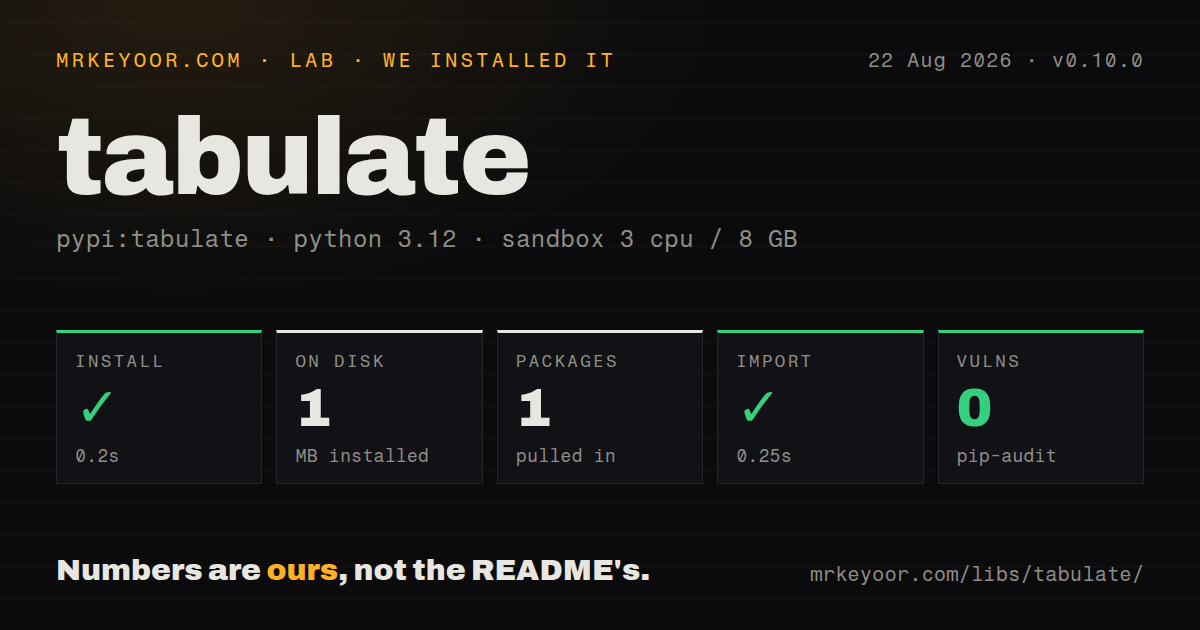
| Install | ✓ · 0.2s | 1 package on disk · 1 MB |
| Import | ✓ | import tabulate in 0.25s · pure Python · requires Python >=3.10 |
| Known vulns | 0 | (pip-audit) |
Answers from our run
Does tabulate install cleanly?
Yes. In a fresh container with an empty cache, pip install tabulate finished in 0.2s, leaving 1 package and 1 MB on disk. pip-audit reported no known vulnerabilities.
What does tabulate need to run?
Python >=3.10, and nothing compiled: it is pure Python. In our run import tabulate succeeded in 0.25s.
tabulate or rich: which should you use?
rich: Choose it for styled tables combined with live updates, panels, progress bars, or formatted tracebacks. tabulate 0.10.0 installed in 0.2 seconds and used 1 MB in our sandbox, making it a cheap dependency for static tables in terminals and generated documents.
When should you not use tabulate?
Choose Rich when tables need color, panels, progress displays, live refresh, or other terminal UI components. tabulate returns static text.
Use it if
- A command-line tool needs a static, readable table with automatic numeric or decimal alignment.
- Python code generates Markdown, reStructuredText, HTML, LaTeX, Jira, or wiki table source.
- Rows already live in dictionaries, dataclasses, a cursor, NumPy, or a DataFrame and should not be copied into a table model.
- A shell command needs to convert CSV or JSON-lines input into a chosen text-table format.
- Choose Rich when tables need color, panels, progress displays, live refresh, or other terminal UI components. tabulate returns static text.
- Opaque values such as `007`, version labels, and scientific-looking identifiers can be changed by automatic numeric parsing unless `disable_numparse` is set.
- Do not use it as a viewer for an endless stream. Column widths and type inference require the input rows before rendering.
- Version 0.10.0 excludes Python 3.9 and older, so legacy runtimes need an earlier release.
- Teams requiring frequent tagged releases should note that 0.10.0 arrived more than 3 years after 0.9.0 while unreleased changes are already recorded for 0.11.0.
Setup reality
We installed tabulate 0.10.0 in a fresh Python 3.12 Bookworm container in 0.2 seconds. The environment contained 1 package and used 1 MB. pip-audit found 0 known vulnerabilities. The package metadata has 1 direct dependency entry and requires Python 3.10+. It is pure Python, lacks py.typed, and did not identify a license. import tabulate worked in 0.25 seconds.
There are no credentials, config files, or compiled extensions. A normal installation adds the tabulate command as well as the importable module; set TABULATE_INSTALL=lib-only during installation on supported systems if the executable is unwanted. The optional widechars extra adds wcwidth. When that module is importable, wide-character measurement turns on, which matters for CJK and other double-width terminal characters.
Automatic number detection is the common surprise in version 0.10.0. Text that resembles an integer, float, or exponent can lose its original spelling and receive numeric alignment. Use disable_numparse=True for opaque records or pass the specific column indexes to protect. New alignment controls include colglobalalign, headersglobalalign, and headersalign; colalign still overrides individual columns. The old process-wide PRESERVE_STERILITY switch is now the preserve_sterility argument.
The html format escapes cell content, while unsafehtml emits raw markup and should receive only trusted values. maxcolwidths wraps long content, but the chosen table format determines whether multiline rows remain readable. The command-line reader buffers its input to calculate widths. DataFrames show their index under the default behavior even though ordinary row lists do not, so set showindex explicitly when generated output must be stable.
Patterns
Print rows under named columns print-basic-table
from tabulate import tabulate

rows = [
    ["Mercury", 2439.7],
    ["Earth", 6371.0],
    ["Mars", 3389.5],
]
print(tabulate(rows, headers=["Planet", "Radius km"]))
The default `simple` format aligns text to the left and detected numbers to the right.
Take column names from mapping keys derive-dictionary-headers
from tabulate import tabulate

rows = [
    {"service": "api", "replicas": 3},
    {"service": "worker", "replicas": 8},
]
print(tabulate(rows, headers="keys", tablefmt="grid"))
Normalize mapping keys across rows first. Discovery and column order follow the input mapping structure.
Write a GitHub Markdown table write-github-markdown
from tabulate import tabulate

markdown = tabulate(
    rows,
    headers="keys",
    tablefmt="github",
    showindex=False,
)
readme_section = markdown + "\n"
The `github` format emits the alignment separator GitHub expects. Escape literal pipe characters contained in cells.
Keep numeric-looking identifiers unchanged preserve-numeric-strings
from tabulate import tabulate

rows = [
    ["007", "1e23"],
    ["010", "2.50"],
]
print(tabulate(
    rows,
    headers=["code", "label"],
    disable_numparse=True,
))
Without `disable_numparse`, strings such as `007` and `1e23` can be parsed and rendered with different spelling.
Disable parsing for selected columns disable-selected-number-parsing
from tabulate import tabulate

rows = [["007", 12.5], ["010", 9.0]]
print(tabulate(
    rows,
    headers=["sku", "price"],
    disable_numparse=[0],
    floatfmt=".2f",
))
Column positions are zero-based. Other columns remain eligible for numeric detection and formatting.
Combine global and column alignment control-column-alignment
from tabulate import tabulate

print(tabulate(
    rows,
    headers=["item", "qty", "price"],
    colglobalalign="right",
    colalign=("left", "global", "decimal"),
    headersglobalalign="center",
    headersalign=("left", "global", "right"),
))
The global and header-specific alignment arguments shown here were added in version 0.10.0.
Format numbers and missing values format-numbers-and-missing-values
from tabulate import tabulate

rows = [["alpha", 3.14159, 1200], ["beta", None, 850]]
print(tabulate(
    rows,
    headers=["name", "ratio", "count"],
    floatfmt=".3f",
    intfmt=",",
    missingval="n/a",
))
`missingval` handles `None`; empty strings and NaN values follow separate rendering paths.
Wrap one wide text column wrap-wide-cells
from tabulate import tabulate

rows = [["job-42", "Rebuild the customer search index after import"]]
print(tabulate(
    rows,
    headers=["job", "description"],
    tablefmt="grid",
    maxcolwidths=[None, 24],
    break_long_words=False,
))
`maxcolwidths` maps positionally to columns. Grid formats make continuation lines easier to associate with their row.
Generate escaped HTML render-safe-html
from tabulate import tabulate

html = tabulate(
    [["<Admin>", "active"]],
    headers=["name", "status"],
    tablefmt="html",
)
print(html)
`html` escapes cells. `unsafehtml` keeps raw tags and is safe only when every value is trusted markup.
Render a DataFrame without its index format-dataframe
from tabulate import tabulate

text = tabulate(
    frame,
    headers="keys",
    tablefmt="psql",
    showindex=False,
)
print(text)
DataFrame input shows the index by default. Set `showindex` so generated output does not depend on the input type.
Insert a separator between row groups separate-row-groups
from tabulate import SEPARATING_LINE, tabulate

rows = [
    ["api", "healthy"],
    ["worker", "healthy"],
    SEPARATING_LINE,
    ["cron", "paused"],
]
print(tabulate(rows, headers=["service", "state"], tablefmt="grid"))
The separator is visible only in formats with horizontal-rule support; a plain layout may omit it.
Convert delimited data from the shell format-from-shell
tabulate --read csv --headers firstrow --format github source.csv
cat events.jsonl | tabulate --read jsonl --headers keys --format psql

# Keep only the importable module in a Unix-like environment:
# TABULATE_INSTALL=lib-only pip install tabulate
The command reads all input before output because column widths depend on every row. It is not an unbounded streaming viewer.
Alternatives
| Package | Registry | Pick it when |
|---|---|---|
| rich | PyPI | Choose it for styled tables combined with live updates, panels, progress bars, or formatted tracebacks. |
| prettytable | PyPI | Choose it when code should mutate a table object row by row and control fields or sorting afterward. |
| pandas | PyPI | Choose DataFrame rendering when presentation follows a larger data-cleaning or analysis workflow. |
More cli & tooling guides
commander · chalk · typescript · esbuild · yargs · click · the whole shelf →
How this guide is made: grounded in the library's documentation, release notes, changelog, and issue history, on a fixed rubric — not a hands-on install of every release. The 50 most-downloaded entries are additionally install-verified in clean containers. Corrections: contact the desk.