yargs review
yargs 18.1.0 parses command-line arguments into an `argv` object while generating commands, option help, validation errors, and shell completions from one declaration graph. It supports positional values, aliases, types, choices, defaults, conflicts, implications, custom checks, coercion, middleware, environment variables, and config files. `parseAsync()` waits for promise-returning parsing stages and handlers. Version 18.1.0 ignores Bun when deriving the displayed binary name, adds Georgian localization, fixes German `count` text, and closes a local prototype-pollution path in config extension.
yargs 18.1.0 installed in 0.8 seconds with 14 packages and 2 MB, loaded through require and import, and returned 0 audit findings in our sandbox; it fits a Node CLI that needs a real command model. Enable strict parsing, await parseAsync for promises, and add @types/yargs when TypeScript declarations are needed.
We installed it
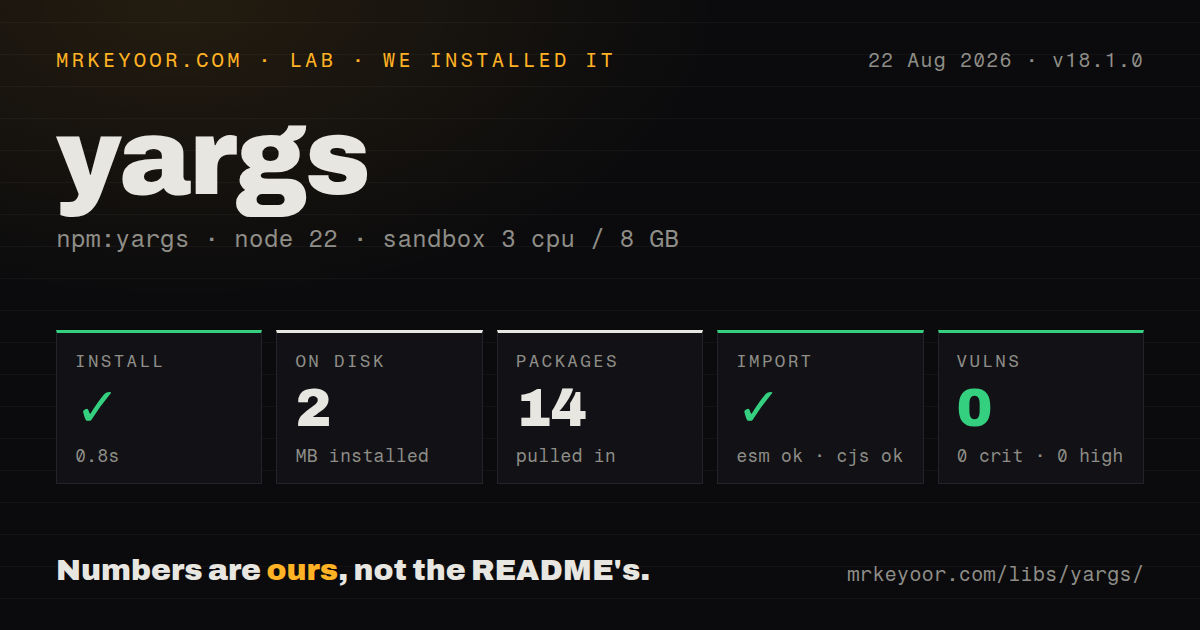
| Install | ✓ · 0.8s | 14 packages on disk · 2 MB |
| Import | ✓ | ESM import works · require() works · ESM package with exports map |
| Browser | n/a | could not be bundled for the browser (Node-only code, most likely) |
| Types | — | no TypeScript types found |
| Known vulns | 0 | 0 critical · 0 high · 0 moderate · 0 low (npm audit) |
Answers from our run
Does yargs install cleanly?
Yes. In a fresh container with an empty cache, npm install yargs finished in 0.8s, leaving 14 packages and 2 MB on disk. npm audit reported no known vulnerabilities.
Can yargs run in a browser?
Not directly: esbuild could not bundle it for the browser in our run, which normally means it depends on Node built-ins. Use it on the server, or find a browser-targeted alternative.
Does yargs work with both ESM and CommonJS?
Yes. Both import 'yargs' and require('yargs') worked in Node 22 in our run. The package is published as ESM with an exports map.
Does yargs include TypeScript types?
No type declarations were found in our install, so TypeScript users need their own declarations.
yargs or commander: which should you use?
commander: Choose it for a smaller command-oriented API with generated help and fewer parser switches. yargs 18.1.0 installed in 0.8 seconds with 14 packages and 2 MB, loaded through require and import, and returned 0 audit findings in our sandbox; it fits a Node CLI that needs a real command model.
When should you not use yargs?
A script has only a couple of fixed options; Node's util.parseArgs can keep that parser inside the standard library.
Discussed on
Use it if
- A Node CLI has several commands whose positional arguments, flags, and generated help should stay in one model.
- Choices, required options, conflicts, implications, coercion, and domain checks must run before a command handler.
- Configuration files and prefixed environment variables should merge into the same option names as command-line input.
- Async middleware or handlers and generated Bash or Zsh completion are part of the product.
- A script has only a couple of fixed options; Node's `util.parseArgs` can keep that parser inside the standard library.
- The runtime is below Node 20.19 or 22.12. Yargs 18 rejects older Node 20 and 22 patch lines as well as all Node 18 releases.
- Bundled TypeScript declarations are required. Our package inspection found none, and the README directs TypeScript users to @types/yargs.
- Unknown arguments must fail without any opt-in. Yargs requires strict(), strictOptions(), or strictCommands() to enforce that policy.
- The browser build must work through the project's current esbuild setup. Our full-package browser probe failed despite yargs publishing a browser export, so that integration needs separate proof.
Setup reality
We installed yargs 18.1.0 in a fresh Node 22 Bookworm sandbox in 0.8 seconds. npm left 14 packages using 2 MB and reported 0 known vulnerabilities. The package declares 6 direct dependencies and 0 peers; it measures 412 KB unpacked and uses the MIT license. It is ESM with an exports map, but both require and ESM import worked in our checks. No bundled TypeScript declarations were found.
The engine range is unusually specific: Node ^20.19.0 || ^22.12.0 || >=23. Pass hideBin(process.argv) so the Node executable and script name do not become user arguments. Define the entire command tree before parsing because parse triggers validation and handlers. If any builder stage, coercion, check, middleware, or handler returns a promise, use and await parseAsync().
Strict behavior is not automatic. Pick strict(), strictOptions(), or strictCommands() based on whether pass-through arguments are allowed, then test misspellings. Scalar type conversion does not validate a port range, URL policy, or file existence. Parser settings also control camel-case expansion, duplicate arrays, number parsing, and handling after --; changing them can alter the argv shape without an obvious syntax error.
Our esbuild browser bundle failed even though yargs exposes ./browser; do not assume the package works in a browser build until the actual import path and bundler are tested. .env(prefix) and .config() can inject secrets into argv, so errors and debug output need redaction. Completion invokes command discovery, making network access and other side effects inside builder functions especially costly.
Patterns
Remove Node's argv prefix parse-arguments
#!/usr/bin/env node
import yargs from 'yargs';
import { hideBin } from 'yargs/helpers';

const argv = yargs(hideBin(process.argv)).parse();
hideBin accounts for runtime variations while removing the executable and script entries before parsing.
Type and constrain flags declare-options
const cli = yargs(hideBin(process.argv))
  .option('env', {
    alias: 'e',
    type: 'string',
    choices: ['dev', 'staging', 'prod'],
    demandOption: true,
  })
  .option('force', { type: 'boolean', default: false });

const argv = cli.parse();
choices validates the named environments. Type conversion alone does not enforce domain rules.
Add a positional command define-command
yargs(hideBin(process.argv))
  .command(
    'serve [port]',
    'start the server',
    (cli) => cli.positional('port', { type: 'number', default: 5000 }),
    (argv) => serve(argv.port),
  )
  .demandCommand(1, 'choose a command')
  .parse();
Help and completion can execute builders, so keep the builder free of network calls and other side effects.
Turn on strict parsing reject-unknown-input
yargs(hideBin(process.argv))
  .command('deploy', 'publish the release', {}, deploy)
  .strict()
  .parse();
strict() rejects unknown commands and options. Use a narrower strict mode only when one category intentionally passes through.
Wait for an async handler await-command
await yargs(hideBin(process.argv))
  .command('migrate', 'apply migrations', {}, async (argv) => {
    await runMigrations(argv);
  })
  .parseAsync();
parseAsync propagates promise completion and rejection; plain parse is insufficient when any parsing stage is asynchronous.
Map a prefixed environment read-environment
const argv = yargs(hideBin(process.argv))
  .env('MYAPP')
  .option('api-key', { type: 'string', demandOption: true })
  .parse();
// MYAPP_API_KEY maps to argv.apiKey
Do not print the full argv object in diagnostics once environment values may contain credentials.
Merge a selected JSON file load-config-file
const argv = yargs(hideBin(process.argv))
  .config('settings')
  .option('region', { type: 'string', default: 'us-east-1' })
  .parse();
// --settings ./deploy.json
Treat file values as untrusted input and document whether CLI, environment, or file settings win.
Express conflicts and implications validate-option-relations
const argv = yargs(hideBin(process.argv))
  .option('token', { type: 'string' })
  .option('anonymous', { type: 'boolean' })
  .option('upload', { type: 'string' })
  .conflicts('token', 'anonymous')
  .implies('upload', 'token')
  .strictOptions()
  .parse();
conflicts and implies run during parsing, before a handler sees an invalid option combination.
Alternatives
| Package | Registry | Pick it when |
|---|---|---|
| commander | npm | Choose it for a smaller command-oriented API with generated help and fewer parser switches. |
| cac | npm | Choose it for a compact command and option API often used by modern JavaScript build tools. |
| minimist | npm | Choose it for bare argv conversion when the application will own commands, help, and validation. |
More cli & tooling guides
commander · chalk · typescript · esbuild · click · vite · the whole shelf →
How this guide is made: grounded in the library's documentation, release notes, changelog, and issue history, on a fixed rubric — not a hands-on install of every release. The 50 most-downloaded entries are additionally install-verified in clean containers. Corrections: contact the desk.