rich review
Our Python 3.12 sandbox installed Rich 15.0.0 with three supporting packages and imported rich in 0.13 seconds. Rich turns Python objects and its own renderables into terminal cells, then adapts color and width to the detected console. The package includes styled text, tables, progress displays, live regions, Markdown, syntax coloring, logging output and tracebacks. Version 15 drops Python 3.8 and fixes empty print calls ignoring end, lost newlines in Text.from_ansi, FileProxy.isatty forwarding and inline code inside Markdown table cells.
Rich is a good application dependency when terminal presentation needs more than color. Keep machine output separate, escape user text, and choose a smaller package when the command only prints one simple construct.
We installed it
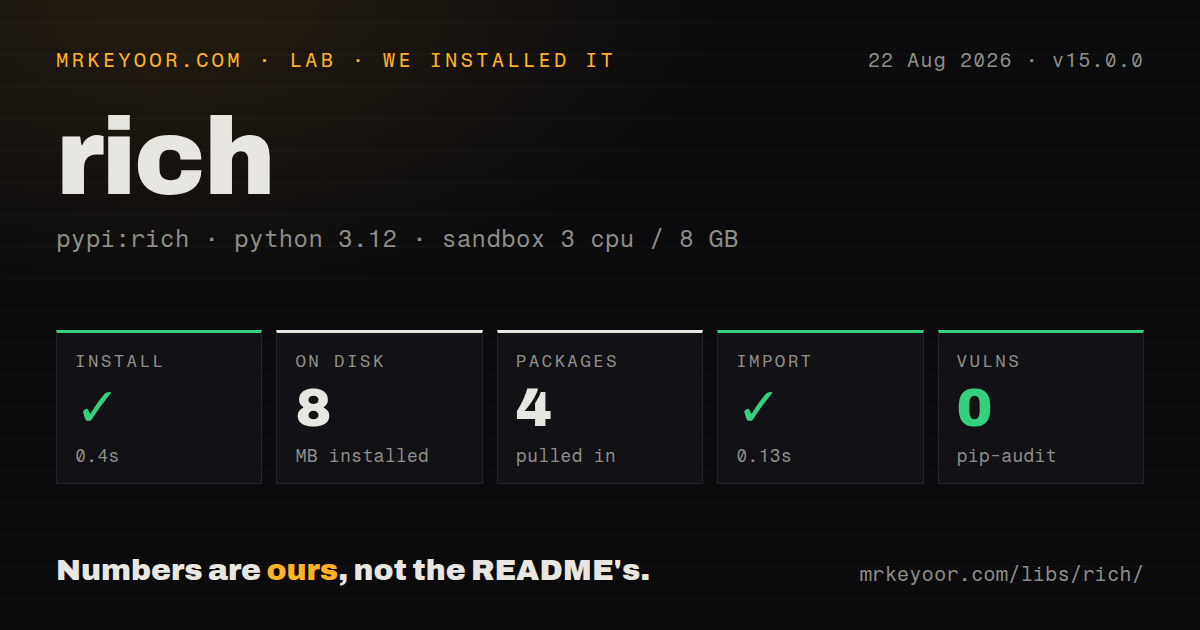
| Install | ✓ · 0.4s | 4 packages on disk · 8 MB |
| Import | ✓ | import rich in 0.13s · pure Python · py.typed · requires Python >=3.9.0 |
| Known vulns | 0 | (pip-audit) |
Answers from our run
Does rich install cleanly?
Yes. In a fresh container with an empty cache, pip install rich finished in 0.4s, leaving 4 packages and 8 MB on disk. pip-audit reported no known vulnerabilities.
What does rich need to run?
Python >=3.9.0, and nothing compiled: it is pure Python. In our run import rich succeeded in 0.13s, and the package ships py.typed for type checkers.
rich or colorama: which should you use?
colorama: Choose it when cross-platform ANSI color conversion is the whole requirement. Rich is a good application dependency when terminal presentation needs more than color.
When should you not use rich?
You maintain a library whose callers control presentation; returning plain data or using logging avoids imposing an 8 MB display stack in our measured environment
Discussed on
Use it if
- An application CLI needs width-aware tables, progress tasks or live status output
- Developers need syntax-colored tracebacks or object inspection during local debugging
- You want one Console abstraction for terminals, redirected text and Jupyter display
- A standard logging handler should add readable levels, paths and tracebacks for people at a terminal
- You maintain a library whose callers control presentation; returning plain data or using logging avoids imposing an 8 MB display stack in our measured environment
- The primary output is JSON, CSV or log records consumed by software; terminal markup and wrapping can corrupt that contract if detection is forced
- You need focus, keyboard events, forms or multiple screens; Rich renders output and Textual is the related interactive UI framework
- Classic Windows Console must match true-color screenshots; the README says that host is limited to 16 colors
- A tiny command only needs one colored line or a simple aligned table; colorama or tabulate covers the narrow job with less API surface
Setup reality
Our fresh Python 3.12 install of Rich 15.0.0 succeeded in 0.4 seconds. Four packages occupied 8 MB, and import rich completed in 0.13 seconds. pip-audit reported zero known vulnerabilities. Rich declares three direct dependencies, requires Python 3.9.0 or newer, is pure Python and includes py.typed. PyPI reports the license as MIT. Running python -m rich gives a local rendering sample without a project config file.
Create one Console and inject or share it at the application edge. Rich normally disables styling when output is not a terminal, which is right for redirected logs. force_terminal=True overrides that check and can put escape sequences into stored output. Pin width only for deterministic screenshots or CI snapshots; a fixed width on a user's terminal can wrap badly. Set no_color or use a plain Console for commands whose stdout is a machine interface.
Console markup treats bracketed tags as formatting. Escape user-provided text with rich.markup.escape(), wrap it in Text, or pass markup=False. The same rule applies to filenames and exception messages inserted into a styled string. RichHandler can show local variables and rich tracebacks, but those values may contain passwords, tokens or customer data. Keep show_locals off in production unless logs have an appropriate sensitivity boundary.
Progress and Live own a refresh region on the terminal. Route ordinary messages through the same Console so they appear above the display instead of tearing it. Background workers should call Progress.update() through a thread-safe application design and stop the display during shutdown. Snapshot tests can change across major releases because wrapping and rendering details are output behavior. Version 15 requires no code migration for the documented fixes, but Python 3.8 environments cannot install it.
Patterns
Print styled text and Python data styled-print
from rich import print

print("[bold magenta]Deploy[/bold magenta] finished :rocket:")
print({"status": "ok", "replicas": 3})
Rich parses bracket tags in strings. Escape outside text or disable markup before displaying it.
Share one Console instance console-object
from rich.console import Console

console = Console()
console.print("Hello", "World!", style="bold red")
console.print("Where there is a [bold cyan]Will[/bold cyan] there [u]is[/u] a way.")
A shared Console keeps width, color-system and output-file decisions consistent across the command.
Lay out rows in terminal columns render-table
from rich.console import Console
from rich.table import Table

table = Table(show_header=True, header_style="bold magenta")
table.add_column("Date", style="dim", width=12)
table.add_column("Title")
table.add_column("Box Office", justify="right")
table.add_row("Dec 20, 2019", "Star Wars: The Rise of Skywalker", "$375,126,118")

Console().print(table)
Columns shrink or wrap to the detected width. Use overflow and no_wrap only when truncation is preferable.
Track a finite iterable progress-bar
from rich.progress import track

for step in track(range(100), description="Processing..."):
    do_step(step)
track() derives total length from the iterable. Use Progress with total=None when completion size is unknown.
Show status without a known total status-spinner
from rich.console import Console

console = Console()
with console.status("[bold green]Working on tasks...") as status:
    for task in tasks:
        run(task)
        console.log(f"{task} complete")
Messages written through the same Console are coordinated with the active status display.
Attach RichHandler to logging logging-handler
import logging
from rich.logging import RichHandler

logging.basicConfig(
    level="INFO",
    format="%(message)s",
    datefmt="[%X]",
    handlers=[RichHandler()]
)
logging.getLogger("app").info("Server started")
RichHandler owns several display columns. Keep the logging format to the message unless duplicate metadata is intentional.
Render uncaught exceptions with source context pretty-tracebacks
from rich.traceback import install

install(show_locals=True)

# any uncaught exception now renders with syntax highlighting
1 / 0
show_locals can expose tokens and customer values from stack frames. Leave it off in production logging by default.
Explore an object in the REPL inspect-object
from rich import inspect

my_list = ["foo", "bar"]
inspect(my_list, methods=True)
methods=True produces a large report. help=True adds docstrings when interactive exploration needs them.
Display a Markdown file render-markdown
from rich.console import Console
from rich.markdown import Markdown

with open("README.md") as readme:
    md = Markdown(readme.read())
Console().print(md)
Terminal rendering cannot reproduce browser CSS or arbitrary HTML. Treat the result as a readable console view.
Highlight a source file syntax-highlight
from rich.console import Console
from rich.syntax import Syntax

code = open("app.py").read()
syntax = Syntax(code, "python", theme="monokai", line_numbers=True)
Console().print(syntax)
The language value is a Pygments lexer name. Opening a large file still reads all source into memory in this example.
Install Rich as the REPL display hook pretty-repl
>>> from rich import pretty
>>> pretty.install()
>>> ["data", {"structures": True}]
pretty.install() changes expression display for the current interpreter process. Put it in PYTHONSTARTUP only for personal shells.
Produce deterministic colored CI output force-color-ci
from rich.console import Console

# CI pipes are not TTYs, so Rich disables color by default
console = Console(force_terminal=True, width=120)
console.print("[green]PASS[/green] 128 tests")
Forced terminal mode writes ANSI sequences to the pipe. Use it only when the CI viewer interprets them, and pin width for stable snapshots.
Alternatives
| Package | Registry | Pick it when |
|---|---|---|
| colorama | PyPI | Choose it when cross-platform ANSI color conversion is the whole requirement |
| blessed | PyPI | Choose it for cursor movement, key handling and terminal capability access at a lower level |
| tabulate | PyPI | Choose it when plain text or Markdown-style tables are the only presentation feature |
More cli & tooling guides
commander · chalk · typescript · esbuild · yargs · click · the whole shelf →
How this guide is made: grounded in the library's documentation, release notes, changelog, and issue history, on a fixed rubric — not a hands-on install of every release. The 50 most-downloaded entries are additionally install-verified in clean containers. Corrections: contact the desk.