commander review
Commander turns a Node.js argv array into named options, positional arguments, and subcommand actions. Declarations also generate usage text, validate required values and choices, reject unknown flags, and suggest nearby option names. Version 15 is an ESM-only implementation and requires Node 22.12 or newer; Node's require(esm) support lets current CommonJS programs call require('commander'). The release also reports surplus command arguments more clearly and changes the default behavior when positive and negative forms of the same option are both declared.
Commander fits ordinary Node CLI products that need real help and subcommands without adopting a full application framework. Version 15 is an easy choice only after the Node 22.12 runtime floor and ESM behavior are acceptable.
We installed it
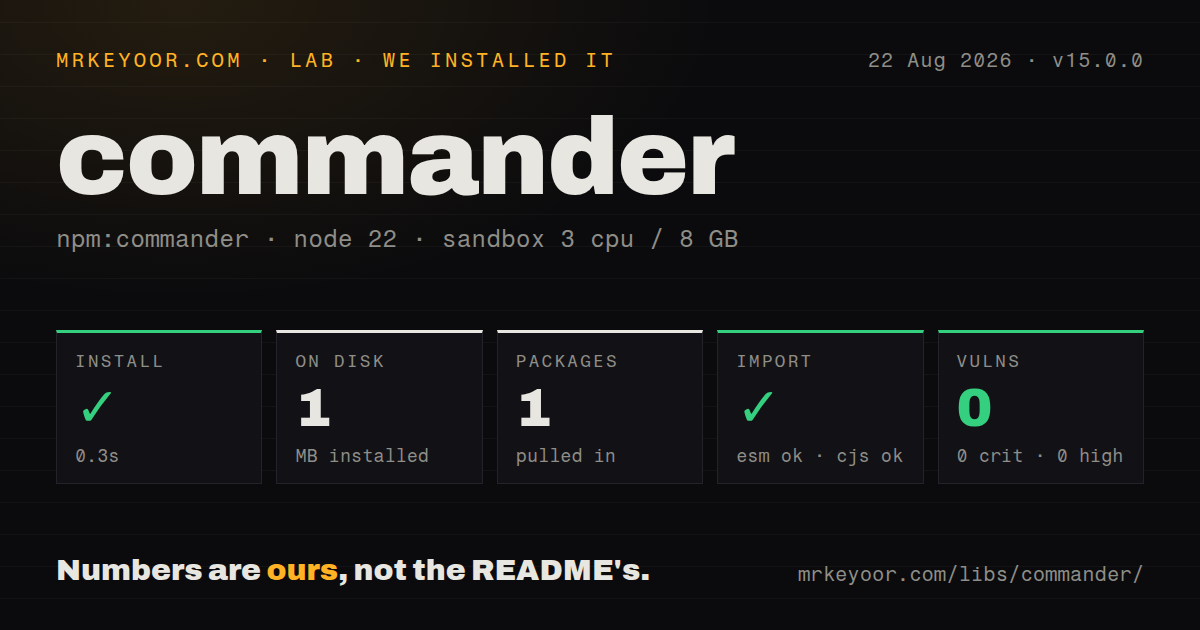
| Install | ✓ · 0.3s | 1 package on disk · 1 MB |
| Import | ✓ | ESM import works · require() works · ESM package with exports map |
| Browser | n/a | could not be bundled for the browser (Node-only code, most likely) |
| Types | ✓ | TypeScript types bundled |
| Known vulns | 0 | 0 critical · 0 high · 0 moderate · 0 low (npm audit) |
Answers from our run
Does commander install cleanly?
Yes. In a fresh container with an empty cache, npm install commander finished in 0.3s, leaving 1 package and 1 MB on disk. npm audit reported no known vulnerabilities.
Can commander run in a browser?
Not directly: esbuild could not bundle it for the browser in our run, which normally means it depends on Node built-ins. Use it on the server, or find a browser-targeted alternative.
Does commander work with both ESM and CommonJS?
Yes. Both import 'commander' and require('commander') worked in Node 22 in our run. The package is published as ESM with an exports map.
Does commander include TypeScript types?
Yes, type declarations ship inside the package, so no @types install is needed.
commander or yargs: which should you use?
yargs: Choose it for command modules, middleware, completion support, and object-style declarations. Commander fits ordinary Node CLI products that need real help and subcommands without adopting a full application framework.
When should you not use commander?
Your supported runtime is below Node 22.12; Commander 15 will not install within that engine policy, while Commander 14 receives security fixes only through May 2027
Use it if
- You need a Node CLI with subcommands, generated help, strict unknown-option errors, and typed option declarations
- Flags need choices, environment-variable sources, conflicts, implied values, custom parsers, or variadic arguments
- Async command handlers and before or after hooks should share one parsing lifecycle
- The CLI is large enough that constructing a fresh Command per test is clearer than hand-parsing process.argv
- Your supported runtime is below Node 22.12; Commander 15 will not install within that engine policy, while Commander 14 receives security fixes only through May 2027
- A script has two ordinary flags and no help hierarchy; node:util parseArgs handles that without a package
- The product needs a plugin architecture, command generators, and a documentation site; Commander parses and presents commands but does not provide that application framework
- You need prompts, terminal colors, spinners, or progress displays; none are part of Commander's scope
- The code must execute in a browser; our esbuild browser target failed because Commander relies on Node CLI behavior
Setup reality
Our fresh Node 22 installation of Commander 15.0.0 took 0.3 seconds. One package occupied 1 MB, and npm audit found no known vulnerabilities. Commander has zero direct and peer dependencies, is 244 KB unpacked, includes TypeScript declarations, and uses the MIT license. It is an ESM package with an exports map. Both ESM import and require() worked on this Node version. Its engine declaration is strict: Node must be 22.12.0 or newer.
Version 15 moved the implementation to ESM. A .cjs program can still require it on a runtime with require(esm), which explains the high Node floor. Tooling that transforms or mocks dependencies may still reject an ESM-only package even when Node itself accepts it. Commander 14 is the documented fallback and receives security updates until May 2027. The former commander/esm.mjs export was removed, so imports should come from commander.
Define a local Command instance for any CLI that will be tested or embedded. The exported program singleton is convenient, but definitions and parsed state persist on it. Option values begin as strings unless an argument parser converts them. Variadic options keep consuming tokens until another option appears, and optional values ignore dash-prefixed text unless supplied with equals syntax. Environment-backed options expose their source through getOptionValueSource(), which helps when a default masks missing configuration.
Call parseAsync() if an action or lifecycle hook returns a promise. parse() does not wait for that work. Command errors and help normally terminate the process; exitOverride() converts exits into CommanderError exceptions for tests, while configureOutput() captures text. The package is meant for Node command lines. Our browser bundle attempt failed, so shared libraries should keep Commander in the executable entry point rather than code that a frontend bundler traverses.
Patterns
Parse boolean and valued options parse-options
import { Command } from 'commander';

const cli = new Command()
  .option('-v, --verbose', 'print details')
  .option('-p, --port <number>', 'listen port', '3000')
  .parse();

const options = cli.opts();
Values are strings unless a parser is supplied. A local Command avoids state leaking between tests.
Attach a subcommand action create-subcommand
const cli = new Command().name('store');

cli.command('remove')
  .description('remove one item')
  .argument('<id>', 'item identifier')
  .option('--force', 'skip confirmation')
  .action((id, options) => {
    console.log({ id, force: options.force });
  });

cli.parse();
The action receives positional arguments first, then the subcommand's local options.
Fail when a value is missing require-option
cli
  .requiredOption('--token <value>', 'API token')
  .parse();

const { token } = cli.opts();
A default or environment source also satisfies requiredOption, so inspect the source if presence on argv matters.
Restrict an option to known values validate-option-choice
import { Option } from 'commander';

cli.addOption(
  new Option('--format <type>', 'output type')
    .choices(['json', 'text'])
    .default('text')
);
choices is available on an Option instance. Invalid input receives Commander's standard usage error.
Use an environment fallback read-option-from-env
cli.addOption(
  new Option('--port <number>', 'listen port')
    .env('PORT')
    .argParser((value) => Number.parseInt(value, 10))
);

cli.parse();
console.log(cli.getOptionValueSource('port'));
Command-line input takes precedence. getOptionValueSource reports cli, env, default, config, or implied.
Parse an integer with a useful error reject-invalid-number
import { InvalidArgumentError } from 'commander';

function integer(value) {
  const parsed = Number.parseInt(value, 10);
  if (!Number.isSafeInteger(parsed)) {
    throw new InvalidArgumentError('expected a safe integer');
  }
  return parsed;
}

cli.option('--count <number>', 'item count', integer);
InvalidArgumentError lets Commander format the failure as a normal command usage error.
Wait for an asynchronous handler run-async-action
cli.command('sync')
  .action(async () => {
    const response = await fetch('https://api.example.com/sync');
    if (!response.ok) throw new Error(`HTTP ${response.status}`);
  });

await cli.parseAsync(process.argv);
Use parseAsync whenever any action or hook returns a promise. parse does not await it.
Run setup before command actions add-lifecycle-hook
cli.hook('preAction', async (_root, actionCommand) => {
  await openLog(actionCommand.name());
});

cli.hook('postAction', async () => {
  await closeLog();
});
Async hooks also require parseAsync. Parent hooks run around nested command actions.
Accept several values after one flag collect-variadic-values
cli.option('--tag <values...>', 'one or more tags');
cli.parse();

console.log(cli.opts().tag);
// --tag red blue green -> ['red', 'blue', 'green']
Collection stops at the next option. Use -- to stop all option parsing before positional text.
Keep a parse failure inside a test test-parser-errors
const cli = new Command()
  .exitOverride()
  .configureOutput({ writeErr: () => {} })
  .option('--known');

try {
  cli.parse(['--unknown'], { from: 'user' });
} catch (error) {
  console.log(error.code);
}
exitOverride throws CommanderError instead of calling process.exit, and configureOutput can silence or capture usage text.
Alternatives
| Package | Registry | Pick it when |
|---|---|---|
| yargs | npm | Choose it for command modules, middleware, completion support, and object-style declarations |
| minimist | npm | Choose it when a tiny script only needs argv converted into an object |
| clipanion | npm | Choose it for class-based, TypeScript-oriented commands with stronger structured typing |
More cli & tooling guides
chalk · typescript · esbuild · yargs · click · vite · the whole shelf →
How this guide is made: grounded in the library's documentation, release notes, changelog, and issue history, on a fixed rubric — not a hands-on install of every release. The 50 most-downloaded entries are additionally install-verified in clean containers. Corrections: contact the desk.