typescript review
TypeScript 7.0.2 installed in 3.7 seconds on our Node 22 sandbox and provides the `tsc` command for checking typed JavaScript, producing JavaScript, writing declaration files, watching projects, and building project references. Its types disappear from the emitted program, so an interface cannot validate a request body or environment variable at runtime. Version 7 moves the compiler and language server to a native Go implementation, runs parsing, checking, and emit work in parallel, changes several configuration defaults, and rejects targets and module modes that version 6 had already deprecated. The package is Apache-2.0 licensed and needs Node 16.20.0 or newer.
TypeScript 7.0.2 took 3.7 seconds and 31 MB to install in our sandbox, with 0 audit findings, making its CLI an easy addition when a project can use the native checker directly. Keep TypeScript 6 available if a compiler-API consumer or embedded-language tool has not moved to the version 7 interfaces.
We installed it
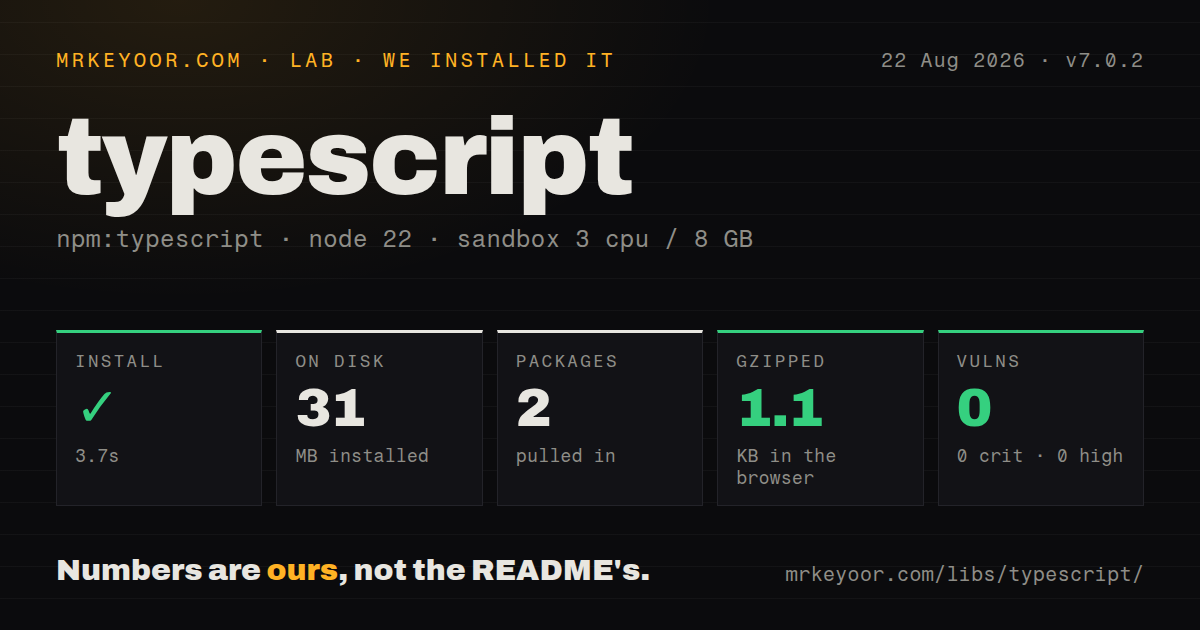
| Install | ✓ · 3.7s | 2 packages on disk · 31 MB |
| Import | ✓ | ESM import works · require() works · ESM package with exports map |
| Browser | 1.1 KB | gzipped (2.9 KB minified), bundled with esbuild |
| Types | — | no TypeScript types found |
| Known vulns | 0 | 0 critical · 0 high · 0 moderate · 0 low (npm audit) |
Answers from our run
Does typescript install cleanly?
Yes. In a fresh container with an empty cache, npm install typescript finished in 4 seconds, leaving 2 packages and 31 MB on disk. npm audit reported no known vulnerabilities.
How much does typescript add to a browser bundle?
1.1 KB gzipped (2.9 KB minified) when the whole package is bundled for the browser with esbuild. Importing only part of it is usually smaller.
Does typescript work with both ESM and CommonJS?
Yes. Both import 'typescript' and require('typescript') worked in Node 22 in our run. The package is published as ESM with an exports map.
Does typescript include TypeScript types?
No type declarations were found in our install, so TypeScript users need their own declarations.
typescript or esbuild: which should you use?
esbuild: Use it when fast bundling and syntax removal matter, with a separate checker if type errors must fail CI. TypeScript 7.0.2 took 3.7 seconds and 31 MB to install in our sandbox, with 0 audit findings, making its CLI an easy addition when a project can use the native checker directly.
When should you not use typescript?
You only need a bundler to remove type syntax; esbuild does that job without running TypeScript's semantic checker
Discussed on
- hnA 10x Faster TypeScript1,827 points
- hnTypeScript types can run DOOM [video]1,328 points
- hnNode.js adds experimental support for TypeScript1,204 points
- hnTypeScript 7720 points
- hnDeno 1.6 supports compiling TypeScript to a single executable657 points
Use it if
- You maintain a JavaScript or TypeScript application where `strict` checks can catch mismatched values before tests or deployment
- You publish a library and need `tsc` to produce `.d.ts` declarations for consumers alongside JavaScript output
- Your monorepo has project references that can use TypeScript 7's parallel project builders
- You are migrating checked JavaScript gradually with `allowJs`, `checkJs`, and JSDoc instead of converting every file at once
- You only need a bundler to remove type syntax; esbuild does that job without running TypeScript's semantic checker
- Your tool imports the compiler API or installs a language-service plugin; TypeScript 7.0 does not expose a stable programmatic API
- Your editor workflow depends on Vue, Svelte, Astro, MDX, or Angular template analysis; Microsoft's 7.0 notes direct those embedded-language users to TypeScript 6 for now
- You must emit ES5, AMD, UMD, SystemJS, or use classic or Node 10 module resolution; TypeScript 7 treats those retired settings as errors
- You need runtime guarantees for untrusted JSON or configuration; erased TypeScript annotations do not inspect values after the program starts
Setup reality
We installed TypeScript 7.0.2 in a fresh unprivileged Node 22 container in 3.7 seconds. The completed install left 2 packages and 31 MB on disk; npm audit found 0 known vulnerabilities. Our package inspection found 0 direct dependencies, 0 peer dependencies, and 3,680 KB unpacked. The package declares ESM and an exports map, yet both require() and ESM import worked. We found no TypeScript declaration files in the installed package itself.
A project still needs a committed tsconfig.json; there are no credentials or services to provision. Version 7 starts with strict: true, module: esnext, types: [], and noUncheckedSideEffectImports: true. Add types: ["node"] or the relevant test globals when the empty default hides them. Set rootDir explicitly when the config is above src, then choose nodenext for Node's resolver or bundler when another build tool owns resolution.
TypeScript 7.0's unstable exports do not replace the compiler API used by lint plugins, custom transformers, code generators, or embedded-language servers. Microsoft publishes @typescript/typescript6 with the tsc6 command for side-by-side use. Check the editor extension, ESLint integration, declaration output, framework template checker, and any transformer before moving the whole workspace to 7.0. Vue, Svelte, Astro, MDX, and specialized Angular template tooling may still need version 6.
Parallel checking is the other operational change. TypeScript 7 defaults to 4 checker workers, while --checkers and --builders can increase CPU use and memory consumption; 4 builders with 4 checkers permits as many as 16 checker processes. Pin those values in CI if diagnostics vary by work ordering. Use --singleThreaded on a 3 CPU or memory-limited runner. Our browser experiment produced 2.9 KB minified and 1.1 KB gzipped, but that root import is version-facing code, not a browser-hosted compiler.
Patterns
Install the compiler and check without emit install-and-check
npm install -D typescript
npx tsc --init
npx tsc --noEmit
`tsc --noEmit` reports type errors without writing JavaScript. TypeScript 7 enables `strict` in a newly generated configuration.
Compile for current Node module rules configure-node
{
  "compilerOptions": {
    "target": "es2022",
    "module": "nodenext",
    "rootDir": "src",
    "outDir": "dist",
    "strict": true,
    "types": ["node"]
  },
  "include": ["src"]
}
`nodenext` follows Node's package type and file-extension rules. Version 7 defaults `types` to an empty array, so Node globals must be named.
Read an exception after a runtime check narrow-unknown-error
function errorMessage(value: unknown): string {
  return value instanceof Error ? value.message : String(value)
}

try {
  await runJob()
} catch (error) {
  console.error(errorMessage(error))
}
A strict catch variable has type `unknown`. Test the value before accessing `message` or another Error property.
Make success and failure mutually exclusive model-result-union
type Result<T> =
  | { ok: true; data: T }
  | { ok: false; reason: string }

function valueOrThrow<T>(result: Result<T>): T {
  if (result.ok) return result.data
  throw new Error(result.reason)
}
The literal `ok` property narrows each branch. Code cannot read `data` from the failure shape without a type error.
Write a focused type guard validate-unknown-shape
type User = { id: string }

function isUser(value: unknown): value is User {
  return (
    typeof value === 'object' &&
    value !== null &&
    'id' in value &&
    typeof value.id === 'string'
  )
}
The predicate tells TypeScript what this function proved at runtime. A mistaken check makes the narrowing unsound, so larger payloads are better handled by a schema validator.
Check an object without widening its properties check-config-shape
const server = {
  host: '127.0.0.1',
  port: 3000,
} satisfies Record<string, string | number>

server.port.toFixed(0)
`satisfies` checks compatibility while preserving `port` as a number. A type annotation on the object would widen it to the declared union.
Derive update and public record types derive-object-views
type Account = { id: string; email: string; secret: string }

type AccountUpdate = Partial<Omit<Account, 'id'>>
type PublicAccount = Pick<Account, 'id' | 'email'>
type AccountsById = Record<string, Account>
`Partial`, `Omit`, `Pick`, and `Record` keep these shapes connected to `Account`. They do not remove `secret` from an object at runtime.
Return values for a checked property name constrain-object-key
function select<T, K extends keyof T>(rows: T[], key: K): T[K][] {
  return rows.map((row) => row[key])
}

const ids = select([{ id: 1, label: 'one' }], 'id')
`K extends keyof T` rejects unknown property names. The indexed access `T[K]` preserves the selected property's value type.
Describe the part of an untyped module you call declare-legacy-package
// src/types/legacy-tool.d.ts
declare module 'legacy-tool' {
  export type Options = { quiet?: boolean }
  export function run(input: string, options?: Options): Promise<string>
}
A local `.d.ts` file only describes behavior; it does not verify the JavaScript implementation. Keep the declaration limited to calls your project tests.
Type-check JavaScript before renaming files check-javascript
{
  "compilerOptions": {
    "allowJs": true,
    "checkJs": true,
    "noEmit": true,
    "strict": true
  },
  "include": ["src/**/*.js"]
}
`allowJs` admits `.js` files and `checkJs` reports errors in them. TypeScript 7 changed several legacy JSDoc rules, so run this config before upgrading a JSDoc-heavy project.
Publish declaration files with JavaScript emit-declarations
{
  "compilerOptions": {
    "declaration": true,
    "declarationMap": true,
    "sourceMap": true,
    "outDir": "dist"
  },
  "include": ["src"]
}
`declaration` writes `.d.ts` files and `declarationMap` links editor navigation back to source. Point the package's published type entry at the generated file.
Bound parallel work in a referenced build build-project-references
npx tsc --build --checkers 2 --builders 2
# Use one thread on a constrained runner:
npx tsc --build --singleThreaded
Two builders with 2 checkers permit up to 4 checker processes. Higher values can consume more memory, so measure them on the actual CI runner.
Alternatives
| Package | Registry | Pick it when |
|---|---|---|
| esbuild | npm | Use it when fast bundling and syntax removal matter, with a separate checker if type errors must fail CI |
| tsx | npm | Use it to run `.ts` scripts directly during development while `tsc --noEmit` handles checking |
| sucrase | npm | Use it for quick development transforms when full type checking and production bundling are separate steps |
| flow-bin | npm | Keep it for an established Flow codebase where changing annotations and editor tooling would cost more than staying put |
More cli & tooling guides
commander · chalk · esbuild · yargs · click · vite · the whole shelf →
How this guide is made: grounded in the library's documentation, release notes, changelog, and issue history, on a fixed rubric — not a hands-on install of every release. The 50 most-downloaded entries are additionally install-verified in clean containers. Corrections: contact the desk.