scikit-image review
scikit-image 0.26.0, imported as `skimage`, applies classical image-processing algorithms to NumPy arrays. Its modules cover exposure, filters, morphology, segmentation, feature detection, geometric transforms, restoration, color conversion, object labelling, and measurement. The API is designed for scientific analysis of images and volumes, with references to the algorithms behind many functions. It does not provide cameras, a CUDA execution path, or pretrained recognition models. Our install shipped compiled extensions and a `py.typed` marker.
scikit-image 0.26.0 imported in 0.09 seconds with 0 audit findings, but our 9-package install occupied 228 MB. Install it for classical scientific image analysis on NumPy arrays; choose Pillow for simple file edits, OpenCV for camera and real-time work, and a tensor library for GPU models.
We installed it
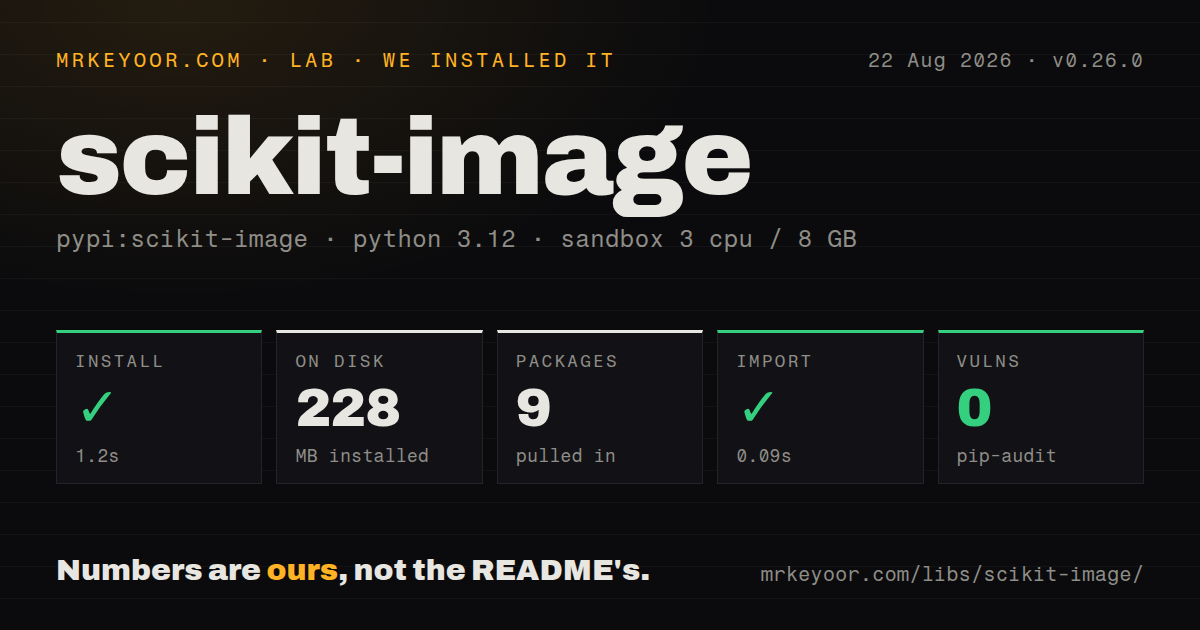
| Install | ✓ · 1.2s | 9 packages on disk · 228 MB |
| Import | ✓ | import skimage in 0.09s · compiled extensions · py.typed · requires Python >=3.11 |
| Known vulns | 0 | (pip-audit) |
Answers from our run
Does scikit-image install cleanly?
Yes. In a fresh container with an empty cache, pip install scikit-image finished in 1 seconds, leaving 9 packages and 228 MB on disk. pip-audit reported no known vulnerabilities.
What does scikit-image need to run?
Python >=3.11, and a platform wheel with compiled extensions. In our run import skimage succeeded in 0.09s, and the package ships py.typed for type checkers.
scikit-image or opencv-python: which should you use?
opencv-python: Choose it for camera input, video pipelines, and a wider real-time computer-vision runtime. scikit-image 0.26.0 imported in 0.09 seconds with 0 audit findings, but our 9-package install occupied 228 MB.
When should you not use scikit-image?
The pipeline needs camera capture or video-rate CPU processing. scikit-image supplies analysis functions, not a real-time vision runtime.
Use it if
- You need to label and measure regions in microscopy, medical, satellite, or other scientific images.
- Classical methods such as Otsu thresholding, watershed, Canny edges, morphology, or CLAHE fit the task.
- Images already live as NumPy arrays beside SciPy, pandas, imageio, tifffile, or Matplotlib code.
- The workflow includes float images, 16-bit data, multichannel arrays, or 3D volumes rather than only ordinary RGB files.
- The pipeline needs camera capture or video-rate CPU processing. scikit-image supplies analysis functions, not a real-time vision runtime.
- The problem is object recognition, learned detection, or neural semantic segmentation. There are no pretrained model weights in this package.
- Production batches must execute on CUDA. scikit-image operates on CPU NumPy arrays and has no general GPU backend.
- Your environment is pinned below Python 3.11. Version 0.26.0 declares Python 3.11 or newer.
- The code must copy old `multichannel` or `selem` examples unchanged. Current APIs use `channel_axis` and `footprint`, and removed names will fail.
Setup reality
We installed scikit-image 0.26.0 in 1.2 seconds in a fresh Python 3.12 Bookworm sandbox. The environment contained 9 packages and occupied 228 MB; pip-audit found 0 known vulnerabilities. The distribution declares 59 direct dependencies, requires Python 3.11 or newer, includes compiled .so extensions and py.typed, and completed import skimage in 0.09 seconds.
That 228 MB result is a poor trade for one resize or file conversion. Pillow is usually enough for those jobs. Wheels avoid a local compiler on supported combinations, while a source build enters scikit-image's compiled toolchain and should be tested in the deployment image. The package's licensing is primarily BSD, with listed files under BSD-2-Clause, BSD-3-Clause, or MIT terms rather than one short metadata string.
Dtype and range rules cause more production bugs than installation. Unsigned 8-bit images usually occupy 0 through 255; floating images are generally expected in 0 through 1 or minus 1 through 1, depending on signedness and function. Use img_as_float and the matching conversion helpers at boundaries. A cast such as array.astype(float) changes dtype without scaling values and can feed mathematically valid but wrong numbers into later steps.
Multichannel functions use channel_axis; spatial operations can otherwise treat the color dimension like image geometry. Current morphology calls use footprint, not the removed selem keyword. Large volumes allocate intermediate NumPy arrays on CPU, so crop, tile, or measure memory before processing a stack concurrently. scikit-image does not own geospatial metadata, video capture, or GPU placement; preserve those concerns in the libraries that load or schedule the data.
Patterns
Load an image and normalize dtype read-image-as-float
from skimage import io, util

img = io.imread("scan.png")        # usually uint8, [0, 255]
imgf = util.img_as_float(img)       # float64, [0, 1]
`img_as_float` rescales integer ranges as it converts them. A plain float cast would leave 0 through 255 unchanged.
Convert RGB to grayscale rgb-to-grayscale
from skimage.color import rgb2gray

gray = rgb2gray(img)  # float in [0, 1], shape (H, W)
`rgb2gray` returns a float image and does not accept an RGBA array; remove or combine alpha first.
Automatic thresholding with Otsu otsu-threshold
from skimage.filters import threshold_otsu

t = threshold_otsu(gray)
mask = gray > t  # boolean foreground mask
Otsu returns one threshold and assumes a useful bimodal histogram. Uneven illumination often needs `threshold_local`.
Count and measure objects in a mask label-and-measure-regions
from skimage import measure

labels = measure.label(mask)
props = measure.regionprops_table(
    labels, properties=("label", "area", "centroid", "eccentricity"))
import pandas as pd
df = pd.DataFrame(props)
`regionprops_table` produces column arrays ready for pandas, and label 0 remains excluded as background.
Resize with proper anti-aliasing resize-rescale
from skimage.transform import resize, rescale

small = resize(img, (256, 256), anti_aliasing=True)
half = rescale(img, 0.5, anti_aliasing=True, channel_axis=-1)
Declare `channel_axis=-1` for color data. The result is float, so convert deliberately before writing an integer format.
Canny edge detection edge-detection-canny
from skimage.feature import canny

edges = canny(gray, sigma=2.0)  # boolean edge map
`sigma` trades noise for fine edges. The function lives in `skimage.feature`, despite being an edge detector.
Clean a binary mask with morphology morphology-cleanup
from skimage.morphology import binary_opening, remove_small_objects, disk

clean = binary_opening(mask, footprint=disk(3))
clean = remove_small_objects(clean, min_size=64)
Current releases call this argument `footprint`. Pass a boolean mask rather than a 0-or-255 integer image.
Split touching objects with watershed watershed-split-touching
import numpy as np
from scipy import ndimage as ndi
from skimage.feature import peak_local_max
from skimage.segmentation import watershed

dist = ndi.distance_transform_edt(mask)
coords = peak_local_max(dist, footprint=np.ones((3, 3)), labels=mask)
markers = np.zeros(dist.shape, dtype=int)
markers[tuple(coords.T)] = np.arange(1, len(coords) + 1)
labels = watershed(-dist, markers, mask=mask)
Marker quality determines the split. Current `peak_local_max` returns coordinates, unlike much older examples.
Denoise while keeping edges denoise
from skimage.restoration import denoise_tv_chambolle

smooth = denoise_tv_chambolle(imgf, weight=0.1, channel_axis=-1)
Total variation keeps sharper boundaries than Gaussian blur but can flatten texture when `weight` is too high.
Adaptive histogram equalization (CLAHE) clahe-contrast
from skimage import exposure

better = exposure.equalize_adapthist(gray, clip_limit=0.02)
CLAHE returns floats in the 0-to-1 range and can amplify noise inside otherwise flat areas.
Find a template inside an image template-matching
import numpy as np
from skimage.feature import match_template

result = match_template(gray, template)
y, x = np.unravel_index(np.argmax(result), result.shape)
The peak marks the template's top-left corner. Correlation here is neither scale-invariant nor rotation-invariant.
Alternatives
| Package | Registry | Pick it when |
|---|---|---|
| opencv-python | PyPI | Choose it for camera input, video pipelines, and a wider real-time computer-vision runtime. |
| pillow | PyPI | Choose it when loading, resizing, cropping, drawing, and file conversion are the whole job. |
| scipy | PyPI | Choose `scipy.ndimage` when a few array filters or measurements already cover the requirement. |
More ai / ml guides
@modelcontextprotocol/sdk · openai · mcp · huggingface-hub · @anthropic-ai/sdk · openai · the whole shelf →
How this guide is made: grounded in the library's documentation, release notes, changelog, and issue history, on a fixed rubric — not a hands-on install of every release. The 50 most-downloaded entries are additionally install-verified in clean containers. Corrections: contact the desk.