pillow review
Pillow is the maintained fork of the Python Imaging Library. It gives Python an Image object for decoding, inspecting, changing, and encoding raster files such as JPEG, PNG, WebP, GIF, and TIFF. Version 12.3.0 concentrates on faster filters, channel operations, resampling, gradients, blending, and compositing, while adding stricter checks around malformed files and oversized geometry. It is a practical choice for thumbnails, upload normalization, metadata, drawing, and format conversion. It is not a computer-vision toolkit or a streaming image service.
Pillow 12.3.0 installed as one 20 MB package in 0.4 seconds and imported in 0.02 seconds in our sandbox, with 0 audit findings. Install it for ordinary raster-image work, but choose a vision library or libvips binding for analysis or sustained large-image throughput.
We installed it
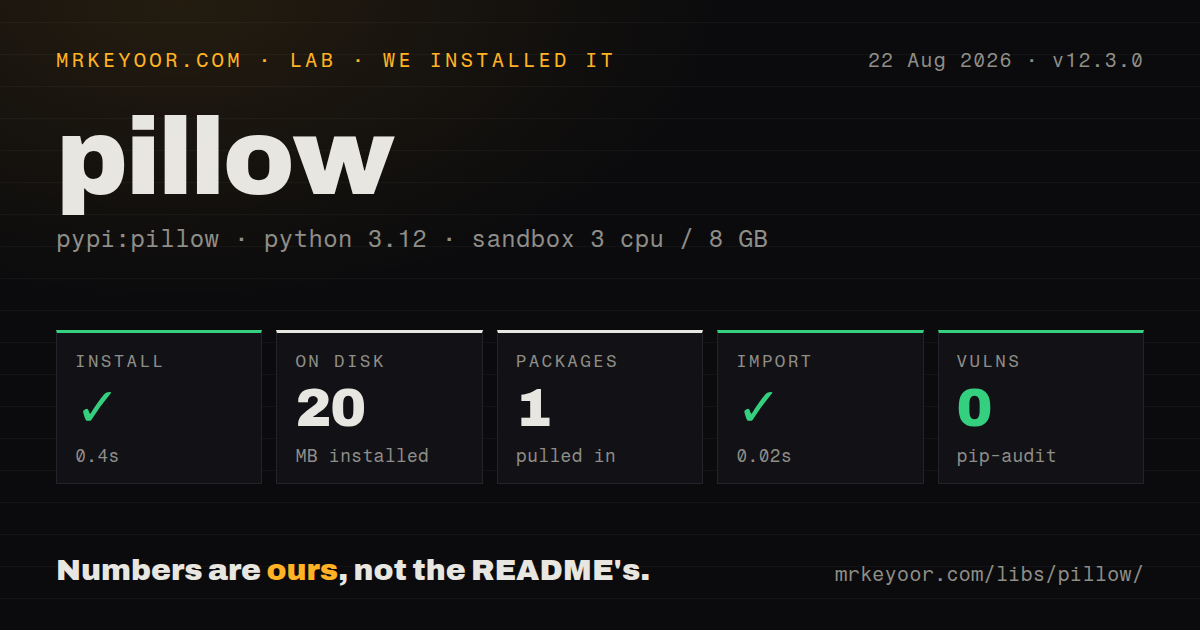
| Install | ✓ · 0.4s | 1 package on disk · 20 MB |
| Import | ✓ | import PIL in 0.02s · compiled extensions · py.typed · requires Python >=3.10 |
| Known vulns | 0 | (pip-audit) |
Answers from our run
Does pillow install cleanly?
Yes. In a fresh container with an empty cache, pip install pillow finished in 0.4s, leaving 1 package and 20 MB on disk. pip-audit reported no known vulnerabilities.
What does pillow need to run?
Python >=3.10, and a platform wheel with compiled extensions. In our run import PIL succeeded in 0.02s, and the package ships py.typed for type checkers.
pillow or opencv-python: which should you use?
opencv-python: Use it for video frames, feature extraction, detection, and numeric computer-vision pipelines. Pillow 12.3.0 installed as one 20 MB package in 0.4 seconds and imported in 0.02 seconds in our sandbox, with 0 audit findings.
When should you not use pillow?
Choose opencv-python when the job is feature detection, tracking, camera frames, or other computer-vision work; Pillow's documented scope is image file processing
Use it if
- You need to crop, resize, rotate, annotate, or re-encode user-uploaded images inside a Python service
- You need one Image API that handles common raster formats, animated images, EXIF orientation, color modes, and alpha channels
- You want typed Python APIs and published wheels instead of calling a separate image-processing executable
- You need to create thumbnails, watermarks, contact sheets, or simple generated graphics without bringing in a vision framework
- Choose opencv-python when the job is feature detection, tracking, camera frames, or other computer-vision work; Pillow's documented scope is image file processing
- Choose pyvips for a high-throughput resize service where lazy, streaming operations and low peak memory matter more than Pillow API familiarity
- Choose imageio when your pipeline wants arrays and a small read/write boundary; Pillow centers its own Image object and mode system
- Do not assume every codec works in every source build: JPEG, TIFF, WebP, AVIF, and font behavior depend on native libraries selected at build time
- Avoid treating Image.verify() as malware scanning or full decoding; it checks file integrity, invalidates that Image object, and still leaves resource limits to your application
Setup reality
Our clean Python 3.12 install of Pillow 12.3.0 finished in 0.4 seconds. It left 1 package and 20 MB on disk, and pip-audit reported 0 known vulnerabilities. The distribution declares 25 direct dependencies, requires Python 3.10 or newer, includes compiled extensions and py.typed, and import PIL completed in 0.02 seconds. Import the package as PIL, not pillow.
Published wheels carry the usual native imaging support, so the ordinary install did not compile anything in our Debian sandbox. A source install is different: the installation guide lists required and optional libraries for JPEG, zlib, FreeType, LittleCMS, WebP, TIFF, JPEG 2000, and others. Missing development headers can remove an optional format or stop the build. Check PIL.features in the actual deployment image when a codec is a requirement.
Image data is decoded lazily. Keep the source file open until load(), copy(), or a consuming operation has completed, especially when using a with Image.open(...) block. thumbnail() changes the object in place, while resize(), crop(), and most filters return another image. JPEG cannot store an alpha channel, so RGBA and palette input needs an explicit conversion or compositing step before saving.
Treat dimensions as attacker-controlled when accepting uploads. Pillow emits decompression-bomb warnings above its pixel threshold, but your service still needs byte limits, pixel limits, timeouts, and isolated handling for hostile files. Version 12.3.0 added more malformed-input checks, including font and image decoders. That is useful hardening, not permission to decode unlimited files in a request worker.
Patterns
Open an image and save another format open-and-save
from PIL import Image

with Image.open("input.png") as image:
    image.convert("RGB").save("output.jpg", quality=88)
JPEG has no alpha channel. Converting RGBA directly to RGB discards transparency against black, so composite onto a chosen background when that distinction matters.
Create a bounded thumbnail make-thumbnail
from PIL import Image

with Image.open("photo.jpg") as image:
    image.thumbnail((480, 480))
    image.save("thumb.webp", format="WEBP", quality=82)
`thumbnail()` preserves aspect ratio, never enlarges the image, and mutates the object in place.
Resize with an explicit resampling filter resize-with-resampling
from PIL import Image

with Image.open("photo.jpg") as image:
    resized = image.resize((1200, 800), Image.Resampling.LANCZOS)
    resized.save("resized.jpg", quality=90)
`resize()` uses the exact dimensions supplied and can distort the source aspect ratio. Calculate the target box first when proportions must stay intact.
Apply camera orientation before processing correct-exif-orientation
from PIL import Image, ImageOps

with Image.open("upload.jpg") as image:
    upright = ImageOps.exif_transpose(image)
    upright.save("upright.jpg", quality=90)
Phone photos may store rotation only in EXIF. Apply the transpose before cropping or calculating display dimensions.
Crop using pixel coordinates crop-region
from PIL import Image

with Image.open("photo.jpg") as image:
    region = image.crop((100, 80, 700, 480))
    region.save("crop.png")
The tuple is left, upper, right, lower. Right and lower are excluded from the returned pixel area.
Draw readable text with a TrueType font draw-text
from PIL import Image, ImageDraw, ImageFont

with Image.open("card.png").convert("RGBA") as image:
    draw = ImageDraw.Draw(image)
    font = ImageFont.truetype("/app/fonts/Inter.ttf", 42)
    draw.text((32, 32), "Build complete", font=font, fill="white", stroke_width=2, stroke_fill="black")
    image.save("labeled.png")
Pillow does not supply your application font. Ship the font file and use an explicit path so containers and developer machines render the same result.
Composite an alpha watermark composite-watermark
from PIL import Image

with Image.open("photo.jpg").convert("RGBA") as base, Image.open("mark.png").convert("RGBA") as mark:
    position = (base.width - mark.width - 24, base.height - mark.height - 24)
    base.alpha_composite(mark, position)
    base.convert("RGB").save("watermarked.jpg", quality=90)
Both inputs need RGBA for `alpha_composite()`. Convert back to RGB before encoding as JPEG.
Check an uploaded image before decoding it again validate-upload
from io import BytesIO
from PIL import Image

def open_checked(data: bytes) -> Image.Image:
    with Image.open(BytesIO(data)) as probe:
        probe.verify()
    image = Image.open(BytesIO(data))
    image.load()
    return image
`verify()` leaves the probe unusable, which is why the bytes are opened twice. Add application byte and pixel limits before calling this code.
Iterate frames in an animated image read-animation-frames
from PIL import Image, ImageSequence

with Image.open("animation.gif") as image:
    frames = [frame.convert("RGBA").copy() for frame in ImageSequence.Iterator(image)]
Copy each converted frame while the source file is open. Frame disposal and timing metadata need separate handling when re-encoding an animation.
Move image pixels into a NumPy array convert-to-numpy
import numpy as np
from PIL import Image

with Image.open("photo.png") as image:
    pixels = np.array(image.convert("RGB"), copy=True)

result = Image.fromarray(pixels, mode="RGB")
Use a copy if later code mutates the array. Keep the dtype and channel layout compatible with the mode passed to `fromarray()`.
Check native codec support at runtime inspect-codec-support
from PIL import features

for codec in ("jpg", "webp", "avif", "libtiff"):
    print(codec, features.check(codec))
Feature names are Pillow-specific. Run this in the deployed image when a source build or uncommon platform may have omitted an optional native library.
Alternatives
| Package | Registry | Pick it when |
|---|---|---|
| opencv-python | PyPI | Use it for video frames, feature extraction, detection, and numeric computer-vision pipelines. |
| imageio | PyPI | Use it when the main contract is reading and writing images or video as NumPy arrays. |
| pyvips | PyPI | Use it for large images or resize services that benefit from libvips' lazy processing model. |
More utils guides
lru-cache · type-fest · ajv · zod · p-limit · find-up · the whole shelf →
How this guide is made: grounded in the library's documentation, release notes, changelog, and issue history, on a fixed rubric — not a hands-on install of every release. The 50 most-downloaded entries are additionally install-verified in clean containers. Corrections: contact the desk.