gray-matter review
gray-matter 4.0.3 splits front matter from a document body and can serialize edited metadata back above the content. YAML is the default parser; JSON and executable JavaScript are built in, while engine hooks cover formats such as TOML. Its result retains data, content, the original buffer, raw matter, detected language, empty-state information, and an optional excerpt. Our Node 22 install worked through CommonJS require and ESM interoperability, but this is still a CommonJS package last published in 2021.
gray-matter 4.0.3 installed in 1.3 seconds and occupied 2 MB across 10 packages in our sandbox, with zero audit findings. It remains useful in build-time Markdown pipelines, but untrusted content must never reach its executable JavaScript engine.
We installed it
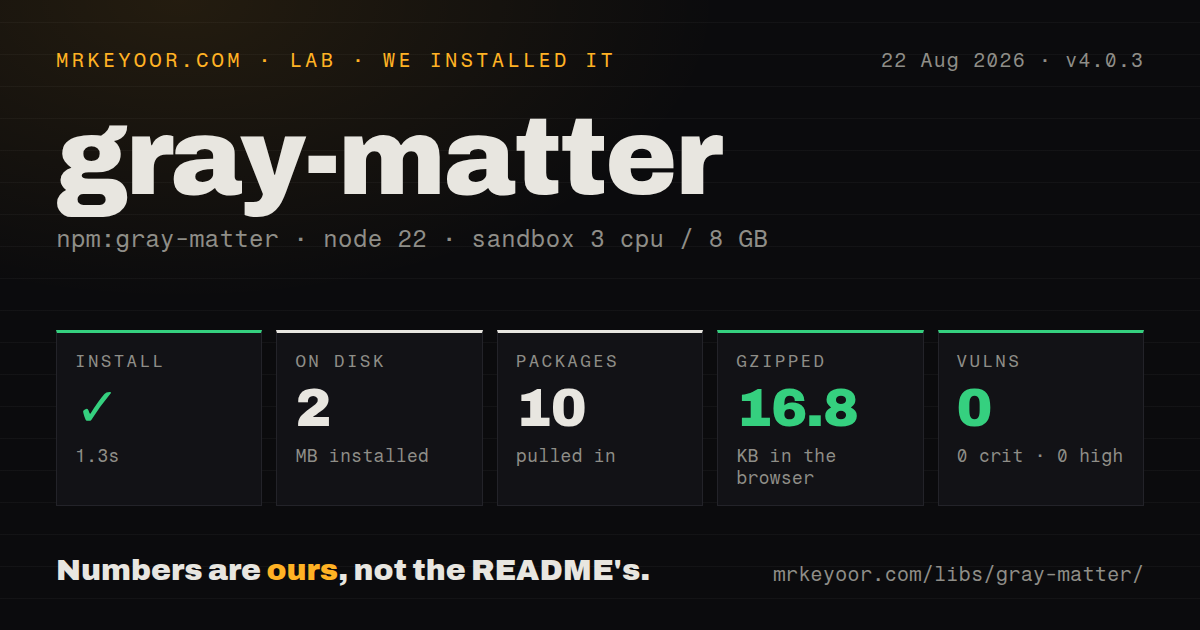
| Install | ✓ · 1.3s | 10 packages on disk · 2 MB |
| Import | ✓ | ESM import works · require() works · CommonJS package |
| Browser | 16.8 KB | gzipped (50.9 KB minified), bundled with esbuild |
| Types | ✓ | TypeScript types bundled |
| Known vulns | 0 | 0 critical · 0 high · 0 moderate · 0 low (npm audit) |
Answers from our run
Does gray-matter install cleanly?
Yes. In a fresh container with an empty cache, npm install gray-matter finished in 1 seconds, leaving 10 packages and 2 MB on disk. npm audit reported no known vulnerabilities.
How much does gray-matter add to a browser bundle?
16.8 KB gzipped (50.9 KB minified) when the whole package is bundled for the browser with esbuild. Importing only part of it is usually smaller.
Does gray-matter work with both ESM and CommonJS?
Yes. Both import 'gray-matter' and require('gray-matter') worked in Node 22 in our run. The package is published as CommonJS.
Does gray-matter include TypeScript types?
Yes, type declarations ship inside the package, so no @types install is needed.
gray-matter or front-matter: which should you use?
front-matter: Use it for a narrower YAML reader when writing and custom engines are unnecessary. gray-matter 4.0.3 installed in 1.3 seconds and occupied 2 MB across 10 packages in our sandbox, with zero audit findings.
When should you not use gray-matter?
Contributors are untrusted and may select a language after the opening fence. The included JavaScript engine evaluates its block.
Use it if
- A Markdown build needs parsed YAML metadata and the remaining body as separate values.
- A content migration must change metadata and write a new front-matter block.
- Documents use nonstandard fences or a registered parser for TOML or another format.
- Excerpt extraction should happen beside parsing through a marker or callback.
- Contributors are untrusted and may select a language after the opening fence. The included JavaScript engine evaluates its block.
- YAML comments, quote style, anchors, or exact key layout must survive an edit. Serialization generates new YAML text.
- Native ESM metadata and an exports map are release requirements. Version 4.0.3 supplies neither.
- Parsing must happen in the browser under a tight budget. Our full import measured 16.8 KB gzipped and includes front-matter machinery readers rarely need.
- Current dependency releases are required. The npm version has not changed since April 2021 and retains an older js-yaml line.
Setup reality
We installed gray-matter 4.0.3 in a fresh Node 22 Bookworm sandbox in 1.3 seconds. npm produced 10 installed packages using 2 MB on disk. The package has four direct dependencies, zero peer dependencies, and an unpacked size of 84 KB. npm audit returned zero findings at critical, high, moderate, and low severity. TypeScript declarations are included, and the license is MIT.
The publication is CommonJS with no exports map. require worked, and ESM import succeeded through Node interoperability. Its declared Node floor is version 6, which does not promise behavior for a current bundler. Our esbuild whole-package result was 50.9 KB minified and 16.8 KB gzipped. Build-time or server-side parsing keeps that code away from the browser.
Calls made without options use an internal cache keyed by the full input. A long-running indexer that sees many unique files should clear it, and code that mutates nested parsed values should test for reference reuse because cached results are only shallow-copied. matter.read uses synchronous disk I/O. Read through fs.promises first when the surrounding job is asynchronous.
YAML and JSON can parse and stringify out of the box. A custom language needs a parse function and also a stringify function if files will be written back. Do not expose the JavaScript engine to untrusted documents because it evaluates the matter. The quick test helper only recognizes an opening fence, so a leading horizontal rule can be a false positive; parse it and inspect isEmpty before treating it as metadata.
Patterns
Split YAML metadata from content parse-document
const matter = require('gray-matter')
const file = matter('---\ntitle: Home\n---\nBody')
console.log(file.data.title, file.content)
A document with no opening fence still parses and returns an empty data object.
Read asynchronously before parsing read-async
import { readFile } from 'node:fs/promises'
import matter from 'gray-matter'
const source = await readFile('./post.md', 'utf8')
const file = matter(source)
matter.read uses synchronous file access; separate I/O from parsing in an asynchronous pipeline.
Write metadata above a body serialize-document
const output = matter.stringify('Body text', { title: 'Home', draft: false })The serializer emits fresh YAML, so comments, quoting choices, and original key formatting do not survive.
Stop an excerpt at a marker extract-excerpt
const file = matter(source, { excerpt_separator: '<!-- more -->' })
console.log(file.excerpt)
The excerpt remains present in content; the parser also copies it into the excerpt field.
Avoid a delimiter collision custom-fences
const file = matter(source, { delimiters: ['<!--meta', 'meta-->'] })Pass one delimiter for matching fences or a two-item array for distinct opening and closing text.
Add a TOML engine register-toml
const TOML = require('@iarna/toml')
const file = matter(source, {
  language: 'toml',
  engines: { toml: { parse: TOML.parse, stringify: TOML.stringify } },
})
A parse-only function reads TOML, but matter.stringify requires the engine's stringify method.
Distinguish an empty fence detect-empty-matter
const file = matter(source)
if (file.isEmpty) console.log(file.empty)
A leading horizontal rule can resemble a matter fence; isEmpty records that no metadata fields were parsed.
Release cached source entries clear-parser-cache
for (const source of documents) index.push(matter(source).data)
matter.clearCache()
Calls without options populate a process-level cache using the complete source string as the key.
Alternatives
| Package | Registry | Pick it when |
|---|---|---|
| front-matter | npm | Use it for a narrower YAML reader when writing and custom engines are unnecessary. |
| yaml | npm | Use it with your own fence splitter when preserving YAML structure or using current YAML features matters. |
| js-yaml | npm | Use it when you already own the document splitting and only need YAML conversion. |
More cli & tooling guides
chalk · commander · typescript · esbuild · yargs · click · the whole shelf →
How this guide is made: grounded in the library's documentation, release notes, changelog, and issue history, on a fixed rubric — not a hands-on install of every release. The 50 most-downloaded entries are additionally install-verified in clean containers. Corrections: contact the desk.