front-matter review
front-matter 4.0.2 splits a YAML header from the text that follows it. Pass one string and it returns attributes, body, the original header text, and a one-based bodyBegin line. It recognizes `---`, the older `= yaml =` fence, and `...` as a closing marker. The package never opens files, validates metadata against a schema, or writes a document back out. Our clean install found a 28 KB CommonJS package with bundled types, so its appeal is the narrow parse result rather than a complete content pipeline.
front-matter 4.0.2 installed in 0.7 seconds and used 2 MB in our sandbox, with bundled types and 0 audit findings. Keep it when bodyBegin or its established result shape matters; choose gray-matter for new pipelines that also need serialization or custom formats.
We installed it
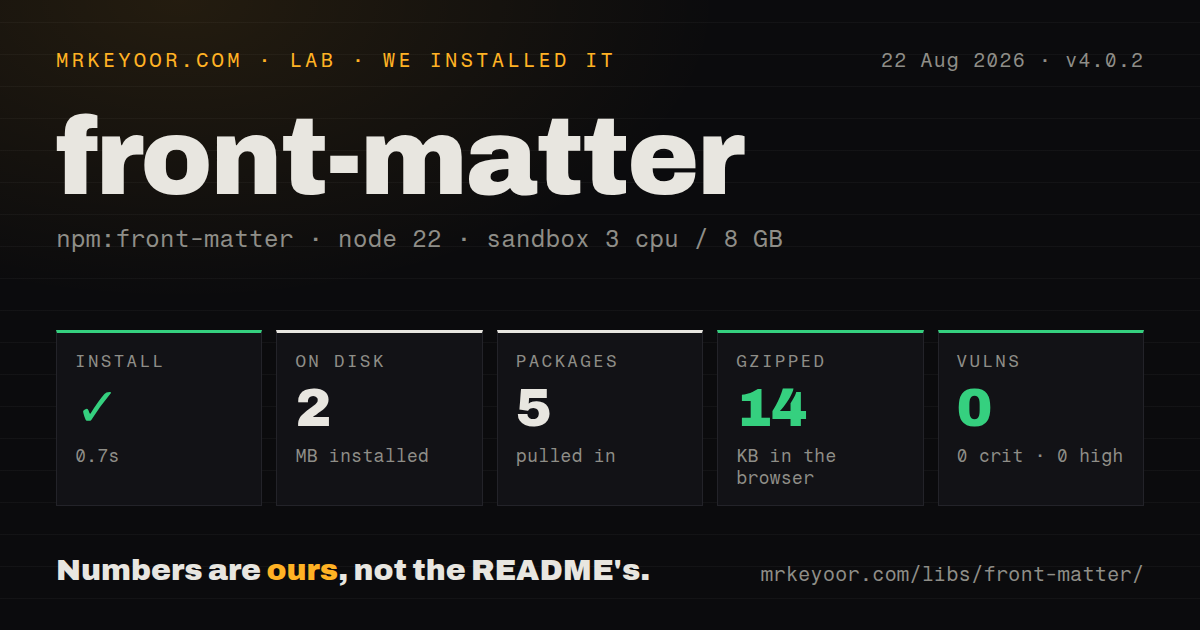
| Install | ✓ · 0.7s | 5 packages on disk · 2 MB |
| Import | ✓ | ESM import works · require() works · CommonJS package |
| Browser | 14 KB | gzipped (42.1 KB minified), bundled with esbuild |
| Types | ✓ | TypeScript types bundled |
| Known vulns | 0 | 0 critical · 0 high · 0 moderate · 0 low (npm audit) |
Answers from our run
Does front-matter install cleanly?
Yes. In a fresh container with an empty cache, npm install front-matter finished in 0.7s, leaving 5 packages and 2 MB on disk. npm audit reported no known vulnerabilities.
How much does front-matter add to a browser bundle?
14 KB gzipped (42.1 KB minified) when the whole package is bundled for the browser with esbuild. Importing only part of it is usually smaller.
Does front-matter work with both ESM and CommonJS?
Yes. Both import 'front-matter' and require('front-matter') worked in Node 22 in our run. The package is published as CommonJS.
Does front-matter include TypeScript types?
Yes, type declarations ship inside the package, so no @types install is needed.
front-matter or gray-matter: which should you use?
gray-matter: Use it when parsing and stringifying, custom delimiters, or pluggable front-matter engines belong in one package. front-matter 4.0.2 installed in 0.7 seconds and used 2 MB in our sandbox, with bundled types and 0 audit findings.
When should you not use front-matter?
Release cadence matters for a new dependency. npm published 4.0.2 in May 2020, and GitHub records the last push in August 2023.
Use it if
- An existing CommonJS tool already expects the attributes, body, bodyBegin, and frontmatter result shape.
- Source diagnostics need bodyBegin to translate a body-relative line back to the original document.
- The input format is YAML fenced by `---` or the legacy `= yaml =` marker.
- A synchronous parser is enough because your own code already handles reading, validation, and serialization.
- Release cadence matters for a new dependency. npm published 4.0.2 in May 2020, and GitHub records the last push in August 2023.
- You require a native ESM entry or an exports map. This release is CommonJS, even though Node's ESM interop worked in our sandbox.
- Metadata may be JSON, TOML, or wrapped in custom fences. The parser only accepts its fixed YAML delimiters.
- The same library must parse and stringify documents. Public methods cover parsing and header detection only.
- Your dependency policy excludes js-yaml 3.x. Version 4.0.2 declares that older major rather than the current js-yaml API line.
Setup reality
We installed front-matter 4.0.2 in 0.7 seconds in a fresh Node 22 Bookworm container. Five packages occupied 2 MB afterward, and npm audit found 0 known vulnerabilities. The package has 1 direct dependency, no peers, 28 KB unpacked, an MIT license, and bundled TypeScript declarations. It is CommonJS without an exports map. require() and ESM import both worked in our checks.
Input shape causes most surprises. The opening fence must be the first line, apart from an accepted UTF-8 byte order mark. A leading blank line or comment means the parser sees no header and returns the complete string as body with empty attributes. The module performs no I/O, so decode a file yourself before passing its contents. ESM consumers rely on Node's CommonJS default-import behavior rather than a native ESM entry.
Safe YAML parsing is the default. { allowUnsafe: true } selects js-yaml's wider load behavior and should stay off for content you do not control. Invalid YAML throws a YAMLException; there is no partial result or error property. Version 4.0.2 depends on js-yaml ^3.13.1, so test any YAML edge cases against that major's rules.
The parser does not validate fields or serialize changes. Your code must check required keys and types, decide how YAML dates are treated, and rebuild the document if metadata changes. Valid input returns attributes, body, and bodyBegin. The raw frontmatter property appears only when a fenced header was recognized.
Patterns
Split metadata from article text parse-document
const fm = require('front-matter')

const doc = fm('---\ntitle: Hello\ntags: [node, docs]\n---\nArticle text')
console.log(doc.attributes.title)
console.log(doc.body)
Line 1 must contain the opening fence. If it does not, attributes stays empty and the entire string remains in body.
Parse a Markdown file from disk read-markdown-file
const { readFile } = require('node:fs/promises')
const fm = require('front-matter')

const source = await readFile('./post.md', 'utf8')
const { attributes, body } = fm(source)
front-matter accepts text only. File reading and character decoding happen before the parser call.
Default-import it in Node ESM import-from-esm
import fm from 'front-matter'

const { attributes, body } = fm(source)
Our ESM import succeeded through Node interoperability. Version 4.0.2 itself is CommonJS and defines no exports map.
Detect a supported opening fence detect-front-matter
const fm = require('front-matter')

if (fm.test(source)) {
  const parsed = fm(source)
  console.log(parsed.attributes)
}
test only recognizes the header form. Malformed YAML can still throw when the full parser runs.
Accept a body-only document handle-body-only
const parsed = fm(source)

if (Object.keys(parsed.attributes).length === 0) {
  console.log('No front matter')
}
console.log(parsed.body)
Without a recognized fence, body equals the source, bodyBegin is 1, and the raw frontmatter property is not present.
Convert body lines to source lines map-body-lines
const parsed = fm(source)
const bodyLine = 3
const sourceLine = parsed.bodyBegin + bodyLine - 1
console.log({ bodyLine, sourceLine })
bodyBegin counts from 1, which matches the line numbering shown by most editors and diagnostics.
Keep the unparsed YAML header preserve-raw-yaml
const parsed = fm(source)

if (parsed.frontmatter !== undefined) {
  console.log(parsed.frontmatter)
}
The returned frontmatter string leaves out both fences. It exists only after the parser recognizes a valid header.
Read the legacy YAML fence use-yaml-marker
const parsed = fm('= yaml =\ntitle: Alternate\n= yaml =\nBody')
console.log(parsed.attributes.title)
`= yaml =` works in this parser, while `---` is understood by a wider range of Markdown and static-site tools.
Use a YAML document-end marker use-document-end-marker
const parsed = fm('---\ntitle: Dot ending\n...\nBody')
console.log(parsed.body)
Three dots can close the header. The first line must still use one of the package's two accepted opening fences.
Catch parser exceptions catch-invalid-yaml
try {
  const parsed = fm(source)
  usePost(parsed)
} catch (error) {
  console.error('Invalid front matter:', error.message)
}
js-yaml errors escape as exceptions. front-matter does not attach an error to a result or preserve a partial parse.
Check parsed metadata types validate-attributes
const { attributes, body } = fm(source)

if (typeof attributes.title !== 'string' || !attributes.title.trim()) {
  throw new TypeError('front matter requires a title')
}
publish({ title: attributes.title, body })
A successful YAML parse says nothing about your content model. Verify every required field and its expected type before publishing.
Enable the wider YAML loader allow-unsafe-yaml
const parsed = fm(source, { allowUnsafe: true })
console.log(parsed.attributes)
allowUnsafe selects js-yaml's broader load path. Leave it false for documents supplied by users or outside repositories.
Alternatives
| Package | Registry | Pick it when |
|---|---|---|
| gray-matter | npm | Use it when parsing and stringifying, custom delimiters, or pluggable front-matter engines belong in one package. |
| vfile-matter | npm | Use it when documents already travel through unified processors as vfile objects. |
| yaml-front-matter | npm | Use it for an older script whose preferred API reads YAML-front-matter files by filename. |
More utils guides
lru-cache · type-fest · ajv · zod · p-limit · find-up · the whole shelf →
How this guide is made: grounded in the library's documentation, release notes, changelog, and issue history, on a fixed rubric — not a hands-on install of every release. The 50 most-downloaded entries are additionally install-verified in clean containers. Corrections: contact the desk.