js-yaml review
js-yaml parses YAML text into JavaScript values and serializes JavaScript values back to YAML. The default loader follows a YAML 1.2 core schema, while an explicit YAML 1.1 schema restores timestamps and older tag behavior. Version 5 rewrote the parser in TypeScript, added event and AST layers, passed the YAML test suite, bundled declarations, and replaced the old Type and Schema.extend APIs. Version 5.3 adds new documentation, exports DUMP_SCHEMA and YAMLException.throwAt(), groups parser constants, requires identify on custom tags, and fixes merge-key validation and literal << handling.
js-yaml is a good fit for parsing or generating YAML as data, and version 5.3 has much clearer schema and tag machinery. Use another parser for comment-preserving edits, and set hard limits plus an explicit schema for untrusted configuration.
We installed it
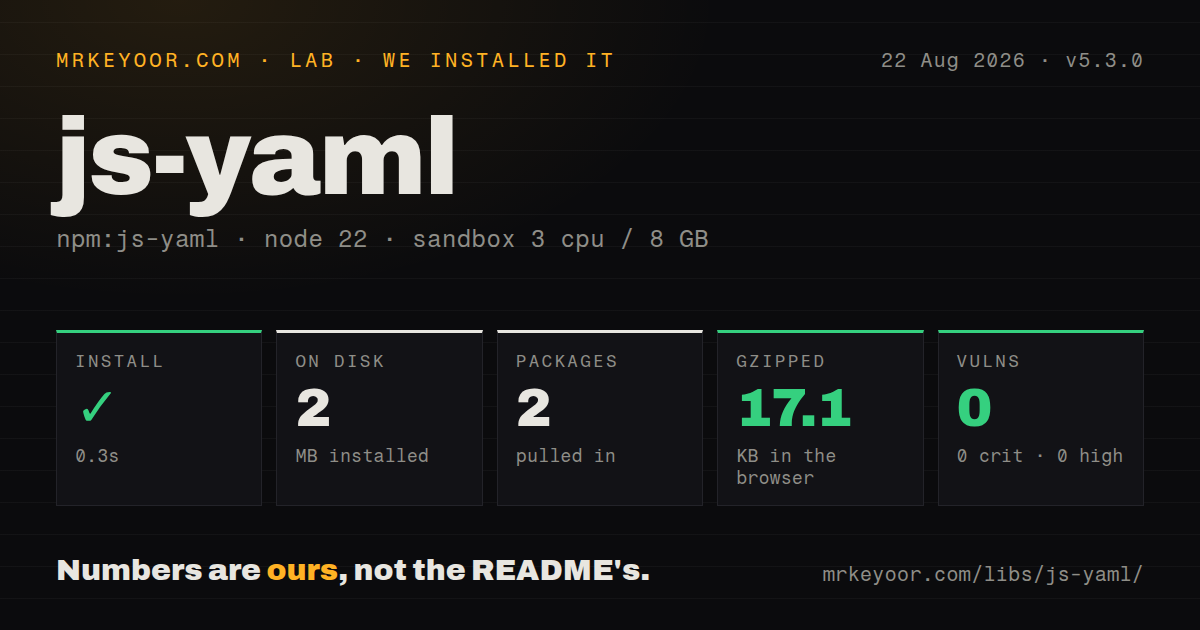
| Install | ✓ · 0.3s | 2 packages on disk · 2 MB |
| Import | ✓ | ESM import works · require() works · CommonJS package with exports map |
| Browser | 17.1 KB | gzipped (56.7 KB minified), bundled with esbuild |
| Types | ✓ | TypeScript types bundled |
| Known vulns | 0 | 0 critical · 0 high · 0 moderate · 0 low (npm audit) |
Answers from our run
Does js-yaml install cleanly?
Yes. In a fresh container with an empty cache, npm install js-yaml finished in 0.3s, leaving 2 packages and 2 MB on disk. npm audit reported no known vulnerabilities.
How much does js-yaml add to a browser bundle?
17.1 KB gzipped (56.7 KB minified) when the whole package is bundled for the browser with esbuild. Importing only part of it is usually smaller.
Does js-yaml work with both ESM and CommonJS?
Yes. Both import 'js-yaml' and require('js-yaml') worked in Node 22 in our run. The package is published as CommonJS with an exports map.
Does js-yaml include TypeScript types?
Yes, type declarations ship inside the package, so no @types install is needed.
js-yaml or yaml: which should you use?
yaml: Choose it for a document model that can retain comments and formatting during edits. js-yaml is a good fit for parsing or generating YAML as data, and version 5.3 has much clearer schema and tag machinery.
When should you not use js-yaml?
You must edit a document while preserving comments, anchors, scalar style, blank lines, and key order exactly; load and dump create a new representation
Use it if
- A Node tool needs plain objects from YAML configuration or needs to emit YAML without preserving the original layout
- Untrusted input needs explicit alias, depth, and merge-key work limits before it is accepted
- The application must opt between YAML 1.2 core values and documented YAML 1.1 tags
- Custom scalar, sequence, or mapping tags should convert domain values through a schema
- You must edit a document while preserving comments, anchors, scalar style, blank lines, and key order exactly; load and dump create a new representation
- Existing code depends on version 4 Type objects, DEFAULT_SCHEMA, Schema.extend, safeLoad, deep lib imports, or removed dump formatting options; version 5 requires a migration
- Browser weight is tight; our whole-package browser import measured 56.7 KB minified and 17.1 KB gzipped
- You need a restricted configuration language with no aliases or surprising scalar rules and can choose JSON instead
- You expect YAML merge keys or timestamps to receive version 4 behavior under the default loader; version 5's core schema leaves merge disabled and timestamps as strings
Setup reality
Our fresh Node 22 install of js-yaml 5.3.0 succeeded in 0.3 seconds. Two packages used 2 MB on disk, and npm audit reported no known vulnerabilities. The package itself has one direct dependency, no peers, is 1,560 KB unpacked, uses the MIT license, and includes TypeScript declarations. It is CommonJS with an exports map; both require() and ESM import worked. A whole-package browser import produced 56.7 KB minified and 17.1 KB gzipped.
Version 5 uses named exports. Import load and dump directly, or use a namespace import; code expecting a default export should be changed. Browser builds live under the documented browser export. Type declarations are included, so remove @types/js-yaml when it conflicts with the package definitions. load() now rejects empty input, while loadAll() returns an array for a document stream. Invalid YAML throws YAMLException with source marks; supply filename in options so multi-file tools report the right path.
The default CORE_SCHEMA does not resolve << as a merge key and does not convert timestamp text into Date. Add mergeTag to a schema for merges or select YAML11_SCHEMA for older tags. These choices change returned JavaScript types and should be fixed in application code rather than inferred from a file. Version 5.3 requires identify on every custom tag definition. A load-only tag can use identify: () => false. DUMP_SCHEMA now exposes the dumper's default representation choices.
Parsing YAML is resource-sensitive. Set maxAliases, maxDepth, and maxTotalMergeKeys for input outside your control. maxAliases can be zero when aliases are unnecessary. Duplicate keys reject by default; json: true makes the last value win, which can hide configuration mistakes. Custom tag resolvers execute your code during parsing, so do not register constructors that perform I/O or accept unsafe values. dump() cannot restore comments or original quoting because ordinary JavaScript objects do not retain them.
Patterns
Load a configuration file parse-yaml-file
import { load, YAMLException } from 'js-yaml';
import { readFileSync } from 'node:fs';

try {
  const config = load(readFileSync('app.yml', 'utf8'), {
    filename: 'app.yml',
  });
  console.log(config);
} catch (error) {
  if (error instanceof YAMLException) console.error(error.message);
  else throw error;
}
Version 5 load throws on an empty string. filename improves the marked error message.
Read several YAML documents parse-document-stream
import { loadAll } from 'js-yaml';

const documents = loadAll(`
name: first
---
name: second
`);

console.log(documents.length);
Use loadAll for streams separated by document markers. The older iterator signature is deprecated.
Dump sorted configuration serialize-yaml
import { dump } from 'js-yaml';

const text = dump(
  { ports: [443, 80], service: 'api' },
  { indent: 2, sortKeys: true, lineWidth: -1 },
);
lineWidth: -1 prevents automatic folding of long scalar lines. The output is newly formatted.
Opt into YAML merge behavior enable-merge-key
import { CORE_SCHEMA, load, mergeTag } from 'js-yaml';

const schema = CORE_SCHEMA.withTags(mergeTag);
const value = load(source, {
  schema,
  maxTotalMergeKeys: 1_000,
});
Merge keys are absent from the default CORE_SCHEMA. Bound total merged keys for untrusted documents.
Select legacy YAML 1.1 tags parse-yaml-1-1
import { load, YAML11_SCHEMA } from 'js-yaml';

const value = load('created: 2026-08-22', {
  schema: YAML11_SCHEMA,
});

console.log(value.created instanceof Date);
The default YAML 1.2 core schema leaves the timestamp as a string. YAML11_SCHEMA changes more than dates, so test the whole input set.
Limit aliases and nesting bound-parser-work
const value = load(untrustedText, {
  maxAliases: 0,
  maxDepth: 30,
  maxTotalMergeKeys: 500,
});
maxAliases: 0 rejects aliases. Pick limits from the configuration shape your application actually accepts.
Keep duplicate mappings as errors reject-duplicate-keys
load('mode: safe\nmode: unsafe'); // throws

const compatible = load('mode: safe\nmode: unsafe', {
  json: true,
});
console.log(compatible.mode); // unsafe
json: true keeps the last value. Avoid it for security or deployment configuration where duplicates should fail review.
Convert a tagged scalar define-custom-tag
import { CORE_SCHEMA, defineScalarTag, load } from 'js-yaml';

const urlTag = defineScalarTag('!url', {
  resolve: (source) => new URL(source),
  identify: (value) => value instanceof URL,
  represent: (value) => value.href,
});

const schema = CORE_SCHEMA.withTags(urlTag);
const config = load('endpoint: !url https://example.com/', { schema });
Version 5.3 requires identify. Validate source inside resolve before constructing domain values.
Create a tag that is never dumped define-load-only-tag
const envTag = defineScalarTag('!env', {
  resolve: (name) => process.env[name],
  identify: () => false,
});

const schema = CORE_SCHEMA.withTags(envTag);
identify: () => false is the version 5.3 pattern for load-only tags. Reading environment variables makes parsing context-dependent.
Import from CommonJS load-with-commonjs
const { load, dump } = require('js-yaml');

const data = load('enabled: true');
console.log(dump(data));
The measured package supports require(). ESM code should use named or namespace imports instead of assuming a default export.
Alternatives
| Package | Registry | Pick it when |
|---|---|---|
| yaml | npm | Choose it for a document model that can retain comments and formatting during edits |
| yamljs | npm | Choose it only for compatibility with an existing YAMLJS codebase after checking its slower maintenance pace |
| json5 | npm | Choose it when human-edited configuration only needs comments, trailing commas, and relaxed JSON syntax |
More utils guides
lru-cache · type-fest · ajv · zod · p-limit · find-up · the whole shelf →
How this guide is made: grounded in the library's documentation, release notes, changelog, and issue history, on a fixed rubric — not a hands-on install of every release. The 50 most-downloaded entries are additionally install-verified in clean containers. Corrections: contact the desk.