datasets review
Datasets 5.0.1 turns Hub repositories, local files, Python records, and remote storage into two Arrow-based interfaces: Dataset for indexed materialized data and IterableDataset for lazy streams. Its job is preparing data for model training and evaluation, with batched transforms, fingerprints, cache reuse, and conversion to PyTorch, JAX, TensorFlow, NumPy, Pandas, or Polars. The 5.0.1 patch closes archive and folder path traversal faults, repairs stream resume data loss, accepts JSON files with a UTF-8 BOM, preserves several nullable column types, and adds Hermes and Droid agent traces. Our import took 3.87 seconds, so this is substantial data machinery rather than a tiny file reader.
Datasets 5.0.1 installed in 1.8 seconds but left 35 packages and 290 MB in our sandbox, a sensible cost for ML pipelines that need Hub revisions, reusable Arrow transforms, and streaming. Install a table engine or shard reader instead when you only need file scans, joins, or sequential tar input.
We installed it
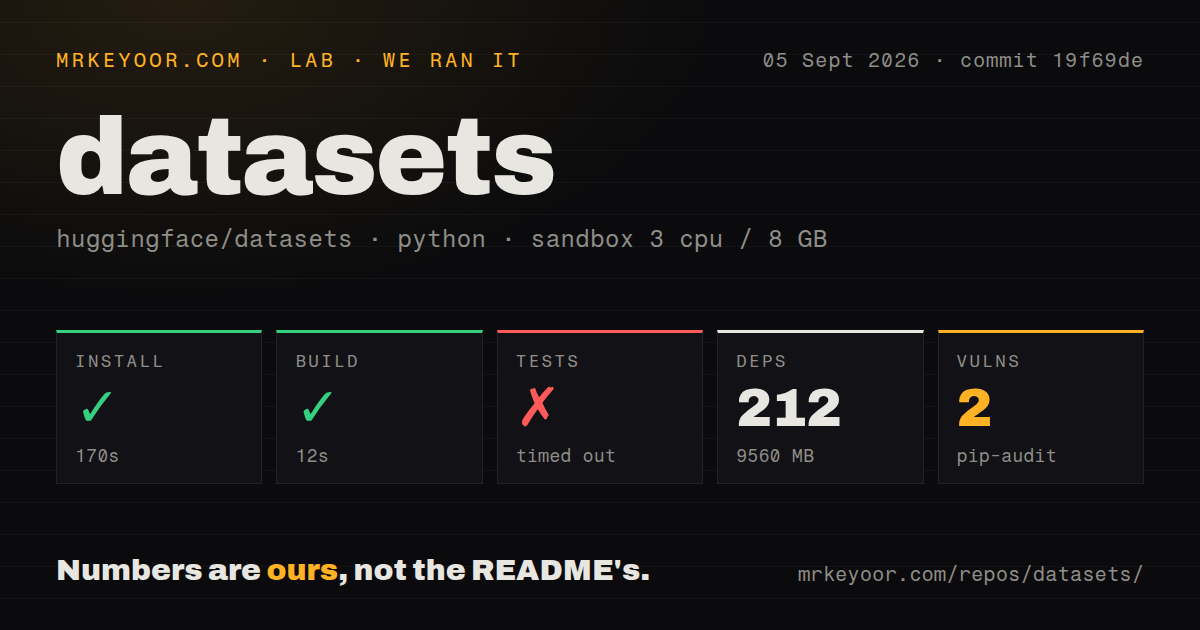
| Install | ✓ · 1.8s | 35 packages on disk · 290 MB |
| Import | ✓ | import datasets in 3.87s · pure Python · requires Python >=3.10.0 |
| Known vulns | 0 | (pip-audit) |
Answers from our run
Does datasets install cleanly?
Yes. In a fresh container with an empty cache, pip install datasets finished in 2 seconds, leaving 35 packages and 290 MB on disk. pip-audit reported no known vulnerabilities.
What does datasets need to run?
Python >=3.10.0, and nothing compiled: it is pure Python. In our run import datasets succeeded in 3.87s.
datasets or webdataset: which should you use?
webdataset: Choose it for sequential model input stored as tar shards and a smaller pipeline abstraction. Datasets 5.0.1 installed in 1.8 seconds but left 35 packages and 290 MB in our sandbox, a sensible cost for ML pipelines that need Hub revisions, reusable Arrow transforms, and streaming.
When should you not use datasets?
You mainly need joins, grouped analysis, and SQL over Parquet or CSV. DuckDB or Polars has those operations without the Hub and training-layer concepts.
Use it if
- Training data already lives on the Hugging Face Hub and you want to select a configuration, split, and pinned repository revision with one loader.
- Tokenization or filtering runs more than once, making fingerprints and cached Arrow results worth managing.
- A corpus cannot be materialized locally and sequential access through IterableDataset fits the training loop.
- The same prepared rows must move between Arrow, NumPy, Pandas, Polars, PyTorch, TensorFlow, or JAX without separate ingestion code.
- You mainly need joins, grouped analysis, and SQL over Parquet or CSV. DuckDB or Polars has those operations without the Hub and training-layer concepts.
- A small deployment image matters. Our base installation consumed 290 MB and put 35 packages on disk before any vision, audio, or framework extra.
- Your algorithm needs arbitrary row access or an exact length while reading remote data lazily. IterableDataset supplies neither integer indexing nor a dependable len().
- Local cache files are forbidden or hard to clean up. Materialized map and filter operations can leave new fingerprinted Arrow results for each changed transform.
- The source is an old Hub repository that depends on executable dataset loading scripts. Current Datasets releases load supported data files and metadata instead of running those scripts.
Setup reality
We installed datasets 5.0.1 in an empty Python 3.12 Bookworm container. It completed in 1.8 seconds, placed 35 packages on disk, and occupied 290 MB. import datasets then needed 3.87 seconds. The pure-Python distribution requires Python 3.10 or later, lists 143 dependencies when optional requirements are included, and does not ship py.typed. pip-audit reported 0 known vulnerabilities.
Anonymous access is enough for public Hub repositories. Private or gated data needs permission on the dataset plus a Hugging Face token, supplied through login state, HF_TOKEN, or the call. Pin a tag or commit in revision; locking datasets 5.0.1 does not lock a separate data repository. Image, audio, PDF, NIfTI, and framework examples also need the documented extras and their decoders.
Dataset transforms materialize Arrow output and identify it with a fingerprint. Changing the callable, its arguments, or the source can produce another cache entry. Put HF_HOME or HF_DATASETS_CACHE on storage you can monitor. Data written by save_to_disk() must come back through load_from_disk(), since that directory is a saved Datasets object rather than an ordinary Parquet input.
With streaming=True, work happens as the IterableDataset is consumed. Shuffle uses a bounded buffer, and worker sharding changes which process sees each item. Version 5.0.1 specifically fixes lost rows when a filtered Arrow stream resumes and fixes a dataloader reset after a second resume. Test checkpoint recovery against the same sequence of map, filter, shuffle, shard, and batch calls used in training.
Patterns
Load one Hub split at a fixed commit load-pinned-split
from datasets import load_dataset

train = load_dataset(
    "rajpurkar/squad",
    split="train",
    revision="COMMIT_SHA",
)
A commit hash freezes the data repository. Pinning datasets 5.0.1 alone does not freeze the rows on the Hub.
Name splits from local Parquet files load-local-files
from datasets import load_dataset

data = load_dataset(
    "parquet",
    data_files={
        "train": "records/train-*.parquet",
        "test": "records/test.parquet",
    },
)
The dictionary keys become split names. Passing one path without a mapping creates a `train` split.
Consume remote rows without materializing them stream-hub-data
stream = load_dataset(
    "HuggingFaceFW/fineweb",
    split="train",
    streaming=True,
)

for row in stream.take(5):
    print(row["text"][:120])
`streaming=True` returns IterableDataset. Integer row access and a reliable `len()` are unavailable.
Tokenize batches in worker processes map-tokenizer-batches
from transformers import AutoTokenizer

tokenizer = AutoTokenizer.from_pretrained("bert-base-cased")

def encode(batch):
    return tokenizer(batch["text"], truncation=True, max_length=512)

tokenized = train.map(encode, batched=True, num_proc=4)
A batched function receives each column as a list. Materialized map output may add a fingerprinted Arrow file to the cache.
Drop raw fields after preprocessing remove-source-columns
def encode(batch):
    return tokenizer(batch["text"], truncation=True)

model_rows = train.map(
    encode,
    batched=True,
    remove_columns=train.column_names,
)
`remove_columns` applies after the callback has read the input batch, leaving only the fields returned by the transform.
Filter rows with one callback per batch filter-batched-rows
short = train.filter(
    lambda batch: [len(text) <= 1_000 for text in batch["text"]],
    batched=True,
)
Return exactly one boolean per input row. Version 5.0.1 raises when batched IterableDataset.map returns a mismatched length.
Make a repeatable train and test split split-reproducibly
parts = train.train_test_split(test_size=0.1, seed=42)
train_rows = parts["train"]
test_rows = parts["test"]
Record the source revision with the seed. The same seed cannot reproduce a split after the source rows change.
Expose model columns as PyTorch tensors format-for-pytorch
torch_rows = tokenized.with_format(
    "torch",
    columns=["input_ids", "attention_mask", "label"],
)

from torch.utils.data import DataLoader
loader = DataLoader(torch_rows, batch_size=32, shuffle=True)
Select only collatable model fields. Free-form strings and irregular objects can break PyTorch's default batch collation.
Build a dataset from Python records create-from-records
from datasets import Dataset

rows = [
    {"text": "first", "label": 0},
    {"text": "second", "label": 1},
]
data = Dataset.from_list(rows)
All records should follow a compatible column shape. Declare Features when type inference would choose the wrong Arrow type.
Save and reopen an Arrow-backed dataset persist-processed-data
from datasets import load_from_disk

tokenized.save_to_disk("artifacts/tokenized")
restored = load_from_disk("artifacts/tokenized")
A `save_to_disk()` directory is reopened with `load_from_disk()`, not with the Parquet or Arrow file builder.
Shuffle a stream through a fixed buffer shuffle-stream-buffer
mixed = stream.shuffle(seed=42, buffer_size=10_000)
for row in mixed.take(100):
    train_one(row)
The buffer approximates a shuffle instead of permuting the whole source. Increasing 10,000 improves mixing and raises memory use.
Upload processed splits to a private Hub repo push-private-repository
data.push_to_hub(
    "acme/training-records",
    private=True,
    token=hf_token,
)
The token needs write permission for the target namespace. Downloading gated sources may require a separate accepted access request.
Alternatives
| Package | Registry | Pick it when |
|---|---|---|
| webdataset | PyPI | Choose it for sequential model input stored as tar shards and a smaller pipeline abstraction. |
| polars | PyPI | Choose it for lazy columnar transforms, joins, and analytics where Hub conventions add little. |
| duckdb | PyPI | Choose it when SQL over local or remote tabular files is the main job. |
| pandas | PyPI | Choose it for familiar in-memory table work that fits comfortably on one machine. |
More ai / ml guides
@modelcontextprotocol/sdk · openai · mcp · huggingface-hub · @anthropic-ai/sdk · openai · the whole shelf →
How this guide is made: grounded in the library's documentation, release notes, changelog, and issue history, on a fixed rubric — not a hands-on install of every release. The 50 most-downloaded entries are additionally install-verified in clean containers. Corrections: contact the desk.