polars review
Polars 1.44.1 is a column-oriented DataFrame engine whose Python API drives a Rust query runtime. Eager `DataFrame` operations run now, while `LazyFrame` scans let the optimizer push projections and filters into CSV, Parquet, cloud, and database reads. The current patch corrects conditional-expression broadcasting and null masks, `pl.Unknown` dtype consistency, `collect_batches` typing, and concatenated gzip members in Parquet pages. Our measured 1.43.2 install imported in 1.06 seconds and shipped `py.typed`; we did not measure 1.44.1.
Polars 1.43.2 installed in 1.1 seconds but occupied 211 MB across two packages in our sandbox; current 1.44.1 was not remeasured. Choose it for expression-based analytical plans and supported streaming paths, while pandas remains the safer fit for index semantics and a tiny CSV job may not justify the footprint.
We installed it
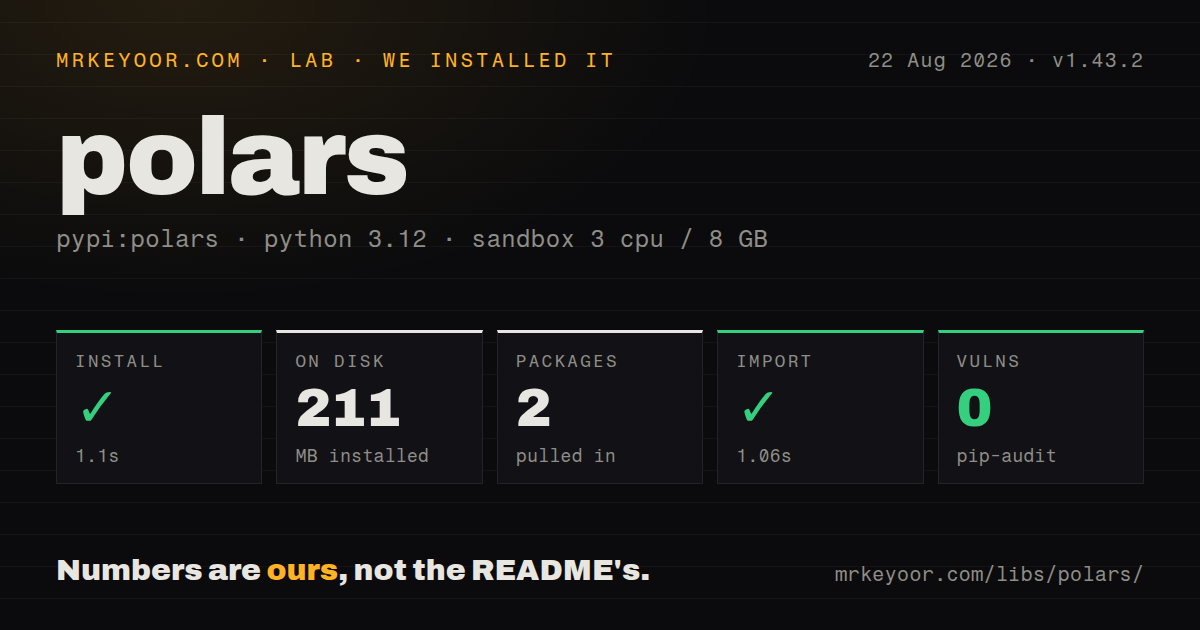
| Install | ✓ · 1.1s | 2 packages on disk · 211 MB |
| Import | ✓ | import polars in 1.06s · pure Python · py.typed · requires Python >=3.10 |
| Known vulns | 0 | (pip-audit) |
Answers from our run
Does polars install cleanly?
Yes. In a fresh container with an empty cache, pip install polars finished in 1 seconds, leaving 2 packages and 211 MB on disk. pip-audit reported no known vulnerabilities.
What does polars need to run?
Python >=3.10, and nothing compiled: it is pure Python. In our run import polars succeeded in 1.06s, and the package ships py.typed for type checkers.
polars or pandas: which should you use?
pandas: Use it for index-oriented analysis and the widest Python dataframe extension ecosystem. Polars 1.43.2 installed in 1.1 seconds but occupied 211 MB across two packages in our sandbox; current 1.44.1 was not remeasured.
When should you not use polars?
Existing logic depends on pandas indexes, implicit alignment, in-place mutation, or extensions that accept pandas objects
Use it if
- A scan, join, aggregation, and output write should be optimized together as one lazy query plan
- Supported operators must stream batches because the source data can exceed available memory
- The team accepts explicit expressions and schemas instead of pandas index alignment and row mutation
- Parquet, Arrow interchange, nested columns, and local multi-core analytical execution are routine requirements
- Existing logic depends on pandas indexes, implicit alignment, in-place mutation, or extensions that accept pandas objects
- A small service cannot absorb the 211 MB left by our 1.43.2 install for one modest CSV task
- Most business logic is an arbitrary Python function per row; `map_elements` crosses the Python boundary and bypasses native expressions
- Every operator must stream; joins, pivots, sorts, and unsupported plan nodes may still materialize substantial state
- Work must run across a general-purpose compute cluster without Polars Cloud; local Polars uses threads and is not a Spark scheduler
Setup reality
We installed Polars 1.43.2 in a clean Python 3.12 sandbox in 1.1 seconds. Two packages consumed 211 MB, and pip-audit found zero known vulnerabilities. The measured distribution declared 31 direct dependencies, required Python 3.10 or later, was classified as pure Python, and included py.typed. import polars completed in 1.06 seconds. Its license text contains the MIT grant with Ritchie Vink and NVIDIA copyright notices. Current 1.44.1 was not installed in this run.
The default package provides the frame engine, while integrations have their own extras. pandas conversion may require pandas and PyArrow; Excel paths select calamine, openpyxl, xlsx2csv, or xlsxwriter; database access adds ADBC, ConnectorX, or SQLAlchemy. Object stores and table formats introduce filesystem packages, credentials, and endpoint configuration. Installing base Polars proves none of those optional imports. Choose the narrow extra used by the application instead of polars[all].
Inference can corrupt business meaning before a query begins. A postal code may become an integer, a string late in a file can conflict with an inferred numeric type, and a glob can contain files with different schemas. Define schema_overrides for contractual fields. scan_* defers reads until collect() or a sink, giving the optimizer a chance to push work down; read_* materializes immediately. Streaming applies only when every relevant plan node supports it.
All expressions in one with_columns() see the input schema, so an alias created there is unavailable to its siblings. Add another call for dependent expressions. A bare string can mean a column; wrap literal text with pl.lit(). Null and floating-point NaN remain distinct. Set POLARS_MAX_THREADS before the process starts if 3 CPUs should not all be used, and inspect explain() when memory rises unexpectedly. Multiprocessing should use spawn, not fork, after the thread pool exists.
Patterns
Build one lazy Parquet query scan-lazy-parquet
import polars as pl

result = (
    pl.scan_parquet("orders/*.parquet")
    .filter(pl.col("status") == "shipped")
    .group_by("customer_id")
    .agg(pl.col("amount").sum().alias("total"))
    .collect()
)
scan_parquet delays reading until collect and lets filters and projections reach the file scan. read_parquet loads before those optimizations can help.
Stream a lazy result to Parquet stream-query-to-disk
(
    pl.scan_csv("events/*.csv", schema_overrides={"user_id": pl.String})
    .filter(pl.col("active"))
    .sink_parquet("active.parquet")
)
A streaming sink avoids materializing the final frame, but only supported operators stream. Inspect the plan when joins or sorts increase memory.
Create typed expression columns derive-columns
df = df.with_columns(
    (pl.col("quantity") * pl.col("unit_price")).alias("subtotal"),
    pl.col("email").str.strip_chars().str.to_lowercase().alias("email_clean"),
)
Sibling expressions cannot refer to aliases created in the same with_columns call. Add a second call for dependent calculations.
Assign a conditional label write-conditional-expression
df = df.with_columns(
    pl.when(pl.col("amount") >= 1000)
    .then(pl.lit("large"))
    .otherwise(pl.lit("standard"))
    .alias("order_band")
)
Use pl.lit for literal strings. A bare string in an expression position can be interpreted as a column name.
Join frames without index semantics join-by-columns
enriched = orders.join(
    customers,
    left_on="customer_id",
    right_on="id",
    how="left",
    validate="m:1",
)
validate checks the expected key cardinality. Duplicate keys on the right can otherwise multiply rows without an error.
Keep rows while aggregating by group calculate-window-value
df = df.with_columns(
    pl.col("amount").sum().over("customer_id").alias("customer_total"),
    pl.col("amount").rank(descending=True).over("customer_id").alias("order_rank"),
)
over keeps the original row count. group_by collapses rows, so choose based on the required output shape.
Scan multiple CSV schemas deliberately control-csv-inference
lf = pl.scan_csv(
    "daily/*.csv",
    schema_overrides={"postal_code": pl.String, "amount": pl.Decimal(12, 2)},
    infer_schema_files=20,
)
infer_schema_files is new in 1.43.2. Sampling more files reduces surprises but does not replace an explicit schema for contractual fields.
Handle nulls and NaN separately distinguish-null-nan
clean = df.with_columns(
    pl.col("count").fill_null(0),
    pl.col("ratio").fill_nan(None),
).filter(pl.col("account_id").is_not_null())
fill_null does not change floating-point NaN. Decide whether NaN means missing, invalid arithmetic, or a value before converting it.
Run SQL against registered frames query-frames-with-sql
context = pl.SQLContext(orders=orders.lazy())
result = context.execute(
    "SELECT customer_id, SUM(amount) AS total FROM orders GROUP BY customer_id"
).collect()
SQLContext.execute returns a LazyFrame unless eager execution is requested. Register only the frames and tables the query should see.
Expand list elements into rows explode-list-column
expanded = df.explode("tags").filter(pl.col("tags").is_not_null())explode changes row count and can duplicate every other column. Current releases are tightening empty-list behavior, so pin the intended empty_as_null semantics where supported.
Parse and convert timestamp zones parse-zoned-datetime
df = df.with_columns(
    pl.col("created_at")
    .str.to_datetime(time_zone="UTC", strict=True)
    .dt.convert_time_zone("Asia/Kolkata")
)
Assigning a zone to naive text and converting an existing instant are different operations. Reject ambiguous source timestamps instead of guessing their zone.
Convert at a pandas integration boundary convert-pandas-boundary
import polars as pl

frame = pl.from_pandas(pandas_frame)
result = run_polars_query(frame)
pandas_result = result.to_pandas()
pandas and PyArrow may be optional installs. Conversion can copy data and loses Polars lazy planning, so keep it at system boundaries rather than inside loops.
Alternatives
| Package | Registry | Pick it when |
|---|---|---|
| pandas | PyPI | Use it for index-oriented analysis and the widest Python dataframe extension ecosystem |
| duckdb | PyPI | Use it when SQL over files and an embedded analytical database are the main interface |
| pyarrow | PyPI | Use it for direct Arrow arrays, datasets, Parquet I/O, and interchange without a dataframe query DSL |
| dask | PyPI | Use it when pandas-like work must be scheduled across processes or a cluster |
More data guides
numpy · pandas · fsspec · pyarrow · lxml · sqlalchemy · the whole shelf →
How this guide is made: grounded in the library's documentation, release notes, changelog, and issue history, on a fixed rubric — not a hands-on install of every release. The 50 most-downloaded entries are additionally install-verified in clean containers. Corrections: contact the desk.