Slate supplies editor mechanics, not a finished editor
Slate's core models a document as nested elements and text nodes, close to the shape of the DOM. An application can define tables, captions, mentions, images, nested quotes, or its own domain objects without fitting them into a preset schema. Commands and transforms change that tree programmatically, while plugins extend the editor object. This is the reason to choose Slate: the product can decide what a document means instead of accepting a vendor's menu of node types.
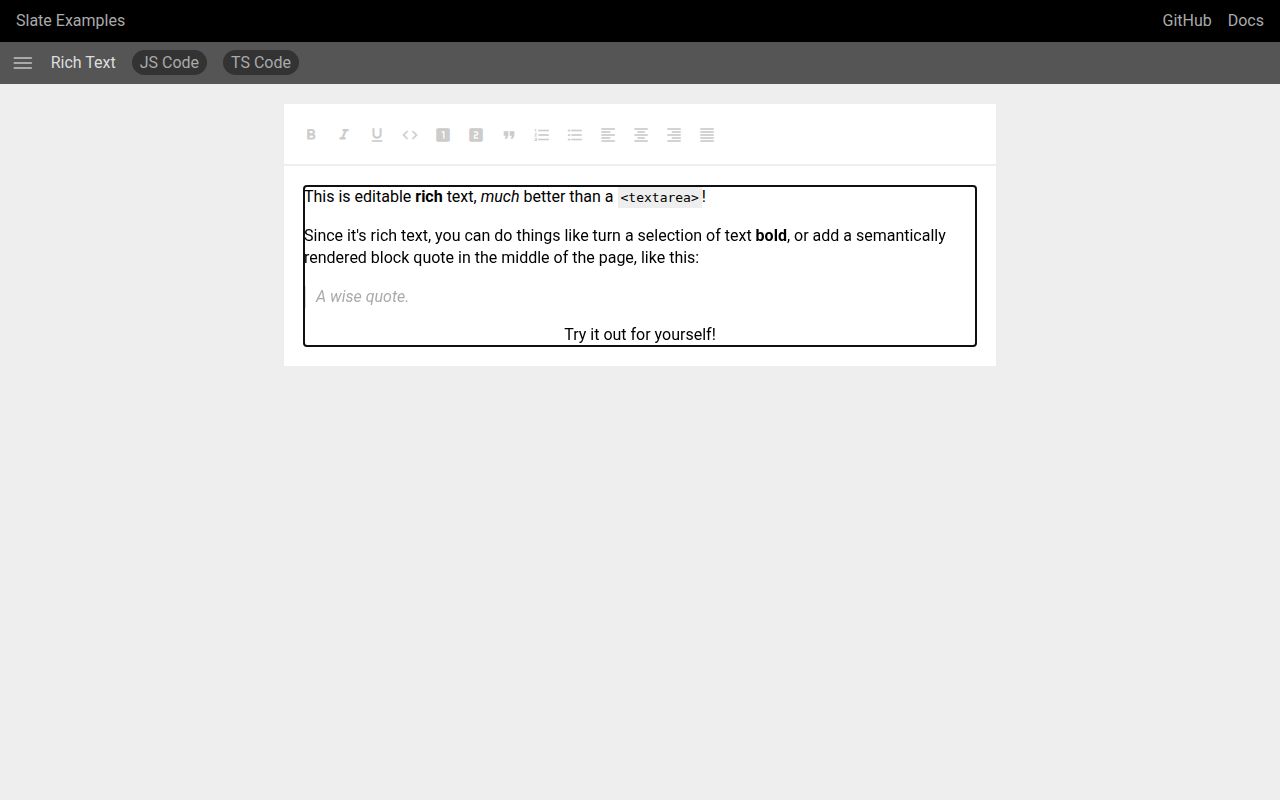
That freedom moves work into your codebase. Slate does not know what bold text, a block quote, or an uploaded image means unless you teach it. The FAQ says pasted content becomes plain text by default because the core cannot infer how your schema should deserialize HTML. A toolbar, keyboard shortcuts, validation rules, serialization, and error handling are application features. The examples show how to build them, but they are examples rather than a finished editing product.
Four packages divide the core, React, history, and test helpers
The monorepo publishes slate, slate-react, slate-history, and slate-hyperscript, with slate-dom also present in the current workspace. A basic React setup installs the first 2 packages plus React and React DOM, creates an editor with createEditor(), wraps it with withReact(), and renders Slate above Editable. TypeScript users declare their own element and text types through module augmentation. That makes domain nodes typeable, but it is extra setup before the first custom block.
Core slate and slate-react reached version 0.129.0 on October 7, 2026. The React package currently accepts React 18.2 or newer as a peer. Its same-day release fixed Android input that could be dropped before a rerender and repaired editor replacement during fast refresh. Those changes are practical, low-level editing fixes. They also show why a contenteditable framework needs release testing around typing, selection, deletion, and composition rather than only rendered snapshots.
What happened when we ran it
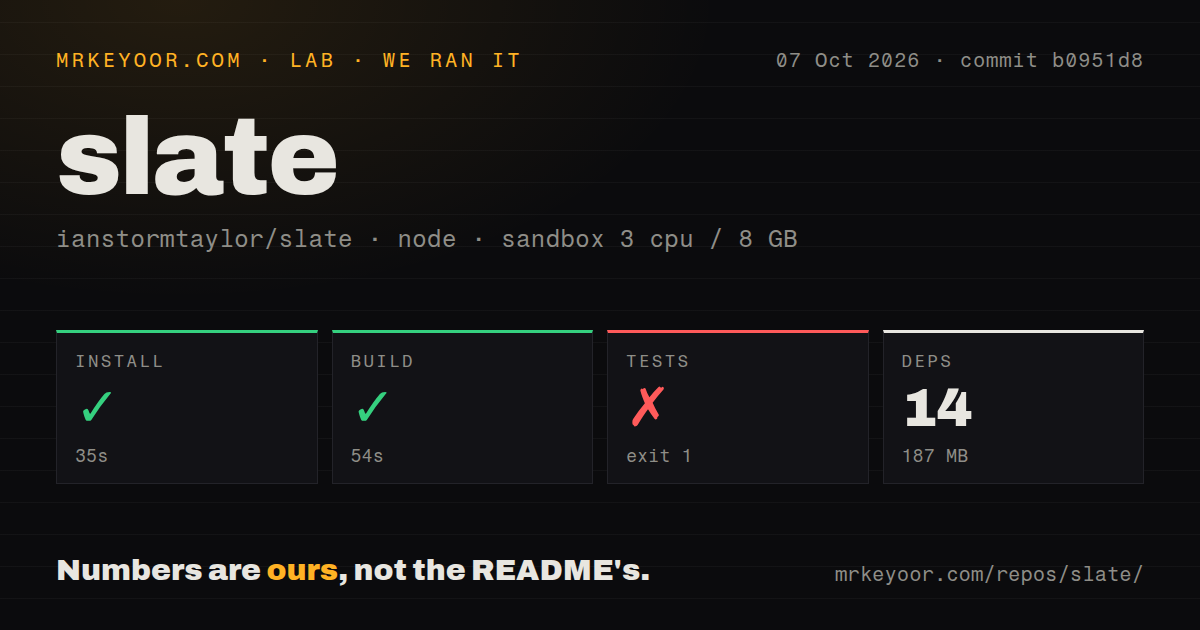
Our sandbox cloned commit b0951d8 into an unprivileged Debian container with 3 CPUs, 8 GB of RAM, Node 22, and no secrets. Yarn installed 14 packages in 35 seconds, consuming 187 MB on disk. The build completed successfully in 54 seconds. The checkout held 1,580 files, about 62,671 lines of source, and occupied 7.6 MB before installation.
Tests failed with exit code 1 after 4 seconds. Node reported that the named export BaseEditor was not found because the requested slate module was CommonJS. The message says CommonJS packages can be loaded through a default import, then the stack continues through Mocha's ESM import helper. That is the entire supported finding. The log does not tell us which configuration or packaging step produced the mismatch, so assigning blame to Node 22, Yarn, Mocha, or Slate would be guesswork.
Our scan found 4 CI workflow files, no Dockerfile, no root tests directory, and Yarn workspaces. A Dockerfile is not important for a browser library, while the failed suite is important for contributors. Installation and build passed cleanly, yet the normal test command did not reach assertions in our environment. If you plan to patch the editor, reproduce the package-format path in your own CI before relying on the repository as a green baseline.
Collaboration requires 3 extra moving parts
Slate's operation model was designed so collaboration can be layered on, but the server and synchronization protocol are outside core. The official walkthrough uses Yjs, @slate-yjs/core, and a communication provider. A hosted Liveblocks provider is one option; y-websocket is an example you run yourself. Remote cursors come from another slate-yjs React package. This is a workable recipe, though a product team still owns connection state, provider lifecycle, permissions, persistence, and recovery.
The distinction matters during selection. The README's collaboration-ready claim describes the data model, not a multiplayer service included with Slate. If live cursors, comments, and offline merges are primary requirements, prototype them before locking the document schema. Tiptap, Lexical, and direct ProseMirror use make different tradeoffs, but none removes the need to understand how collaborative state is stored and authorized.
Mobile and IME behavior need real-device checks
Slate's FAQ says desktop coverage targets recent Chrome, Edge, Firefox, and Safari. iOS is supported without regular testing, while Android uses compositions and mutations because its beforeInput behavior differs. Open issue 6118 reports a multi-line Chinese IME commit appearing twice in Chrome on macOS, even though the Slate model stores it once. That is a narrow reproduction, but it concerns exactly the sort of text path an English-only smoke test misses.
Recent release work fixed lost Android input and several void-element selection cases. Another open report, issue 6157, is limited to Pixel 5 emulation and explicitly says real-device impact is unconfirmed. That careful wording matters. It is evidence to test a fast select-all and delete flow, not evidence that every Android user will lose text. Build a matrix around the browsers, keyboards, languages, paste sources, and assistive technology your audience uses.
The beta label still governs the decision
GitHub listed 31,754 stars and 591 open issues and pull requests combined, and the repository was pushed on October 8, 2026. Package releases landed the previous day. Those dates show active maintenance; they do not cancel the README's beta warning. Slate says some APIs can still break, gives no schedule for 1.0, and describes maintenance as contributor-driven. A popular, active beta can still demand migration work from its users.
Choose Slate when the editor itself is part of your product's identity and a generic schema would fight the design. Its nested tree, transforms, and React rendering give a capable team room to build unusual interactions. The bill is ownership: our 4-second module failure, external collaboration stack, plain-text default paste, and device-specific input paths all require engineering attention. If your roadmap mostly says headings, lists, links, and comments, start by comparing the amount of code a more packaged option removes.