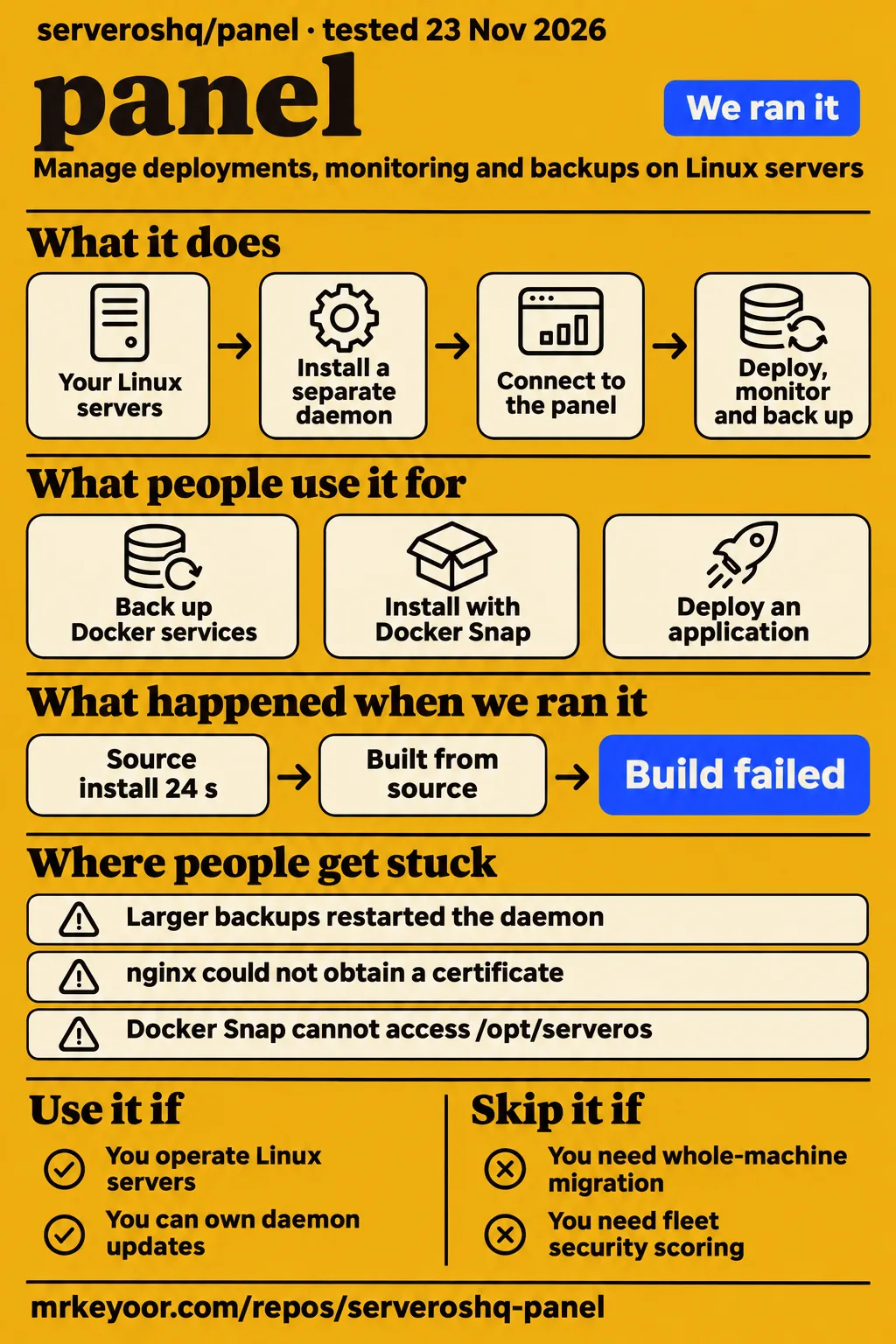
ServerOS belongs on the shortlist if you operate Linux servers and want a shared place to deploy, monitor and back them up, with someone responsible for daemon updates. Skip it if your deciding requirement is a released whole-machine migration button or fleet security scoring: both are open proposals in the machine-move discussion and security-page proposal.
This review concerns serveroshq/panel, the ServerOS web application. Its README describes a panel plus a separate daemon on each managed server. HoloViz Panel, the Python dashboard library, is a different product. The adoption question here is whether ServerOS fits the Linux machines you already operate. Your machines stay with their existing provider and account; serverosd is the component installed on each managed machine.
What people use panel for
GitHub users report backing up four Docker services, installing with Docker Snap and deploying an application behind nginx, with different outcomes in each case. These reports give prospective operators concrete workflows to examine: backup execution, the panel's installation directory and certificate provisioning. They also show why the panel and daemon need separate entries in an operational change record. A panel issue can describe work performed by the daemon on a managed machine.
| Who and task | What happened | What you should take from it |
|---|---|---|
| GitHub reporter gualtierogrey backed up four Docker services on an Ubuntu VPS. | Two larger jobs restarted the daemon; after v0.1.1-pre.44, gualtierogrey confirmed the repair worked. | Record the daemon release alongside the affected backup jobs. |
| The reporter of #65 installed with Docker from Snap. | Compose could not read /opt/serveros. The reporter got it working in a non-hidden home directory with a symlink. | Docker installation method affects access to the panel directory. |
| The reporter of #97 deployed an application using nginx. | SSL provisioning failed on panel 1.7.0 and daemon v0.1.1-pre.40; liamdevss reported the repair in v0.1.1-pre.41. | Application deployment and certificate issuance are separate outcomes. |
The README's broader feature list includes deployments from Git or templates, scheduled backups, uptime alerts, logs, workflows and team roles. It also lists an MCP server and an API for outside tools and assistants. These are documented ServerOS capabilities. The panel supplies the shared web interface, while serverosd runs on the machines being administered. That division explains why the repair ledger below identifies daemon releases rather than treating every change as a panel update.
What happened when we ran it
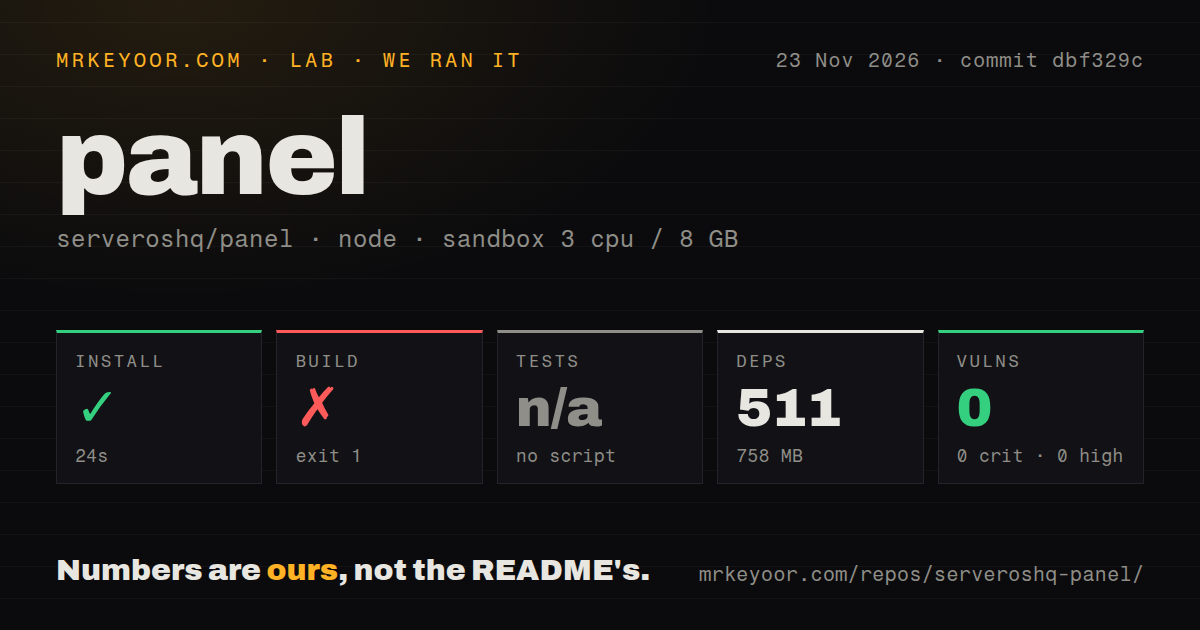
Our November 23, 2026 run at dbf329c installed npm dependencies in 24 seconds, recording 511 dependencies and 758 MB on disk. The build then failed with exit 1 in 3 seconds. The sandbox configuration recorded 3 CPUs, 8 GB RAM and image label lab-node:22. The checkout scan counted 2,211 files, about 250,018 source lines and 14.5 MB of checked-out content. These measurements describe the source checkout and npm execution path.
| Source-check step | Our recorded result | Meaning |
|---|---|---|
| npm install | Succeeded in 24 seconds; 511 dependencies recorded; 758 MB on disk | Dependency installation completed. |
| Build | Failed, exit 1, in 3 seconds | The build command stopped with an error. |
| Tests | No tests script or target; skipped | The harness did not execute tests. |
| npm audit | 0 known vulnerabilities: 0 critical, high, moderate or low | npm returned no known dependency advisories. |
| Checkout scan | 2,211 files; about 250,018 source lines; 14.5 MB | Size of the inspected checkout. |
| Automation scan | 5 CI workflow files; a tests directory; no Dockerfile detected | File-discovery observations from the scan. |
The separate deployment attempt has conflicting records. Its summary says it deployed through Docker Compose with every port bound to 127.0.0.1, while the detailed safety step failed because none of four expected Compose filenames existed. The filenames were compose.yaml, compose.yml, docker-compose.yaml and docker-compose.yml. The detailed failure is the stopping point used in this review, and teardown completed successfully.
The failing build tail passes through @laravel/vite-plugin-wayfinder's generate function, Vite and Rolldown, and ends with 0 modules transformed. The development README requires PHP 8.4, Composer, Node 22 and npm, with composer setup as its entry point. That entry point includes installation, environment setup, an application key, migrations and the build. Our harness followed an npm path, so its recorded sequence differs from the README's development setup.
The self-hosting guide names docker/self-hosted/Dockerfile and describes an installer-created compose.yaml. Those documented paths and the scanner's file-discovery results are separate observations. The scan also found a tests directory, while the harness skipped execution because it found no tests script or target. The record therefore contains dependency installation, a failed build, a stopped deployment attempt and successful teardown, with each result attached to its own execution step.
Where people get stuck: backups, certificates and Docker Snap
Issue #108 records user-confirmed backup recovery after daemon v0.1.1-pre.44, while #97 records a maintainer-announced certificate repair in v0.1.1-pre.41. In the backup report, two of four jobs completed and the larger pair caused exit status 75/TEMPFAIL. Systemd restarted serverosd and child Docker processes were killed. The maintainer attributed the failure to checksumming and uploading whole archives in memory, then changed that work to stream from disk.
| Symptom | What the issue says to do | Status of the account |
|---|---|---|
| Larger backups restart serverosd | Update to the daemon repair in v0.1.1-pre.44, then rerun the affected backups. | Maintainer release plus user confirmation. |
| nginx or Apache cannot obtain a certificate | v0.1.1-pre.41 relocates the challenge directory and rewrites existing site files. | Maintainer-reported repair. |
no configuration file provided: not found with Docker Snap |
The #65 reporter used a non-hidden directory under /home and a symlink from /opt/serveros. | Reporter workaround and documentation request. |
| Expired AI key has no obvious Remove button | Open the provider row and choose Disconnect. | MrGuato explains the existing control. |
For certificates, the failure was specific: certbot's challenge file lived inside a private directory that nginx's web-server user could not enter. Apache had the same problem. In #97, liamdevss describes moving the challenge folder somewhere the web server can read. The release reply says the daemon rewrites existing site configurations, retries certificate issuance within 15 minutes when the domain points at the machine, and removes the need to redeploy.
The #65 reporter attributes the missing-configuration error to Docker Snap being unable to access /opt. From inside the Snap, listing /opt returned Permission denied, so Compose found no compose.yaml in the current directory. The reporter says no services started and no volumes were created. A non-hidden directory under /home worked; hidden folders such as ~/.serveros were also blocked. The reporter requested either an early installer check or a troubleshooting note.
Keep panel and daemon versions in the same change record
Daemon v0.1.1-pre.40 added proxy choice, v0.1.1-pre.41 repaired certificate provisioning, and v0.1.1-pre.44 repaired backups, according to the issue replies. These releases address different operations on managed machines. The ledger preserves the panel 1.7.0 context stated in the SSL report and identifies the other incidents by issue number. It connects each reported change to its component without assigning an original panel or daemon version to the backup reporter.
| Panel context in the issue | Daemon release | Change and attribution |
|---|---|---|
| Proxy request #92 | v0.1.1-pre.40 | Liamdevss announces Caddy, nginx, Apache and Traefik selection. |
| SSL reporter used panel 1.7.0 | v0.1.1-pre.41 | Maintainer reports the nginx and Apache challenge-directory repair. |
| Backup report #108 | v0.1.1-pre.44 | Maintainer reports streaming backups; reporter confirms success. |
Existing nginx users get a concrete integration detail in #92: ServerOS uses an installed nginx and adds its sites under /etc/nginx/serveros.d. The maintainer says proxy selection applies to the whole machine because only one proxy can own ports 80 and 443. Changing the dropdown moves that machine's existing ServerOS sites too. The release announcement says proxy choice needs both the panel change and the daemon update.
Self-hosting means DNS, a gateway and working email
The README's standard Docker route needs a Linux server, a domain with wildcard DNS, and ports 80, 443 and 8443. The self-hosting guide starts the panel host at 2 CPUs, 4 GB of memory and 20 GB of disk. It describes separate web, queue, scheduler, gateway, database and Redis containers. Workspaces use subdomains below the panel address, which explains the wildcard DNS record alongside the panel's own record.
Managed machines connect out to the gateway on 8443 and also need access to the panel domain on 443. You can create the owner account before configuring email, but invitations, alerts and password resets stay in logs until SMTP is configured. The web installer sends a test email before saving SMTP settings. Public repositories need no GitHub setup; private repositories and deployment on push require your installation's own GitHub App and a webhook address GitHub can reach.
The README distinguishes the AGPL community build from the official image containing commercial panel-ee code. Without a license key, the official image behaves like the community edition. Single sign-on, SCIM and custom roles are among the paid features. Building from this repository produces the community edition, while the official image includes the commercial package under its own terms. The daemon is also licensed under AGPL-3.0.
Security controls exist; fleet scoring is a proposal
The self-hosting guide describes a one-time setup code and invite-only registration after the first account, while issue #69 proposes fleet security scoring. The guide says finishing setup deletes the code. It also describes checking a daemon release's checksum and signature before installation, using the release key configured by the installer. These are documented setup controls, distinct from the contributor's proposed Security page.
The guide identifies the machine-certificate signing key as essential backup material: losing it means reconnecting machines. A panel backup includes the database, storage and .env. Storage contains the signing key, while .env contains APP_KEY, which is needed to read encrypted database secrets. The guide's restore procedure concerns the management application's state, including those keys and the database, rather than moving every workload on a managed server.
Issue #69 proposes a Security tab listing machines with a score out of 100, a grade and failing checks. Its initial list contains nine checks, including SSH root sign-in, exposed databases and unencrypted remote access. The contributor describes screenshots from a development panel using demo data. The proposal would use information the daemon already reports; its open issue status is the relevant distinction for an operator choosing software for fleet scoring today.
Fleet notifications and translations have specific issue reports
Issue #96 uses an 11-machine example to describe repeated daemon-update alerts, and #25 reports about 490 missing German, Spanish and Hindi interface strings. These reports concern everyday panel use after installation: the number of notifications an update generates and the language shown in newer interface areas. The notification report identifies panel 1.7.0 and daemon v0.1.1-pre.40, giving its example an explicit component context.
In #96, SyedMuqeem03 traces repeated alerts to each machine reconnecting after an update. The proposed change keeps the combined ready-to-install notification and per-machine activity entries while dropping individual success alerts. Liamdevss asks for update availability to be announced per workspace. The final comment promises a focused PR. Separately, #17 reports the toast "Deleted 1 lines" after clearing a single log line and proposes count-aware pluralisation.
The translation report names machine updates, fixes, workflows and projects among areas falling back to English. It asks contributors to work in small batches by language and panel area. In #90, MrGuato explains the existing Disconnect action and describes clearer controls on a fork. Those proposed labels include Manage and Remove key, along with Spanish, German and Hindi strings. The existing removal action and the fork's labels are separate parts of the account.
Panel vs Coolify, Dokploy and keeping your existing nginx
Coolify and Dokploy document application-deployment platforms; keeping nginx is a proxy choice within ServerOS. Their READMEs support a shortlist based on deployment scope and configuration needs. ServerOS's issue history adds operational details about adopting existing machines, including machine-wide proxy selection and daemon-specific backup repairs. The comparison below keeps those categories separate so a preference for nginx does not become a claim about choosing a different panel product.
| Choice | Why consider it | What the comparison supports |
|---|---|---|
| ServerOS with existing nginx | The #92 requester already used nginx across servers and preferred its familiar configuration. | The maintainer reports released proxy choice. |
| Coolify | Its README describes a self-hostable platform for deploying applications, databases and services on your servers. | Coolify's documented deployment scope. |
| Dokploy | Its README lists native Docker Compose support and multiple-node operation using Docker Swarm. | Dokploy's documented Compose and Swarm support. |
| Terraform, Pulumi or OpenTofu alongside a panel | A participant in #104 wants one definition covering VPS provisioning through application configuration. | #104 discusses infrastructure definitions and proposed daemon-driven recreation. |
Coolify describes deployment of applications, databases and services on your own servers. Dokploy lists native Docker Compose support. Dokploy also names Docker Swarm for multiple-node operation. Those descriptions make application deployment a reason to consider either product, with Compose and Swarm explicit in Dokploy's feature list. The evidence supports those documented distinctions without assigning a performance or reliability ranking to the three panels.
The author of #104 describes manual environment-file copying, database dumps and restores, DNS changes and SSL work as the burden of moving a machine. The maintainer says the proposed first version would use daemon-driven recreation rather than IaC. An export file is discussed as a direction, with coolify.json used as an analogy. The participant asking about Terraform, Pulumi and OpenTofu wants a definition covering infrastructure and surrounding services too.
Repository activity and the measured checkout
Release metadata identifies v1.11.1, published November 21, 2026, while our November 23 build measurement identifies commit dbf329c. GitHub's repository metadata recorded 1,192 stars and a last push on November 23. Those are repository activity facts, with the repository API as their source. The install and build timings remain attached to dbf329c throughout this review rather than being relabelled as measurements of the release tag.
The README identifies serveroshq/panel as the web application used by operators and teams, with serverosd on each managed machine. That component split also appears in the issue replies: proxy choice required a panel change and daemon update, while the backup repair names a daemon release. For an adoption decision, the useful record combines the checkout tested, the panel installed and the daemon release running on each managed server.
Questions people ask
Daemon v0.1.1-pre.44 streams backups from disk, and gualtierogrey confirmed success after updating. The backup restart is one of the concrete questions raised in ServerOS issues, alongside managed-machine requirements, proxy selection, API-key removal and migration. The answers below distinguish existing controls, announced repairs and requested features. Release identifiers stay attached to the operation they changed, rather than becoming a general recommendation to pair every panel with one daemon release.
Why do larger ServerOS backups fail and restart the daemon with exit status 75/TEMPFAIL?
The maintainer attributes the #108 failure to loading whole backup archives into memory during checksumming and upload, exceeding the daemon's own limit. Daemon v0.1.1-pre.44 changes that work to stream from disk. The report concerns four Docker-service backup jobs on an Ubuntu VPS, with the larger two failing. After updating, the reporter replied that the repair worked.
What minimum machine resources does ServerOS require?
The self-hosting guide starts the panel server at 2 CPUs, 4 GB of memory and 20 GB of disk. That sizing covers the host running the panel and its supporting containers. The #108 reporter's question concerns the machine being monitored. The maintainer's answer to that incident identifies a daemon memory-management bug and directs the reporter to the backup repair.
How do I remove or replace an expired AI API key in ServerOS?
MrGuato says to click the provider row and use Disconnect. That is the existing removal action described in the reply. The same contributor describes a fork with a Manage button, a Remove key label and a removal toast. For the interface discussed in the issue, opening the connected provider's row exposes the control needed to remove its stored key.
Can ServerOS move a whole machine, including applications and data, to a different server?
Whole-machine migration is an open proposal in #104. The requested move covers applications, sites, databases and their data, environment variables, domains, volumes, cron jobs and firewall rules. The self-hosting guide separately describes restoring the panel's own backup on a new host. That procedure moves the management application and its state; #104 asks to move workloads on a managed machine.
Will ServerOS machine migration support Terraform, Pulumi, OpenTofu, or an exportable configuration file?
The maintainer says the proposed first version would use daemon-driven recreation, without IaC. An exportable file is discussed as a possible extension. The participant asking about infrastructure tools wants reproducibility beyond the project itself, including VPS provisioning and surrounding services. The coolify.json reference describes the proposed approach rather than an implemented ServerOS infrastructure provider.
Can daemon update notifications be grouped by workspace instead of sent for each server?
The maintainer agrees in #96 that update availability should be announced per workspace. The contributor proposes retaining per-machine activity entries while removing separate success alerts as machines reconnect. The existing waiting method is described as already sending a combined ready-to-install notification. The final reply commits to a focused PR following that workspace-level approach.
Can ServerOS show security posture scores and failing checks across all machines?
Issue #69 proposes a Security tab with a score out of 100, a grade and failing checks for each machine. The initial list contains nine checks, and the contributor describes development screenshots using demo data. The proposal builds on security information already reported by the daemon, including SSH settings, failed sign-ins and automatic updates.
Can I use nginx, Apache, or Traefik instead of Caddy?
Yes: liamdevss announces all four choices with daemon v0.1.1-pre.40 in #92. The dropdown applies to the whole machine because only one proxy can own ports 80 and 443. Existing nginx installations are used, with ServerOS sites added under /etc/nginx/serveros.d. The later certificate repair for nginx and Apache is reported separately in daemon v0.1.1-pre.41.
Why does deploying an app with nginx fail to configure SSL, and do I need to redeploy?
The #97 repair moves challenge files out of the daemon's private directory. The maintainer says v0.1.1-pre.41 rewrites existing nginx and Apache site configurations and retries certificate issuance within 15 minutes. Redeployment is unnecessary when the domain points at the machine. The reported cause was the web server's inability to enter the directory containing the challenge file.
Can I disable HTTPS when a CDN or upstream proxy handles TLS?
The maintainer reports a Serve over HTTPS checkbox, enabled by default, in #97. Unticking it serves plain HTTP behind the upstream TLS endpoint. The control is described in the same release reply as the certificate repair. It addresses deployments where a CDN or another proxy handles HTTPS before traffic reaches the machine's application endpoint.
Why does self-hosted installation with Docker Snap fail with 'no configuration file provided'?
The #65 reporter says Docker Snap cannot read /opt/serveros and describes a working non-hidden home-directory installation with a symlink. Compose receives the resolved path through that symlink. Hidden home directories were blocked too. The reporter requests an early Snap check or troubleshooting guidance and suggests Docker from docker.com's apt repository as another installation choice.
Why do German, Spanish, and Hindi users still see English interface strings?
Issue #25 attributes English fallback to about 490 missing translations for newer strings. The report names machine updates, fixes, workflows and projects among the affected areas. Its proposed contribution approach is one language and one panel area at a time. The issue points translators to the language README for tone and asks them to preserve placeholders in English.
What we have not tested yet
Our run produced a failed npm build and a deployment safety failure, rather than a working panel or daemon workload result. Service deployment, backup restoration, certificate recovery, upgrades, team permissions, MCP actions and security boundaries need live-installation testing. The dependency audit's 0 known vulnerabilities covers npm advisories. It does not assess those operational or security controls, and the conflicting deployment summary supplies no detailed successful execution trace to resolve the safety failure.
The build tail lacks the initiating error, and actual toolchain and operating-system versions require the raw logs. The image label lab-node:22 records sandbox configuration. The source scan and current documentation describe different file-discovery outcomes, without a supported-environment reproduction resolving them. No hands-on Q&A or screenshot records demonstrate a working application in this run. The evidence does not connect measured commit dbf329c to the v1.11.1 release tag.
The original panel and daemon versions used by the #108 backup reporter are absent from the readable issue passages. Those passages also leave a complete panel-to-daemon compatibility matrix and a universal managed-machine hardware minimum unanswered. The SSL repair has no follow-up user confirmation in #97. Issue #65 supports the reporter's workaround, but the self-hosting extract ends before the troubleshooting passage needed to establish delivery of the requested Docker Snap guidance.
Notification, pluralisation, fork-control and translation delivery need matching release evidence. Whole-machine migration and fleet security scoring remain proposals. The security evidence supports demo screenshots and nine initial checks, without establishing a pull-request count or a trend-chart implementation. Community search results offer no identifiable ServerOS operator experience for measuring adoption or satisfaction, and the sampled issues do not measure typical support response times. Competitors have not been benchmarked against ServerOS here.
Rendered layout, resolved evidence links, automatic related links, recommendation modules and template content are outside this assessment. The four editorial rating dimensions remain unassessed because the execution record and sampled documentation do not support numerical product judgments. A useful next acceptance exercise is a disposable application deployed through the chosen proxy, followed by a backup and restore, with the panel version, daemon release and job outcomes recorded together.