Short answer: choose it for a personal site you can stop during updates
the separate CLI run reached help output but rejected its version flag. Use it if you want personal-site analytics and can own the proxy, database and update procedure. Skip it if you require uninterrupted updates while keeping the default DuckDB file: the README requires stop-first deployment, which includes an outage.
The attraction is concrete. egoist/tinytraffic packages its dashboard and tracker into a Go executable, with an embedded database instead of a separate database service by default. You keep the traffic data on your machine. The decision turns on whether that compact operating model suits you, rather than whether a short feature list makes it look interchangeable with an established analytics service.
What you can do with tinytraffic
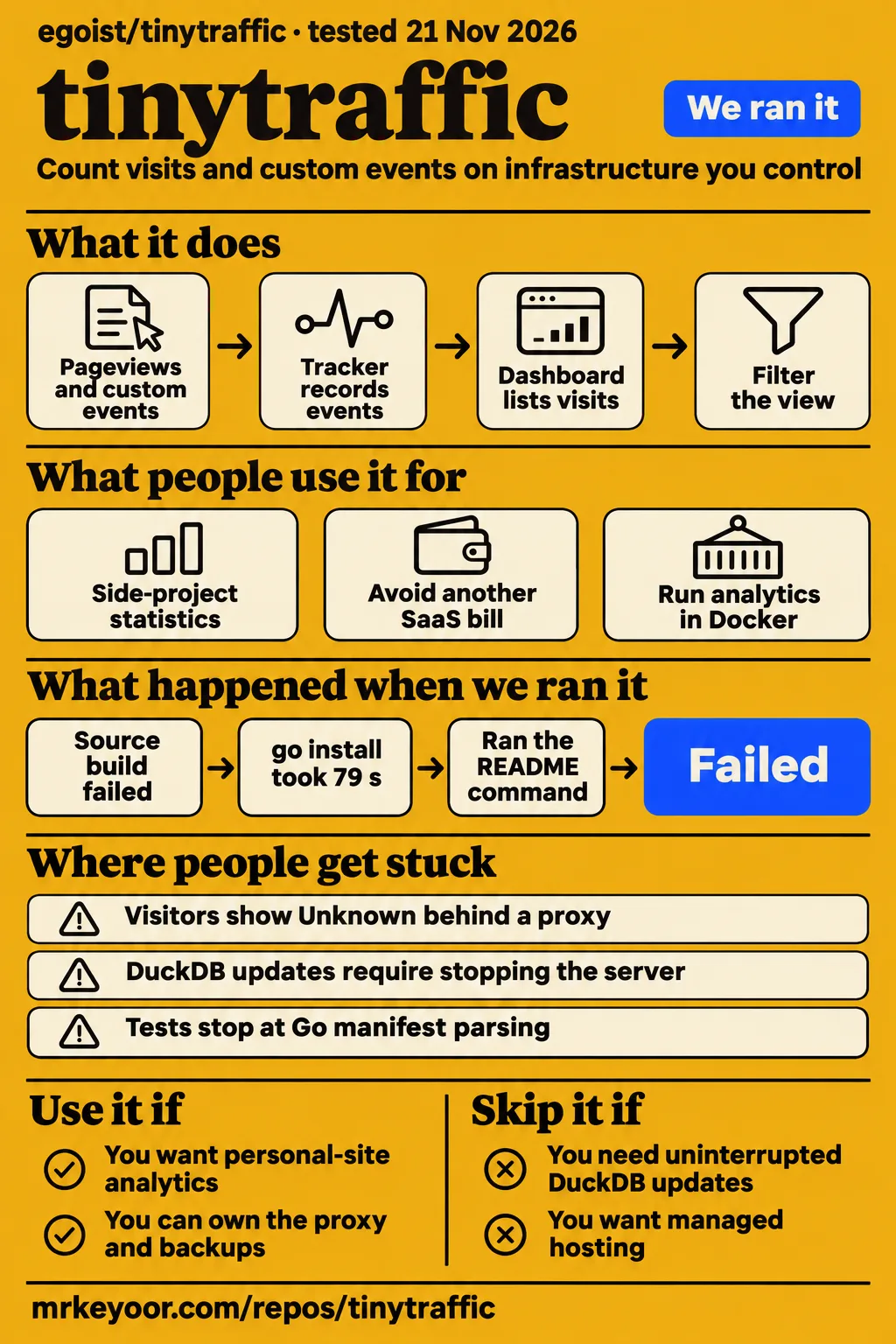
The README documents pageviews, single-page-app navigation, outbound clicks and custom events, enough to answer where readers arrive, what they read and whether they complete an action you care about. A single-page application changes screens without always loading a new document, so navigation tracking matters if your site works that way. Custom events appear as Goals; the example records a signup with a plan property.
The dashboard lists visitors, visits, pageviews, bounce rate and visit duration, with breakdowns for referrers, pages, locations and devices. Its rows can filter the view. That makes a personal publication or side project a sensible target: you can start with readership and add a named action rather than designing an analytics system around a warehouse.
The README also documents API keys for reading statistics, managing sites and sending events. Those interfaces give you another route when the browser script isn't the right sender. A site's dashboard can be made public without sign-in, so sharing statistics is a deliberate publishing choice. Public access deserves the same thought as publishing the underlying numbers: decide which site's information you actually want visitors to see.
What people use tinytraffic for
X user sunsetsyntax reported choosing tinytraffic for a side project, while GitHub participant dgtask reported running it in Docker and resolving missing locations. These are different kinds of useful feedback: one identifies a reason to choose the project, and the other documents a configuration problem with a reported resolution.
| Person | What they did | What they reported |
|---|---|---|
| X user sunsetsyntax | Sought side-project statistics without another SaaS bill or a cookie banner | Said tinytraffic fit, citing a Go binary, DuckDB and cookie-free tracking |
| GitHub participant dgtask | Used Docker and investigated missing visitor locations | Posted a proxy-trust setting as the solution in closed issue #2 |
The side-project report speaks directly to the reader who already pays for a small server and wants another service to manage locally. sunsetsyntax also mentioned Plausible's event format as a reason an existing integration could be considered for a switch. The location thread is more useful once you're deploying: an apparently missing analytics feature turned into a proxy setting, with a spelling discrepancy that makes copying the final comment risky.
What happened when we ran it
Our November 21 CLI run reached tinytraffic --help successfully, but tinytraffic --version exited 2 and printed usage text. The run description identifies checkout 94d9124dd486 and an unprivileged container configured with 2 CPUs and 4 GB RAM, without published ports or secrets. That was a command-line inspection, separate from the source harness below.
The recipe cloned the repository and obtained an executable with go install github.com/egoist/tinytraffic/...@latest. Its first identification attempt then hit an unsupported version flag: flag provided but not defined: -version. The response was help for serve, including listen-address, data-directory, ClickHouse and GeoIP options. An automation script that treats any usage output as success would miss the exit code.
The recipe's usage step then failed because it found no runnable tinytraffic command in the README's usage/examples sections. That describes the recipe's extraction result, not the whole README: the README checked for this review includes a Docker quick start and a source-start command. The recorded teardown completed successfully.
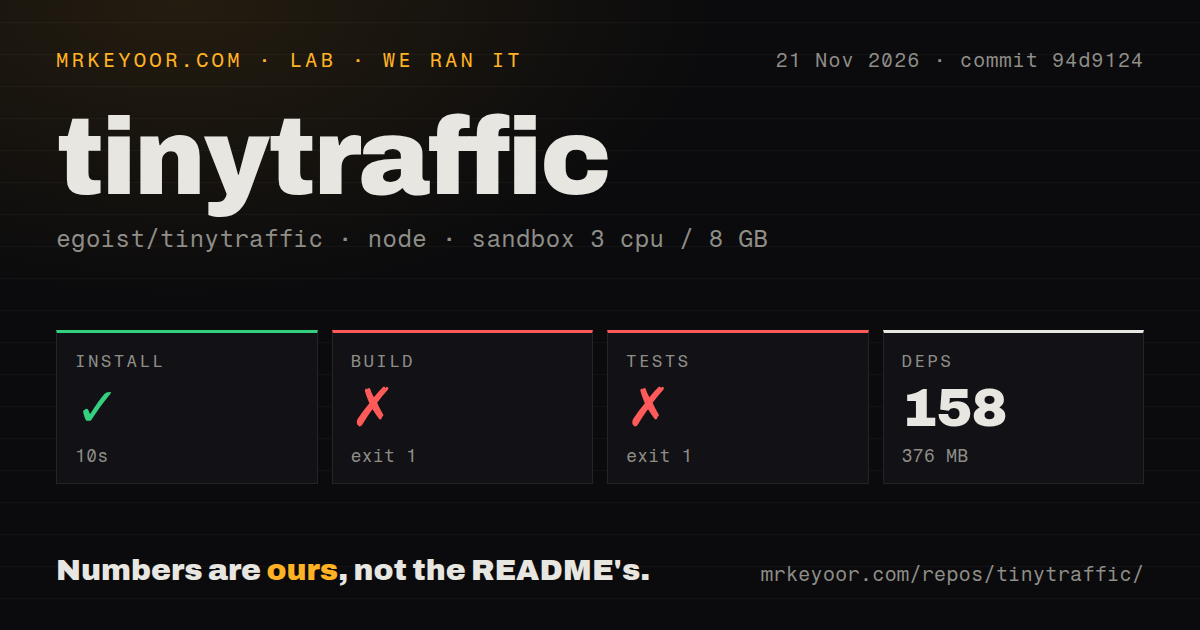
The source harness used commit 94d9124 on November 21, with 3 CPUs, 8 GB RAM and image label lab-node:22. The checkout contained 103 files, approximately 12,794 source lines and 0.6 MB. That installed footprint describes the source environment, not a measured running binary or container.
| Source-harness step | Result | What the log shows |
|---|---|---|
| Dependency install | Succeeded in 10 seconds | 158 dependencies recorded; 376 MB on disk |
| Build | Failed, exit 1, in 21 seconds | Dashboard build reported ECONNREFUSED at 127.0.0.1:33705 |
| Tests | Failed, exit 1, in 2 seconds | go test ./... stopped while parsing the Go version in go.mod |
The build progressed to dashboard output, then reported a refused connection to 127.0.0.1 on port 33705. The tail identifies Node.js v22.23.2, followed by the dashboard and parent build scripts exiting 1. It doesn't identify which component should have accepted that connection. Changing a package, network setting or build flag on that evidence alone would be a guess.
The test command stopped earlier in its own work. Our test step failed in 2 seconds, with go: errors parsing go.mod and invalid go version '1.26.0': must match format 1.23. This is a manifest-parsing failure, not a reported failed assertion. The tail doesn't name the Go executable's version. The image label likewise cannot establish the actual runtime or operating-system version. The scan found one CI workflow, a Dockerfile and workspaces; finding no tests directory doesn't mean a Go repository has no test files.
Where people get stuck: the proxy hides visitor locations
Missing visitor locations behind a reverse proxy can be fixed by enabling TT_TRUST_PROXY=true, according to the README and the resolution reported in issue #2. A reverse proxy receives the public request and forwards it to tinytraffic. Without that setting, the README says visitors appear to come from the proxy and show as Unknown.
In issue #2, the reporter said Umami had previously recognized regions. dgtask's Docker command includes TT_TRUST_PROXY=true; the closing prose says T_TRUST_PROXY=true, dropping a T. The configuration table and the command agree on the double-T spelling. Use that spelling. The thread reports a configuration fix, rather than documenting a change to the location database or a new software release.
| Symptom | Relevant evidence | Action supported by it |
|---|---|---|
| Visitors show Unknown behind a proxy | README describes the proxy IP replacing the visitor IP | Enable TT_TRUST_PROXY=true behind the proxy |
| A copied closing comment has no effect | Issue #2's final prose uses T_TRUST_PROXY |
Use the documented TT_TRUST_PROXY spelling |
| A source build refuses a localhost connection | Our dashboard log names 127.0.0.1:33705 |
Inspect the complete build log before choosing a remedy |
Tests stop at go.mod |
Our parser rejected 1.26.0 |
Compare the actual Go toolchain with the documented source requirements |
The source requirements are Go 1.26+, Bun 1.4+ and a C compiler, because the Go build links DuckDB through cgo, Go's interface to native code. Keep those requirements separate from the runtime versions established by a log. For locations, the README describes DB-IP's city database bundled in Docker and found through the repository's node modules for source use; custom MMDB database files are also supported.
DuckDB saves a service, but rolling updates hit its file lock
DuckDB permits one process per database file in tinytraffic's documented deployment, so a replacement container cannot open the file while the old process owns it. This affects maintenance commands as well as deployments. The README requires stopping the DuckDB server before running commands such as password changes and demo-data seeding.
For Dokploy and Docker Swarm, the prescribed update and rollback order is stop-first. The docs describe a particularly misleading outcome with the default start-first order: the replacement container hits a DuckDB lock error while Dokploy reports the deployment as done. If you use these platforms, checking the service's update order belongs alongside choosing the data volume. A successful deployment label isn't enough to tell you the replacement is serving requests.
ClickHouse lets several tinytraffic processes share one database, which changes that update model. It also changes what you operate: sites, passwords, API keys, salts and events move into a separate database service. The README explicitly expects a single ClickHouse server, with tables that aren't replicated or sharded. Choosing that backend doesn't automatically give you a database cluster.
Sessions remain in each process's memory. The README recommends routing a visitor's requests to the same process when running several for an extended period, otherwise visits can be counted twice. Its migration command copies the DuckDB data into ClickHouse and is documented as resumable; changes made later in ClickHouse aren't copied back when you return to DuckDB. For backups, the documented simple DuckDB route is to stop the server and copy its data directory.
Security starts with the first password and the proxy boundary
Setting TT_PASSWORD on first start prevents someone else from claiming tinytraffic's setup screen, according to the README. Without it, the first visit chooses the dashboard password. Set your own password before exposing the service. The example's placeholder is an instruction to replace a value, not a credential to keep.
Proxy trust is off by default. Enabling it tells tinytraffic to read client addresses from forwarding headers. The README says to enable it only behind a reverse proxy, and its quick start recommends making the proxy the only way into the app. That boundary is part of the location fix: a setting intended to recover real visitor addresses belongs with a deployment that controls who supplies those headers.
The privacy design is also specific. The README says visitor identifiers hash a daily salt, site, IP address and user agent; it says IP addresses aren't stored and referrer query strings are dropped. The salt rotates at midnight in the site's timezone. These statements explain the tracking model. sunsetsyntax's wish to avoid a cookie banner is a user's selection reason, rather than a blanket legal conclusion for every website or jurisdiction.
tinytraffic vs Umami and Plausible
The useful comparison is operating responsibility and integration fit: Umami documents a Node.js and PostgreSQL deployment, while Plausible offers managed hosting as well as its self-hosted Community Edition. tinytraffic's default DuckDB route removes the separate database service, with the file-lock obligations described above. Those are documented architecture choices, not results from a race between the products.
| Choice | What the evidence supports | When it deserves your attention |
|---|---|---|
| tinytraffic | README documents a Go binary with DuckDB or ClickHouse | You want personal-site statistics and accept ownership of updates, proxy settings and backups |
| Umami | Its README specifies Node.js and PostgreSQL; issue #2's reporter said regions worked in their earlier Umami setup | You prefer its documented web and product analytics approach and can operate that database stack |
| Plausible | Its README offers managed cloud and self-hosted Community Edition; sunsetsyntax pointed to tinytraffic's event-format compatibility | You want a hosted analytics option, or are deciding whether an existing Plausible event integration should move |
The location thread doesn't make Umami a universal winner at geolocation: the tinytraffic problem was subsequently reported resolved through proxy configuration. Similarly, the README's Plausible event-format compatibility concerns sending events. It isn't a promise that historical reports, every API client or all administrative workflows transfer unchanged. sunsetsyntax described a script-source change, not a documented completed migration.
Plausible's own README distinguishes its cloud features from Community Edition. Compare the edition you would actually use, especially if paying for managed operations is the point of leaving a self-hosted service. A comparison that puts a hosted product's operating conveniences beside tinytraffic's binary without accounting for who maintains each deployment won't answer your decision.
Search results mix this analytics project with unrelated games
Indie Game Reviewer's Tiny Traffic review concerns Virtual Turtle Games' puzzle game, not egoist's analytics server. Its opening identifies the developer and the traffic puzzle. A game review, Steam listing or similarly named traffic tool cannot establish whether this Go application is reliable. Include egoist/tinytraffic when looking for deployment reports.
HotRepo does cover the correct project. Its overview attributes performance figures to the author and explicitly separates those figures from adoption. That's the useful distinction to keep when reading enthusiastic posts: a README workload, a user saying a project fits and a closed troubleshooting issue answer different questions. Neither game ratings nor the number of promotional mentions supplies a production track record for analytics.
The README is in English, including the proxy and deployment instructions. The location issue is in Chinese, but its Docker command exposes the relevant setting directly. You can follow that fix without treating an unrelated English-language game review as product documentation.
Questions people ask
Behind a reverse proxy, tinytraffic needs TT_TRUST_PROXY=true to recover visitor IPs for locations, according to the README and issue #2's reported fix.
Why is tinytraffic not recognizing visitor IP locations, and how can I fix it?
The proxy may be the address tinytraffic sees. The README says to enable TT_TRUST_PROXY=true behind that proxy and expose the app only through it. Use the double-T spelling from the configuration table and the issue's Docker example. This addresses the configuration problem described there; an Unknown location isn't by itself proof that every missing region has the same cause.
What do I need to run tinytraffic?
The README's Docker quick start uses a persistent /data volume and a password. Building from source requires Go 1.26+, Bun 1.4+ and a C compiler. Choose the documented route that matches your purpose: operating a packaged service and contributing to the source have different prerequisites. A reverse proxy provides the documented public HTTPS deployment boundary.
What licence does tinytraffic use?
HotRepo identifies the project as AGPL-3.0, matching GitHub's repository licence metadata. If your selection requires a permissive licence, account for that before adopting or modifying the service. The licence label answers what terms to read; it doesn't remove the cost of the server, database maintenance or backups you choose to operate.
What we have not tested yet
The recorded runs stop short of a working browser-to-dashboard analytics task. We have not tested event ingestion, report accuracy, a completed Plausible migration, public-dashboard access controls, proxy-header spoofing, backup restoration or the DuckDB-to-ClickHouse migration. The CLI recipe used @latest, so its executable should not be assumed pinned to the checkout's commit. Its container label likewise isn't proof of the actual Go or operating-system version.
Our source-harness tail establishes a localhost connection refusal and a Go manifest-parsing error, not their complete causes. We have not rerun that harness with the README's supported toolchain. The CLI recipe's usage failure says what its extractor found, rather than proving the documented Docker route fails. The source environment's disk footprint isn't the deployed service's memory or storage requirement.
The reviews and community reports examined here don't independently validate the author's performance figures or establish sustained production reliability. We have not tested throughput, query latency at volume, data durability under interruption or multi-process visit counting. There is no numerical capacity recommendation from this review. Before moving a site's reporting, the next useful result is a recorded pageview and custom event reaching its dashboard, followed by a backup restored into a separate instance.