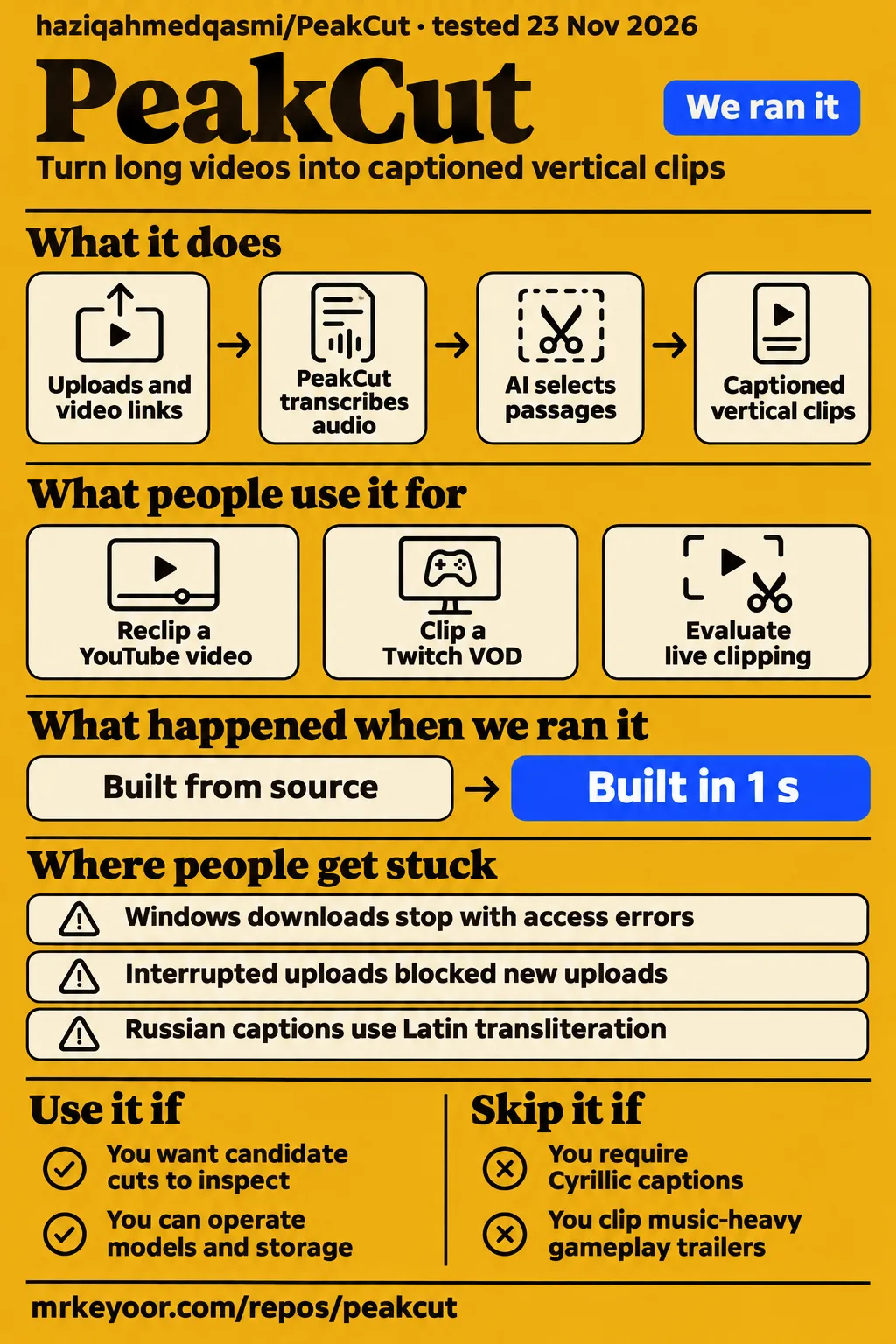
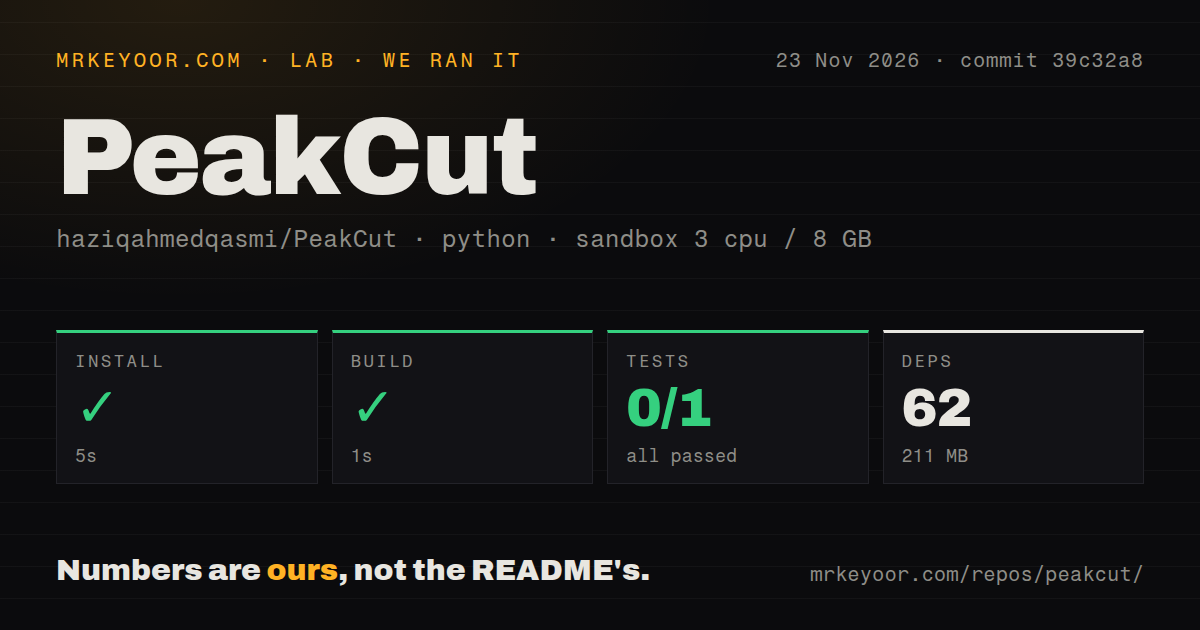
Our run installed PeakCut in 5 seconds and built it in 1 second, but pytest stopped with a collection/setup error. PeakCut suits creators who want candidate cuts from spoken footage and can operate the models, storage and posting configuration themselves. Creators who need Instagram connection through a new Meta app offering only Unified login or Facebook login should choose another workflow: the maintainer says those apps cannot connect through PeakCut's existing flow.
What people use PeakCut for
PeakCut's README describes turning uploads and YouTube, Twitch or Kick links into captioned 9:16 clips on your own computer or server. Its documented workflow transcribes audio, asks AI to select passages and renders the chosen cuts. The README also describes recording a live stream into a rolling buffer. A recorded stream and a broadcast still running therefore enter different parts of the application, even though both can produce vertical clips.
The issue tracker records attempts to download footage, recognize speech, select moments and render captions. These reports separate a finished file from a useful highlight: issue #71 describes rendered clips with missing Russian speech, while issue #16 describes a trailer that produced no selected moments. The outcomes below belong to the named reporters, rather than to our setup run.
| Who and task | Reported outcome |
|---|---|
| 1hebread, processing a roughly five-hour Russian-language Twitch VOD | Changing the speech model enabled Russian recognition, but captions appeared in Latin transliteration instead of Cyrillic. |
| The issue #16 reporter, trying a 2.5-minute gameplay trailer | The discussion describes no selected moments and recommends commentary or streams with talking instead of trailers dominated by music and effects. |
| AngeloMarvs, downloading and reclipping a YouTube video with Gemini connected | One attempt worked, but subsequent attempts encountered Windows access errors and selection by audio levels. |
| Participants in issue #44, trying configured AI selection, including live clipping | The discussion reports loudness fallback; AngeloMarvs later reported corrected captions alongside missing audio and continued loudness selection. |
The presenter of FREE AI Clipping Tool for GTA 6: PeakCut Full Setup & Tutorial reports a clip ready in less than a minute. For choosing footage, issue #16 gives a more specific recommendation: use commentary or a stream with talking. Speech supplies passages for transcript-based selection, while the trailer in that discussion consisted mostly of music and effects and produced no clip-worthy moments.
What happened when we ran it
Our November 23, 2026 source sandbox used commit 39c32a8; installation and build succeeded, while pytest failed during collection. The separate Compose attempt recorded "compose config unreadable" at its safety step. These are two recorded attempts with different outcomes, so the source-step results and Compose failure stay separate in the tables below.
| Sandbox step | Recorded result | Meaning |
|---|---|---|
| Install | Succeeded in 5 seconds; 62 dependencies recorded; 211 MB on disk | Dependency installation completed. |
| Build | Succeeded in 1 second | The recorded build command completed. |
| Tests | Failed with exit 3 in 4 seconds; 0 passed, 0 failed, 1 collection/setup error | Pytest stopped during collection. |
| Repository scan | 111 files, approximately 15,292 source lines, 2 MB checked out | These figures describe the measured checkout. |
| Automation and packaging scan | 0 CI workflow files; Dockerfile, Compose file and tests directory present | The checkout contained packaging and test files. |
The failing log identifies tests/test_ai.py, line 178, calling sys.exit(1 if fails else 0) during import. It then records SystemExit: 0 and INTERNALERROR. Pytest's tail says "1 error in 1.58s", while the enclosing test step took 4 seconds. The exit value inside SystemExit does not turn the enclosing pytest result into a successful test suite.
| Hands-on question | Answer | Verdict | Why |
|---|---|---|---|
| What configuration did the Compose run describe? | The repository's own Docker Compose configuration, with every port bound to 127.0.0.1. | Configuration recorded | The run record names the intended deployment configuration. |
| Did the Compose safety step complete? | No: "compose config unreadable". | Failed | The recorded safety step stopped the attempt. |
| Did teardown complete? | Yes: "teardown: ok". | Completed | The teardown record reports success. |
Where people get stuck: downloads, selection and posting
Issue #13 separates Windows download failures from AI fallback, while issue #20 identifies an Instagram login problem. A download retry concerns getting the source file, model diagnostics concern choosing moments, and platform credentials concern publishing. The maintainer directs the AI problem in #13 to issue #44, giving the two symptoms separate troubleshooting paths rather than treating them as one download failure.
| Symptom | What the discussion says | Suggested action or reported change |
|---|---|---|
| Windows "Access is denied", issue #13 | The maintainer reports temporary failures while saving download progress. | Merged change #65 retries those saves; the maintainer asks users to update and restart. |
| YouTube repeatedly asks to try again, issue #9 | The maintainer identifies YouTube's "confirm you're not a bot" response and a ten-minute retry wait. | Update the downloader, try another network, disable a VPN or proxy, or use an admin-configured cookies file. Uploads and Twitch or Kick links are suggested alternatives. |
| Configured AI falls back to loudness, issue #44 | The maintainer says none of the AI answers arrived. | Update for clearer errors, use Find models, choose a current model and press Save and test. |
| Instagram "Invalid platform app", issue #20 | PeakCut uses Instagram Login with a separate Instagram app ID and secret. | New apps offering only Unified login or Facebook login need a different sign-in flow. |
| Caption rendering fails, issue #11 | kshitijjan identifies an FFmpeg build lacking libass support. | The reported missing component is libass support for the ass subtitle filter. |
AngeloMarvs reported that the initial Windows suggestions did not help before the maintainer described progress-save retries in #65. In issue #44, the maintainer asks for the yellow warning or terminal lines beginning with "AI window", together with the operating system and model name. AngeloMarvs subsequently reported corrected captions but continued loudness selection and missing audio. Those are three separate reported outcomes.
Russian recognition and Cyrillic captions are separate outcomes
1hebread reported Russian speech recognition after changing models, followed by captions written in Latin letters. The issue #71 reply says, "Russian speech is now recognized, but the captions appear in Latin transliteration instead of Cyrillic". The recognition change answered one part of the report while leaving the caption script different from the user's requested Cyrillic output. Inspecting the rendered text therefore reveals a different outcome from checking whether speech was recognized.
The maintainer attributes the Latin output to the bundled Anton, Archivo Black and Poppins fonts, stating that they lack Cyrillic characters. The same reply says real Cyrillic requires a suitable font for each caption style. The README separately documents an Arabic speech-model option with English captions. Spoken language and caption language are distinct choices in the documented workflow, rather than interchangeable descriptions of one language setting.
Interrupted uploads can leave occupied slots
Issue #72 describes interrupted uploads retaining invisible slots for up to six hours. The maintainer says stopping and starting PeakCut clears those reservations immediately. Closing or refreshing the browser tab can leave a reservation on the server after the upload stops. The discussion identifies that retained slot as the reason a user could hit an upload limit even though the dashboard did not show the interrupted uploads.
The maintainer attributes the cleanup change to commit 06bad18: starting another upload clears that user's uploads that have made no progress for 15 minutes. A follow-up tells the reporter to wait 15 minutes and try again, or restart PeakCut to clear reservations immediately. For shared deployments, the README's access instruction is to enable PEAKCUT_ACCOUNTS=1 on servers other people can reach. That instruction stands independently of the upload cleanup change.
Local transcription and hosted selection use different services
PeakCut's README says speech recognition runs on your machine and hosted AI usage is paid directly to the chosen provider. Its provider list includes Ollama and a no-key mode that selects by loudness. These choices affect the selection stage: a hosted chat service processes selection requests, a local model runs on the host, and loudness selection chooses intervals without asking a chat model to judge passages.
The X explanation distinguishes local transcription from sending selection text to a cloud chat provider. The README gives http://127.0.0.1:8765 as the local dashboard address and instructs operators to enable accounts on reachable servers. It also explains that dashboard-saved AI settings take precedence over the corresponding environment-file settings. Changing a provider in .env therefore differs from changing the settings already saved through the dashboard.
PeakCut vs OpusClip and manual editing
PeakCut runs on your host, OpusClip advertises a web application, and Shotcut describes itself as a video editor. Those documented differences support a workflow comparison: operate a clipping application, use a hosted clipping service, or choose and edit cuts yourself. PeakCut's README makes hosted AI charges a separate payment to the provider, so its free software licence does not describe the cost of every configuration.
| Choice | Supported difference | Choose it when |
|---|---|---|
| PeakCut with hosted AI | Runs on your computer or server; AI usage is paid directly to the selected service. | You want to operate the clipping workflow and choose its AI provider. |
| PeakCut with Ollama or loudness selection | The README lists a local model through Ollama and loudness-based selection without a key. | You want one of those selection paths within PeakCut. |
| OpusClip | OpusClip advertises clipping, editing, resizing and publishing through its web application. | You prefer a hosted clipping workflow. |
| Shotcut | Shotcut is a free, open source, cross-platform video editor. | You want to choose the moments and edit the cuts yourself. |
The X discussion of manual editing describes having candidate cuts and captions ready to inspect. It also points out that a loud reaction can lose the context that made the original exchange worth watching. Manual editing puts interval selection at the start of the task; generated candidates move that decision to inspection. For a creator, the practical choice is where to spend that editorial effort.
Outdated claims, corrected
The configuration example's "no titles" description needs the later issue #27 update about user-written text and hashtags. The example says no-key clips are selected by loudness with no titles, while the maintainer reports merged support for custom big text, descriptions and hashtags without AI. Automatically generated titles and metadata a person supplies are different features. The same issue describes Write again with AI in #31 as under review.
The YouTube overview Self-Host AI Video Clipping describes output as entirely on the user's hardware. The provider choice changes that description: transcription runs locally, while hosted highlight selection sends selection text to a provider. Similarly, the X promotion says PeakCut does the same thing as OpusClip for free. PeakCut's README instead describes free software with AI usage paid directly to the selected service.
The tutorial The Free AI Clipping Tool Nobody Talks About reassures viewers about copyright strikes from large creators. The project's own instruction is narrower: clip videos you made or have permission to use, and take responsibility for download, clipping and posting rights. A tutorial's reassurance is not permission from the owner of a recording, and the README also directs users to follow platform terms.
FAQ
PeakCut turns long videos and live streams into captioned vertical clips, according to its README. Its documented inputs include uploaded files and YouTube, Twitch and Kick links, with 9:16 output and word-by-word captions. The questions below cover that workflow, the repository's identity, licensing and the settings or error messages named in recurring issue reports.
What is PeakCut, and what does its AI clipping workflow do?
PeakCut transcribes audio, asks AI to select moments and renders captioned clips, according to the README's workflow description. It accepts uploaded files and supported video links, and its documented output is vertical 9:16 video. The README also lists loudness selection without an AI key, so the selection method depends on the configuration rather than the input link alone.
Where is Haziq Qasmi's official PeakCut GitHub repository?
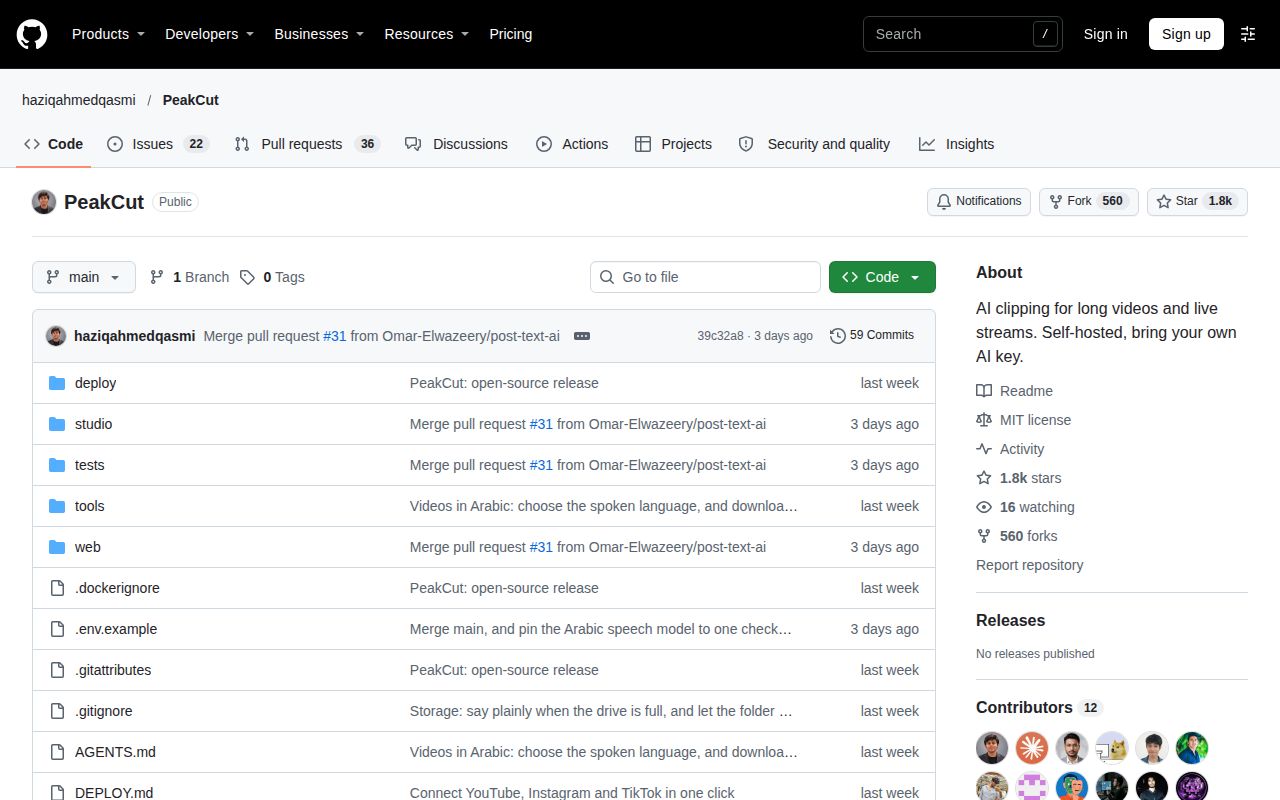
The repository reviewed here is haziqahmedqasmi/PeakCut on GitHub. Its README describes the application that accepts video links and uploads, performs transcription and renders vertical clips. The maintainer's issue #20 reply asks users to install from that repository and says comment-linked forks have not been reviewed there. The owner and repository name identify the application discussed throughout this review.
What license does PeakCut use?
PeakCut uses the MIT licence, as recorded in the repository metadata. Its README separately identifies NVIDIA's Parakeet English and FastConformer Arabic speech models as released under Creative Commons Attribution 4.0, or CC-BY-4.0. The README's architecture description names those models and their licence. The application licence and the model licences therefore need separate entries when documenting this installation's dependencies.
Do I need permission to clip and repost another creator's videos?
The README instructs users to clip their own videos or material they have permission to use. It assigns responsibility for download, clipping and posting rights to the user. It also instructs users to follow the terms of the sites involved. A supported download link describes an accepted input; permission concerns the particular recording and its owner.
Can PeakCut turn a pasted link into a vertical 9:16 clip?
The README documents YouTube, Twitch and Kick links with 9:16 output and word-by-word captions. Its input description also includes direct file uploads. For selecting footage, the maintainer's issue #16 reply recommends commentary or streams with talking. The reported 2.5-minute gameplay trailer contained mostly music and effects and produced no selected moments.
How does PeakCut compare with OpusClip on price and hosting?
PeakCut is free software you host, and its README says hosted AI usage is paid to your chosen provider. OpusClip describes a web application for creating and publishing videos. PeakCut puts installation and provider configuration on the operator; OpusClip presents a hosted interface. Those operating arrangements, rather than the promotional subscription comparisons, are the basis of the comparison table above.
Does PeakCut keep processing local when I choose a cloud AI provider?
Cloud highlight selection sends the text used for selection to that provider, according to the X explanation of PeakCut's data flow. The README separately says speech recognition runs locally and lists Ollama as a local model option. Choosing loudness selection changes the selection method again: it picks clips without sending a chat model a request to judge passages.
Can PeakCut run without an AI API key?
Yes: the README says clips are selected by loudness when no AI key is configured, and it also lists Ollama for a local model. Those options appear alongside the hosted providers in the README. The later issue #27 update reports custom big text, descriptions and hashtags without AI, distinguishing user-written metadata from AI-generated titles.
Why are YouTube links failing or asking me to try again later?
The issue #9 maintainer reply identifies YouTube's bot-check refusal and says PeakCut waits ten minutes before retrying. Suggested responses include updating, changing networks, disabling a VPN or proxy, and an admin-provided cookies file. The same reply offers file upload or Twitch and Kick links in the meantime. This error occurs while acquiring the source video, before selection and rendering.
How do I fix Windows Access is denied errors during downloads?
The issue #13 maintainer update says merged change #65 retries progress saves when Windows briefly refuses a write. The requested action is to update and restart PeakCut. AngeloMarvs had reported continued errors after earlier suggestions about the project path and data folder. The later progress-save explanation names the targeted change, while the AI-selection complaint is directed to issue #44.
Why does PeakCut pick clips by loudness even after I connect Gemini or Groq?
The issue #44 maintainer says the fallback means none of the AI answers arrived. The reply recommends updating, choosing a current model with Find models and pressing Save and test. For continued fallback, it requests the yellow message or terminal lines starting with "AI window", plus the operating system and model name. A saved provider setting and a returned selection answer are separate events.
Why are my captions wrong or in the wrong language?
The issue #44 maintainer describes the built-in speech model as English-only, while issue #71 records a Russian-model workaround. 1hebread reported recognized Russian speech with Latin-transliterated captions after the change. The maintainer then identified the bundled fonts' Cyrillic coverage as a separate issue. A useful report includes the spoken language, selected speech model and actual caption text, as issue #71 does.
What we have not tested yet
Our measurements cover repository setup steps, a pytest collection failure and a stopped Compose attempt, rather than a completed video-to-post workflow. The configured image label was ghcr.io/astral-sh/uv:python3.12-bookworm; actual runtime and operating-system versions require toolchain logs. The 8 GB allocation is not a measured minimum requirement. The 5-second installation and 1-second build are repository-step timings, and the tutorial's under-one-minute clip report is not a matched processing benchmark.
The evaluation does not include clipping quality, live output, caption accuracy, Ollama selection, hosted AI spending, concurrent-user throughput or platform publishing. The documented test runner has no result here. There are no screenshot records or known-answer clipping outputs from the Compose attempt. The user-reported Windows retry change, upload cleanup, Russian workaround and libass diagnosis were not reproduced in our sandbox; the missing-audio discussion contains no confirmed fix, and the Windows and rendering threads contain no successful retry establishing resolution.
The reviewed README passages do not establish default network binding, password hashing, session-token hashing, queue rotation, resource-based waiting or default upload, duration and storage limits. They support the local dashboard address and the instruction to enable accounts on reachable servers. There is no security-audit result, matched PeakCut-versus-OpusClip quality test, or confirmed relationship connecting this repository to similarly named commercial products. These boundaries also apply to the review's unassessed ratings.
A useful next evaluation would use a video the operator owns and a passage already identified as worth clipping. Recording its duration, model, selected interval, captions, audio and export would make the outcome inspectable; posting would be a separate recorded step. PeakCut is a reasonable candidate for operators prepared to conduct that evaluation on spoken footage. It is the wrong immediate choice for creators whose required Instagram connection uses the unsupported new-Meta-app login flow.