What our run establishes
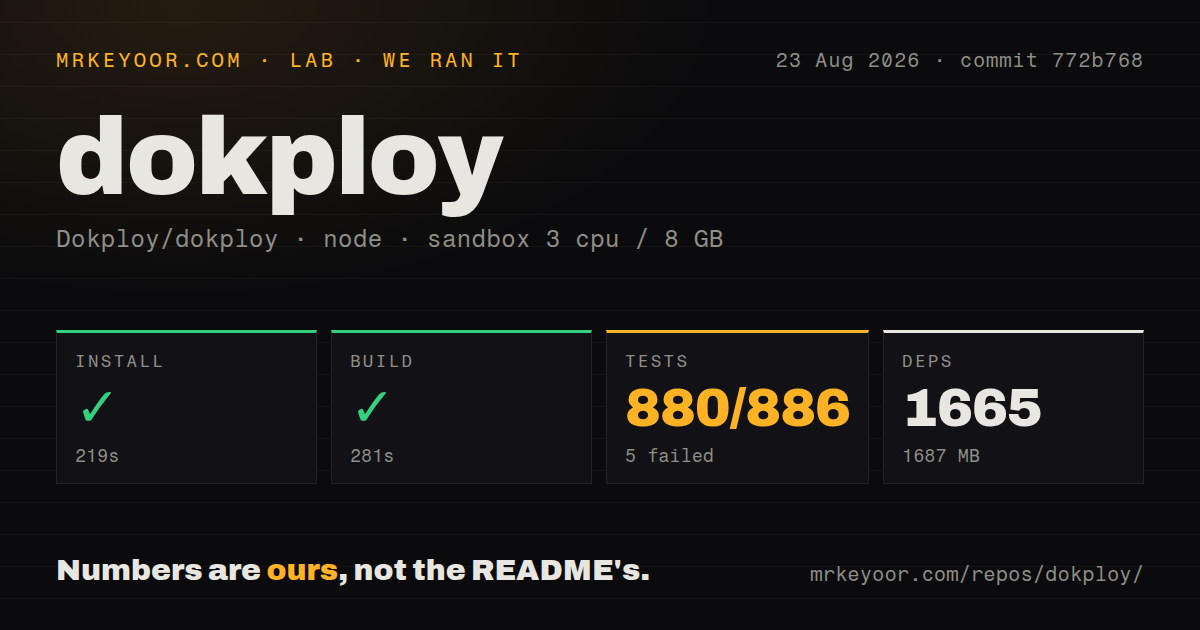
Our run on 2026-08-23 tested commit 772b768, whose test output identifies the package as v0.30.2. Installation and the application build completed in our sandbox. The test command exited with status 1. A successful application build does not establish that an application was deployed successfully through Dokploy.
The harness stores command outcomes separately from parsed test counts. Its attached stored parser summaries record passed: 880; failed: 5; skipped: 1; total: 886. These are recorded summaries, not a verified inventory of unique tests across the repository. The skipped entry is not a failure.
The raw tail names two failing cases in __test__/deploy/application.real.test.ts: should verify REAL commit info extraction and should REALLY build with Dockerfile. Both report command-execution errors. The displayed commands include cloning the examples repository and attempting a Nixpacks or Docker build, with output redirected to separate log files. The supplied tail does not contain enough of those logs to identify the failing subprocess or assign a root cause. These named cases explain part of the observed failure without replacing the attached aggregate summary.
The test runner's footer reports a duration of 82.26 seconds; the harness records 125 seconds for the test step. They are different timing scopes. This review uses the attached harness duration for the command outcome.
See how MrKeyoor records sandbox results for provenance and general limits. That methodology page was retrieved in October 2026; it does not establish which methodology revision governed this August run. No new execution accompanies this correction.
What Dokploy would take over
Dokploy supports Docker Compose and uses Docker Swarm for multi-node application deployments. Its commit-pinned README also describes database management, external database backups, Traefik integration, resource monitoring and remote-server deployment. These are documented capabilities, not successful workload checks from our sandbox.
That combination suits an operator who wants application deployment and routine infrastructure tasks in one panel. Docker Swarm and Traefik remain part of the system the operator must understand. The panel's documented scope is a reason to evaluate it, while the failed test command is a reason to reproduce the relevant deployment paths before migration.
A VPS installation has separate requirements
The current installation guide requires available ports 80, 443 and 3000 and says installation will fail if those ports are occupied. It specifies at least 2 GB RAM and 30 GB disk space. Its installer can install Docker when Docker is absent.
After installation, the operator creates an administrator account through port 3000 and configures HTTPS. The guide recommends verifying domain access before removing direct IP-and-port access. It also explains that Docker Swarm's default service discovery needs kernel IPVS support and documents DNSRR configuration for systems without it. These requirements belong in a deployment pilot; a source build does not exercise them.
For source development, use the current contributing guide rather than treating our sandbox as a complete development recipe. That guide includes environment-file setup, Docker services and separate setup scripts. It also identifies additional build tools needed for particular application deployment methods.
Compare deployment workflows, not unsupported rankings
Coolify documents deployment of applications, databases and services on servers reachable over SSH. Compare Coolify when you want another self-hosted deployment platform and need to evaluate its server-management and deployment workflow against Dokploy's. This is a replacement-platform comparison; our run supplies no relative performance or reliability result.
CapRover documents a web GUI and CLI, with Docker Swarm for clustering and nginx for load balancing. Compare CapRover when those interfaces and that proxy stack fit your operating preferences. Its README does not establish that it requires less operational work than Dokploy, so this review makes no such ranking.
What remains unassessed
We did not validate a completed VPS installation, successful workload deployment, multi-node networking, HTTPS issuance or backup restoration. The supplied records also do not establish runtime throughput or production reliability.
The audit field is null. Scan coverage is unknown, and there is no advisory result to interpret as a security assessment. The supplied primary extracts do not verify the published page's license interpretation, routing issue, backup issue or release-activity claims; this correction does not rely on them.
How to use the ratings
For assessed dimensions, 1 means substantial demonstrated obstacles, 2 means significant gaps, 3 means a usable documented path with material operator work, 4 means a thorough documented path with limited unresolved gaps, and 5 requires strong corroborating evidence across the dimension. These are editorial judgments, not benchmarks. A missing evidence base receives no score.
Setup ease is 3 because the documented installer still requires server preparation, administrator setup and HTTPS configuration. Documentation is 4 because the supplied installation and contribution guides explain prerequisites, configuration steps and specific networking constraints. Community and maturity remain unassessed: contribution instructions and a single sandbox run cannot establish adoption, support responsiveness or operational reliability.
Before moving workloads, reproduce the deployment method you intend to use, verify domain routing and complete a backup-and-restore drill. Those checks address the operational questions this run leaves open.