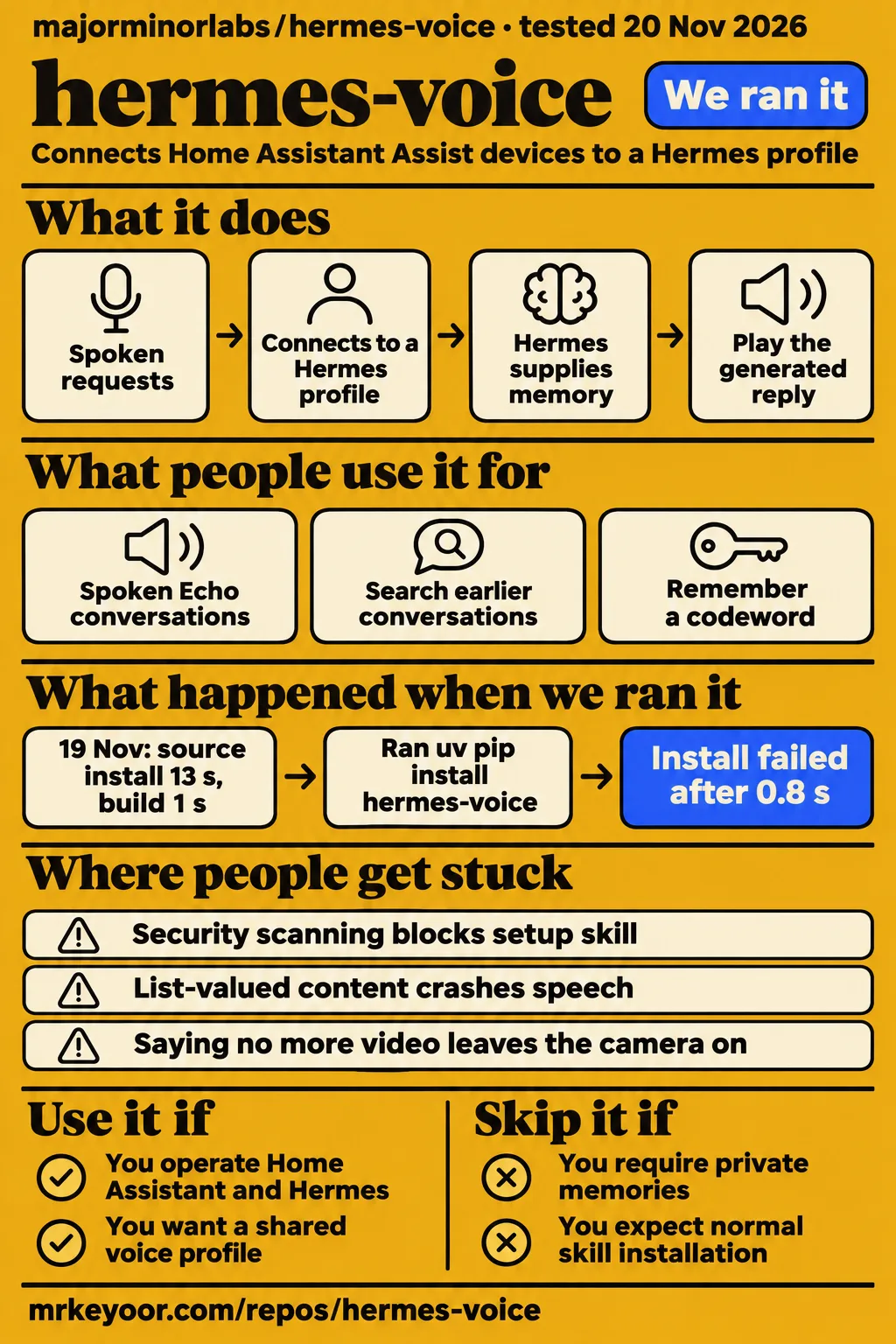
Our November 19 sandbox installed majorminorlabs/hermes-voice successfully, then stopped during test setup on a missing homeassistant import. The project connects Home Assistant Assist to a Hermes profile, including its memory and permitted tools. Use it if you already operate both systems and want that connection through a room device. Skip it if each speaker needs private memories, because the documented memory boundary is the profile.
What people use hermes-voice for
The project documents spoken Echo conversations, cross-conversation recall and persistent profile memory. A room device provides access, transcript search retrieves earlier conversations, and saved memory carries facts into later ones. Starting another conversation does not create another person's profile. The reports below identify who obtained each result and distinguish the project's documented experiments from a user's wake-word adjustment and our installation measurements.
| Who used it | What they did | What happened |
|---|---|---|
| Project author, summarized by HotRepo | Connected an Echo Dot 2nd gen through Home Assistant Assist to a Hermes profile | HotRepo attributes end-to-end testing and about 3.5 seconds per plain turn to the README in its Hermes Voice overview. |
| Project author, in the troubleshooting guide | Asked a new conversation for a codeword from another conversation | The guide reports retrieval through session_search in about 11 seconds. |
| Project author, in the troubleshooting guide | Asked the profile to remember a codeword | The codeword was written to memories/USER.md and became visible to later conversations. |
| Reporter of issue #6 | Tuned Hey Hermes on a flashed Echo Dot 2 | The reporter describes frequent misses at 0.92 and reliable responses after lowering the threshold to 0.70. |
The codeword experiment separates conversation continuity from personal privacy. A fresh conversation retrieved information from another conversation through the profile's transcript-search tool. Asking the profile to remember a fact used another mechanism: the fact entered its persistent memory file. Both behaviors appear in the project's troubleshooting guide. For a personal assistant, that continuity may be useful; for a shared kitchen device, everyone is speaking into the same memory boundary.
What happened when we ran it
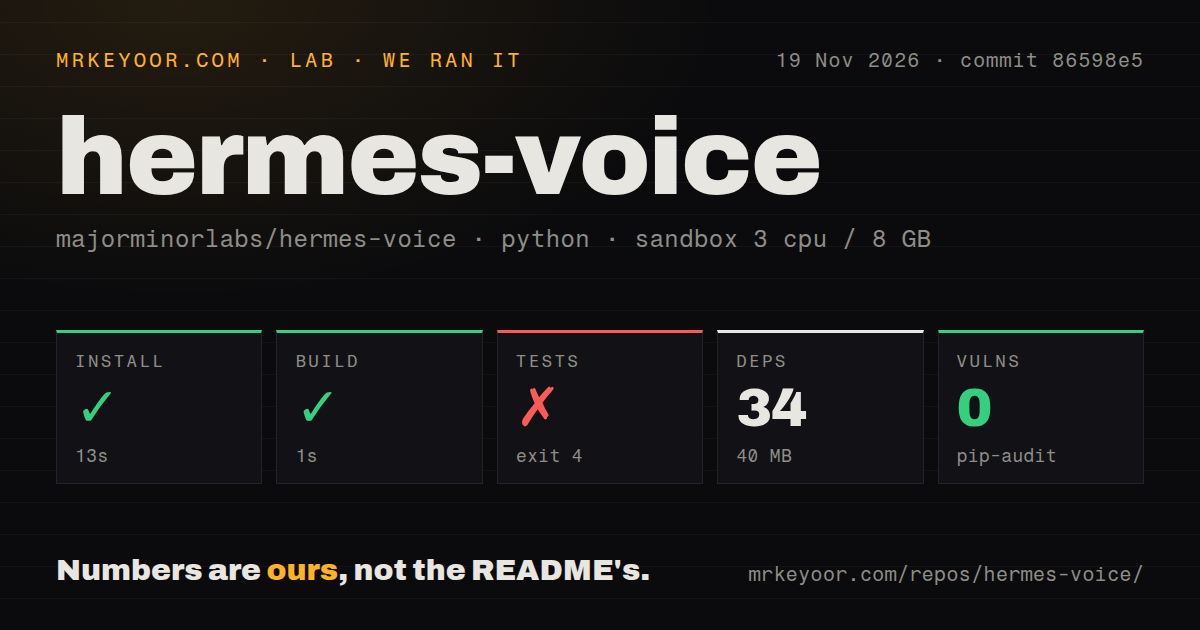
Our November 19 run at commit 86598e5 completed installation in 13 seconds and the build in 1 second, then the test command exited 4 after 6 seconds. Installation recorded 34 dependencies and 40 MB on disk. These figures come from our source-checkout run. The test loader stopped during setup, leaving three separate outcomes: a completed installation, a completed build and a failed test command.
| Question | Answer | Verdict | Why |
|---|---|---|---|
| Did installation complete? | Yes, in 13 seconds; 34 dependencies; 40 MB on disk | Completed | The recorded installation step succeeded. |
| Did the build complete? | Yes, in 1 second | Completed | The recorded build step succeeded. |
| Did tests run successfully? | No; exit 4 after 6 seconds | Failed during setup | tests/conftest.py could not import homeassistant. |
| What did pip-audit report? | 0 known vulnerabilities | Recorded audit result | The audit covered 34 recorded packages. |
| What checkout was inspected? | 173 files, about 26,162 source lines, 2.5 MB | Repository measurement | These figures describe the source checkout. |
| What automation files were found? | 0 CI workflow files, no Dockerfile, tests directory present | Repository scan result | The test directory existed despite the loader failure. |
| Did the November 20 registry installation complete? | Clone: 1 second. Installation: failed in 0.8 seconds, exit 1 | Stopped at install | uv pip install hermes-voice could not resolve the package. |
| Did the November 20 teardown complete? | Yes | Completed | The teardown record says ok. |
The loader reached tests/conftest.py:7, which imports HomeAssistant from homeassistant.core, and returned ModuleNotFoundError: No module named 'homeassistant' in the recorded failing log. The sandbox configuration was 3 CPUs, 8 GB RAM and image label ghcr.io/astral-sh/uv:python3.12-bookworm. The repository's development instructions describe a different test environment: tests/run.sh uses a pinned Home Assistant 2026.10.4 image.
The November 20 registry attempt identifies commit 86598e5c663c, a fresh unprivileged container with 2 CPUs and 4 GB RAM, no published ports and no secrets. Its clone step took 1 second. The installation output identifies Python 3.12.12 at /work/venv and records failure in 0.8 seconds with exit 1. Although the run summary says installation from PyPI succeeded, the step output says the package was unavailable.
That registry failure ended the attempt at installation, as the install-failed finding records, and teardown completed successfully. The command was uv pip install hermes-voice; the README's manual routes are HACS and a release archive. The command identifies exactly which route failed, while the README describes installing the integration into Home Assistant and selecting its conversation entity in an Assist pipeline.
Where people get stuck: a greeting can hide a failed tool turn
Issue #7 reports that Home Assistant 2026.9.2 handles simple answers but crashes on streamed tool turns because llm.ToolResult is missing. The satellite can say its working phrase before the failure. The report also says the manifest declares no Home Assistant minimum version, allowing the integration to load on that older core. The version-failure report requests an enforced minimum; the README requires Home Assistant 2026.10 or newer.
| Symptom | Reported finding | Workaround or status |
|---|---|---|
| Setup skill refuses installation, including --force | Issue #4 reports the scanner blocking the advertised identifier | The README directs users to manual installation; the author's review mechanism is a draft upstream PR. Issue #4. |
| "One moment" without a final answer | Issue #7 reports missing llm.ToolResult on Home Assistant 2026.9.2 | The documented requirement is Home Assistant 2026.10+. Issue #7. |
| Standalone gateway repeatedly restarts | Issue #5 describes Hermes v0.23, exit status 75 and the host gateway still serving the profile | The reporter sent rescan-profiles to the host gateway; the standalone service then started. Waiting up to 30 seconds had failed. Issue #5. |
| Gateway reply raises a raw exception | Issue #9 describes malformed /models JSON and streaming choices | The open report requests response-shape validation and typed Hermes errors. Parsing report. |
| List-valued content crashes speech | Issue #13 reports AttributeError in streaming and non-streaming reply paths | The requested behavior joins text parts and retains a typed error for replies without text. Content-parts report. |
| Token-limited streamed answer becomes a fallback | Issue #2 reports discarded partial text when finish_reason is length | The issue is closed. Token-limit report. |
Issues #9 and #13 describe specific reply shapes behind the raw exceptions. In issue #9, a list returned by /models raises AttributeError, while an object-valued streaming choices raises KeyError: 0. Issue #13 describes list-valued text reaching string methods in both reply paths. These attributed reports explain why hearing the working phrase and receiving a completed spoken answer are separate outcomes in the request path.
A voice profile shares memory and the powers you give it
The connected Hermes profile supplies its personality, long-term memory and permitted tools, according to the README's description of profile behavior. Review those permissions before putting the profile on a shared device. The README distinguishes safe, home and full tool choices; full includes terminal, files and code. Choosing the voice profile therefore determines which of those capabilities spoken requests can reach.
The README's v0.1 description says the integration gives Hermes no Home Assistant device-control tools automatically. Device control instead requires giving the profile access to Home Assistant's MCP server. These are documented setup choices. A device connected to the profile and a profile equipped to control Home Assistant are separate pieces of configuration, with the latter depending on the tools made available to Hermes.
The troubleshooting guide documents disabling session_search for unwanted transcript recall and editing USER.md and MEMORY.md for persistent facts. SOUL.md controls what the profile is told to remember. The guide's codeword experiments distinguish those two routes: one retrieves an earlier transcript, while the other writes a fact into long-term memory. Review both settings when the same profile will answer several household members.
Issue #15 reports that saying "no more video" leaves the camera active because command processing strips the leading "no" before matching the off command. The report identifies "stop video" as a working alternative and requests preserving the longer phrase. The camera-command report gives a concrete parser result: parse_command("No more video") returns None instead of "off", sending the words to Hermes while video mode stays on.
Check the Echo's firmware before you buy one
An Amazon firmware update can block unlocking an Echo, and a factory reset leaves the installed firmware in place, according to the README. Its buying advice is to obtain the model label and full software version, then compare the installed build with the relevant model guide. The Echo compatibility section distinguishes installed builds from target builds that a guide may install after unlocking.
The README gives a concrete example: Echo Show 5 1st gen model H23K37 worked on build 8149, while Fire OS 6575.1, NS65751, build 8848 blocks the guide's unlock. For Echo Dot 3rd gen it names D9N29T, excluding refresh model C78MP8 and clock model 36EBT3. Those model-specific details give a used-device buyer identifiers to request from the seller before choosing a unit.
The current README reports end-to-end testing on an Echo Dot 2nd gen and an Echo Show 5 1st gen with Home Assistant in Docker on macOS. It records a stalled Dot unlock requiring a hardware short, and a Show unlock that reported success while leaving the device locked until a rerun. Flashing can brick an Echo, as the device notes state. The licence section separately distinguishes MIT-licensed code from the bundled wake-word model's non-commercial terms.
hermes-voice vs upstream voice mode, GPT-Live and LiveKit projects
majorminorlabs/hermes-voice connects an Assist device to a Hermes profile, while upstream Hermes documents voice interfaces for CLI, Telegram and Discord. Another repository named hermes-voice uses a self-hosted LiveKit server and a phone or web client. Those projects answer different interface questions. Including the repository owner in the comparison distinguishes the Home Assistant integration from the LiveKit project and from voice features in Hermes Agent itself.
| Route | Interface or requested use | Evidence |
|---|---|---|
| majorminorlabs/hermes-voice | A Home Assistant Assist device connected to a Hermes profile | The project README describes the integration. |
| NousResearch/hermes-agent voice mode | CLI, Telegram or Discord voice use | The upstream voice guide names those interfaces. |
| GPT-Live conversation | Support requested for this integration, for continuous full-duplex conversation and spoken progress | Issue #1 requests GPT-Live support. |
| rahulsethi/hermes-voice | A self-hosted LiveKit server with a phone or web client | Its README describes public and private local-only lanes. |
| Parakeet through sherpa-onnx versus faster-whisper | Recognition settings within the documented speech setup | The author reports 0.25 seconds versus about 2.3 seconds for the same three-second clip on an M1 Max in Docker. |
Issue #1 requests GPT-Live support for a continuously running, full-duplex conversation between the user and Hermes, including acknowledgments and spoken progress while work continues. The GPT-Live request describes a different interaction from streaming a generated reply through Home Assistant. For readers choosing among the named repositories, the practical distinction is the desired interface: an Assist satellite, a terminal or messaging client, or a phone and browser connected through LiveKit.
What the other reviews get wrong
HotRepo recommends the setup-skill installation path without mentioning the scanner barrier, while the current README explicitly says installation is blocked. HotRepo also says short fallback lines replace raw error text, whereas issues #9 and #13 describe response-parsing failures that raise raw exceptions. Its Hermes Voice overview therefore needs both the current quick-start warning and the attributed parsing reports to describe those paths accurately.
Issue #4 distinguishes the original screenshot's 27 findings from later scanner observations. Those observations are separate counts. The maintainer describes a draft upstream --review implementation that displays the scan and package, requires confirmation of the full package SHA-256 and refuses changed bytes. The maintainer's response says normal installation and --force retain their existing behavior; the README directs users to manual installation.
Outdated claims, corrected
The upstream Hermes guide says the all extra excludes voice and messaging extras, correcting older guidance that labelled it "Everything." It also describes a separately managed NeuTTS command provider as needing its own supported Python environment. The dependency correction is specific: NeuTTS requires Python below 3.14 while the Hermes runtime requires Python 3.14. These upstream setup instructions concern Hermes Agent, rather than the HACS or release installation of majorminorlabs' integration.
The separate handnewb/hermes-voice project has a verification document recording real-hardware downloads, Piper synthesis and a functional text-to-speech pipeline. That qualifies its README's blanket statement that engines and downloads had never run on real hardware. Its verification document describes handnewb's local microphone project. Similarly, the Livetalk post describes Hermes Desktop, so its interruption and spoken file-request examples belong to that system rather than this Home Assistant integration.
FAQ
Hermes blocks the advertised setup skill through its security scanner, and the current README directs users to manual installation. That answers the installation question raised in issue #4. The questions below also cover wake-word selection, a user's threshold adjustment, session continuity and speech playback. Each concerns a different stage of the voice path, with operational details in the project's troubleshooting guide.
Why does Hermes refuse to install the quick-start setup skill, even with --force?
Issue #4 reports scanner refusal for majorminorlabs/hermes-voice/skill/hermes-voice-setup, including with --force. The maintainer describes a draft review mechanism requiring explicit confirmation of the package hash and preserving the scanner verdict. The README directs users to HACS or a release archive, followed by a Home Assistant restart, integration configuration and selection of the conversation entity in the Assist pipeline.
What wake-word threshold makes Hey Hermes respond reliably on an Echo Dot 2?
The reporter of issue #6 found 0.70 reliable after frequent missed activations at the default 0.92. The report concerns a flashed Echo Dot 2 using the microWakeWord engine and the bundled Hey Hermes model. Its threshold adjustment is made through the Echo's settings page, under the wake-word model's threshold option. The two values describe that reporter's before-and-after result on the named device.
Why did the Echo stop responding after I uploaded the Hey Hermes model?
Uploading the model removes Alexa and leaves the Echo's wake-word slot empty, according to the troubleshooting guide. Select Hey Hermes in the Echo's Home Assistant wake-word entity to activate the replacement. That documented configuration step addresses a different symptom from issue #6: an empty selection needs a selected model before changing that model's recognition threshold can affect activation.
Why does the conversation forget its context after a few minutes?
Home Assistant ends an Assist conversation after five minutes without a turn; in per_conversation mode, the next turn starts another Hermes session. The guide recommends per_device with idle_reset_minutes for longer continuity. The README gives a default idle reset of 30 minutes and says the device session's window state survives restarts. The session settings govern conversation continuity, while the profile's long-term memory persists separately.
Why does the device hear me but play no spoken reply?
The troubleshooting guide records Home Assistant advertising a Docker-container address that the device could not reach to download generated speech. Set Home Assistant's internal URL to the host's reachable LAN address, through its network settings or the documented speech setup option. The audio-download example explains the two-stage outcome: speech recognition succeeds, but the device needs a reachable URL to download and play the generated reply.
How can I reduce the silence before an answer?
Streamed replies require streaming to be enabled and a compatible speech engine; the guide names Piper through Wyoming. It also recommends lower reasoning effort and fewer tools for the voice profile. These latency-related settings affect different stages before speech begins. The README describes a working phrase for tool turns and allows that phrase to be disabled with an empty value in the integration options.
What we have not tested yet
Our sandbox results contain no successful spoken conversation, microphone capture, wake-word run, audio playback or device-latency measurement. We did not reproduce the documented Home Assistant installation route or its pinned test environment. The image label alone identifies no actual runtime version, and the missing-import log gives no cause for the package's absence. The November 20 registry result concerns its named command, rather than HACS or release installation.
The threshold report includes no false-activation comparison, and our work adds no measurements across rooms, speakers, accents or languages. Camera shutdown on hardware, simultaneous devices, sustained gateway operation, provider billing and rate-limit behavior also fall outside our measurements. The recognition timings and Echo results belong to their authors. Issue #2's closed status identifies no shipped fix in its readable account, and the draft scanner-review proposal supplies no generally released installation fix.
The current README reports testing on two Echo models in one home; it labels other Echo models and other Assist satellites as untested by the project. We found no attributable Reddit deployment account for this repository in the research reviewed here. The sampled Desktop posts, Apollo videos and Bilibili results establish no community consensus about this integration, and handnewb's verification document leaves open-microphone operation untested for that separate project.
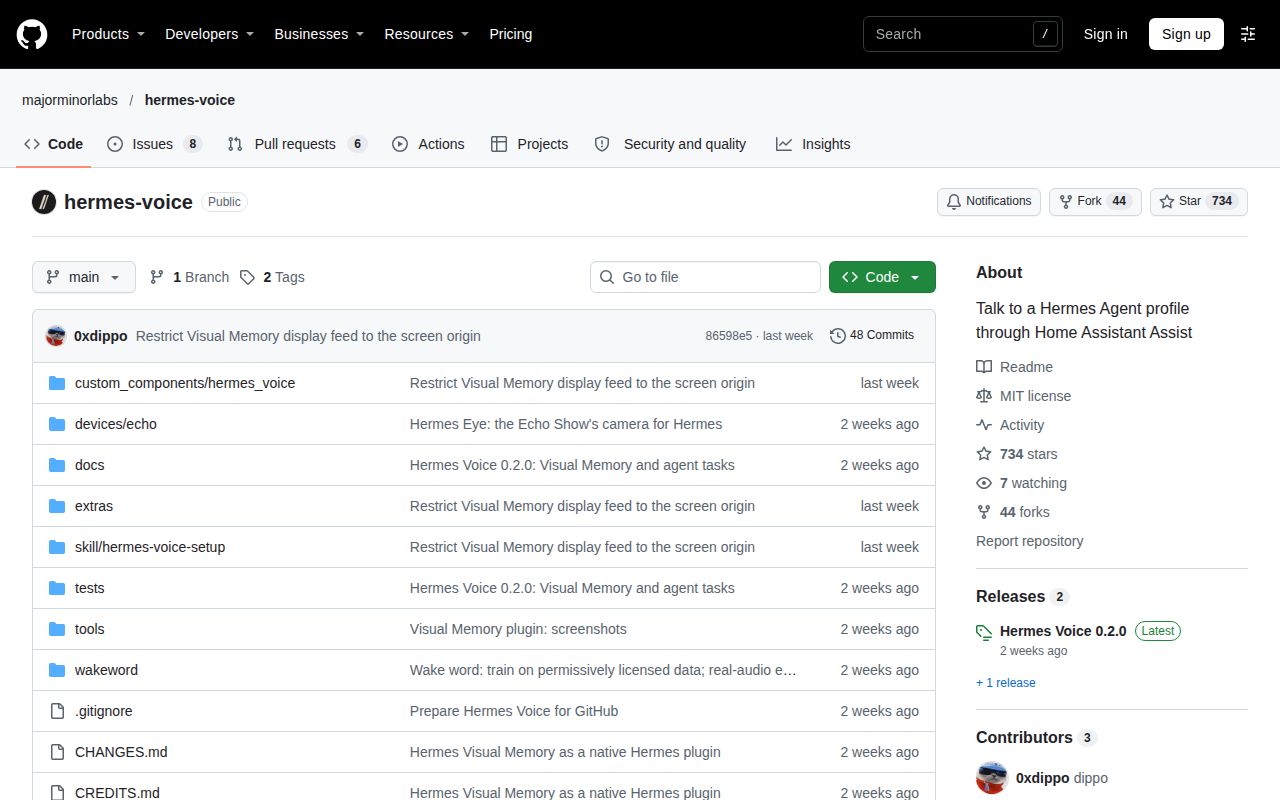
GitHub's November 22 metadata records 733 stars, 14 open issues and PRs combined, and a November 11 last push; the latest-release data identifies v0.2.0, published November 8. Those activity figures provide no support guarantee. This revision is a text-and-evidence review: rendered layout, resolved links, related links, recommendation modules and other page-level behavior fall outside it. For a shared household device, the next practical check is whether the intended profile's tools and recall behavior match what every speaker should be able to access.