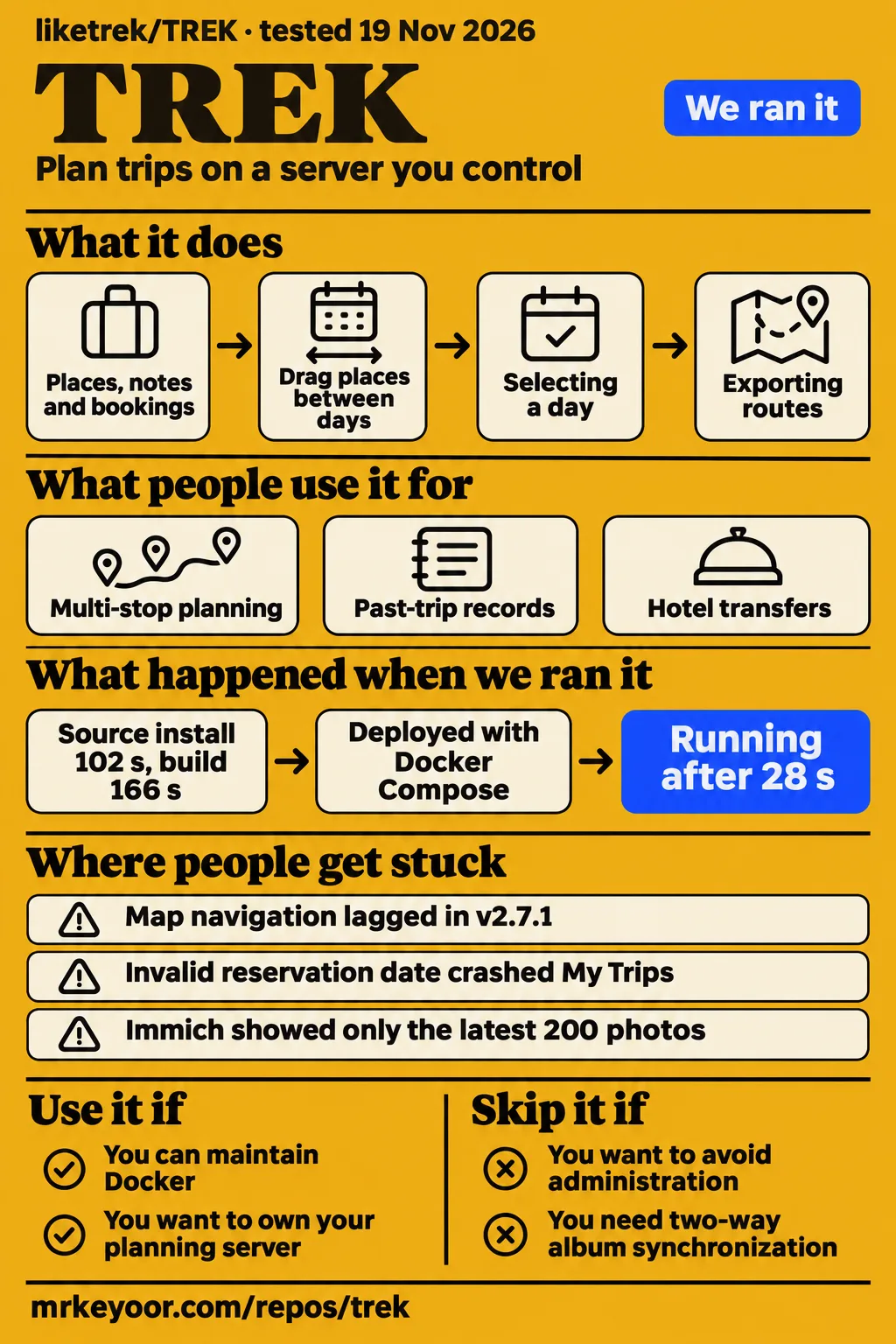

Our lab deployed liketrek/TREK in 28 seconds, then the planning recipe stopped with "no runnable adapter yet for recipe generic". Use TREK if you want to own your travel-planning server and can maintain Docker and its integrations. Choose another service if you want to avoid that administration. Server ownership is the practical reason to consider this application alongside an existing travel service.
TREK combines day plans, bookings, shared costs and maps in a self-hosted application, according to its README. Historical issue discussions describe hotel-transfer controls, photo credentials, country-counting rules and upgrades with different failure modes. Those reports belong to the versions and branches their authors discussed. Our November 19 measurements describe a source checkout and a separate Docker deployment, while the current README describes the project's documented features.
What people use TREK for
Users describe multi-stop planning, past-trip records, hotel transfers and Immich photo browsing in TREK. Their reports connect those uses to specific outcomes: map lag, country attribution, active-day selection and the number of photos displayed. The examples below identify who reported each outcome, so a reader can distinguish a traveller's experience from a maintainer's development test or our deployment measurements.
| Who used it | What they did | What happened |
|---|---|---|
| The reporter of issue #218 | Hosted TREK in Kubernetes using its Helm chart and planned around 60 places | Map navigation, sidebar scrolling and drag and drop lagged; small trips behaved better. |
| MikeDabrowski | Added a past Sri Lanka trip | 25 of 36 places appeared as India; the discussion identified missing Sri Lanka definitions. |
| steffenrapp | Imported AirTrail flights and tracked visited countries | A separately saved airport put its layover country on Atlas. |
| mikevanes | Planned hotel-to-hotel transfer days on mobile | Selecting the correct day made routing work, but active-day selection felt unintuitive and travel time was missing. |
| entropyst72 | Connected Immich and browsed photos | Reported seeing only the latest 200 photos. |
The README documents dragging places, notes and bookings between days, importing map lists and exporting routes. It describes searching TREK Places and OpenStreetMap without a key, with Google Places and Amap as credential-based choices. For a group planning a real itinerary, an acceptance trip should include hotels and assigned days as well as pins: selecting a day exposed the hotel-transfer route for one participant in issue #1297.
What happened when we ran it
Our Docker deployment succeeded in 28 seconds, and the health step succeeded in 0.2 seconds. Our November 19, 2026 run used commit 2bcfc1bfcbbf and the project's Docker Compose, with every port bound to 127.0.0.1. The functional recipe then failed because the harness had no runnable adapter for recipe generic. The recorded sequence is deployment, health, then the adapter error.
| Docker-run step | Recorded result | Verdict | Why |
|---|---|---|---|
| Deploy | 28 seconds | Success | The deploy step recorded ok. |
| Health | 0.2 seconds | Success | The health step recorded ok. |
| Functional recipe | FAILED; no runnable adapter yet for recipe generic | Harness failure | The adapter needed to carry out the recipe was absent. |
| Idle memory | 499 MiB for TREK, 499 MiB total | Recorded sample | The entry labels this reading idle. |
| Later memory sample | 499 MiB for TREK, 499 MiB total | Recorded sample | The entry labels it after the questions, despite the recipe failure. |
| Teardown | ok | Success | Cleanup recorded ok. |
The harness recorded ollama-connect as ok. Its model-pull output included digest checks, 4.7 GB/4.7 GB, 122 MB/s and 0s. These entries describe harness activity. The README lists the AI assistant as an addon that ships off and describes several provider choices; the model-pull output therefore belongs alongside the deployment log rather than the itinerary outcomes in the user reports.
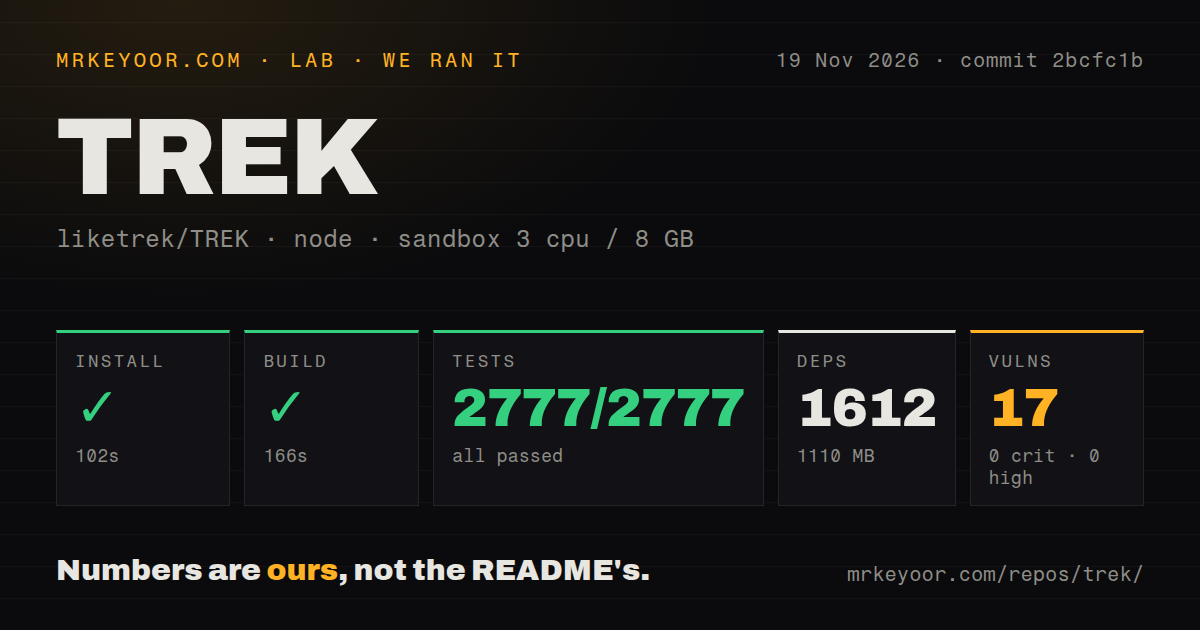
Our source run at commit 2bcfc1b recorded a sandbox configuration of 3 CPUs, 8 GB RAM and image label lab-node:22. The checkout contained 14,100 files, approximately 2,268,879 source lines and 310.4 MB. Installation recorded 1,612 dependencies and 1,110 MB on disk. These figures describe the developer checkout and source commands, separate from the Docker memory readings.
| Source-run measurement | Result |
|---|---|
| npm installation | 102 seconds, succeeded |
| Build | 166 seconds, succeeded |
| Tests | Timed out at 900 seconds |
| Vitest results recorded | 2,777 passed, zero failed of 2,777 |
| npm audit | 17 moderate vulnerabilities, zero critical, high or low |
| Repository signals | 14 CI workflow files, Dockerfile, Compose file, workspace monorepo |
The final log lines include successful login-cookie, password, registration, ski-tour, booking-import and budget tests. The scanner also emitted a no-tests-directory flag, while the log names tests/unit and tests/e2e paths. Those explicit paths and results contradict a description of TREK as having no tests; a timeout and recorded passing tests are both part of this run.
Where people get stuck: separate the container from the page
Issue #1221 distinguishes a missing executable, an obsolete healthcheck and a dashboard date exception. Participants reported different repairs for each symptom, even within the same upgrade discussion. An operator seeing su-exec: not found has a different starting point from someone whose container is healthy but whose My Trips page throws a JavaScript exception. The error text is more useful than the broad description that an upgrade failed.
| Symptom reported | What helped in that discussion | Status of the advice |
|---|---|---|
sh: 1: exec: su-exec: not found after the v3.1.0 upgrade |
Pulling and recreating the container, with version-pinning advice | kamiller42 confirmed that the recreation advice worked. |
/bin/sh: 1: nc: not found |
Replacing the old check with wget -qO- http://localhost:3000/api/health |
The affected user reported a healthy container afterward. |
Blank My Trips page with RangeError: Invalid time value |
Correcting the malformed reservation date | The reporter confirmed recovery; the maintainer described a defensive change for upcoming 3.1.1. |
Google key shown as Invalid |
Correct billing configuration and enabling Places API (New) | Participants reported success with those changes. |
In issue #1221, a repaired healthcheck was followed by a blank dashboard. The maintainer traced the page failure to a reservation date, and huskerluke13 confirmed that correcting it restored the page. Google setup has its own reported remedies: issue #26 names billing and Places API (New), while the current README also documents key-free search through TREK Places and OpenStreetMap.
Large trips need day assignments in the performance check
Issue #218 contrasts a barely usable 47-location trip with a smooth 72-location trip. Its original reporter used v2.7.1 in Kubernetes and described lag around 60 places, affecting map navigation, sidebar scrolling and drag and drop. A trip with only 5/10 places behaved better in the same instance, according to the original report. Those observations make place count alone a poor selection rule.
Later, lucaam suggested that links between places in the day planner mattered more than count alone. Maintainer mauriceboe reported smooth zoom, scrolling and drag and drop on development with 200+ places and 100+ day assignments. The described changes included client-generated marker thumbnails, selective state subscriptions and a shared photo cache. The development-branch attribution belongs with that result, alongside the earlier release-specific reports.
Atlas counts saved places, including unplanned airports
Atlas counts every place saved in a trip toward its country, whether assigned to a day or still unplanned, according to the maintainer's explanation in issue #1535. steffenrapp had imported AirTrail flights and also saved airports as trip locations. Deleting the airport place removed the country from the visited map, giving the discussion a concrete explanation for the unexpected country mark.
A transport connection and a separately saved airport place are distinct inputs to Atlas. The discussion distinguishes transport layovers from saved places: excluding a connection does not remove an airport saved as a place. The maintainer said the saved-place rule stays because unscheduled places can represent actual visits. This worked example explains why removing the airport place changed steffenrapp's map without asserting a time-based layover algorithm.
Country attribution also produced separate reports. MikeDabrowski reported 25 of 36 Sri Lanka places appearing as India in issue #576, where missing country definitions and Nominatim rate limiting were discussed. Issue #285 reports Atlas selection and exchange-rate requests affected by CSP in v2.7.2. These concern country data and outbound requests, while issue #1535 explains a deliberate saved-place counting rule.
Photo access and HTTPS need deliberate configuration
The Immich announcement describes administrator addon activation, per-user credentials and a Photos tab inside each trip. Its workflow is Photos, Add photos, then browsing and selecting library images. The maintainer described the integration as read-only, reading thumbnails and originals without creating albums, moving photos or changing metadata. The current README places Immich photos within Journey, an addon that ships off by default.
The same discussion describes a development change that lets Test Connection validate credentials before saving and keeps Save disabled until success. URL formatting caused another reported failure: removing a trailing slash resolved antedebaas's HTTP 406 error on TREK 3.4.1. That discussion also explains default restrictions on private and local destinations and an internal-network allowance for LAN services. The reporter's Immich host was public.
For production, the README requires a TLS-terminating reverse proxy and WebSocket upgrades on /ws. It reserves COOKIE_SECURE=false for trying plain HTTP and says to remove it behind HTTPS. With MCP enabled, the proxy must pass Mcp-Session-Id in both directions on /mcp. These documented deployment settings sit alongside, rather than explain, the 17 moderate vulnerabilities recorded by the source run's npm audit.
Native app availability differs between sources
The v5.1.4 release notes describe native apps as a closed test, while the current README says they connect to any TREK server. The November 12 release notes say the iPhone, iPad, Apple Watch and Android apps were still in a closed test and did not ship with that release. The README separately documents installing the browser interface as a Progressive Web App with HTTPS. These statements describe different dated material.
The same release records an AirTrail credential repair. Changing the configured host while leaving the key field unchanged previously retained the stored key, which the next synchronization sent to that host. The release says a new host now needs its own key, while a path change on the same host keeps it. That specific security fix is a reason to identify the installed version when maintaining an integration.
TREK's name helps locate older support threads
Issue #19 records confusion with Project NOMAD before TREK's rename. Use liketrek/TREK to identify this repository and NOMAD when following older conversations: the naming discussion explicitly describes that confusion. Older comments therefore use a different name for this planner. That history helps locate relevant support without treating other products named Trek or NOMAD as evidence about the same application.
GitHub metadata observed on November 22, 2026 recorded 15,863 stars, 22 open issues and pull requests combined, and a last push of November 21. The v5.1.4 release page displays commit 2bcfc1b, matching the abbreviated source-run commit. These are repository activity and identity facts. The deployment timings, issue outcomes and documented configuration provide the practical grounds for the server-ownership decision.
TREK vs Wanderlog and wanderer
Wanderlog's site presents itinerary, map and booking management; wanderer's README describes a self-hosted trail database. TREK's README spans day plans, bookings, shared costs and tours. The comparison therefore starts with the job: operating a trip workspace, using an existing planning service, or organizing a searchable trail catalogue. Each project's own description supports that distinction without turning its feature list into a comparative performance result.
| Choice | Documented focus | Pick it when |
|---|---|---|
| TREK | Self-hosted day planning, maps, bookings and shared costs | You want to operate the trip workspace yourself. |
| Wanderlog | An itinerary and map in one view, with booking management | You want to evaluate an existing travel-planning service. |
| wanderer | A self-hosted trail database for recorded tracks, new routes and searchable metadata | Your main task is keeping and finding trails. |
Issue #576 places Wanderlog in a migration discussion: its author had past trips there and was considering bringing that history into TREK. Existing trip records are therefore a practical selection concern. For a trail workflow, the relationship differs: TREK's README documents importing trails from a wanderer instance, allowing a trail catalogue to feed the broader trip workspace rather than requiring a choice between them.
Questions people ask
Issue #218 reports a slow 47-location trip and a smooth 72-location trip, so it supplies no dependable 50-place cutoff. The questions below come from performance, photo, upgrade and Google-key discussions. Each answer names the reported behavior or configuration rather than treating a closed issue as proof that every installation has the same outcome. The longer explanations above separate the errors and versions involved.
Does TREK stay responsive when a trip contains more than 50 places?
The maintainer reported smooth performance with 200+ places and 100+ day assignments on development after mixed earlier results. Issue #218 contrasts 47-location and 72-location trips, while its original reporter described lag around 60 places on v2.7.1. A representative itinerary should include the day assignments and links that participants were investigating, rather than relying on the number of unassigned pins.
How can I connect Immich photos to a TREK trip?
The announcement starts with an administrator enabling Photos (Immich), followed by each user's server URL and API key. Issue #24 then directs users to Photos and Add photos inside a trip. A later reply points to Journey when the tab is absent, and the current README places Immich photos within Journey. Addon activation and personal credentials are separate parts of that documented setup.
Can TREK keep a trip synchronized with a specific Immich album?
A one-to-one relationship between a trip and an Immich album was requested in issue #24. The maintainer's announcement describes selecting photos and read-only access, including no album creation. That makes photo display the supported reason to consider the integration; someone choosing software specifically for automatic two-way album synchronization should choose on evidence of that requested workflow being delivered.
Does TREK only read Immich photos, or can it upload and modify them?
The maintainer described read-only access: TREK reads thumbnails and originals without creating, modifying or deleting anything in Immich. Issue #24 names albums, photo movement and metadata among the unchanged items. This describes displaying selected library photos in the trip workflow. The current README's Journey description adds the context that photos can sit alongside dated journal entries, uploads and video.
Which Immich API key permissions does TREK require?
Issue #24 contains a user's question about the API key permissions needed for everything to work. Its announcement requires a server URL and API key for each user, while issue #1948 records a connection attempt using a key with all scopes. An all-scopes troubleshooting attempt is not a minimum-permission specification; the exact-scope evidence boundary is recorded in the final section.
Where does the Photos tab appear after connecting Immich?
The original announcement places Photos inside each trip after administrator activation and a user connection. A later participant reported a successful connection without a visible tab, and the maintainer replied "Journey Addon". The current README lists Journey as off by default. That ties the interface's location to addon state as well as to whether the entered credentials connect successfully.
Why does TREK show only the last 200 Immich photos?
entropyst72 reported that exact symptom when adding photos in issue #24. The announcement describes browsing by trip dates or showing all photos grouped by month, explaining the expected browsing workflow. The reported count is a user's observation, not our measurement. A library containing older trip photos is a useful input for an acceptance check of this particular workflow.
Why does testing an Immich connection return HTTP 406?
Removing the trailing slash solved antedebaas's connection error on TREK 3.4.1 in issue #1948. That reporter used a public host. The discussion also describes private-network restrictions and allowing internal access for services on a LAN. Those are separate configurations: the confirmed repair concerns URL formatting, while the LAN advice concerns destinations blocked by the default request restrictions.
Why will TREK not start after upgrading to v3.1.x?
Issue #1221 reports su-exec: not found after the v3.1.0 upgrade and container-recreation advice that worked for a participant. The same thread records an nc healthcheck error. The named executable separates the symptoms. Recreating a container and replacing an obsolete healthcheck address different steps, and the thread's later blank-dashboard report had a reservation-date cause rather than either executable error.
How do I recreate the TREK Docker container after an upgrade fails?
Pulling and recreating the container, with explicit image-version advice, worked for kamiller42 in issue #1221. The discussion stresses pinning the version in Docker Compose and identifying the image in use. This is the reported repair for that historical upgrade failure. The separate dashboard case was resolved by correcting a reservation date after the container had become healthy.
Why is the My Trips dashboard blank even though the container is healthy?
A malformed reservation date caused RangeError: Invalid time value in the Upcoming Reservations widget in issue #1221. Correcting the date restored huskerluke13's dashboard. The maintainer described a defensive change for upcoming 3.1.1 that would render a dash for malformed dates instead of throwing. The confirmed outcome is the user's date correction; the comment identifies the intended version for the defensive change.
Why does TREK reject my Google API key even with Places API (New) enabled?
Issue #26 includes later invalid-key reports despite Places API (New) being active. Earlier participants succeeded after correcting billing or enabling that API, as the Google-key discussion records. Those settings are the concrete repairs reported in the thread. The current README separately documents TREK Places and OpenStreetMap searches without a key, giving readers another documented search configuration to consider.
What we have not tested yet
Our November 19 run stopped at the missing functional adapter after deployment and health completed. Trip creation, collaborative edits, booking imports, hotel routing and photo selection received no completed functional test here. The run contains no scored planning questions or screenshots. Its two 499 MiB readings are point observations, with no load series or memory-leak conclusion. The source test tail gives no cause for the 900-second timeout, and lab-node:22 does not identify the actual runtime or operating system.
Current public native-app availability was not verified. The November 12 v5.1.4 notes establish closed testing for that release; they do not establish that the later README is wrong. The community remedies have not been reproduced on the measured commit, and the development performance overhaul has no released version identified in the discussion. The airport example establishes a distinction between transport connections and saved places, without establishing a time-based layover algorithm.
The photo discussions leave album synchronization, the 200-photo report and promised slash stripping unresolved as delivered release behavior. Exact minimum Immich API-key scopes are absent from the readable comments. Later Google-key failures, the CSP and exchange-rate reports, and conflicting hotel-routing outcomes also lack a universal resolution in those discussions. Historical settings instructions and the current README describe different points in the application's development, so this review keeps their attribution attached.
TREK and the alternatives have no same-itinerary comparison here. Offline behavior, phone usability, wider country attribution, authentication, MCP, AI functions, backups, restoration and outbound traffic need direct assessment. Rendered page layout, resolved links and recommendation modules also received no check in this text revision. Before moving a main itinerary, complete a representative trip on the exact image you intend to keep, including day assignments, a hotel-transfer day and any photo integration the trip depends on.