SD.Next trades a narrow workflow for one crowded control room
SD.Next puts text-to-image, image editing, video generation, captioning, tagging, upscaling, interpolation, color work, and extensions behind one web server. It supports model add-ons such as LoRA, ControlNet, and IP-Adapter, while its model loader covers several diffusion families. The project began from AUTOMATIC1111's WebUI codebase, but now has its own interface, model paths, quantization engine, offload controls, and API work.
Breadth is the appeal and the maintenance cost. Each combination of model family, quantization, attention method, extension, operating system, and accelerator can behave differently. SD.Next tries to detect the platform and tune installation, which lowers the first hurdle. It cannot make CUDA, ROCm, IPEX, OpenVINO, MPS, model weights, and third-party extensions one interchangeable runtime. Pin the combinations that matter to your work.
The 286 MB pnpm layer is only the interface setup
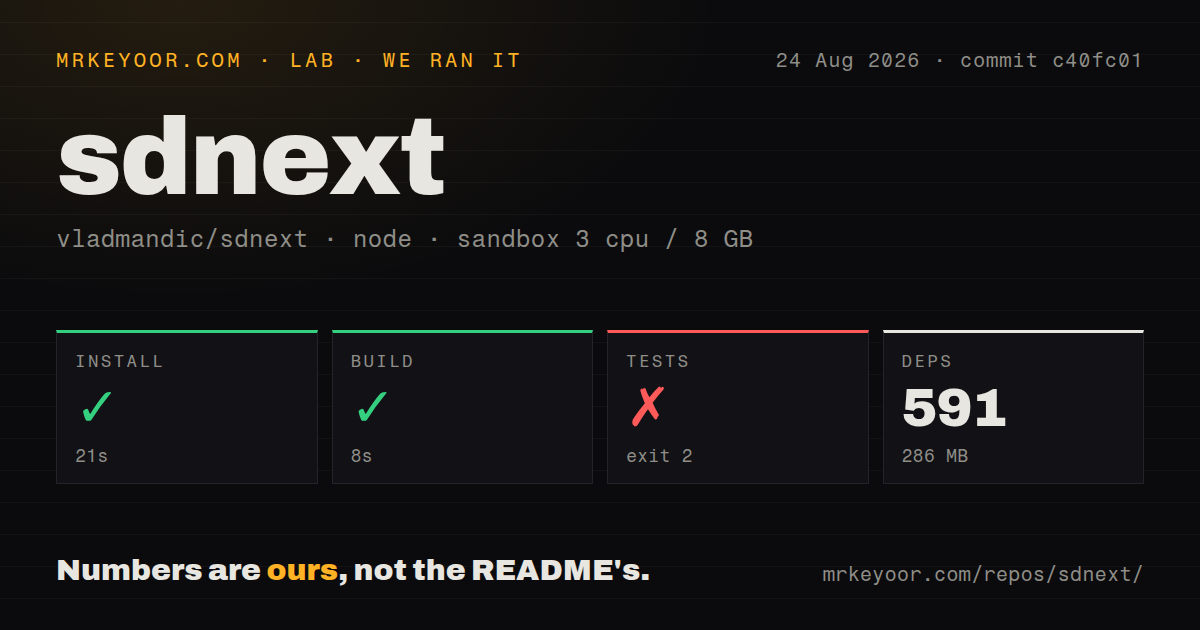
Our checkout at commit c40fc01 contained 2,345 files, about 377,297 source lines, and 72.8 MB before dependencies. The harness identified a pnpm workspace and installed 591 packages, taking 21 seconds and 286 MB. The build completed in 8 seconds. Those numbers describe the Node-facing part of a Python application, not a complete image-generation installation.
A usable server still needs Python packages, a virtual environment, model weights, and a compute backend. The quick start launches webui.sh on Linux or macOS and batch or PowerShell scripts on Windows. The README lists NVIDIA CUDA, AMD ROCm, Intel IPEX, OpenVINO, Apple MPS, and CPU paths, with separate Docker recipes in the documentation. Gated models may also require Hugging Face authentication.
What happened when we ran it
Our sandbox installed the pnpm dependencies in 21 seconds and built them in 8 seconds. The test command then exited with code 2 after 6 seconds. Its first command tried to source venv/bin/activate before running python launch.py --debug --test; the shell replied that the activation file did not exist. No Python tests ran, so there is no pass count to report.
That failure does not show a broken assertion, unsupported GPU, or bad model. It shows that the repository test target assumes the Python environment has already been created. Our unprivileged Node 22 container had 3 CPUs and 8 GB of RAM, but no prepared venv. For contributors, the practical sequence must include the Python setup before the package-level test command can say anything about the server.
Hardware support is broad, while each path needs its own proof
SD.Next documents CPU execution and several accelerator families, plus balanced offload and SDNQ quantization for fitting larger models into limited memory. That makes it more accommodating than a CUDA-only interface. It also makes generic claims about speed or model fit unhelpful. We did not generate an image, load a model, allocate a GPU, or measure latency, quality, RAM, or VRAM in our sandbox.
Current issues show why hardware-specific trials matter. Issue 4975 reports that a Windows ROCm setup can close the server during a large generation with Triton or Sage attention. Issue 4939 reports intermittent LoRA loading failures through the Diffusers method on another Windows ROCm setup. The latter report also shows a later attempt succeeding, so it is evidence of an intermittent compatibility edge, not a claim that all LoRA use is broken.
Automatic downloads still require storage discipline
The interface can download selected reference models and detect manually added files. That convenience can fill disks quickly once checkpoints, text encoders, VAEs, LoRAs, upscalers, and video models accumulate. The August 26 changelog describes a 33B video transformer paired with a 32B text encoder and another gated 22B model with a 12B encoder. These are repository claims about model scale, not measurements from our run.
Open issue 4533 reports that one Hugging Face flow downloaded files into a Diffusers directory, then fetched them again into a separate cache when activated. Operators should set model and cache locations deliberately, watch free space, and verify deduplication on the path they use. Backups should focus on custom models, outputs, prompts, and settings; downloaded public weights may be cheaper to restore from their source.
Dated changelogs replace formal GitHub releases
GitHub recorded 7,318 stars, 67 combined issues and pull requests, and a push on August 26, 2026. The latest-release endpoint returned no formal release object. The repository instead uses dated tags and a detailed changelog, whose August 26 entry covers video models, offload, quantization, APIs, authentication, file-path validation, and fixes. A stale release page would therefore misread the project's current activity.
The Apache-2.0 codebase is actively maintained, but update discipline matters. Read the changelog, preserve a working environment, and test important models before replacing it. SD.Next is a strong candidate for an experienced local-generation user who wants many workflows in one place. It is a poor fit for someone who wants appliance-like upgrades across every GPU, model, and extension combination.