InvokeAI is a creative workstation, not just a prompt box
InvokeAI belongs in the category of self-hosted creative software rather than a thin model front end. The project started in 2022, has 28,126 GitHub stars, and presents a locally hosted web server with a React interface. Its purpose is to keep generation, revision, workflow construction, and asset recall inside one workspace. That distinction matters for professionals who move repeatedly between a rough image, selective edits, alternate versions, and final assets. The Apache-2.0 license is commercially friendly, and the project says its code also underpins commercial products. You still supply compatible hardware and models, but the product tries to turn those components into a usable studio rather than a collection of scripts.
Our clean-container test found a real system dependency gap
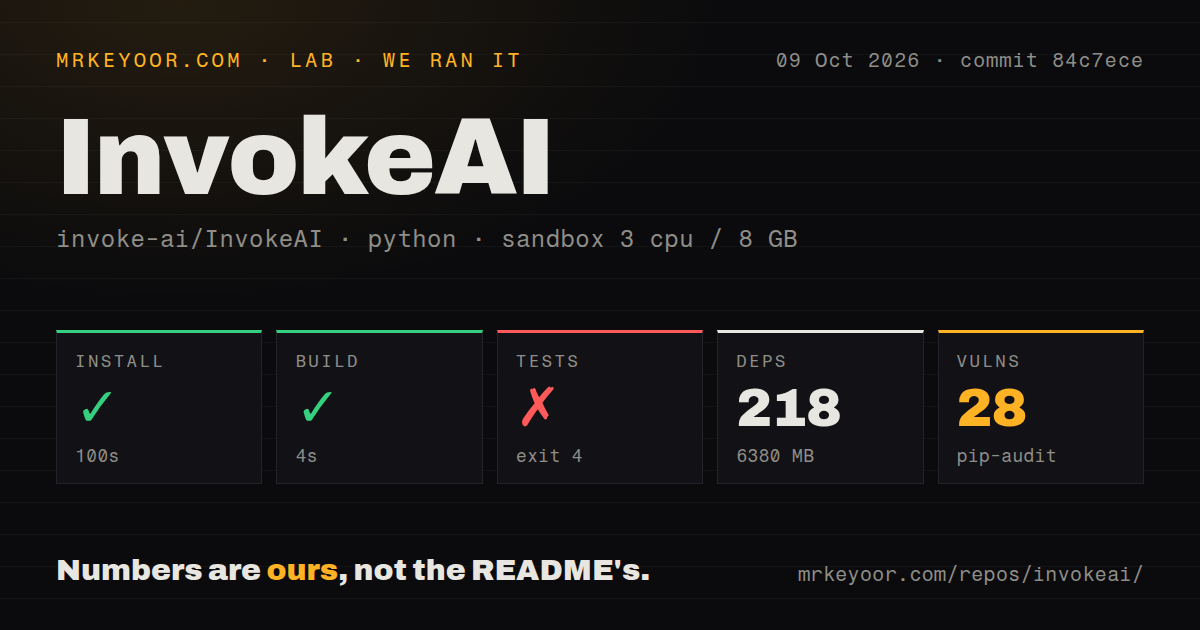
We cloned commit 4b2254b and tested it on 2026-09-03 in an unprivileged Debian container with 3 CPUs and 8 GB of RAM. Installation succeeded, but it was not small: 264 packages took 146 seconds and occupied 7,026 MB. The build then completed successfully in 7 seconds. Tests failed with exit code 4 after 35 seconds during Python import, before they could provide a meaningful pass count. The trace reaches OpenCV and stops because libGL.so.1 is unavailable. That log proves the missing shared library, not any broader defect in image generation. It does show that a fresh headless environment needs system-level preparation beyond installing Python dependencies. Pip-audit also found 17 known vulnerabilities in the installed environment, which deserves triage before exposing a server.
The canvas and workflows solve different parts of production
The strongest feature set is unusually coherent. Unified Canvas supports core generation operations, in-painting, out-painting, and brush tools, so a creator can correct a region instead of regenerating an entire frame. The node architecture handles the other side of the work: repeatable generation pipelines that can be built, saved, and shared. Board and gallery management then gives outputs a home, with drag-and-drop reuse and metadata for recalling prompts or settings. Model support is broad in the supplied README, spanning SD 1.5, SDXL, Flux.1 variants, Flux.2 variants, Qwen Image, Ideogram 4, and API-only options such as GPT Image. Support for ckpt, diffusers, and some gguf files, plus upscaling, embeddings, and SAM or SAM2 selection, reduces the need to bolt together separate utilities.
The convenience comes with weight and operational chores
InvokeAI's breadth is also its main cost. A 7,026 MB environment is a serious commitment for a desktop utility, CI runner, or small server, and actual model storage will sit outside that measured Python footprint. The README sends newcomers toward a Launcher, which is sensible for a supported workstation but less informative for container operators who must discover native libraries and hardware details. Our test failure is a concrete example: the application imports an image utility that imports cv2, which in turn requires libGL.so.1 in this environment. There is no Dockerfile among the 3,944 repository files we inspected, so the repo does not provide a single canonical container recipe at that commit. The 17 audit findings also mean maintainers and deployers should inspect affected packages, reachable code paths, and available fixes rather than assuming a successful install equals a safe service.
Current development looks healthy, while the issue queue needs judgment
The maintenance signals are encouraging as of 2026-09-04. The latest release, v6.14.0, arrived on 2026-08-25, only 10 days before this review, and the repository was pushed again today. Those two dates together are much stronger evidence of life than the release tag alone. The project also contains 15 CI workflow files and a dedicated tests directory, both signs that changes are handled through an established engineering process. Adoption is substantial at more than 28,000 stars. Still, 377 open issues is a meaningful support and triage load. That number does not prove neglect, nor does it tell us how quickly maintainers respond. It does mean a buyer should search existing issues for their exact GPU, operating system, model format, and workflow before standardizing on the tool.
It fits on a creator workstation or behind a controlled team service
For an individual, the natural home is a capable local workstation where the browser UI can sit near the generation hardware and large model files. For a studio, InvokeAI can serve as the visual production layer behind existing authentication, storage, backup, and monitoring controls; the README establishes a local web server, not a complete enterprise perimeter. Boards and metadata can support iteration, while node workflows can encode repeatable house processes across a team. Budget storage for the measured 7,026 MB environment plus models and generated assets, and test upgrades against representative workflows before rollout. ComfyUI is the sharper choice when graphs are the product, Stable Diffusion Web UI suits users who prefer a control-panel and extension approach, Fooocus favors simplicity, and Krita AI Diffusion keeps painting central. InvokeAI earns its place when one integrated canvas-to-gallery loop is worth operating the larger stack.