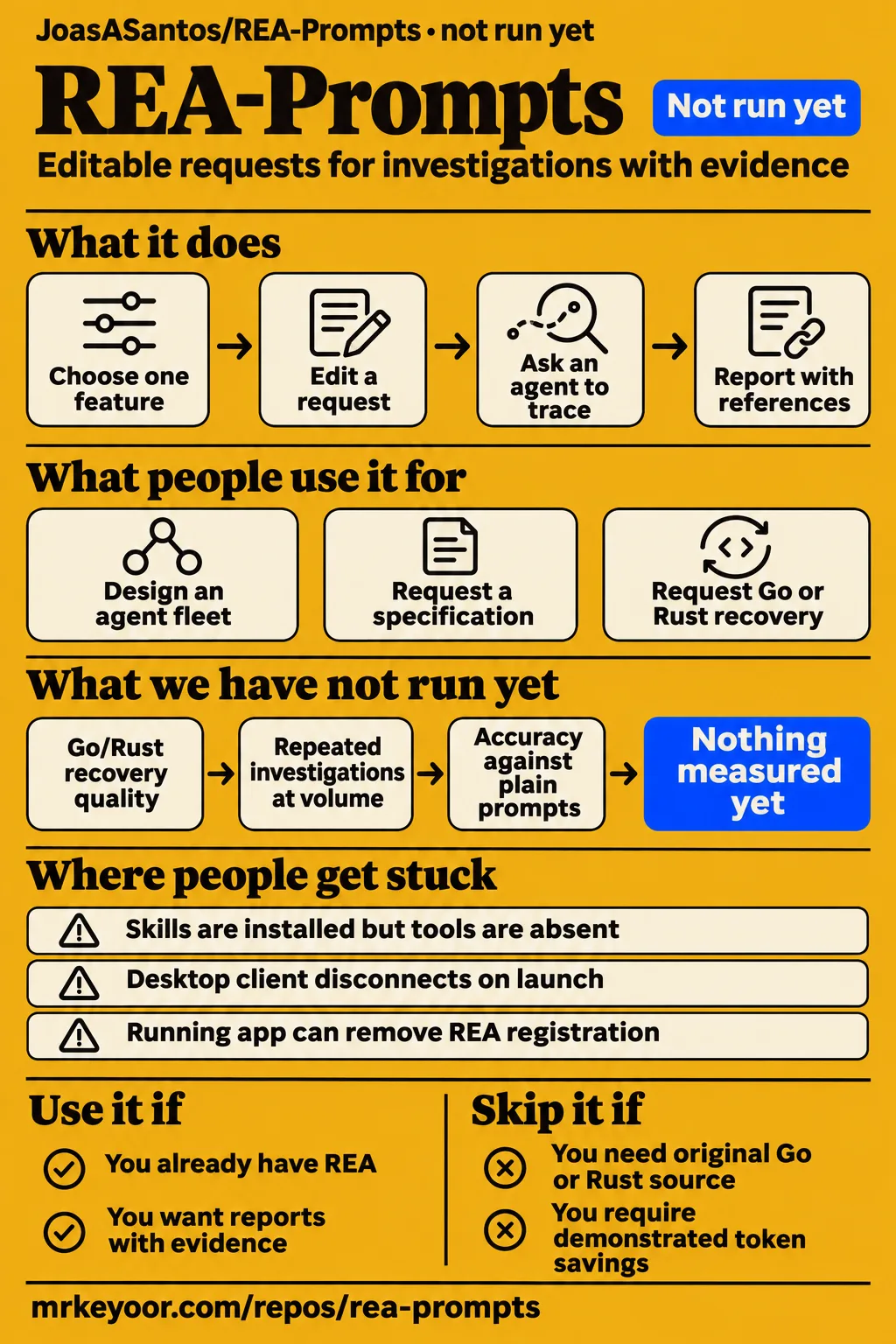
REA-Prompts supplies investigation prompts and agent skills for REA. Use it when you already have a coding agent and want a report whose conclusions point to files, functions or addresses. REA is the analysis toolset; REAP describes what to ask it. Developers seeking original source files from a compiled binary should choose a different goal: the README defines recovery as reconstructed structure and logic.
The adoption decision is whether REAP expresses your investigation more clearly than REA's built-in guidance. Its central request is concrete: investigate one feature, show the evidence and distinguish confirmed facts from inferences and unknowns. That gives a reviewer a useful acceptance rule. Before accepting a report, follow its references and check whether they support the explanation. REA-Prompts README.
What you can do with REA-Prompts
The README provides requests for feature tracing, native-binary inspection and behavioral specifications. Its feature-tracing prompt asks for the entry point, involved functions, data flow, dependencies and observable effects. Each conclusion should carry a file, function, address or relevant snippet. This is a useful assignment format when you have a specific behavior to explain, such as exporting a file, processing an input or passing a message between application components. Feature-tracing requests.
The introductory CSV exercise asks an agent to follow the Export notes action through to the file write, identify the fields in notes.csv and name the files and functions supporting each step. That assignment has an observable finish line. A report naming an export module would answer less of the request than one connecting the button, data preparation and destination. Use those requested artifacts as the checklist when reading the result. CSV-export exercise.
The documented installation choices are generated skill packs or a single system-prompt document. The README lists setup.sh and setup.bat, along with Python generators that rebuild the skills and system prompt from readme.md. Choose the pasted form when you want to inspect and edit a request before sending it. Choose installed guidance when that fits your agent's workflow. Both forms carry investigation instructions. Installation and generated files.
What people use REA-Prompts for
The operator in issue #3 reports using REAP's structure as a design reference for an agent fleet. They wrote their own rules around one function per question, file/function/address evidence and separating confirmed findings from guesses. They also said they were using the structure rather than installing the packs while the licensing question was open. This is a reported adaptation of the method, with a specific explanation of what the operator kept. License and adaptation discussion, issue #3, supplied issue record.
Issue #5 records a different use: a contributor says Awesome REA lists REAP under Guides and research as a prompt collection. The supplied snapshot shows an optional-badge request with no replies. That establishes a directory listing and explains another route by which readers may encounter the project. It is useful context for discovery, while issue #3 supplies the more concrete account of adapting the investigation rules. Directory-listing discussion, issue #5, supplied listing record.
The supplied X toolkit post describes an analysis, specification, rebuild, comparison and retry loop. It includes REA's own ready-made workflows alongside analysis and reconstruction tools. Read that as a proposed workflow: the specification connects an investigation to an implementation, and comparison feeds corrections back into the rebuild. For a REAP user, the practical takeaway is to request an artifact that the next stage can inspect, rather than ending with a broad explanation. Toolkit workflow post.
What happened when we ran it
Our November 16, 2026 assessment at commit 9756618 recorded NOT RUN: the harness supported no ecosystem for the Batchfile classification and found no Dockerfile. The consequence was a stopped assessment before an investigation began. The 3 CPUs and 8 GB RAM describe the sandbox allocation, not resource consumption. The table preserves the recorded outcomes and distinguishes the main harness result from the conflicting hands-on metadata.
| Recorded item | Result | Meaning for this review |
|---|---|---|
| Sandbox allocation | 3 CPUs, 8 GB RAM | Recorded configuration |
| Commit and date | 9756618, November 16, 2026 | Scope of our assessment |
| Execution | NOT RUN | No supported ecosystem; language classified as Batchfile |
| Dockerfile | None found | Harness stopped before a container build |
| Image | n/a | Recorded image value |
| Hands-on safety step | FAILED | Runner required a Compose file and found none of its four accepted filenames |
| Hands-on run metadata | Claims deployment on November 16, 2026, with ports bound to 127.0.0.1 | Conflicts with the safety failure and NOT RUN result |
| Hands-on teardown | ok | Recorded cleanup outcome |
The safety record names the failed condition precisely: none of compose.yaml, compose.yml, docker-compose.yaml or docker-compose.yml exists. Its unsafe-repo label comes from that runner's Compose requirement. The finding is a harness refusal triggered by a missing file. The README's shell and Windows setup routes explain why a prompt library can have installation instructions while failing this particular container-oriented check. documented setup routes.
The generic run entry says the repository was deployed with its own Docker Compose, with every port bound to 127.0.0.1. That conflicts with both the explicit Compose-file failure and the main harness result, so the deployment statement is recorded as conflicting metadata rather than adopted as an outcome. The separate teardown entry says ok. These entries remain visible so readers can see why the stated run result takes precedence.
Where people get stuck: guidance, registration and tool access
REA's client reference treats installed guidance, server registration and model tool discovery as separate checks. Inspect the active client's tool listing and server association when an agent cannot perform an operation. A desktop client can inherit a different PATH from a terminal, so troubleshooting should follow the process that actually launches REA. This directs attention to the client startup error and registered launcher before changing the investigation request. REA client configuration.
| Symptom | Source explanation | Documented next action |
|---|---|---|
| Skills are installed, but analysis tools are absent | Guidance installation and tool discovery are separate | Inspect the active client's tool list and server association |
| Terminal launch succeeds, but the desktop client disconnects | The client can inherit a different PATH | Inspect its startup error and registered launcher |
| Windows MSIX Claude Desktop drops the REA entry | A running app can rewrite configuration from memory | Fully quit the app, run setup from an ordinary terminal and restart |
| Copilot CLI rejects chat with full schemas | The documented case concerns built-in gpt-4.1 model metadata | Consult the compact-profile or distinct BYOK-model-ID workaround |
| Tools appear without native MCP prompts | Some clients expose tools without prompts | List or render guidance through guided_workflows |
The Windows case turns on quitting the application, rather than merely closing its window. REA's reference says the running MSIX app can replace configuration from its in-memory copy. Follow that documented sequence when the symptom matches: quit fully, run setup from an ordinary terminal and restart. For clients that expose tools without prompts, the guided-workflow reference supplies a separate route. Rendering returns the selected guidance without starting analysis. Windows registration guidance, workflow rendering.
Security: local analysis sends results to your agent
REA's README says targets are analyzed locally and the agent receives tool results under its model provider's data policy. Decide which results your chosen provider may receive before submitting a target. Strings, paths and recovered logic can be part of an analysis report, so the data boundary includes the output delivered to the agent as well as the target's location. REA data-handling explanation.
Thaki Cloud's package inspection describes REA as a tool that parses an untrusted binary with local privileges and explicitly calls it no sandbox. Its account also identifies malicious strings that look like instructions as an agent risk. Keep target text in the evidence role when reviewing output. REAP's static-first instruction governs the requested investigation sequence; the execution environment and the client's permissions determine what actions are available. Package-inspection security discussion.
The swarm guide's broad tool-prefix permissions also need to be read alongside REA's client reference. The MCP host decides the names exposed to its model, and several servers can share a prefix in a client or fork. Select permissions using the actual tool names, server association and approval rules shown by that client. A role description communicates a task; client configuration supplies the permission scope. Swarm guide, tool naming and permissions.
English documentation and MIT terms
The supplied current LICENSE contains MIT terms. It grants permission to use, copy, modify and distribute the software and associated documentation, subject to its conditions. Copies or substantial portions must retain the copyright and permission notice. The README is available in English and documents the installation forms and investigation requests discussed here. Read the actual license alongside the material you intend to copy or adapt. Current LICENSE, English README.
Issue #3 explains why the historical licensing concern mattered: the operator wanted to install and adapt packs and asked for explicit permission. The author replied that they had made an adjustment. The supplied license text now answers the terms question directly, rather than requiring an inference from that reply. Apply those terms to REAP material; analysis engines, model services and target applications have their own applicable terms. Historical licensing discussion.
REA-Prompts vs alternatives
REA supplies six provider-neutral investigation workflows, making its integrated guidance the first option to inspect when REA is already connected. The documented inventory covers feature tracing, version comparison, reconstruction checks, crash tracing, unknowns auditing and planning controlled process capture. REAP adds editable, subject-specific requests. Choose between them by the assignment and requested deliverable, such as a function map, behavioral specification or recovery report. REA guided-workflow inventory, REAP request collection.
| Option | What the supplied evidence describes | Selection reason |
|---|---|---|
| REAP | Investigation prompts and agent skills | Edit a request around a specific feature or report |
| REA guided workflows | Six built-in provider-neutral investigation workflows | Start with guidance integrated into REA |
| leanrea | HotRepo describes a prompt-and-routing skill using plain CLI tools | Inspect a CLI-based approach |
| CraftAnything | A supplied video presents a macOS Preview reconstruction request | Consider a separate reconstruction candidate |
| Engine and debugger bridges | Repo Explainer distinguishes tool-access bridges from REAP's workflow layer | Obtain access to a particular analysis engine or debugger |
HotRepo supplies the leanrea description; it should remain attributed to that directory. Repo Explainer's distinction between access bridges and investigation guidance helps prevent a category mistake: a prompt collection describes the work, while a bridge exposes operations. For REAP and REA's built-in workflows, retain the same target, question and acceptance criteria when deciding which request produces the artifact you need. HotRepo alternative descriptions, Repo Explainer comparison.
What the other reviews get wrong
The supplied README lists setup scripts, generated skills and Python generators, correcting descriptions of REAP as a single README with no executable code. Repo Explainer uses that older description, and Heatdrop also says the repository contains no code. Prompts remain the main product, but the current documented installation and generation files belong in an accurate account of what the repository contains. Current file descriptions, Repo Explainer, Heatdrop.
License descriptions also need dates and primary evidence. HotRepo's missing-license warning reflects a concern raised in issue #3; Heatdrop calls the material MIT-licensed. The supplied current LICENSE settles the present terms. Likewise, the README's statement that demanding citations stops confabulation should be read as the author's claim. The useful editorial recommendation is narrower: demand references, then inspect whether those references support the conclusion. Current MIT text, HotRepo, README evidence advice.
FAQ
REAP defines Go/Rust recovery as reconstructed structure and logic, rather than the original .go or .rs files. That answers the source-recovery question raised in issue #2 and sets the right expectation for the prompts. The other questions below come from the supplied issue, video, social and search records. They concern installation, investigation artifacts and the relationship between REAP and REA. Go/Rust recovery definition, source-recovery request, issue #2.
Can you recover original Go or Rust source code from Windows executables or Linux binaries?
The README asks for readable pseudocode, package or module layout and type definitions, with evidence-based fidelity labels. It explicitly distinguishes reconstruction from original source files. In issue #2, the author reports adding prompts and skills after the user requested Go/Rust coverage. Use the resulting requests to specify the artifact you need and require inferred names and reconstructed behavior to be labelled accordingly. Recovery definition, supplied issue #2 record.
What license permits installing and adapting REAP's prompt packs?
The supplied current LICENSE grants MIT permissions for the software and associated documentation. Retain the copyright and permission notice in copies or substantial portions, as the file requires. Issue #3 records the earlier request for explicit permission and the author's adjustment reply. The license file supplies the terms to consult when copying packs into an agent directory or adapting the material for another workflow. Current license terms, license request.
Is REA or CraftAnything better at cloning the same software?
The supplied video presents a request to recreate macOS Preview as a desktop app. Its comparison setup suggests a useful evaluation task: give both candidates the same observable requirements and inspect the resulting behavior. The question concerns reconstruction tools, whereas REAP supplies investigation instructions. Keep the request, evidence requirements and comparison criteria together when using that task design. The excerpt's outcome boundary appears in the final evidence section. REA and CraftAnything comparison excerpt.
How do you enable or disable REA tool calls to save tokens?
REA's documentation describes tool-family scoping and client-specific tool selection. Start with those controls to inspect which operations the model receives. The supplied Chinese-language Bilibili search record includes a dsh-switch video title about enabling or disabling REA calls to save tokens; that is a search listing, separate from the documented REA controls. Use the instructions for your actual client when changing its exposed tools. Client configuration, workflow scoping, Bilibili search listing.
How do you correctly add REA as an MCP service?
REA's README directs users through setup, review of proposed changes and a client restart. Its client reference then directs attention to the active tool list and server association. Follow that chain in the client you intend to use, and query REA through it. This checks the registration and launcher in the environment that supplies tools to the model, including desktop clients whose PATH differs from the terminal. REA setup instructions, client launch and discovery reference.
How can you defend code against AI reverse engineering?
REAP's protector-research pack asks for a risk-ranked hardening report, with function/address evidence and a concrete recommendation for each weakness. It directs the agent to document weaknesses without producing a working bypass. Use that request as an assessment brief for software you own or are authorized to examine, and judge each proposed change against the cited path and protection it is meant to improve. Protector and obfuscator research pack.
How does a desktop app feature work?
The CSV exercise asks the agent to trace a button through to its output and identify the fields, files and functions involved. That gives a first-time user a bounded investigation with a visible finish line. Request the same chain for another desktop feature: entry point, data changes and observable effect. Read the report against those requested steps before carrying its conclusions into an implementation brief. README CSV exercise.
How can you learn REA through practical investigations?
The README's notes-export exercise supplies a concrete starting assignment, and the Pocket Notes guide supplies an evidence ledger and acceptance criteria. Work through the references before moving from explanation to implementation. Keep the original question, target identity and requested output with the report so a later correction can identify which assumption failed. The guide's actual test coverage is recorded in the final section. Notes-export assignment, Pocket Notes instructional guide.
What we have not tested yet
Our assessment produced 0 executed investigations, so it supplies no basis for comparing REAP's accuracy or token cost. The harness recorded no installation, build or test result. The 3 CPUs and 8 GB RAM are configuration, not minimum requirements or measured consumption; the image value is n/a, and actual runtime versions require raw toolchain logs. The supplied latest-release lookup is null; it does not establish whether releases exist.
The supplied evidence contains no controlled comparison against plain prompts or REA's built-in workflows for accuracy, elapsed time or token cost, and no independently checked REAP reconstruction. Heatdrop explicitly notes the absence of benchmarks against naive prompts. The CraftAnything video excerpt presents the comparison request without its outcome or demonstrated REAP participation. The Bilibili switch listing supplies neither an operating command nor measured savings. Heatdrop's benchmark discussion, comparison excerpt, switch search listing.
Pocket Notes reports three controlled handler checks: canceled dialog returned saved: false with no write requested; missing path returned saved: false with no write requested; selected path produced quoted CSV with escaped quotes and saved: true. Its dependencies were mocked, excluding the Electron interface, native dialogs and real disk writes. The guide also says it obtained no completed Claude response for the templates that session and mentions a later write-rejection test without supplying its result here. These are the guide's checks, separate from our assessment. Pocket Notes checks and coverage.
Client registration, Go/Rust recovery quality, effective swarm isolation, confidential-data handling and repeated investigations at volume remain outside our executed coverage. The Copilot workaround's source also leaves live model API acceptance and Windows unresolved. Thaki Cloud describes package and documentation inspection without executed reverse-engineering results. The recorded 4,125 stars, November 5, 2026 last push, sampled issue replies and directory listing describe attention and activity rather than reliability or production support. Client reference, package-inspection scope, supplied repository facts.
The next useful evaluation is one bounded investigation with a retained target, exact prompt, exposed tool list and report checked against known behavior. That would supply evidence about the complete workflow. For the present adoption decision, use REAP when its requests make the intended deliverable easier to specify, start with REA's built-in guidance when it already fits, and judge the report by whether its references support its conclusions.