Sync can delete the files you meant to keep
Run rclone sync against a destination containing extra files and those files can disappear. That's the first decision to understand before pointing rclone at an archive. Its sync command documentation recommends a dry run or interactive mode because matching the source can require deletion. Choose copy when you want new and changed files transferred while preserving destination extras. The difference is small to type and expensive to misunderstand.
Rclone connects storage accounts through named remotes, so the same command structure can move files between Google Drive, Backblaze B2, an SFTP server, or local folders. Our checkout contained 2,684 files and roughly 346,209 source lines. That breadth buys you a common interface across providers. It's particularly useful when your files live in several services and you want scripts you can inspect instead of separate desktop clients for each account.
What happened when we ran it
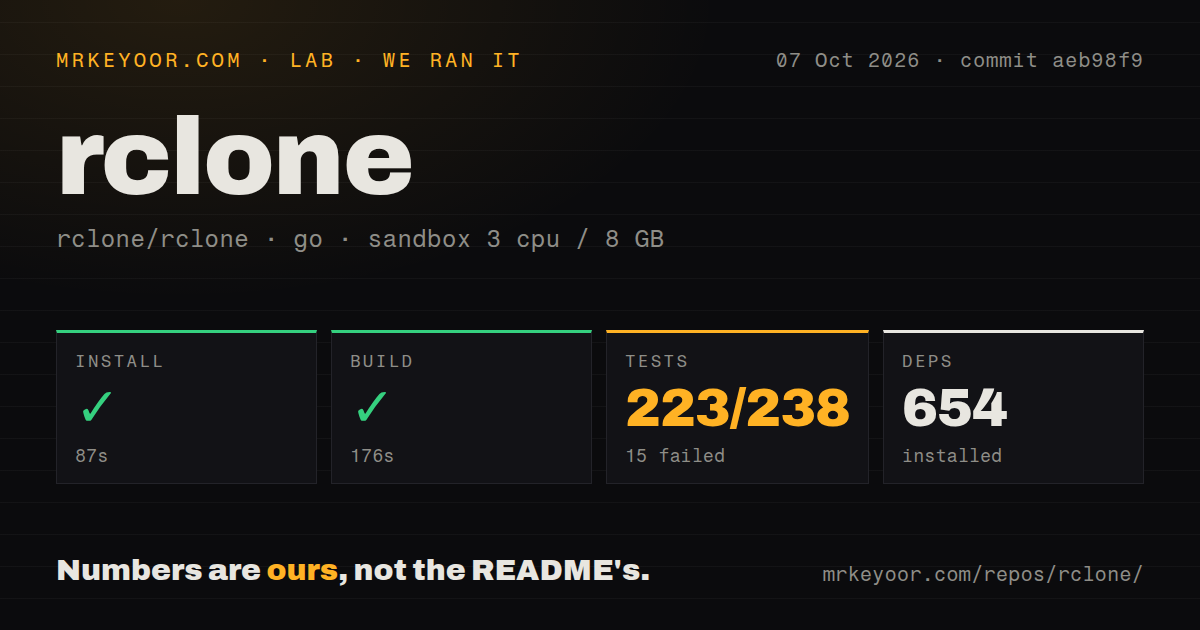
Our rclone run installed 654 packages in 87 seconds and built successfully in 176 seconds. We cloned commit aeb98f9 on October 7, 2026, using the golang:1.24-bookworm image in an unprivileged Debian container with 3 CPUs, 8 GB of RAM, and no secrets. The checkout occupied 41.7 MB. These are source-setup measurements, so they don't tell you how quickly a published binary starts or how fast a cloud transfer runs.
The test step failed with exit code 1 after 372 seconds. The supplied summary reports 223 passed and 15 failed out of 238 Go test results. The log tail shows successful packages under lib and vfs, including the VFS cache, downloaders, and writeback packages, followed by the final FAIL. It doesn't contain the failed package names or their assertions. Missing credentials, container restrictions, and code defects would all be guesses from this excerpt.
Our scan found 5 CI workflow files and a Dockerfile, but no dedicated tests directory. Passing package results in the log show why that directory signal alone cannot establish whether Go checks exist. Installation and compilation worked in this environment. The complete suite didn't. Anyone contributing a backend or shipping a patched build should examine the full failure log before accepting this commit through a release gate.
Cloud credentials are a separate setup job
The 654-package install didn't configure a storage account. The README sends you to the website for installation and provider instructions, and rclone's configuration guide recommends the interactive rclone config command. Depending on the backend, you'll need an OAuth authorization, access keys, or server login details. A local-to-local operation can avoid cloud credentials entirely. A working compiler gives you no evidence that a particular provider login or permission policy is correct.
Treat rclone.conf as a credential file. The configuration guide says it typically contains login information and should have restricted permissions. Token-based remotes also need it writable so refreshed tokens can be saved. Optional configuration encryption adds an unlock requirement for unattended jobs. I'd establish that service account and its access boundaries before scheduling transfers, then verify the intended remote with a harmless listing. A readable configuration file is part of the deployment.
A cloud mount needs cache space and filesystem support
Rclone's mount documentation says many applications need --vfs-cache-mode writes or full because uncached writes are sequential. A mounted bucket therefore deserves more thought than a local directory shortcut. The documented Windows route requires WinFsp, while Linux uses FUSE. Container permissions and filesystem support need their own check. None of those platform requirements explains the 15 failures in our source run, whose failing assertions weren't supplied.
Cache storage is separate from the 41.7 MB checkout we measured. The mount guide warns that open files cannot be evicted and cache limits can be exceeded between checks. It also warns against overlapping mounts sharing the same write cache because that can corrupt data. For an application writing large working files, reserve local space and give each mount its own cache directory. I'd choose direct copy jobs when a persistent filesystem view adds no practical benefit.
Provider support doesn't promise identical file semantics
The storage feature matrix separates checksum support, modification times, and other backend capabilities. Read the row for your actual service before deciding how to verify an archive. The README's integrity features are useful, but cloud providers expose different information. A common command cannot manufacture metadata the destination doesn't support. Compare representative files and their restore behavior before moving the only remaining copy of a folder.
With roughly 346,209 source lines in our checkout, the broad backend list also means your route through rclone is only a slice of the project. Open issue 10083 reports VFS directory changes staying invisible after deletion and cache-forget operations. That's a specific mount report, separate from our sandbox failures. Developers depending on fresh directory listings should follow that discussion and validate their own application behavior before adopting a mount as shared working storage.
October maintenance supports a trial, not blind trust
The last push was October 13, 2026. GitHub listed 60,281 stars and 1,324 open issues and PRs, and v1.75.2 shipped on October 9. The issue feed showed current VFS reports alongside proposed fixes. Taken together, these are signs of active maintenance. The combined queue count includes pull requests, so it cannot be read as a count of unresolved bugs.
Our 176-second build supports trying a source checkout, while the failed suite argues for checking the exact backend you intend to use. Choose Restic when recoverable backup snapshots are the job, Syncthing for ongoing folder synchronization between your devices, or rsync for incremental transfers between filesystem endpoints. For moving files among cloud accounts, I'd start rclone with a disposable destination and copy. Before enabling sync, inspect the dry-run deletion list against the files you intend to retain.