Should you use Syncthing for your working folders?
Syncthing fits a specific job: keeping files synchronized across computers you control. The official FAQ says devices exchange data when they are online at the same time, rather than uploading it to cloud storage. Before replacing a hosted drive, decide which devices will be available when another computer needs their files.
The same FAQ explains the recovery tradeoff. File modifications and deletions propagate to other devices. Optional versioning can help, but the project recommends other tools to protect against mistakes. Keep a separate backup and check that you can restore it before sharing important folders.
What our recorded run establishes
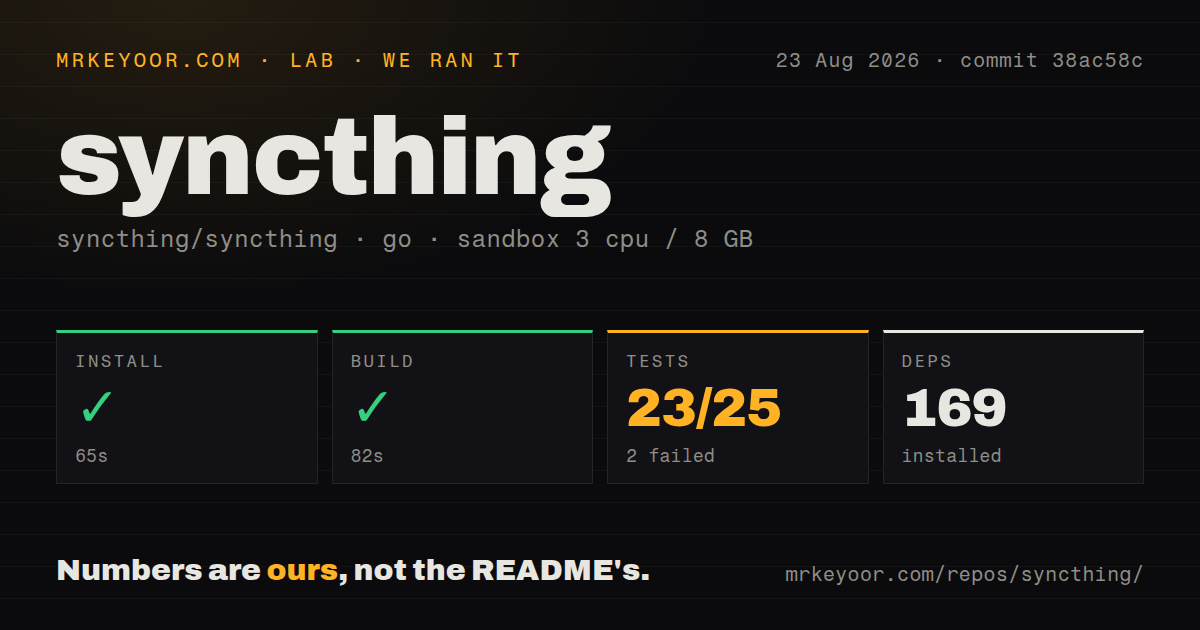
Our stored run began on August 23, 2026, at 05:50:46.021 UTC, using commit 38ac58c82e50acba382ed1070710c7c5f984257d, dated August 20, 2026. The recorded environment had 3 CPUs, 8 GB of memory, and image golang:1.24-bookworm. The image label does not establish the toolchain used: the install output says it was downloading go1.26.2 for linux/amd64, and no retained version check confirms the resulting toolchain.
The checkout metrics were 900 files, 128,502 lines of source, and 10.1 MB. The record also identifies 8 CI workflow files, a Dockerfile, and a tests directory. These describe the checkout, not runtime resource requirements or test coverage.
The install-labeled step took 65 seconds and exited 0. Its retained tail shows a toolchain download. The dependency count is recorded as 169, but neither that metric nor step completion proves that the Syncthing CLI was installed.
The build-labeled step took 82 seconds and recorded exit 0. Its retained output nevertheless reports undefined: auto.Assets in cmd/infra/strelaypoolsrv and lib/api, followed by vet-exit:1. The status and output do not establish a clean build. The README describes go run build.go as the source-build command that creates binaries in ./bin; the supplied run does not include an installed-binary check establishing that outcome.
The test step took 428 seconds and exited 1. The retained tail identifies lib/model as failing after 360.146 seconds and lib/syncthing as [build failed]. It also contains successful package results and entries with no test files. The parser summary records 23 passing package results, 2 failing package results, and 7 packages without test files, with a recorded total of 25. These are stored parser fields, not a reconciled inventory. They cannot support a claim that 23 of 25 individual tests passed or a calculated pass rate.
The retained output does not establish the root cause of either package failure. No new execution or complete-log reconciliation was performed. We did not verify a running release binary, pair devices, or measure synchronization speed, memory use, or recovery. A failed test command in this environment does not prove the released product is broken.
Pair devices before sharing important files
The official getting-started guide describes downloading and unpacking a release for each operating system. First launch generates configuration and encryption keys and opens the admin GUI. The default GUI address is 127.0.0.1:8384; the guide's example shows TCP and QUIC listeners on port 22000.
Both devices must be configured with each other's device ID. Add the remote device on each side and select the folder to share. For an initial evaluation, use disposable files and confirm that changes reach the other device before adding important data. This is a recommended next step, not a workload completed in our run.
Remote GUI access requires care. The FAQ recommends authentication and HTTPS when exposing the GUI beyond localhost and also describes SSH forwarding as an option.
Encrypted file traffic still leaves metadata
The security documentation says all device-to-device traffic uses TLS. It also explains the metadata exposed by discovery and relays. With global discovery enabled, announcements every 30 minutes let the discovery service associate a device ID with an external IP address and listening ports. Global discovery defaults to on.
Relaying also defaults to on. A selected relay learns the connecting device ID and, when carrying a connection between peers, the other device's ID. The documentation says the transferred data remains encrypted and cannot be inspected by the relay. Administrators can disable relaying or select specific relays. Review these settings if policy restricts metadata leaving your network; encryption alone does not answer that policy question.
Keep release evidence separate from workload reports
The supplied v2.1.3 release notes list GUI grouping, HTTP and HTTPS proxy support, configurable GUI sessions, and fixes. The repository README describes signed release binaries. These are upstream documentation, not outcomes of our sandbox run, and the tested commit should not be treated as a test of a v2.1.3 release binary.
Issue 10869, opened August 25, 2026, reports slow identical-file scanning on v2.1.3 under Arch Linux x86_64. The supplied extract labels it needs-triage and includes later user reports of costly rescans. This report postdates our August 23 run and is not a regression we reproduced. If your workload contains large trees of small or identical files, evaluate a representative folder on your intended version and hardware before rollout.
When a server platform fits better
Seafile's README describes separately synchronized libraries, sharing, and a virtual drive with files synchronized on demand. Consider it when those library and drive features match your needs.
Nextcloud's README describes storing files, contacts, and calendars on a server of your choosing, synchronizing them across devices, sharing them, and adding apps. Consider it when that broader server role is part of the requirement. We did not test either alternative here.
How to read the scores
These are editorial assessments of the supplied evidence, not benchmark results. The rubric is: 1 means substantial documented obstacles; 2 means limited validation or substantial uncertainty; 3 means a documented path with operational work; 4 means detailed supporting documentation or release practices, with remaining limits; 5 requires broad corroboration beyond the evidence supplied here. Unknown adoption, support quality, and compatibility do not earn a high score.
The practical next step is a small two-device trial with disposable files, explicit discovery settings, and an independent backup. Source contributors should also capture the full commands and logs and verify the generated binary before drawing conclusions from the recorded step statuses.