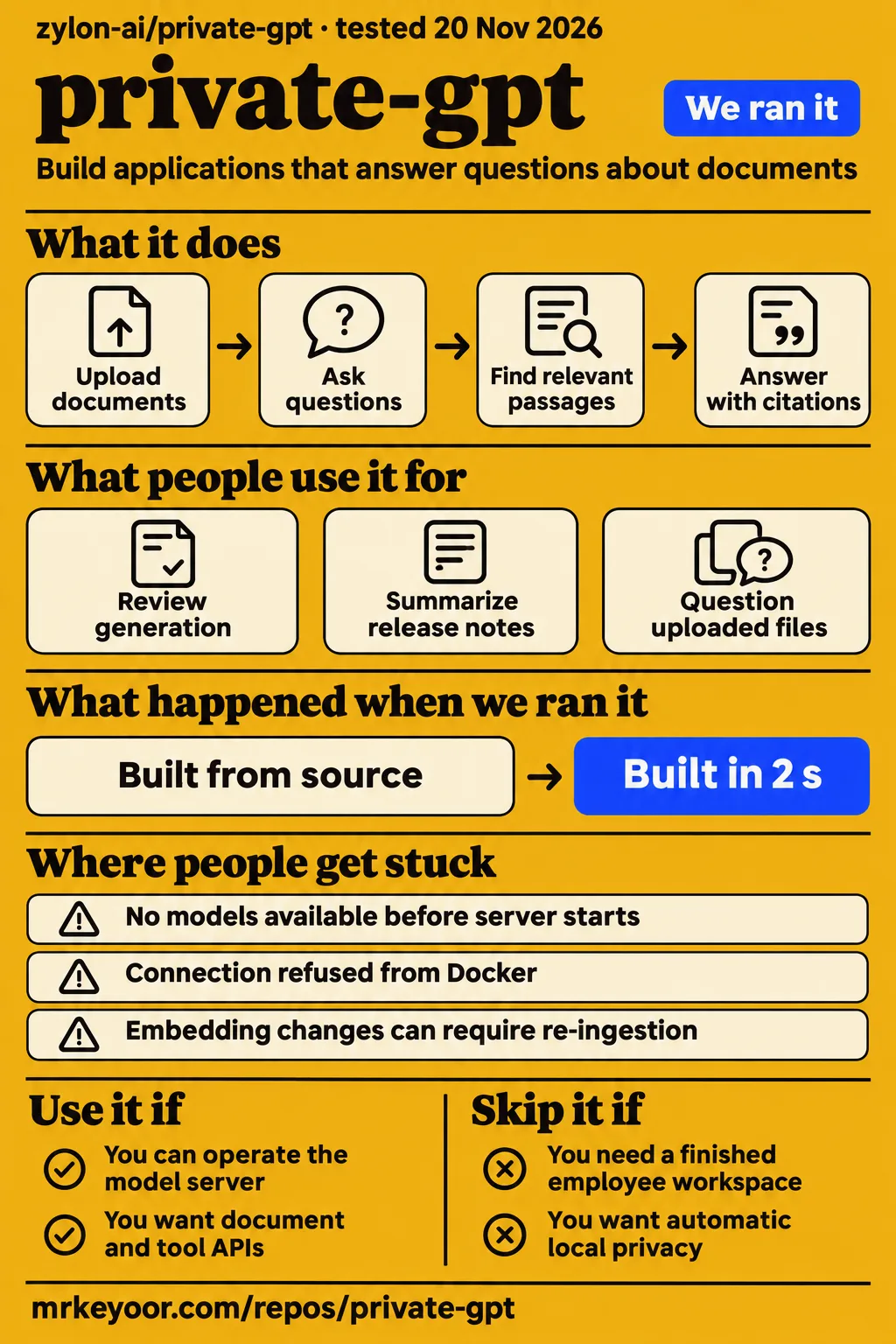
PrivateGPT is an application API backend above a separately operated model server. Our November 20 run installed and built commit 2373cc7, then the tests stopped on a missing pandas import. Use it if you want to build against that backend and can operate the model server too. Skip it if you need a finished employee workspace with built-in organization management: the project describes its UI as a workbench and marks OAuth and organizations unsupported in its compatibility table.
What people use private-gpt for
People have used PrivateGPT to search internal documentation and question uploaded files, with demonstrations spanning different generations of the project. The current introduction describes ingestion, retrieval with citations and tools. Retrieval finds relevant passages before asking the model to answer, giving the application material it can cite. The examples below identify who reported each workflow so readers can distinguish a user's account, a tutorial demonstration and the project's own feature description.
| Who used it | What they did | What came back |
|---|---|---|
| Alex Liu at saas.pet | Put PrivateGPT in front of Ollama for review generation and internal documentation search | Liu reports both workflows. |
| Creator of the State of the Union installation tutorial | Asked what the bundled document said about the economy | The video shows an answer drawing on that document, using the historical script workflow. |
| Creator of the PrivateGPT version 0.2 setup video | Uploaded Markdown notes about Nextcloud updates, requested a summary, then asked a narrower question | The creator calls the initial summary insufficiently clear, then shows a follow-up answer. |
| Intel's IPEX-LLM documentation authors | Demonstrated model chat and document retrieval | Intel describes selecting LLM Chat or Query Files, through an older PrivateGPT integration. |
The Nextcloud creator gets a list mentioning PDF annotations and other changes, says it isn't as clear-cut as wanted, then asks specifically about Nextcloud updates. That gives a concrete sequence for a document assistant: upload release notes, request a summary, then narrow the question when the first answer is too broad. The useful detail is the change in question, rather than the creator's enthusiasm about generation speed.
What happened when we ran it
Our November 23 hands-on attempt stopped at the safety step because the lab required a Compose file and found none of the accepted filenames. The failure names compose.yaml, compose.yml, docker-compose.yaml and docker-compose.yml. The step's “unsafe repo” label came from that deployment rule. It describes the lab's requirement, rather than a security assessment of PrivateGPT or its document-processing features.
The November 23 run description says it deployed through the project's own Docker Compose, with every port bound to 127.0.0.1. The specific safety step instead records failure before a document task, and the teardown reported success. These entries conflict about deployment; the failed step is the recorded stopping point. The successful teardown describes cleanup after that attempt.
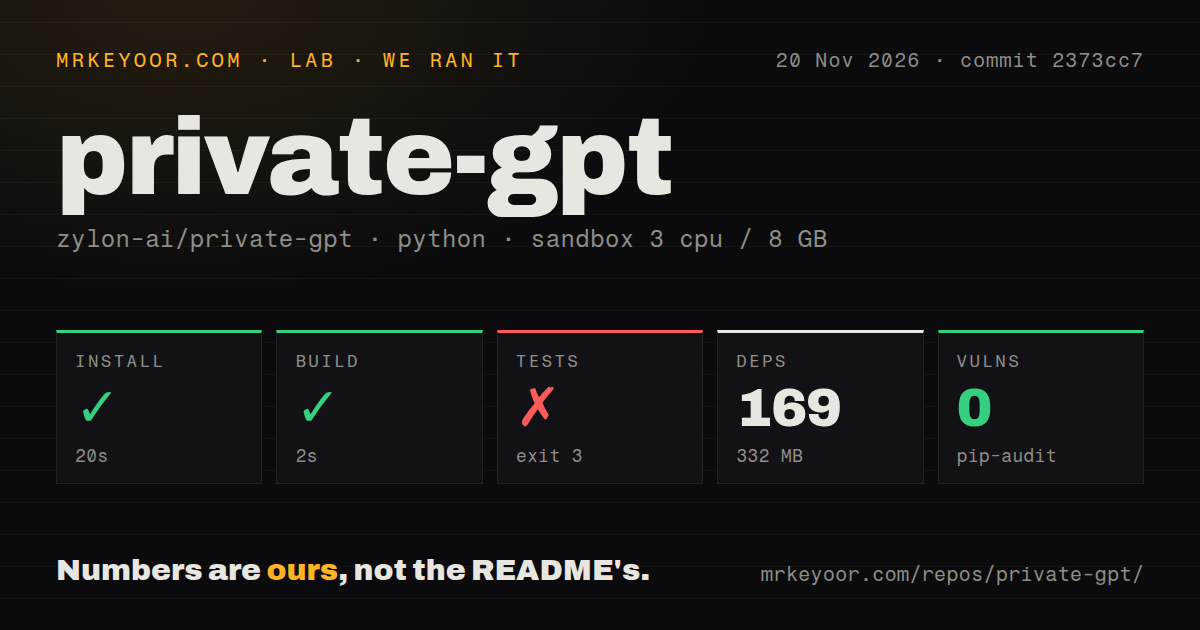
On November 20, our run installed commit 2373cc7 in 20 seconds and built it in 2 seconds. The sandbox configuration recorded 3 CPUs, 8 GB RAM and image label ghcr.io/astral-sh/uv:python3.12-bookworm. The same source-run measurements record tests failing with exit 3 after 7 seconds. Installation, build and test outcomes are separate results, so the table keeps the successful steps alongside the failure.
| November 20 source check | Recorded result |
|---|---|
| Install | Succeeded in 20 seconds; 169 dependencies recorded, 332 MB on disk |
| Build | Succeeded in 2 seconds |
| Tests | Failed, exit 3, in 7 seconds |
| Test-log ending | ModuleNotFoundError: No module named 'pandas' |
| pip-audit | 0 known vulnerabilities |
| Repository scan | 10 CI workflow files, a Dockerfile and a tests directory |
The failing test log follows imports through citation formatting, chunks and reader nodes. In private_gpt/components/readers/nodes/table_node.py, line 8 imports pandas as pd; that import raised ModuleNotFoundError: No module named 'pandas'. The recorded command failed at this point. The traceback gives a concrete place to begin investigating the dependency environment without assigning a cause that the log does not show.
Where people get stuck: check the generation before applying a fix
Current model discovery uses an inference server and HTTP endpoints; the older GPT4All and embedded LlamaCpp reports describe a different workflow. The official troubleshooting page starts with the running inference server, the /v1 endpoint and automatic discovery. That distinction changes which settings matter: current endpoint configuration belongs to the backend, while old MODEL_PATH and binding-version advice belongs to the scripts discussed in those issues.
| Symptom | Which workflow | What the source supports |
|---|---|---|
| No models available | Current API backend | Start the model server first, include /v1 in OPENAI_API_BASE, and keep automatic discovery enabled, according to the official troubleshooting page. |
| Connection refused from Docker | Current API backend | The docs use host.docker.internal on macOS and Windows, or host networking on Linux, to reach a model server running on the host. |
| Invalid model file | Legacy GPT4All script | Issue #691 reports a GPT4All 0.2.3 workaround, followed by different failures for another commenter. |
| Metadata preparation fails | Legacy requirements installation | Issue #942 reports installation success with Python 3.10.12; today's package documentation requires 3.11. |
| Llama has no ctx attribute | Legacy ingestion script | Issue #161 records the original reporter correcting reversed models. |
| Wheel builds fail | Legacy native dependencies | Issue #445 includes a Windows build-tools success and a subsequent Linux question. |
| Unknown-token messages | Legacy GPT4All script | Issue #343 records an eventual response after waiting, with unknown letters continuing on the next question. |
| Invalid model directory | Legacy GPT4All script | Issue #621 discusses MODEL_PATH in .env. |
For current installations, the model server must be reachable from the place PrivateGPT runs. Inside a container, localhost points back at that container, which explains the platform-specific addresses in the troubleshooting guide. A path copied from an old privateGPT.py discussion addresses a different part of the system. The current backend discovers models through the inference server's HTTP interface instead of loading that historical script's model file directly.
Long documents and embedding changes have operating costs
PrivateGPT estimates Ollama token counts at four characters per token because Ollama lacks a tokenizer endpoint, according to the troubleshooting guide. The guide associates that estimate with context-window overflow and recommends setting context_window below the model's actual limit. A context window is the amount of text the model can handle in a request, including conversation history and retrieved material; the documented setting leaves headroom for those inputs.
An embedding dimension mismatch means the vector store was initialized with a different embedding model from the one currently configured. The documented remedies are returning to the original model or wiping the vector store and re-ingesting documents. Embeddings are numerical representations used to find related passages. Choosing the wipe route therefore adds document processing to the change, rather than making the switch solely an endpoint edit.
Privacy depends on endpoints and enabled tools
PrivateGPT permits local or remote inference servers, and its tools include web search and web fetch. The introduction explicitly describes local and remote servers, while the tools guide documents external searches and URL fetching. Where the application runs and where it sends requests are separate configuration choices. A local process can use a remote model endpoint or an enabled tool that contacts an external website.
The package guide lists https://api.openai.com/v1 as the default OPENAI_API_BASE, with the embedding endpoint following it unless overridden. For a local document application, set both endpoints deliberately before uploading confidential material. The configuration names distinguish the inference server used to generate answers from the embedding server used to represent document passages, even when one server supplies both capabilities.
PrivateGPT executes its built-in server tools, while Anthropic-style client tools are returned to the calling application. The tools guide says code_execution_v1 expands into bash_v1 and text_editor_v1; the latter expands into viewing, replacement, creation and insertion tools. In contrast, the bash_* and text_editor_* client families are executed by the API caller. Enabling code execution therefore requires a decision about which machine performs the operation.
The project's compatibility table supports token authentication and marks OAuth and organizations unsupported. Its README assigns LDAP/Active Directory integration, RBAC user management and an end-user workspace to Zylon's additional platform services. Those distinctions matter when selecting the application layer: a developer API with token authentication and a managed employee workspace have different responsibilities, even when the commercial platform uses the open-source backend underneath.
Offline packages separate dependency delivery from model operation
The official package guide documents offline archives containing pinned wheels and installation with hash checking. Its offline instructions use --no-index and --require-hashes, allowing dependency installation without PyPI once the archive and Python 3.11 are available. That describes how the application dependencies reach the machine. The runtime architecture still includes a model server, its model assets, and the inference and embedding endpoints selected by the operator.
Native document features have additional requirements. The package guide lists libmagic for detecting file types, LibreOffice for older Office formats and Ghostscript for rendering slides. It says PrivateGPT starts without these tools, while particular document features need them. A collection containing .doc, .ppt or .xls files therefore has different conversion requirements from a collection of plain text documents, despite using the same application server.
PrivateGPT vs Open WebUI, Onyx and Ollama
PrivateGPT's official comparison describes Open WebUI and Onyx as applications, and Ollama as an inference server. The introduction positions PrivateGPT above model serving and below the final application. This makes the useful comparison about the layer you want to operate: a backend for your own software, an application people can use, or a server that runs the model behind either approach.
| Project | Role in PrivateGPT's documented comparison | Pick it when |
|---|---|---|
| PrivateGPT | API backend for messages, ingestion, retrieval and tools | You are building the application your users will use. |
| Open WebUI | Application focused on chat and enterprise search | You want to consider an application instead of building a UI around an API. |
| Onyx | Application focused on chat and enterprise search | Your immediate need is an end-user search or chat application. |
| Ollama | Inference server that runs models | You need model serving, including underneath PrivateGPT. |
The workbench can upload documents, select models and test retrieval, but the README says developers are expected to build their own applications on the API. For an employee rollout, that final application is part of the work you take on. The README separately describes Zylon as adding deployment, governance, operations and user management around PrivateGPT, giving readers a concrete distinction between the open-source layer and the commercial platform.
Liu at saas.pet reports using PrivateGPT for application features and LiteLLM for backend routing. His account puts them at complementary layers: review generation and semantic search above routing between model backends. It is another example of choosing components by responsibility. PrivateGPT's documented role is the application API, while the inference server and the application calling that API remain separately operated parts of the system.
What the other reviews get wrong
The open-source README lists streaming in the messages API, correcting saas.pet's claim that streaming is reserved for paid Zylon. The repository feature list explicitly includes streaming, async operation and token counting. This is a feature-description correction: someone comparing the two offerings should not assign streaming exclusively to the commercial platform when the open-source project's own list includes it.
The saas.pet review also promises an OpenAI or Anthropic migration with only a URL change. The official quickstart describes an Anthropic-shaped application API, while OpenAI compatibility describes the inference server underneath it. These are different sides of the backend. A migration decision needs the client-facing API's request and response shapes, rather than assuming that the protocol used to contact the model server also describes the application interface.
Wald's article describes Poetry and an OpenAI-style API architecture. The current source guide uses uv sync --frozen --extra core, and the quickstart describes the Anthropic interface on port 8080. Wald also describes information staying inside the environment and role-based permissions with isolated workspaces. The official documentation instead permits remote inference and web tools, while the README assigns RBAC and the end-user workspace to Zylon's additional services.
Intel's guide describes an older workflow using Poetry extras, the Ollama profile and port 8001. Its model-chat and document-retrieval demonstration remains a concrete example of that integration. For the current source route, the installation guide uses uv and opens the workbench on port 8080. The commands, profiles and interface in a tutorial identify the workflow more usefully than treating every page about PrivateGPT as instructions for the same generation.
Repository identity and release metadata
GitHub metadata records release tag v1.0.1 on June 18, 2026, and a later repository push on November 23, 2026. The repository endpoint and latest-release endpoint describe different events. Our measured source checkout is commit 2373cc7. Keeping those identifiers separate lets readers distinguish the source run from release metadata instead of attaching a release tag to a command that ran at a commit.
The README says PrivateGPT powers Zylon, which is the maintainer's production-use claim. Its enterprise section lists Zylon's additional deployment, governance and user-management services. That identifies the relationship between the projects and explains why enterprise platform features appear alongside the open-source backend. It also gives the comparison a named source, rather than treating GitHub attention as evidence of application performance.
Search results mix software identities. OnVeris discusses deploying a generic private GPT, while privategpt.dk describes a platform in a customer's Azure tenant. This review concerns zylon-ai/private-gpt, whose README describes an application API above an inference server. Keeping the repository owner attached to the name prevents another product's hosting, access-management or integration claims from becoming features attributed to this codebase.
FAQ
Python 3.11, a running inference server and two model endpoint settings are the documented starting point for PrivateGPT document chat. The quickstart installs the core package, connects the server and opens the workbench. The questions below separate that route from historical installation errors, since several widely discussed problems refer to the earlier scripts and their embedded model dependencies rather than the current API backend.
How do I install PrivateGPT and chat privately with my own documents?
Install the core package, start your model server, set OPENAI_API_BASE and OPENAI_EMBEDDING_API_BASE, and open http://localhost:8080/ui. The quickstart documents that sequence. The workbench supports uploading documents and testing retrieval with citations. For local document use, choose local inference and embedding endpoints and account for enabled web tools, since those settings determine where the application sends requests during use.
How do I install PrivateGPT on Linux?
The documented Linux package command is uv tool install --python 3.11 --find-links https://wheels.privategpt.dev/packages/ "private-gpt[core]". For a source checkout, the source guide uses uv sync --frozen --extra core. The package route is for running PrivateGPT against an existing model server; the source route is for modifying code, running tests or using development reload. Both are distinct from the Poetry instructions in older tutorials.
How do I connect PrivateGPT to Ollama or another model server?
Set OPENAI_API_BASE to the server's /v1 URL and set the embedding endpoint separately when needed. The quickstart uses Ollama on port 11434. Start the inference service first so PrivateGPT can discover available models. When PrivateGPT runs in Docker and the model server runs on the host, use the platform-specific host connection described in the troubleshooting guide rather than the container's own localhost.
Does PrivateGPT use the CPU or GPU, and why are responses so slow?
The current backend delegates model execution to the inference server, so its hardware configuration determines where generation runs. Issue #931 concerns the older embedded LlamaCpp workflow, where the discussion involved GPU-enabled bindings and GPU layers in the script. That architecture distinction directs the investigation: inspect the current inference service's configuration instead of copying an embedded LlamaCpp constructor into the application backend.
How much faster does PrivateGPT run after enabling GPU acceleration?
Jiapei100 reported roughly three times faster operation in the historical issue #931 discussion after changing the LlamaCpp setup. The report concerns that user's older configuration and script changes. For the current backend, hardware and model execution belong to the separately operated inference server. The reported multiplier belongs to its original account rather than a general performance specification for PrivateGPT.
How do I fix an Invalid model file error in PrivateGPT?
JasonMaggard reported that downgrading GPT4All to 0.2.3 removed the legacy error in issue #691. Another commenter got past that error and then failed elsewhere. This is a dependency workaround reported for the old GPT4All script. The current backend connects to an inference server, so first identify whether the failing command belongs to that historical workflow or to the server supplying today's model endpoint.
How do I fix hnswlib and llama-cpp-python wheel build failures?
A Windows user in issue #445 reported installation success after using Microsoft C++ Build Tools. The same discussion includes another user still seeing errors after installing build tools, followed by a question about Linux. These reports concern the historical native dependency stack. The package, operating system and compiler error identify which part of that discussion applies; the successful Windows account has that specific platform scope.
How do I resolve native dependency build errors on Linux rather than Windows?
Angurajdin asks specifically how to install on Ubuntu, CentOS or another Linux environment after succeeding on Windows with Microsoft C++ Build Tools in issue #445. The quoted Windows success addresses a Windows compiler setup. For a Linux investigation, retain the failing package name and compiler output together with the PrivateGPT workflow in use, so a historical dependency problem is not confused with the current package route.
Why does PrivateGPT print unknown-token errors?
The legacy issue #343 records repeated GPT4All unknown-token messages. Shaybc eventually received an answer after waiting, described it as poor, and reported unknown letters again on the next question. The observation is that generation eventually produced output while the messages continued. It gives a specific outcome for the old script without turning waiting into a repair or assigning the problem to the user's keyboard language.
Which Python version should I use when installation fails during metadata preparation?
Current package documentation requires Python 3.11 and excludes Python 3.10 and 3.12 or later. The Python 3.10.12 success in issue #942 belongs to the historical requirements workflow. Use the current package requirement for the current package route. The apparent conflict comes from instructions for different generations, rather than a choice between interchangeable Python versions for the same documented installation.
How do I fix AttributeError: 'Llama' object has no attribute 'ctx'?
Redfort1987 reported having reversed the models in the legacy issue #161 discussion. The thread distinguishes generation and embedding model paths; another participant reported the same exception after trying absolute paths. The original reporter's outcome therefore points to model assignment in that setup. It should stay attached to the legacy ingestion workflow and the model configuration discussed there, rather than becoming a universal dependency change.
Where should I put model files, and how should I configure MODEL_PATH?
MODEL_PATH advice in issue #621 refers to the legacy GPT4All script, with the model location set in .env. Issue #161 also discusses old embedding and generation paths. The current architecture connects PrivateGPT to a separately configured inference server through HTTP endpoints. Model storage for that server and the historical script's local path setting are therefore different configuration tasks.
What we have not tested yet
Our checks cover the successful install and build at 2373cc7, the failed test command, and the November 23 attempt blocked by the lab's Compose requirement. They do not cover a working current-version document conversation, retrieval accuracy, citation correctness, streaming, concurrency, GPU performance or end-to-end memory use. The deployment summary is not proof of a working service because its safety step failed. No screenshots or known-answer document results accompanied that attempt.
The actual interpreter and operating-system versions require raw toolchain logs; the configured image label alone does not identify them. The missing pandas import needs a reproduced repair and a rerun of the same tests. The 332 MB footprint describes the recorded installation, excluding any measured inference deployment. Likewise, pip-audit's zero known vulnerabilities is an advisory result, not a security assessment of the server, enabled tools or final application.
The package guide uses version 1.1.0 in examples, while the retrieved latest-release metadata identifies v1.0.1. Neither establishes that the live documentation describes the measured commit. Our checks also exclude offline bundles, network isolation, authentication, server-side code execution and re-ingestion costs. Liu's cost and uptime figures and the historical demonstrations are attributed reports, not independent current-version benchmarks. The historical issue sample does not establish current support response times, independent deployment adoption or universal repairs for Linux builds, tokenizer errors and model-loading failures.
Rendered layout, resolved links, related links, recommendation modules and template content were outside these checks. A useful next run would follow the documented Python 3.11 route, record the exact application version and model server, and upload a document with known answers. That would address the missing document-task result while keeping installation measurements, model performance and answer correctness as separate observations.