A local chat endpoint is Ollama's strongest reason to exist
Point a small application at localhost:11434/api/chat and you can exchange messages with a model managed by Ollama. The README shows the same job through curl, Python, and JavaScript. That's the attraction: your application gets a concrete service boundary instead of owning the machinery for loading model files. For a developer adding local inference to an existing tool, this is a sensible starting point.
Our checkout contained 1,445 files and roughly 388,900 source lines, occupying 48.6 MB. There's substantial software behind that short request. Ollama's README credits llama.cpp as a supported backend and lists separate chat interfaces such as Open WebUI. Decide which part you actually need: Ollama handles model execution and management, while a browser workspace can come from another project. Its MIT code license also doesn't settle the license of whichever model you choose.
What happened when we ran it
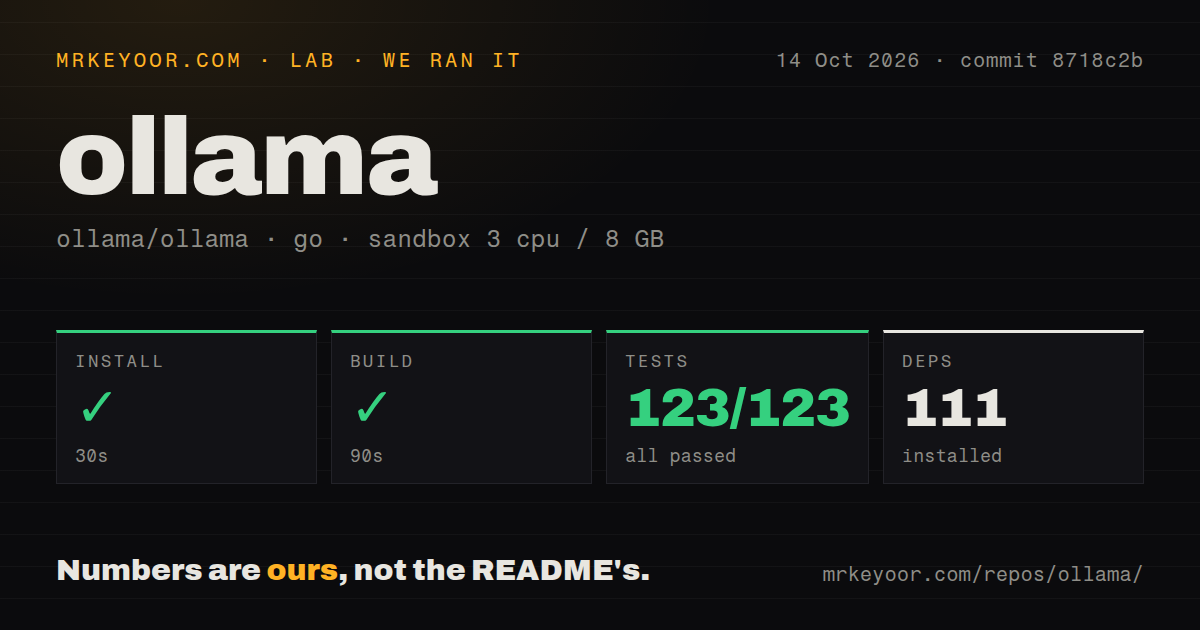
Our sandbox installed Ollama commit 8718c2b in 30 seconds, adding 111 packages, and the build succeeded in 90 seconds. We ran it on October 14, 2026, in an unprivileged Debian container using golang:1.24-bookworm, with 3 CPUs, 8 GB of RAM, and no secrets. Those are encouraging results for someone who needs to work on the repository rather than simply download the application.
The Go test step completed in 121 seconds: 123 passed, 0 failed out of 123. Our scan found 7 CI workflow files and a Dockerfile, with no dedicated tests directory. That directory finding plainly doesn't mean the project lacks tests. The measurements establish a successful install, build, and suite at that commit. They provide no model throughput, answer-quality, GPU compatibility, or concurrent-request benchmark, so they cannot size an inference service for you.
The download path and native development have different requirements
The README gives application downloads for macOS and Windows, a Linux installer, and an official Docker image. A contributor follows a more involved route: the development guide names Go, CMake, and a C/C++ compiler, with platform-specific acceleration toolchains. Native code and Go code live together. That's a material distinction if your expectation is that a Go repository only needs the Go compiler.
The 90-second build from our Debian sandbox doesn't certify those other routes. The guide says a fresh native build defaults to CPU inference outside macOS arm64, and additional GPU backends require explicit selection. Windows ARM currently lacks additional acceleration libraries. Choose the documented path for your machine before investing in a local development environment, and keep the native runtime payload alongside the executable when packaging it.
Local requests need no account, while cloud requests do
Ollama's authentication reference says the local API needs no authentication. Cloud models, private downloads, and publishing require sign-in, while direct calls to ollama.com use an API key. A request arriving at your local server can still select a cloud model. Anyone choosing Ollama to keep prompts on their own computer needs to control the selected model and the cloud configuration explicitly.
Our no-secrets run passed 123 tests, which is useful evidence about the development path, not proof of offline inference. The FAQ's cloud controls include OLLAMA_NO_CLOUD=1 and a server configuration option. For a shared service, put authentication in front of the local API before extending access. An unauthenticated development endpoint is convenient on your own machine and a poor access policy for other people's clients.
Windows users should check how the server starts
Open issue 19013 reports a specific Windows failure: starting the tray app after a separately running server causes repeated attempts to start another server on the occupied port. The existing server keeps working, but failed child launches keep producing logs. This matters if you start Ollama through a scheduled task and also let the desktop app launch at login. The report concerns that start order, rather than every Windows installation.
A proposed fix appears in pull request 19014, which checks for an existing healthy server before launching a child. It remained open in the evidence we checked on October 15. Our 121-second Debian suite does not reproduce or clear a Windows tray problem. If your rollout uses that arrangement, verify the startup behavior on Windows before treating a passing Linux suite as your release gate.
The integration catalog makes it useful behind an existing application
The README links official Python and JavaScript libraries and shows ollama launch claude for connecting Claude Code. Its community catalog includes LangChain, document-search applications, and several chat interfaces. These are practical reasons to choose the service: you can keep an existing client and change where inference happens. A listed integration still deserves its own check against the client version and model capabilities you intend to use.
For a smaller application, our 30-second install and clean suite justify a closer trial. For direct control over GGUF execution, compare llama.cpp itself. For a serving project centered on batching and distributed inference, examine vLLM's documented architecture. Neither comparison supplies a speed winner from this review. We would choose between them by operating requirements, then measure the chosen model on the target hardware before committing capacity.
October maintenance is active, and the queue needs careful reading
The repository's last push was October 15, 2026. GitHub showed 183,196 stars and 4,279 open issues and PRs, with fresh reports and proposed fixes in the queue. Release v0.40.4 shipped October 12, including decision-model CLI support and changes to model loading. Those dates support an active-maintenance judgment. The combined queue count cannot tell you how many unresolved bugs affect your setup.
Use Ollama when the local endpoint and existing integrations save you application work. Keep the 48.6 MB source checkout separate in your planning from model storage and inference memory, which our run didn't measure. Before rolling it out, fix the model choice, confirm the execution stays where you intend, and exercise the startup arrangement your users will actually have. A successful source build earns the next trial. The model still has to fit the machine.