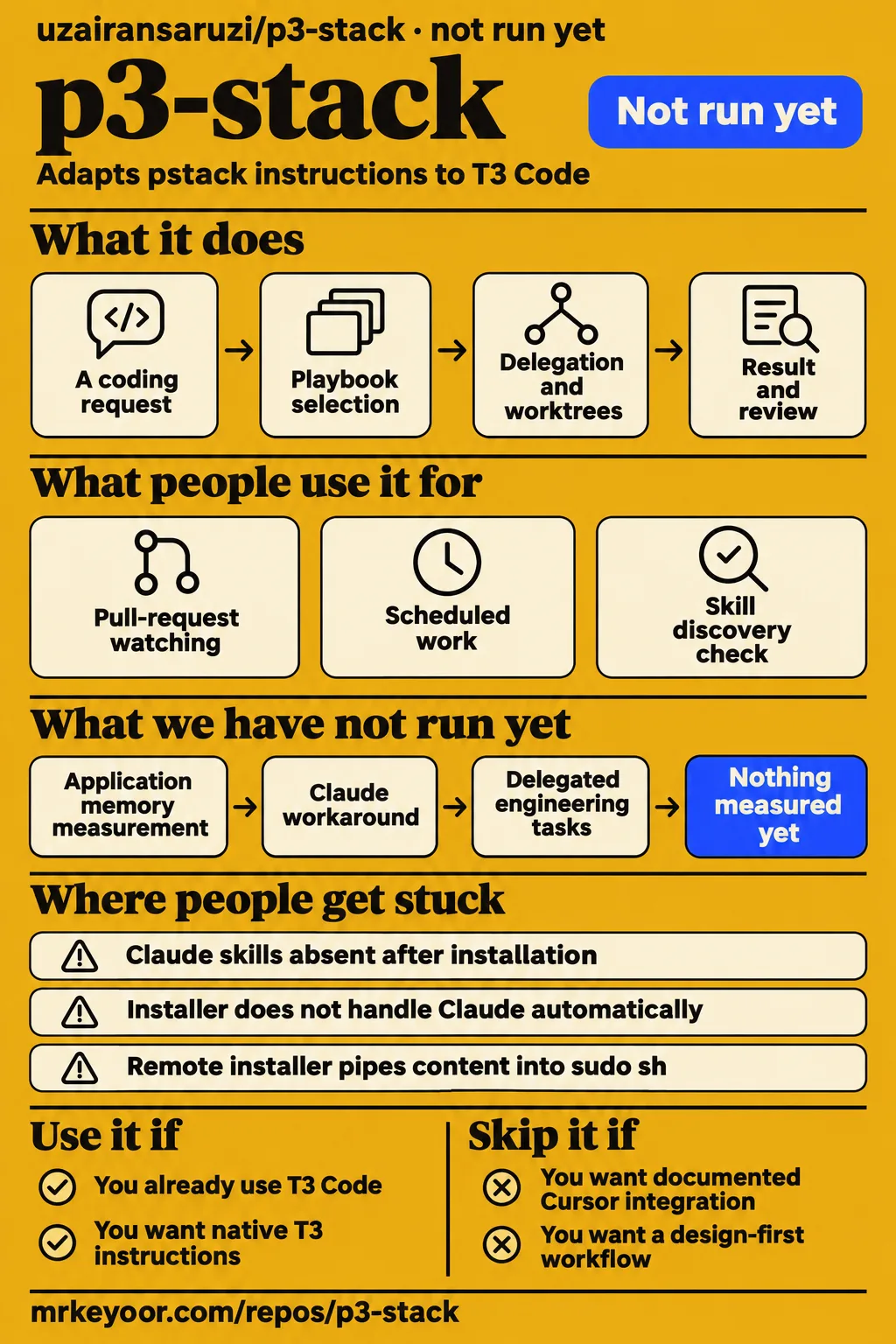
p3-stack adapts poteto's pstack engineering instructions to T3 Code, but the first installation decision concerns the provider reading those instructions. Issue #2 reports a mismatch between the default installation destination and the locations used by T3's Claude provider. That makes this repository most relevant to developers who already use T3 and want its native operations reflected in their agent workflow. The p3-stack README describes the intended workflow; issue #2's provider-directory explanation supplies the installation correction.
What people use p3-stack for
p3-stack's README describes delegation, worker worktrees, pull-request watching and scheduled work through T3 Code operations. A skill here is an instruction set for a coding agent, rather than an application deployed as a service. The repository supplies role guidance and playbooks that refer to the surrounding agent environment. For a developer already working in T3, the appeal is that these instructions name the operations available there. Read the p3-stack workflow description.
The supplied research records two concrete activities: the author's adaptation and a user's discovery check. The author describes experimenting with T3 Code and making pstack work natively in that environment. The issue reporter describes whether the resulting skills appeared in a Claude session. Those activities explain both the project's purpose and an installation obstacle, without turning the author's motivation into a claim about engineering results.
| Who | What they did | Recorded outcome |
|---|---|---|
| Uzi, the project author | Adapted poteto's pstack while experimenting with T3 Code | Published the skill repository and asked for feedback. Author announcement |
| The issue #2 reporter | Tested skill discovery with T3 Code and Claude Code 2.1.291 on Windows 11 | A fresh session listed p3-help after the skills were additionally linked into the Claude skills directory. Discovery reproduction |
The README names delegate_task for child agents, t3_thread_launch for worker worktrees and branches, and watch_pull_request for pull-request events. It also names schedule_task for scheduled work and thread-reading tools for session history. These are the specific mechanics behind the adaptation. A prospective user can compare those documented operations with the environment they use before deciding whether the repository's instructions fit their work. Read the documented T3 operations.
What happened when we ran it
Our run at commit 09909eb on November 13, 2026 recorded NOT RUN; the separate safety step found none of four accepted Compose filenames. That missing-file check stopped the Compose-based lab path before execution. The source harness separately reported no supported ecosystem for this Shell repository and no Dockerfile. Our recorded sandbox configuration was 3 CPUs and 8 GB RAM, with image n/a. Cleanup then reported ok, a different outcome from running the software.
| Lab record | Result | What it means |
|---|---|---|
| Source harness | NOT RUN: unsupported ecosystem, language Shell; no Dockerfile | The harness stopped without an installation, build or test result |
| Hands-on safety step | FAILED: none of compose.yaml, compose.yml, docker-compose.yaml or docker-compose.yml exists | The Compose-based lab path stopped at its required-file check |
| Teardown | ok | The cleanup step reported success |
The safety log uses the phrase "unsafe repo" because its rule requires a Compose file. Its diagnostic names compose.yaml, compose.yml, docker-compose.yaml and docker-compose.yml as absent. All four accepted filenames were missing, so the lab stopped at that prerequisite rather than reaching execution. The Compose safety-step record supplies that failure, and the teardown record supplies the cleanup result. This finding concerns the lab's required-file rule.
Where people get stuck: Claude reads a different skill directory
Issue #2 says T3 discovers skills per provider and that its Claude driver scans Claude skill locations. The README's installer instead links skills into ~/.agents/skills by default. The issue points to the Claude driver's source and describes the distinction as mirroring each provider's CLI. For someone facing a missing command, the selected provider and its skill directory are therefore the relevant starting facts. Read issue #2's directory explanation.
The reported reproduction used T3 Code with Claude Code 2.1.291 on Windows 11. A fresh session after installation only into ~/.agents/skills did not list p3-help. After the reporter additionally linked the skills into ~/.claude/skills, another fresh session listed it. That sequence gives a concrete troubleshooting checkpoint: establish command discovery before changing the role-to-model mapping or investigating a playbook's response to a coding request. Read the supplied discovery report.
| Symptom or situation | Evidence-backed response | Status in the supplied record |
|---|---|---|
| p3-help absent in a fresh Claude session | Also link the skills into ~/.claude/skills, then start a fresh session | Reporter reproduced discovery after this change |
| Same question on macOS or Linux | Inspect the selected provider's skill location | Reporter says the limitation affects every OS |
| Expecting install.sh to handle Claude automatically | Read the proposed documentation or installer changes in issue #2 | The supplied synthesis records the issue as open |
The issue proposes documenting the additional Claude location, adding an installer option, or waiting for upstream support. Those proposals differ from the directory change the reporter used. The actionable result in the record is discovery after exposing the existing skills through a Claude location and starting a fresh session. An installer option appears as a proposed remedy, rather than an implemented feature established by this report. Read the proposed installation remedies.
Model routing starts with the providers you already have
The README says /setup-p3 reads orchestrator_capabilities and writes role-to-model choices into p3-models.md. It names code, judgment and review-panel roles, mapped to a provider and model available to the user. This gives configuration a specific artifact to inspect after installation: the role mapping file. Recording that mapping alongside a task result would also give later troubleshooting a concrete account of which provider and model handled each role. Read the setup description.
The documented task entry point is /p3-mode, whose playbooks include investigation, bug fixes, performance work, refactoring, shipping and session pickup. For an initial evaluation, choose a bounded change in a repository you understand and state the expected result before starting. That makes the request and its acceptance criteria available for comparison with the resulting changes. The README also directs users to /p3-help when choosing a skill. Read the entry commands and playbook list.
The README assigns worker worktree and branch binding to t3_thread_launch and says the app enforces one writer per worktree. That documented arrangement matters when choosing instructions for several workers touching a repository. Inspect the assigned branches together with the resulting changes: branch ownership explains where each worker is meant to write, while the task's acceptance criteria explain what the completed changes should accomplish. Read the worktree description.
Security: the scan flags a privileged remote installer
SkillsLLM's October 6, 2026 scan flags a remote installation command in skills/make-bot-ui/SKILL.md at line 64. The recorded command fetches https://tailscale.com/install.sh with curl and pipes it into sudo sh. The scan labels the finding medium severity and advises reviewing the source before running it. These details identify the instruction to inspect, rather than leaving the reader with an unexplained scanner badge. Read the SkillsLLM scan record.
The command passes downloaded content to a privileged shell. Before following the affected instructions, read the installation source and decide whether that action belongs on the machine where the agent works. Include the skill files in that inspection, alongside the repository's top-level installer, because those files contain instructions an agent may follow during a task. This recommendation follows the scanner's advice to review the remote source before running it.
Clelp's listing separately reports that none of its static security checks tripped and explicitly rejects treating that result as a safety guarantee. Its listed categories include network calls, secrets and credentials, permission scope, and code or shell execution. Reading the stated check categories gives the result a clearer meaning than the badge alone. The two supplied scanner records should be read with their own descriptions of what they checked. Read Clelp's static-check statement.
Repository activity and the documentation score
GitHub's supplied repository metadata lists the last push as October 5, 2026. The author's announcement describes adapting pstack while experimenting with T3 Code. These records identify the project's recorded activity and purpose; issue #2 supplies the installation correction relevant to Claude users. For evaluating this repository, that suggests a reading order: start with the README's intended setup, then read the provider-specific report. Repository metadata and author announcement provide the underlying records.
Documentation receives 3/5 on this review's editorial scale: the README supplies a starting path, while issue #2 supplies a material installation correction. On that scale, 1 means essential starting guidance is missing, 3 means a concrete starting path needs a material correction, and 5 requires corroborated guidance across the reviewed paths. The setup commands, role-mapping file and task entry point support the starting-path judgment. The provider-directory mismatch supports the correction. Setup ease, community support and operational maturity receive N/A.
p3-stack vs pstack and Superpowers
Choose p3-stack for native T3 instructions, original pstack for its documented Cursor or Claude adapter, and Superpowers for its design-and-planning workflow. The distinction comes from their documented integrations and processes. A developer choosing among them should first decide which agent environment and task sequence they want, then read that project's installation instructions. The table preserves those choices without assigning comparative performance scores to the projects.
| Project | Documented approach | Pick it when |
|---|---|---|
| p3-stack | Reworks pstack around T3 delegation, threads, watching and scheduling | You already use T3 and want instructions tied to its native operations |
| poteto's pstack, in cursor/plugins | Original engineering skill system with Cursor guidance and a documented Claude Code adapter | You want the original workflow and its documented adapter |
| obra/superpowers | Composable development skills with installation guidance separated by harness | You want its design, planning and development process |
The supplied pstack README documents Claude Code plugin installation and says its adapter skips steps requiring Cursor-only features with a one-line note. A Claude user therefore has an original-project option alongside the T3 adaptation. Its setup documentation also names a model configuration file under ~/.claude/rules. Read that adapter's instructions when comparing the projects, particularly if the reason for considering p3-stack was an assumption that original pstack documents only Cursor. Read pstack's Claude adapter description.
Superpowers says installation differs by harness and directs people using several harnesses to install it separately for each. Its documented workflow begins with design discussion, proceeds to an implementation plan after design agreement, and then carries out development tasks. That sequence is a reason to choose it if explicit design agreement and planning fit how you want to work with a coding agent. Read Superpowers' installation and workflow documentation.
What the other reviews get wrong
AI Indigo repeats installation into ~/.agents/skills, while issue #2 describes a different discovery location for T3's Claude provider. The correction is to make the installation explanation provider-specific. Someone following the directory summary should inspect the selected provider's skill location before treating a missing command as a role-routing problem. AI Indigo's installation summary and issue #2's directory explanation show the distinction.
Clelp displays a Reviewed label while explicitly saying no agent has reviewed or vetted p3-stack. Its explanation says the listing exists because the author published the project. Those statements give the label its necessary context: the page contains a listing and static-check results, alongside an explicit statement about the absence of an agent review. Read that explanation when deciding what weight to give the badge. Read Clelp's review-status statement.
AI Indigo's Carrel comparison labels p3-stack's pricing "open-source" and also lists "Pricing not published" as a con. Those labels are inconsistent as pricing guidance; the supplied extract does not call p3-stack a paid tool. The upstream README identifies the repository as MIT licensed. Use that statement for the repository's license, and consider the provider used for an agent session as a separate setup choice. Read AI Indigo's comparison labels and p3-stack's license statement.
P3 Identity Stack is a separate listing associated with a different repository owner. Its supplied extract describes an archive pointer and says it is not an installable skill. Keep the full identity, uzairansaruzi/p3-stack, attached to this review and its installation sources. The similarly named entry's installation snippet and security badge belong to that entry, rather than supplying evidence about this repository. Read the separate P3 Identity Stack listing.
Questions people ask
Issue #2 reports successful discovery after additionally linking skills into ~/.claude/skills and starting a fresh session. That result answers the immediate question for a Claude user whose p3-help command is missing. The three questions below come from the supplied research synthesis and cover the directory mismatch, the reported remedy and its platform explanation. Each answer attributes the result or explanation to the same issue rather than presenting it as our installation result.
Why don't p3-stack skills load with T3 Code's Claude provider?
Issue #2 attributes the missing skills to the difference between ~/.agents/skills and Claude's skill locations. The default installer targets the former, while the report says T3's Claude driver scans Claude locations. Inspect the provider selected for the session and the directory it reads before changing model assignments. That addresses the file-discovery symptom described in the report. Read the provider-directory explanation.
How can Claude users make p3-stack skills appear?
The issue #2 reporter additionally linked the skills into ~/.claude/skills and started a fresh session, which then listed p3-help. Use the appearance of that command as the discovery checkpoint before moving to the README's /setup-p3 configuration step. The issue separately proposes documenting or automating the additional installation location. Read the reported workaround and proposed remedies.
Does the Claude skill-loading problem affect operating systems other than Windows?
Issue #2 says the mismatch affects every OS and explains it through the provider's directory choices. Its concrete reproduction uses Windows 11. For someone troubleshooting on another platform, the report directs attention to the selected provider and its skill directory, rather than identifying a Windows-specific path failure. That preserves the difference between the reporter's explanation and the environment named in the reproduction. Read the supplied platform-scope synthesis.
What we have not tested yet
Our checkout at 09909eb produced no application execution, installation duration, build result, passing-test count, application memory measurement or engineering-task outcome. The 3 CPUs and 8 GB RAM describe sandbox configuration, rather than resource requirements or consumption; image n/a supplies no runtime version. The hands-on run description claims deployment with its own Docker Compose configuration and ports bound to 127.0.0.1, contradicting the explicit failed Compose check. That description supplies no reliable deployment result.
The supplied records contain no screenshots or known-answer task results. We have not reproduced the Claude workaround or tested discovery across operating systems; successful discovery belongs to the issue reporter. The proposed installer changes need an implementation check, and the supplied issue extract ends during a follow-up. Its missing continuation supplies no basis for conclusions about later behavior. The versioned discovery account therefore remains an attributed report about T3 Code with Claude Code 2.1.291 on Windows 11.
Delegated engineering tasks, worktree isolation, pull-request watching, scheduled runs and browser evidence need representative execution. Productivity gains, comparative speed, provider costs, sustained concurrency and unattended reliability are unmeasured here. Runtime security and tool combinations also need direct assessment, including whether the instruction flagged by SkillsLLM has changed. The scanner records describe their checks rather than installed behavior. These gaps leave setup ease and operational maturity unassessed; the limited support history also leaves community support quality unassessed.
This review covers the supplied text and evidence. Rendered layout, accessibility, automatic related links, recommendation modules and template behavior were outside the recorded work. The useful next evaluation is to establish skill discovery with the intended provider, configure the available models, and follow one bounded change through its result and review. Recording those steps would add an engineering-task outcome to a pack whose current evidence consists of documentation, attributed discovery troubleshooting and a stopped lab path.