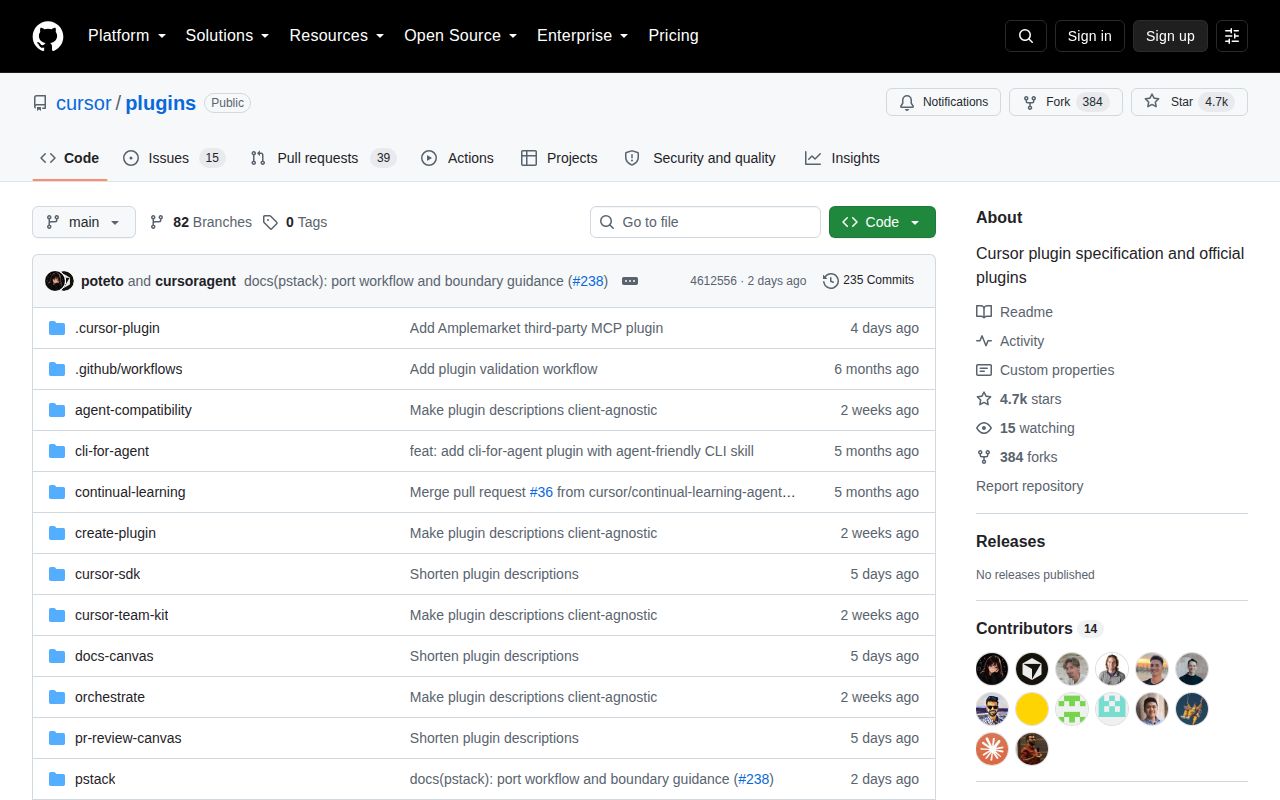
An official marketplace you can inspect
Cursor Plugins is not one extension. It is the official public catalog for a plugin system that can bundle agent skills, persistent rules, slash commands, specialized agents, hooks, and Model Context Protocol connections. Each plugin lives in its own directory with a manifest, while one marketplace file tells Cursor what is available. That makes the repository useful to both users choosing extensions and authors learning the format.
The current marketplace manifest lists 30 entries. Cursor's own developer tools include continual learning from transcripts, deep branch review, plugin creation, agent compatibility audits, interactive review and documentation canvases, SDK guidance, and multi-agent orchestration. Third-party directories connect Cursor to Gmail, Google Drive, Google Calendar, GitHub, Playwright, Salesforce, HubSpot, Apollo, Ashby, Intercom, Zoom, X, Clay, Docusign, and other services.
This breadth is the main attraction. A user can add a focused workflow instead of copying a prompt between projects. A team can read the exact skill and hook instructions in Git before enabling them. Plugin authors get working examples that show how files fit together, not merely an abstract specification.
Plugins range from text to real authority
The safest entries are essentially packaged knowledge. CLI for Agents teaches conventions such as explicit flags, useful help, idempotency, and dry runs. Create Plugin provides scaffolding and a submission review workflow. Canvas plugins explain how an agent should turn a pull request or documentation set into a structured visual artifact. These mostly shape model behavior.
Other entries execute code or connect accounts. Orchestrate installs script dependencies with Bun, requires a Cursor API key, and can fan work across cloud agents. Optional Slack support asks for scopes to post messages, upload files, read reactions, and inspect channel history. Continual Learning uses a stop hook, reads new transcripts, and updates AGENTS.md with inferred preferences and workspace facts. It keeps cadence and transcript indexes in .cursor/hooks/state.
MCP integrations can carry still more authority. Gmail uses Google's hosted MCP server and OAuth, then lets the agent search and read messages, manage labels and drafts, and compose mail. CRM plugins advertise record creation and updates. Playwright drives a browser. These capabilities may be exactly why you install a plugin, but they make blanket recommendations irresponsible. Check endpoints, requested permissions, hook commands, and write actions for every entry.
Installation is simple until the plugin has a runtime
For an end user, /add-plugin gmail or a Settings search is an admirably short start. OAuth-backed plugins prompt for sign-in. Instruction-only bundles may need nothing else. Orchestrate, by contrast, expects Bun, a dependency install inside its scripts directory, and a personal or service-account Cursor API key. Its optional Slack path adds another token and a detailed scope list. Setup belongs to each plugin, not to the marketplace as a whole.
The same applies to removal and control. An open June 2026 issue says installation, disabling, and uninstalling have different disk and agent effects that are not explained in one authoritative document. Cache directories can remain after disabling, and command suggestions may persist. Another request says users cannot globally deactivate skills they did not actively choose and raises concern about token cost from skill descriptions. If strict opt-in behavior matters, verify the current Cursor client rather than relying on the repository layout.
Continual Learning needs extra caution in team repositories. Its README says the updater changes AGENTS.md and stores runtime state inside the workspace. Open work proposes moving personal memory to a user-scoped path because preferences and state can otherwise appear in shared Git status or commits. A separate issue asks for a persistent repository denylist so the hook cannot write instructions in selected workspaces. Do not enable automatic learning everywhere before deciding who owns those files.
The format is clear, validation is shallow
The manifest schema is a useful piece of documentation. It defines names, semantic versions, minimum client versions, authors, component paths, hooks, user variables, and MCP server declarations. The repository's validator checks the marketplace JSON, confirms each source directory and plugin manifest exist, validates both against JSON Schema, and ensures names match. Pull requests run that script on Node 20.
That catches broken catalog wiring, but it does not validate the contents of skills, rules, hooks, or remote services. The workflow only triggers for marketplace, manifest, and schema changes. An August 2026 pull request fixes a skill whose unquoted YAML description contains colons and is skipped by a separate skills scanner. The marketplace validator could not catch it. Runtime claims, permission safety, command availability, and frontmatter still require plugin-level tests and human review.
Local contributor setup has a small papercut too. The validation script imports AJV and AJV Formats, but the repository has no root package file. CI installs both with npm install --no-save; contributors must repeat that manually before running the script. The Create Plugin bundle gives good structural guidance, yet this root workflow could be more reproducible.
Active catalog, incomplete front door
The repository was pushed on August 11, 2026, with pull requests active the same day. Its 30 open items include issues and pull requests, and current discussion covers integrations, model selection, lifecycle behavior, memory safety, and metadata repairs. There are no GitHub releases, which is understandable for a live marketplace but removes a clean catalog changelog and stable snapshot. Individual manifests carry versions instead.
The front-page table also lags the actual manifest. It lists 24 plugins, omitting Teaching, Ralph Loop, Playwright, GitHub, Zoom, and Clay even though the marketplace file contains them. That mismatch is not a runtime failure, but it means users should treat the manifest and Cursor's marketplace UI as the inventory source.
Cursor Plugins is valuable because it makes powerful agent extensions visible and reviewable. Start with one narrow workflow, inspect its files, install it in a low-risk workspace, and confirm how to disable it. Expand to hooks and account-connected MCP services only after their authority matches a real need. The official label is a good signal of relevance, not a substitute for least-privilege review.