OpenCLI v1.8.8 turns logged-in sites into commands
OpenCLI v1.8.8 sits between a command-line tool and a browser automation framework. Built-in adapters expose familiar commands for sites such as Reddit, Twitter, LinkedIn, Bilibili, Zhihu, and Xiaohongshu. Browser primitives can open pages, inspect structured DOM state, click, fill, wait, capture network responses, manage tabs, and take screenshots. Six installable agent skills cover browser use, adapter writing, repair, sitemap work, and command reference. The result suits repeated tasks where a named command is safer and easier to inspect than a fresh agent improvisation.
The repository shows how much code supports that promise. Our checkout contained 2,595 files, about 319,785 lines of source, and occupied 17.4 MB before installation. OpenCLI also acts as a hub for local binaries and controls Electron applications through Chrome DevTools Protocol. That makes discovery convenient, though it expands the trust boundary. A single installation can talk to browser profiles, local daemons, external commands, site credentials, desktop targets, and downloaded files. Operators should decide which of those capabilities each agent session may reach.
More than 100 sites trade convenience for adapter churn
OpenCLI v1.8.8 documents more than 100 supported sites and a plugin model for adding others. Official commands cover public reads, authenticated timelines, downloads, publishing, follows, messages, and account data. Adapters can use public endpoints, cookies, intercepted traffic, browser UI, or local state. That range is the product's appeal: once a stable adapter exists, scripts get JSON, YAML, Markdown, CSV, or tables plus meaningful exit codes. The same range guarantees uneven reliability because every site has its own markup, authentication, risk controls, and rate limits.
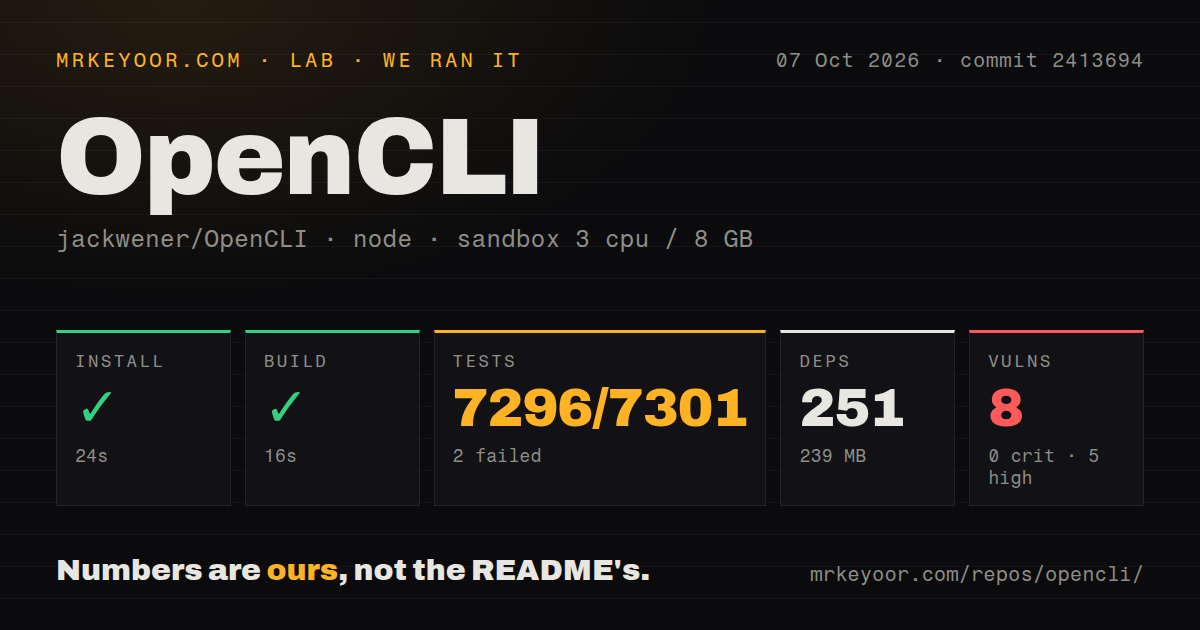
Our source scan found 7 CI workflow files and a tests directory, with no Dockerfile. The monorepo installed 251 packages and occupied 239 MB, which is modest beside its 319,785 source lines. Installation alone does not provide browser access. Chrome or Chromium needs the Browser Bridge extension, and the local daemon must connect to it. Logged-in commands inherit whatever account state exists in the chosen profile. A separate browser profile is a practical containment step, especially when experimenting with adapters that can write.
What happened when we ran it
Our sandbox installed commit 8271afc in 38 seconds and completed the build in 14 seconds. Npm audit reported 0 known vulnerabilities at every listed severity. Our measurement setup used a fresh unprivileged Debian container with 3 CPUs, 8 GB of RAM, Node 22, and no secrets. We measured the repository's install, compilation, and declared test suite. We did not attach a logged-in Chrome profile, publish content, download media, or compare adapter output against live websites.
The test run ended with exit 1 after 95 seconds. Vitest counted 7,312 passed, 2 failed, and 3 skipped out of 7,317. The two failures came from src/download/index.test.ts; the supplied log tail does not show their assertions or error messages. It therefore supports no claim about the cause. The useful conclusion is narrow: almost all cases passed, while this commit did not produce a clean suite in our sandbox. Anyone changing downloads should reproduce those two cases with the full log.
Logged-in automation needs policy outside the prompt
OpenCLI v1.8.8 still has an open request for runtime controls around authenticated browser access. Issue 1595 proposes confirmation for write commands, site and domain allowlists, a local daemon token, and optional dry runs. The issue notes that adapters can reach cookies, broad debugger automation, and actions such as posting, deleting, following, messaging, buying, or uploading. Prompts alone are a poor authorization layer. Until enforcement is available in the version you deploy, put approval in the calling program and restrict OpenCLI to a dedicated profile with only the accounts it needs.
Our 3-CPU, 8 GB sandbox used no secrets, so the 7,317-case test result says nothing about the safety of a real authenticated session. Browser commands default to a foreground window, retain a session's tab lease until close or idle cleanup, and can target multiple tabs. Those choices help a person observe work, but an unattended agent can still invoke write-capable adapters. Log command arguments carefully, require explicit approval before mutations, and keep banking, password management, healthcare, and personal email outside the automated profile.
OpenCLI v1.8.8 is active, while live sites still break adapters
OpenCLI v1.8.8 shipped on August 30, 2026 with a long list of site fixes and new commands. One day later, issue 2445 documented a Xiaohongshu search page that rendered duplicate overlapping filter elements; the adapter treated them as ambiguous and stopped before extraction. The report includes a deterministic fixture and a proposed correction. This is healthy maintenance behavior, and it also captures the permanent cost of the product: consumer sites can change underneath an adapter between OpenCLI releases.
GitHub recorded the last push on August 30, 2026, 28,822 stars, and 219 combined issues and pull requests. Release activity and recent fixes show an active project rather than a neglected adapter dump. Our run still ended with 2 failed tests among 7,317, and the open safety-policy request affects how much authority an agent should receive. OpenCLI is a useful supervised tool and a promising adapter platform. Its browser access should be treated like account access, because that is exactly what a logged-in profile provides.