A task prompt can drive the browser from Python
Browser Use gives a Python application an agent that opens pages and chooses browser actions from a written task. The README's example asks it to find the repository's star count and return the answer. I'd consider it for browser work where the route changes between requests, such as finding information across unfamiliar pages. For a fixed form you already understand, a scripted browser flow gives you more direct control over each action.
The repository is manageable to inspect: our checkout contained 538 files and about 113,110 source lines, occupying 9.6 MB. Its surface extends beyond the Python agent, though. The README separates a coding-agent CLI, local library execution, and a fully hosted service. Choose the execution model first. Giving an existing assistant browser tools and asking a hosted agent to complete an entire job leave different parts of the work under your control.
What happened when we ran it
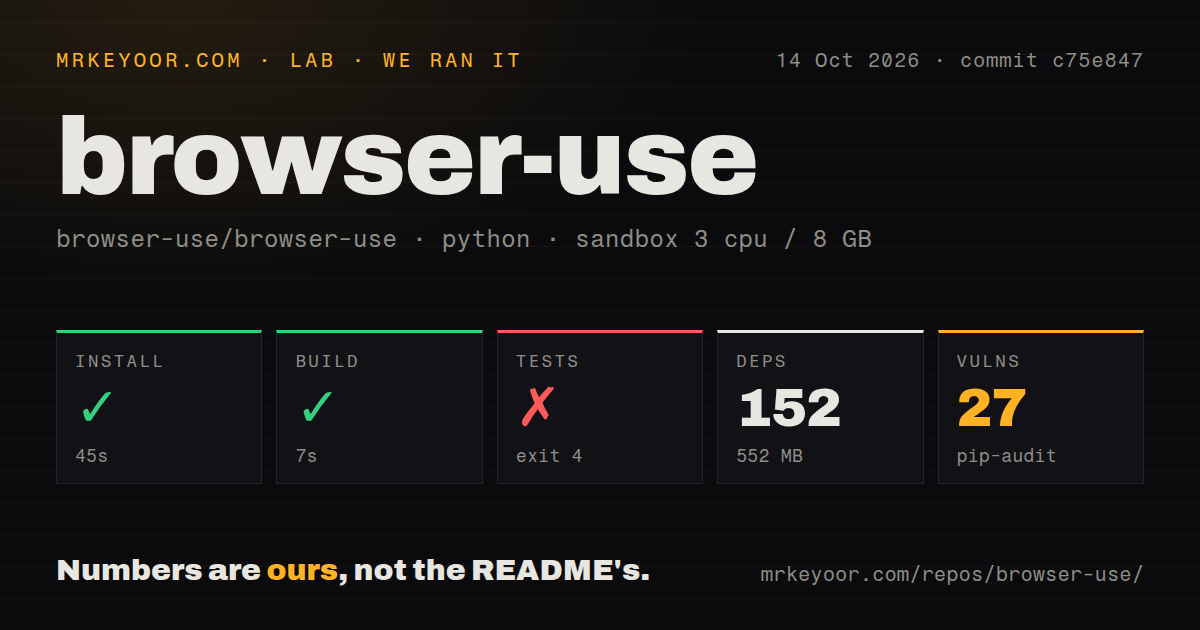
Our sandbox installed Browser Use commit c75e847 in 45 seconds, adding 152 packages and occupying 552 MB. The build succeeded in 7 seconds. We ran it on October 14, 2026, in an unprivileged Debian container with 3 CPUs, 8 GB of RAM, Python 3.12, and no secrets. The image was ghcr.io/astral-sh/uv:python3.12-bookworm. These results establish that the installation and build steps completed in that environment.
The test step failed with exit 4 after 7 seconds. Pytest reported unrecognized arguments: --dist=loadscope and identified /work/repo/pyproject.toml as its configuration file. The supplied tail contains no executed-test summary. We cannot call this a failed browser interaction or claim a passing suite. The finding is narrower: the configured test invocation was rejected, and the log doesn't establish why that option was unavailable.
Pip-audit reported 27 known vulnerabilities. The supplied measurement doesn't identify affected packages, severity, or whether a browser task could reach the vulnerable code, so it cannot establish those details. Our scan also found 9 CI workflow files, a Dockerfile, and a tests directory. Those upstream development signals don't change the failed local invocation. Installation and build worked, while the fresh environment still needs dependency review and a working suite before adoption.
Local browser control still needs a model connection
The quick start wires Agent to a model wrapper and reads a provider credential from .env. Browser Use's own model and cloud browser use a separate Browser Use API key. The README also documents a local browser with a local model through Ollama. MIT licensing covers the library, while hosted inference and browsers have separate usage charges. Keeping the browser local doesn't, by itself, keep its model processing local.
Our 552 MB environment was created without secrets, so the successful install provides no evidence about model responses, account access, or task completion. Pick the model route and browser location deliberately, then try a bounded retrieval task with a result you can check. A fluent final answer isn't sufficient for a job that must download a particular file or change a particular record. Verify the resulting artifact or application state directly.
Cloud profile sync transfers cookies, with limits
The authentication FAQ says cloud profile sync copies cookies, excluding local storage, IndexedDB, and extensions. Some sites may require another sign-in. For local browsing, the README points to reusing a system Chrome profile. If your application depends on storage-backed login state or an extension, budget for checking that exact arrangement. A successful profile transfer doesn't promise that every signed-in service will behave like your desktop browser.
The CAPTCHA FAQ is similarly qualified: cloud browsers and proxies aim to reduce detection, but no configuration guarantees success on every challenge. Our 45-second install didn't exercise either profile sync or CAPTCHA handling. That makes Browser Use a poor choice when the requirement is guaranteed unattended access across arbitrary protected sites. A useful evaluation starts with the actual sites and account states the job requires, including what happens when access fails.
Claude toolsets have SDK and host requirements
Release 0.13.11 introduced the Claude browser-toolset integration and specifies an Anthropic SDK containing anthropic.tools.browser. Its release note says the public SDK lacked that module when the release shipped. Check the SDK you intend to use before choosing this integration. The README also places Bash execution on the SDK host and requires Linux or macOS, with WSL for Windows. A remote browser doesn't move that shell execution off your machine.
For an existing coding assistant, the README instead points to the CLI and its skill registration command. The repository also includes an MCP server exposing browser tasks, direct control, and extraction. These are useful entry points, but our 7-second build didn't exercise them. Start with the interface your application actually needs. Adding both a Python agent and another assistant that chooses browser actions makes it harder to identify which component owns a bad decision.
October maintenance doesn't settle remote-session reliability
The last push was October 15, 2026, and GitHub listed 118,025 stars and 548 open issues and PRs. The activity feed included work on file reading and model configuration, alongside discussion of remote browser sessions. Release 0.13.11 shipped on October 7. Those dates support active maintenance. They don't erase issue 4579, an open report concerning stalled remote CDP calls after idle periods, originally reported against an older release.
That issue isn't a reproduced defect in our measured commit. It is a reason to exercise idle-session recovery if remote browsers are part of your design. I'd compare Playwright for explicit scripted actions and Stagehand for mixing browser code with model-directed actions and structured extraction. Browser Use earns a trial when task-level autonomy saves work you would otherwise encode. Require a working suite and review the 27 audit findings before handing it a persistent account.