1,500 integrations make n8n a platform, not a small library
n8n puts more than 1,500 integrations behind a visual canvas. A workflow can call SaaS products, internal APIs, AI models, or a human approval step, while JavaScript, Python, and npm packages cover gaps in the node catalog. The README also points to more than 9,000 workflow templates. That range is the reason to choose n8n: one shared editor can replace many scripts that only their authors understand.
The same range changes the ownership model. Our checkout contained 29,997 files, about 4,668,602 source lines, and 111 CI workflow files before dependencies arrived. It is a pnpm workspace monorepo containing the editor, execution engine, nodes, command-line package, and development tooling. Treat n8n like an application your team will upgrade and monitor. Calling it a visual script runner understates what lands in your infrastructure.
A 3,408-package install separates trying n8n from changing it
The README's Docker command exposes the editor on port 5678 and stores data in a named volume. That is a sensible way to judge the canvas. Source work is different. The contributor guide calls for pnpm workspaces and native build tools, and the current guide names Node.js 24 or newer. Our measured commit built in the supplied Node 22 lab image, but contributors should follow the version pinned by the project.
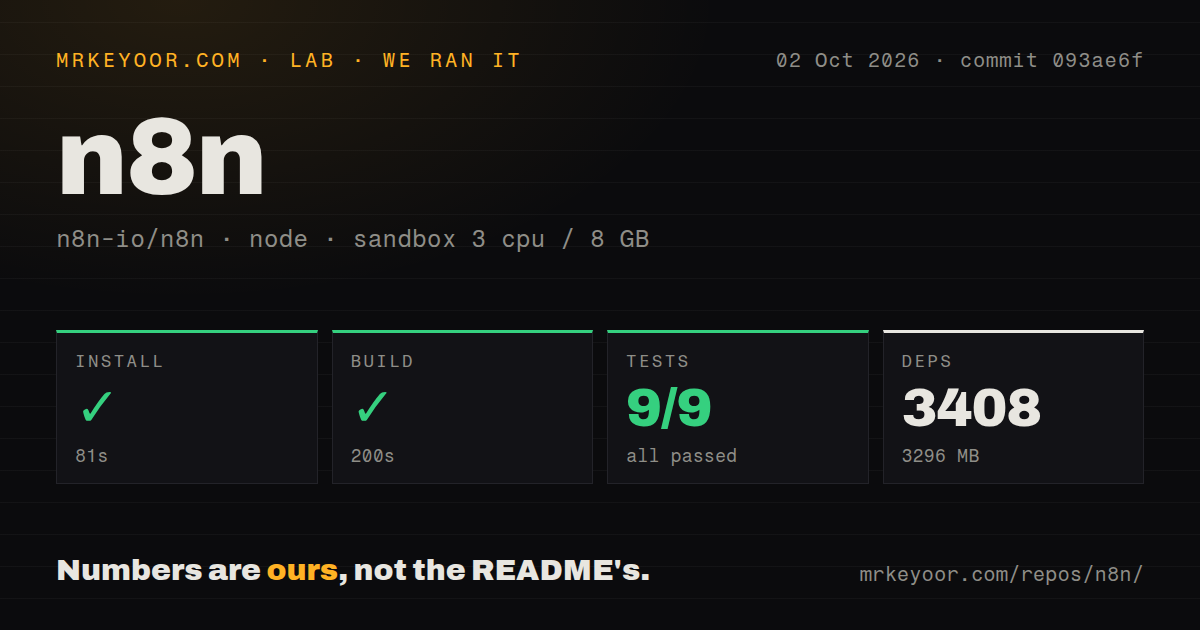
Our clean install completed in 81 seconds, pulled 3,408 packages, and occupied 3,296 MB. The build took another 200 seconds. Those numbers matter on laptops, short-lived development environments, and CI workers without a warm cache. Our scan found no root Dockerfile or top-level tests directory, although the repository contains Docker image material elsewhere and package-level tests throughout the monorepo. A root-directory glance does not describe the real development surface.
What happened when we ran it
Our sandbox installed n8n commit 093ae6f in 81 seconds and built it in 200 seconds. The unprivileged container had 3 CPUs, 8 GB of RAM, Node 22, and no secrets. The checkout was 208.9 MB before installation, and dependencies raised the working footprint to 3,296 MB. These are repository mechanics from our run, not workflow-throughput or hosted-service benchmarks.
The test command exited 1 after 50 seconds. Our harness parsed 9 passing Vitest tests and 0 failures out of 9, but the supplied log tail shows another result inside @n8n/cli:test: 152 passed and 1 failed out of 153. The tail then lists lifecycle failures for the CLI, computer-use, containers, ESLint config, IMAP, config, TypeORM, utilities, expression runtime, and MCP browser packages. It does not show the failed assertion or its cause.
That mismatch is worth reporting without dressing it up. The command did not finish green, and one CLI test is visibly marked failed. The log does not establish whether the other package lines represent separate test defects, cascading task-runner failures, or missing system requirements. A contributor should rerun the named package tests and inspect their full logs before deciding that a product path is broken.
Queue mode adds Redis, workers, and shared secrets
A useful single-instance deployment still needs credentials for every service it calls, persistent execution data, backups, and an encryption key. n8n can generate that key on first startup. Once queue mode enters the design, the main instance, workers, and webhook processors need the same key so they can read stored credentials. Redis carries execution messages, while workers retrieve workflow data from the shared database.
Multiple workers can scale execution capacity, but the 1-container quick start no longer describes the system. Redis availability, database access, secret distribution, worker health, and webhook routing become operating concerns. This is a fair trade when n8n replaces dozens of separate automations. It is expensive attention when the actual job is three timers calling three HTTP endpoints.
The Sustainable Use License limits paid redistribution
n8n publishes its source and calls the project fair-code. Most code is under the Sustainable Use License, while enterprise-marked files use separate terms. The license permits internal business use plus personal and non-commercial work. Distribution or providing the software to others is limited to free, non-commercial use unless another license applies. That is materially different from adopting an MIT or Apache-2.0 dependency.
The license is a deciding constraint for hosted automation vendors, agencies exposing the editor to clients, and software companies embedding n8n in a paid product. Internal automation has a much clearer fit. Make that decision before workflows accumulate credentials, node-specific behavior, and execution history, because those are the parts that make a later migration painful.
A release on October 2 shows active maintenance
GitHub showed 206,531 stars, 1,114 open issues and pull requests combined, and a last push on October 3, 2026. Release 2.41.6 arrived on October 2 with a fix that keeps the task runner alive after an unhandled promise rejection. Recent issue and pull request activity continued the same day, so the large queue is paired with current work rather than a dormant repository.
Breadth also creates more surfaces for regressions. Open issue 40227 reports multi-second editor freezes on an instance with roughly 2,000 usable credentials, and a linked pull request proposes a fix. That report concerns an unusually large credential inventory, not every installation, but it makes a good staging test for large teams. n8n is the right choice when its catalog replaces enough private glue to pay for this platform. For three cron jobs, it is too much system.