Choose layout before evaluating an agent workflow
An agent that reads page text and an agent that clicks coordinates need different evidence from a Moli trial. The README documents mock geometry by default and real layout through --layout. A successful text extraction therefore does not validate a coordinate-based workflow.
Moli is Lexmount's open-source headless browser for AI agents. Its README describes a standalone Rust browser kernel with JavaScript execution, a DOM and access through the CLI, CDP, WebDriver Classic and WebDriver BiDi. These are documented capabilities. Our sandbox run did not exercise an automation session or measure their compatibility with websites.
What happened when we ran it
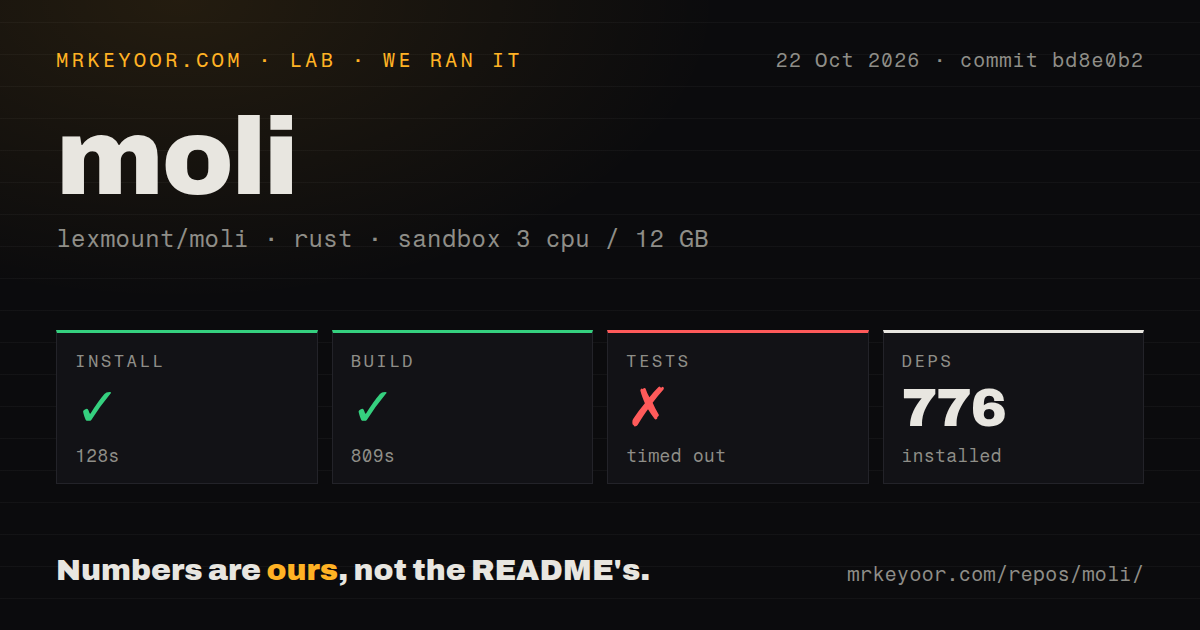
On October 22, 2026, our sandbox installed the source checkout at commit bd8e0b2 in 128 seconds and built it successfully in 809 seconds. The run recorded 776 dependencies. The checkout contained 7,452 files, about 2,434,934 source lines and 102.1 MB. These figures describe the source checkout, rather than a prebuilt installation.
The test step timed out at 900 seconds. Its final visible lines show Rust compilation, including moli v1.1.19, rusty-leveldb and h2. There is no completed test summary in the supplied tail. We cannot assign a passing-test count, identify a failing test or conclude that browser behavior is broken from that result.
The record does not explain why compilation continued during the test step or why the command reached its cap. It provides no basis for blaming memory, downloads or a particular crate. Contributors should budget for the source build measured here and finish the test run in their own environment.
The recorded configuration was 3 CPUs, 12 GB RAM and image lab-rust:1. Actual Rust and operating-system versions are not established by that label. The scan found seven CI workflow files, no Dockerfile and no directory named tests. Rust tests can live elsewhere, so the directory finding is not a test inventory. We measured no request latency, automation memory consumption or site success rate.
Layout and resources need separate decisions
The README documents Markdown and semantic-tree extraction. It also shows three server commands: moli serve for basic automation, moli serve --layout for real geometry and visual surfaces, and moli serve --layout --resource to fetch optional resource families as well. These are unexecuted documentation examples; they are not successful sessions from our lab.
Turning on layout and choosing which resources to fetch are separate steps. If a screenshot lacks content your workflow expects, check the resource policy as well as the layout option. The documented optional families include images, fonts, audio, video, media and text tracks.
For a first evaluation, use the documented prebuilt route if you are assessing the browser rather than contributing Rust code. The README lists Linux, macOS and Windows support, but our run did not verify those binaries. It also distinguishes the open-source browser from Lexmount Browser, its managed service. The open-source browser does not require that service.
A geometry snapshot can outlive a page change
The README says ordinary geometry reads may reuse the latest frozen layout tree even after the page changes. Screenshots rebuild and replace that tree. That makes snapshot timing a specific acceptance check for an agent that uses coordinates.
A proposed check is to open a page you control, capture geometry, change the page layout and then inspect the coordinates returned by the operation your agent actually uses. Compare them with the page state before sending input. This is an evaluation procedure, not an experiment completed in our sandbox. Do not assume that every geometry read refreshes the snapshot.
The documented scope excludes pixel-for-pixel Chrome parity and high-fidelity Canvas, WebGL or media playback. Software screenshots and PDF output do not establish those capabilities. For visual regression, use the browser engine whose rendering you intend to verify.
Choose an engine as well as a client
Moli's README shows Playwright connecting to its local CDP endpoint. That is a documented integration example, not evidence that every Playwright operation behaves as it does under Chromium. The README says unsupported protocol paths return explicit errors. Check the operations your workflow needs rather than treating a connection as a compatibility result.
Playwright drives Chromium, Firefox and WebKit. It is the relevant alternative when testing those engines is the requirement. It can also be the client in a Moli evaluation, as illustrated by Moli's unexecuted example.
Lightpanda Browser documents page extraction, Markdown output and a CDP server with a Puppeteer connection example. It is another candidate to test against the same extraction workload. We have no comparative result for these browsers and do not repeat their upstream performance figures as our findings.
The pinned Moli v1.1.19 release was published October 21, 2026. Its notes list changes to CDP, navigation, networking and layout, among other areas. Release notes establish what the project reports changing; they do not establish that those paths passed in our sandbox. The measured checkout was bd8e0b2, while the release page identifies bd0ddc3. Treat them as distinct revisions.
How the ratings follow the evidence
The editorial scale runs from 1 to 5: 1 means evidence of a major obstacle for the assessed task, 2 means substantial limitations, 3 means adequate evidence with material gaps, 4 means detailed supporting evidence and 5 requires independent corroboration. A missing assessment is recorded as null rather than converted into a score.
Documentation receives 4 for the README's explicit commands, separation of layout and resources, snapshot explanation and stated scope limits. This rates the documentation reviewed here, not verified compatibility of every example. Setup ease remains unassessed because we did not try the prebuilt route or complete a client session. Community remains unassessed because the packet does not establish support responsiveness or adoption quality. Maturity also remains unassessed: a successful build and an incomplete test run are insufficient grounds for a numerical maturity rating.
Start with a representative extraction, then test the interactions your agent needs. For geometry-dependent steps, explicitly enable layout and verify snapshot behavior against a page you control. Record the exact revision and client operations so a successful trial answers the deployment question you actually have.