BPB Panel v5.1.1 requires the online BPB Wizard. Its release instructions explicitly say that manual deployment and Wizard-client deployment do not work for that release. Read that restriction before choosing between the web and CLI editions described in the installer README.
BPB Wizard is intended for installing BPB Panel. The supplied measurements cover npm dependency installation; deployment and the resulting client connection remain unassessed.
Choose the route documented for your panel version
The Wizard README describes two editions. The web edition generates a reusable private link after deployment. The CLI saves logins locally and supports multiple Cloudflare accounts.
The Panel v5.1.1 release instructions narrow that choice to the online Wizard. The supplied Wizard release metadata identifies v3.0.2, released on July 23, 2026. That later Wizard release does not establish that the panel's client-deployment restriction has been resolved.
For Panel v5.1.1, follow its online deployment instructions. For another panel version, check that version's instructions before choosing the CLI. A completed installer step and a working client connection require separate verification.
What happened when we ran it
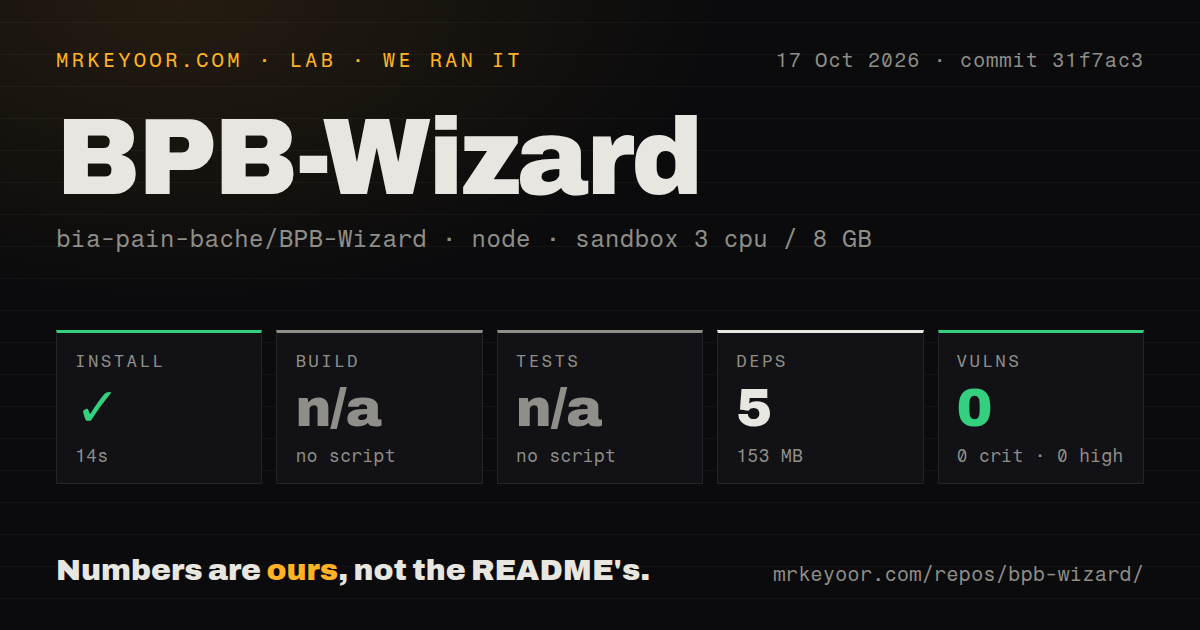
The recorded sandbox run on October 17, 2026 used commit 31f7ac3. Npm installed 5 dependencies in 14 seconds and recorded 153 MB on disk. Build and tests were skipped because the measured path had no corresponding script or target. Npm audit reported 0 known vulnerabilities: 0 critical, high, moderate or low findings.
The checkout contained 33 files, about 1,742 source lines and 0.3 MB of checked-out files. The scan found one CI workflow file, no Dockerfile and no tests directory. These repository signals do not turn skipped checks into passing results.
The recorded sandbox configuration had 3 CPUs, 8 GB of RAM and image lab-node:22. The label does not establish actual runtime or operating-system versions. The supplied results contain no Cloudflare deployment or proxy-throughput measurement. The dependency audit also does not establish how the application protects saved credentials.
CLI execution remains unassessed
GitHub metadata identifies Go as the repository's main language. The npm dependency installation did not assess CLI execution or deployment, and the supplied measurements contain no CLI launch result for Windows, macOS, Linux or Termux.
The README requires its launcher scripts and says standalone CLI execution is not permitted. It documents PowerShell for Windows and a shell-script route for Android through Termux, Linux and macOS. Users requiring standalone execution should avoid this documented workflow. Anyone considering a supported CLI route should inspect the launcher before running it.
Saved-token protection remains unverified
The author of pull request 82 describes plaintext storage of Cloudflare API tokens in store.json and proposes an operating-system credential vault with an encrypted-file fallback.
In the same discussion, the maintainer stated on July 26, 2026 that a credential vault had been implemented before v3 and had encountered compatibility problems on some operating-system architectures, especially Termux. These accounts leave the implementation at commit 31f7ac3 unresolved: neither statement establishes how that checkout stores credentials.
The supplied page shows PR 82 as open. It does not establish delivery of the proposed changes. This review did not independently verify token storage, encryption or filesystem permissions. Teams requiring verified encryption of saved CLI credentials lack that assurance in the supplied evidence.
The web edition's reusable private link also warrants careful handling. Keep it out of shared notes and screenshots. The supplied run did not deploy the hosted service or assess its credential protection. For v5.1.1, the online route is documented; its security remains unassessed here.
Alternatives serve different tasks
Wrangler is Cloudflare's command-line tool for building Workers. Consider it when building your own Worker application. The supplied evidence does not establish it as a workaround for Panel v5.1.1, whose release instructions also exclude manual deployment.
sing-box uses JSON for configuration files. Its documentation concerns configuring sing-box and does not establish another BPB Panel installation route.
For Panel v5.1.1, use the documented online Wizard route, save the resulting panel URL as the release instructions request, and verify both panel access and the client connection before retiring an existing setup.