ModLens gives text-only agents a separate pair of eyes
ModLens connects a coding harness to a vision service. A user supplies an image, ModLens asks another engine to inspect it, and the text-only model receives transcription, reading order, entities, relations, and uncertainty. It suits developers who prefer DeepSeek, GLM, or MiMo text models but need to discuss screenshots or scanned text. It is not a new vision model.
The project has two integration styles. DeepSeek Harness gets a plugin with wrapped (modlens vision) model entries and a direct-paste path. Codex, Claude Code, Pi, and OpenCode use a skill plus the ModLens CLI. The README says native vision models are left alone when host metadata confirms their capability. That matters because a bridge should not add another network call when the selected model can already read the image.
Six provider routes still require a trust decision
The README lists 6 built-in provider routes, including Gemini, Anthropic, an OpenAI-compatible endpoint, and agent CLI paths. It can also reuse signed-in local tools after the user grants permission. API routes are tried before slower agent processes, and each attempt is recorded in output metadata. A pinned provider disables fallback, which is the safer choice when policy says exactly where an image may go.
There is no free privacy upgrade hidden in that flexibility. A Gemini, Anthropic, or OpenAI-compatible service receives the image or a URL to it. Reused CLIs can spend an existing subscription quota, which ModLens labels in warnings. For remote URLs, some vendors fetch the URL themselves, so ModLens cannot apply its private-address check, magic-byte validation, or 25 MB cap on those paths. Security review has to follow the selected provider, not the package name alone.
What happened when we ran it
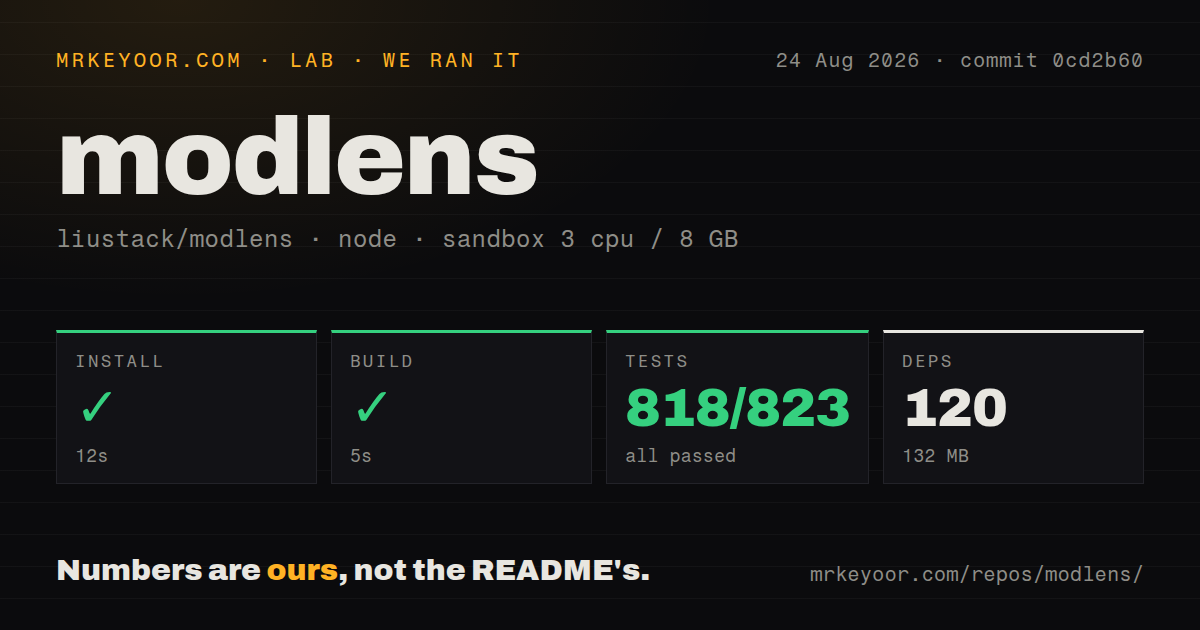
Our sandbox cloned commit 0cd2b60 and installed 120 pnpm packages in 12 seconds. Dependencies occupied 132 MB, and the build passed in 5 seconds. Vitest then completed in 41 seconds with 818 passed, 0 failed, and 5 skipped out of 823. That is a convincing repository check for the Node 22 environment we used.
The checkout contained 154 files, about 31,941 lines of source, and 4.9 MB before dependencies. Our scan found 2 CI workflow files, no Dockerfile, and no top-level tests directory. Those facts describe package health, not OCR accuracy or provider speed. We did not benchmark image recognition, compare vision models, or verify the README's per-provider timing claims, so they do not enter our recommendation.
Private temp files do not make an OS sandbox
Local image recovery has several thoughtful controls. Recovered files use mode 0600 inside a newly created 0700 directory. Project identity is checked against the transcript, and subprocess providers receive a copy in a throwaway working directory rather than access to the original file's neighbors. Claude CLI is restricted to the Read tool. Credentials are scrubbed from errors, warnings, attempt records, and stored cooldown reasons before output.
The security guide also states the boundary plainly. An agent process can still read absolute paths, use the network, and start programs. Antigravity runs with --dangerously-skip-permissions because prompt mode does not work in some environments; its prompt asks it to read only the supplied image. Text inside a screenshot can contain hostile instructions, so that prompt is mitigation rather than isolation. For untrusted images, the guide recommends the direct Gemini API route instead of a local agent process.
Node 24 aborts can bypass the failover chain
Open issue 85 documents a concrete v3.25.0 failure on Node 24. When a provider call is aborted, ModLens tries to replace the message on an AbortError whose property is read-only. The resulting exception exits the CLI instead of recording the failed attempt and moving to another provider. This affects the feature that makes a multi-provider setup attractive, and the report includes a short timeout reproduction. Node 22 passed our 823-test run, so the two findings can coexist.
Codex has a different integration limit. Issue 78 reports that a native attachment sent through a text-only OpenAI-compatible gateway can be rejected by the host before the ModLens skill gets control. Supplying an absolute image path as text works in the reporter's setup. Anyone buying ModLens specifically for paste recovery should test the exact host, model route, and attachment form rather than treating the support matrix as one universal hook.
The output contract favors evidence over fake precision
Version 2 removed pixel coordinates and confidence scores because language models can fabricate both convincingly. The current contract records unreadable details as uncertainty and returns provider-attempt metadata. That is the right bias for agent work: a partial transcription with a named gap is more useful than an invented bounding box. Applications still need to decide whether missing evidence stops a task or merely prompts another read.
ModLens can keep later questions tied to an already processed image, which saves repeated pastes. Key rotation handles authentication, rate-limit, and quota failures, while other provider failures move through the broader chain. These are practical behaviors, but they also create audit work. A production caller should persist which provider answered, which warnings appeared, and whether uncertainty touches the field being acted on.
August releases are fast, and maintenance is concentrated
GitHub listed 3,700 stars, 5 combined issues and pull requests, and a last push on August 25, 2026. Release v3.25.0 was published the same day, while issue activity continued on August 26. Several installation and compatibility reports were closed during the preceding week. The repository is moving quickly rather than sitting idle.
That pace depends on one maintainer. The contribution guide says pull requests are not accepted; users can file issues or fork the MIT-licensed code. This can produce a consistent codebase, though an organization cannot assume its fix will enter upstream through the usual review route. The clean 818-test result makes ModLens worth trying. The open Node 24 and Codex attachment reports should be part of the acceptance test, not footnotes discovered after rollout.