Should you try OpenCode?
Try it if you want to investigate a repository, discuss a change and then let an agent perform the work. Start by checking which agent is active. The measured-commit README describes build as the default full-access agent; plan denies file edits by default and asks permission before bash commands. Tab switches between them. These are documented defaults, not permission behavior we exercised in our sandbox. README at b4a57f6.
OpenCode supports model-provider connections, but our installation result does not demonstrate that any provider worked. The current V2 introduction documents connecting providers through /connect. Choose a provider and review permissions before attempting a small task in a disposable checkout. V2 introduction.
What our run established
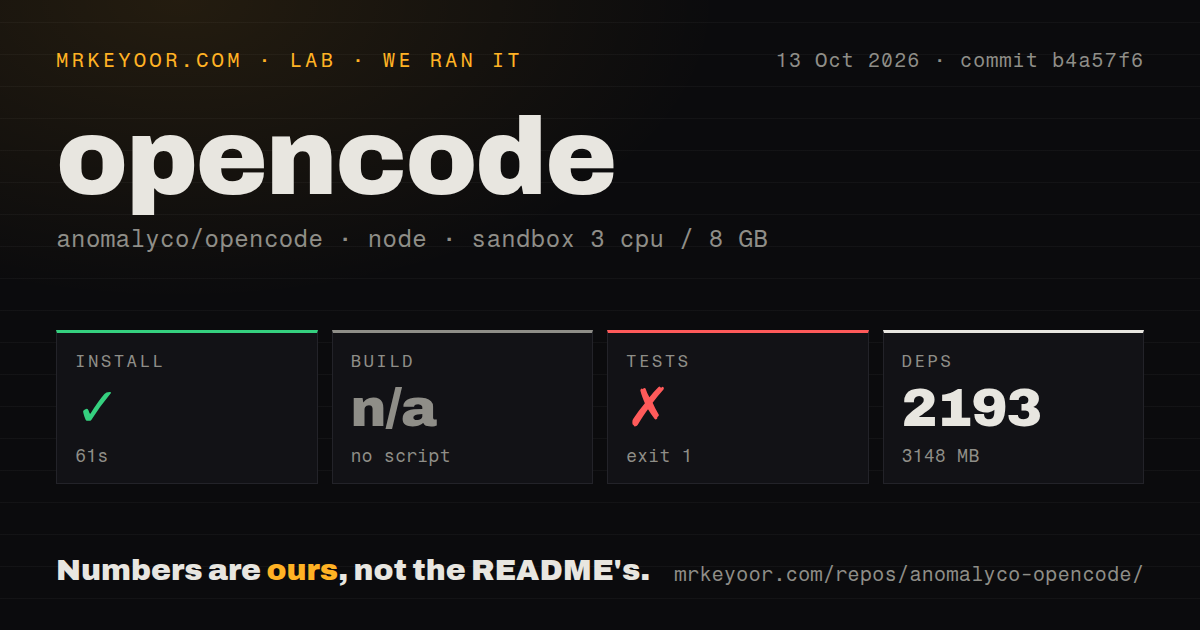
Our run on October 13, 2026, at commit b4a57f6 recorded a successful installation in 61 seconds in our sandbox. The recorded environment was lab-node:22 with 3 CPUs and 8 GB of memory. This was a source installation in a workspace repository, not a standalone CLI installation.
The harness records command success, exit status, elapsed time and available output tails separately. Installation returned exit 0. The build was skipped with the recorded reason no script; a skipped build is not a successful build. The test command returned exit 1 after 20 seconds. Its recorded command was echo 'do not run tests from root' && exit 1, followed by the same refusal message. That establishes a deliberate root-script refusal, not failing package-level assertions. The word 'root' in that message does not establish the operating-system user used for execution.
The attached harness records 2,193 packages and 3,148 MB, while the raw install footer says 2163 packages installed [36.96s]. We preserve both observations with their attribution. The footer does not replace the harness's 61-second installation measurement, and the supplied material does not reconcile the package-count difference.
There is no parsed test total to report. Stored parser summaries do not establish exhaustive unique coverage, and no complete-log reconciliation or new execution was performed. The supplied record also contains no audit result or scanned-package coverage, so security scan coverage is unknown.
Our run did not verify model authentication, a coding session, MCP connections, desktop behavior, inference speed or deployment. A successful installation alone answers none of those questions. The MrKeyoor testing methodology explains how command outcomes and measurement limits are presented. Its supplied October 31 version is provenance context, not evidence that this older run used that version of the procedure.
Choose installation instructions for your intended version
The current V2 introduction names @opencode/cli. Its postinstall script selects the platform's native binary, and the documented Bun and pnpm commands explicitly permit that script. It says Windows package managers are unsupported and offers standalone Windows CLI binaries. The older measured-commit README lists Windows package-manager commands, so those instructions should not be treated as interchangeable. Use the V2 introduction when installing V2.
The v1.19.0 release notes direct users toward OpenCode 2 and say updates are no longer installed automatically. This is a reason to check the intended release path before upgrading an existing installation, not evidence that our measured checkout ran a particular published CLI release. v1.19.0 release notes.
The supplied evidence does not include the migration, permissions or MCP documentation extracts needed to verify the earlier page's detailed V1-to-V2 compatibility claims. This review therefore makes no plugin-compatibility recommendation. The supplied OpenCode 2 article addresses the separate release-and-migration question.
When to choose Aider or Cline
Aider automatically commits changes with sensible commit messages. Its README also documents a codebase map and use of Git tools to inspect and undo changes. Consider it as a replacement coding assistant when reviewing AI work through Git is your preferred workflow. Those capabilities do not establish better coding quality or an easier installation than OpenCode. Aider.
In VS Code and JetBrains, every Cline edit appears as a diff you can review, modify or revert. Choose its editor integration when that review surface matters to you. Cline also has terminal and desktop interfaces, so the distinction is the workflow you choose, not exclusive access to an editor or terminal. It is another coding-agent option, rather than a required OpenCode component. Cline.
How to read the ratings
The five-point rubric describes the supplied evidence: 1 means substantial documented obstacles, 2 means several unresolved obstacles, 3 means usable with material qualifications, 4 means few documented obstacles and 5 means the dimension's stated criterion is fully evidenced. These are editorial assessments, not benchmark results.
Setup ease is 3: installation succeeded, but the root test route refused execution and current installation instructions require platform-specific choices. Documentation is 3: the V2 introduction explains installation details, but the older README and current instructions differ. Maturity is 3: the project has published releases, while the supplied README still labels the desktop app beta.
Community is 5 under the narrow criterion of publicly documented participation routes: the README provides contribution guidance, Discord and X links, and the supplied release credits a community contributor. This score does not measure adoption, response times, support quality or community size.