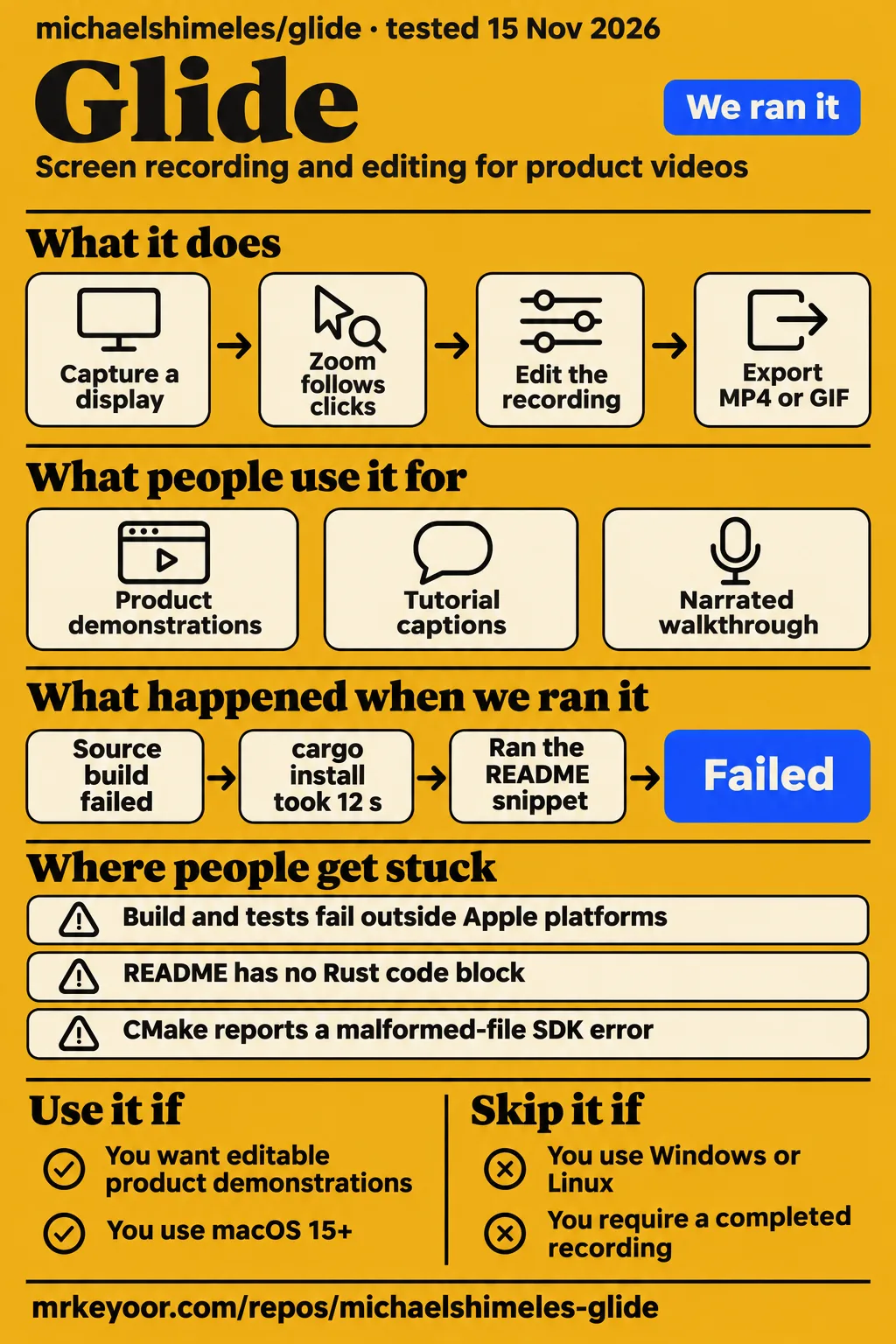
Our source build of michaelshimeles/glide stopped at an Apple-only dependency after 65 seconds. Mac developers seeking automatic zoom and an editable product-video workflow have a reason to evaluate this recorder. Windows and Linux users should choose a recorder documented for their platform. Teams requiring a recommendation grounded in a completed recording should read the run results and testing boundaries before choosing it.
What you can do with Glide
Glide's README describes recording a display, window, selected area or connected iPhone or iPad, followed by editing and MP4 or GIF export. This review concerns the Rust project at michaelshimeles/glide. The README at commit b6c69c7 identifies a macOS screen recorder for product videos; Glide Apps and the Android image-loading library are separate products. That owner-qualified identity is the starting point for choosing instructions, downloads and comparisons.
The documented capture controls include system audio and microphone audio on separate tracks, a camera option, countdown, pause and resume, restart and cancellation. A floating control bar stays outside the recording, according to the README. The app can hide desktop icons and the Dock and resize the recorded window to a preset or custom size. These controls describe a workflow for preparing a demonstration before the editor opens, rather than relying entirely on corrections after capture.
Automatic zoom follows clicks, with manual and follow-mouse zoom options also listed. Cursor treatment includes smoothing, press feedback, idle hiding and optional click sounds. In the editor, the README lists splits, trimming, speed changes, camera layouts, masks and undo or redo. These features give a prospective user concrete things to compare with their current recording process: how clicks become readable, how mistakes are removed and how the finished demonstration is framed.
What people use Glide for
Glide's documented product-demo and tutorial workflows combine screen capture with automatic zoom, captions, voice-over and presentation styling. These are proposed uses supported by the project's feature descriptions. For a product demonstration, the recording and automatic-zoom features connect captured clicks to the presentation. For a tutorial, the same source describes editable captions and a keyboard-shortcut overlay. Those are distinct reasons to examine the editor rather than choose solely by its recording controls.
A narrated walkthrough is another documented workflow: the README lists voice-over with ducking, background music and voice isolation. A device demonstration uses the USB iPhone or iPad capture option and the available device frames. Each use starts with a different acceptance task. A tutorial maker may care about caption corrections and shortcut visibility; someone demonstrating a phone interface may care about capture and framing. The feature list helps choose the task before spending time on setup.
The README says its screenshots use synthetic demo recordings produced with glide synth. That identifies what the images illustrate: the intended editor and presentation controls. The source also describes generated backgrounds, gradients, custom images, padding, shadows and rounded corners. A useful evaluation would apply those controls to representative material, then inspect the exported result. This suggested workflow follows the documented capture, editing and export stages; it is not an additional reported lab session.
What happened when we ran it
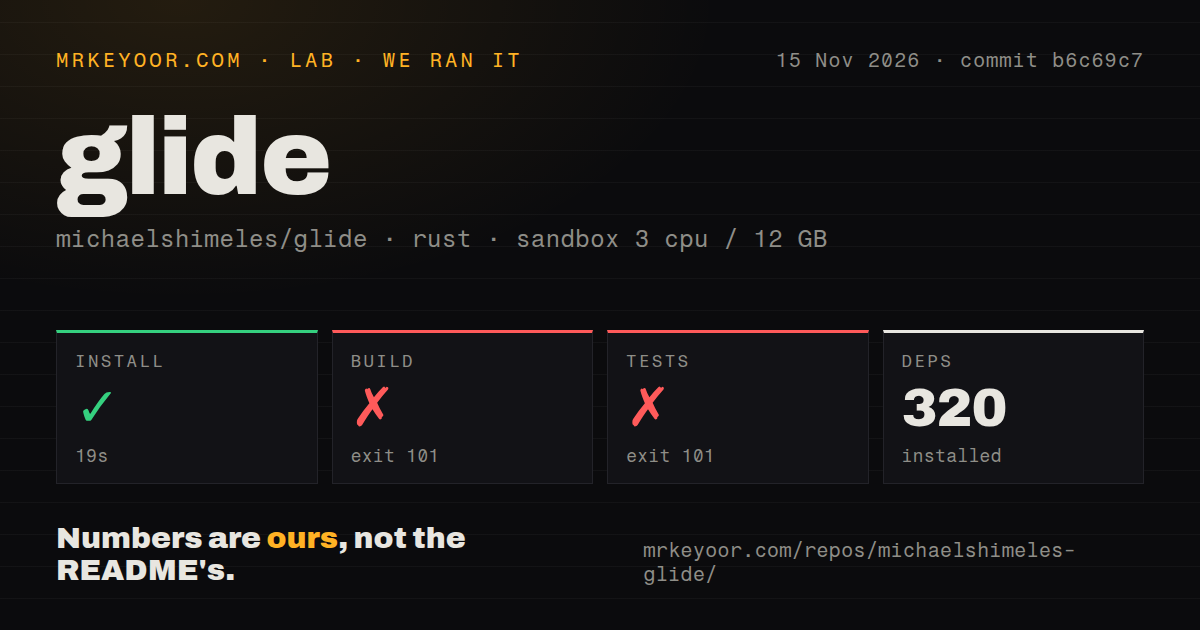
Our sandbox install step succeeded in 19 seconds, but the build failed in 65 seconds and the test command failed in 2 seconds. We measured those outcomes on November 15, 2026, at commit b6c69c7. The configured sandbox had 3 CPUs, 12 GB RAM and image label lab-rust:1. Installation recorded 320 dependencies. Both failing command tails name objc2's Apple-platform restriction, giving the compilation stop a specific location rather than a general diagnosis of the recorder.
| Source-run step | Recorded outcome | What it means for this review |
|---|---|---|
| Install | Succeeded in 19 seconds | The dependency step completed, with 320 dependencies recorded |
| Build | Failed, exit 101, in 65 seconds | Compilation stopped at objc2 |
| Tests | Failed, exit 101, in 2 seconds | The captured tail shows the same compilation barrier |
The build diagnostic says that objc2 only works on Apple platforms and suggests an Apple target such as aarch64-apple-darwin. Both tails end with Cargo unable to compile that library. The checkout scan recorded 195 files, about 32,340 source lines and 4.4 MB checked out. It found a tests directory, 0 CI workflow files and no Dockerfile. These are source-tree and command outcomes; the test command stopped during compilation rather than reporting recording assertions.
The pack also contains a separate quickstart-lib run, recorded on 2026-11-15 at b6c69c7f4099 with 2 CPUs and 4 GB RAM. Its clone step took 2 seconds. In a new binary crate, cargo add glide installed version 0.6.9 in 11.6 seconds. The recipe recorded 281.8 MB of downloaded crate sources and 242 packages besides glide. Those figures belong to that registry-package recipe, separately from the source-run table.
The quickstart recipe's snippet step failed because the README has no Rust code block to run. The pack repeats this as the no-snippet finding, and teardown completed successfully. The project's README instead presents shell commands for building, opening, recording with and exporting from a desktop app. Keeping those recipes separate prevents the registry installation from being mistaken for installation of the reviewed checkout.
Where people get stuck: platform and build requirements
The README requires macOS 15+, Rust's 2024 edition, Xcode and CMake for source builds. Its build script produces dist/Glide.app and dist/glide, and the documented next command opens the app. For a plain Cargo build, the README supplies SDK guidance tied to a specific CMake compiler-check error. Follow that distinction when troubleshooting: a documented response to a malformed-file SDK error addresses a different symptom from the objc2 platform error captured in our run.
| Symptom or decision | Evidence | Practical next step |
|---|---|---|
| objc2 compilation stops | Our build and test tails say Apple platforms only | Use the documented Mac build route for evaluation |
| CMake reports a malformed-file SDK error | README describes setting SDKROOT to Xcode's SDK | Follow that SDK guidance for that error |
| You want to compile on macOS 14 | Source instructions require macOS 15+; release packaging names macOS 14 and later | Choose instructions for the source or packaged route explicitly |
| The description link needs clarification | Issue #7 requests a replacement URL | Follow the repository issue for the requested change |
The source and release paragraphs name different minimum macOS versions. The release script is described as building a universal Apple Silicon and Intel app for macOS 14 and later, then signing, notarizing and packaging it. Developer ID credentials appear in that release process. The ordinary build instructions and release-distribution instructions therefore deserve separate reading, particularly for contributors preparing a local build and maintainers preparing a distributable application.
In issue #7, the description-link request, the reporter asks for the destination to become glide.rasmic.xyz. The supplied record labels the issue open with 0 comments. This is a navigation request, so the useful action for readers is to follow the issue and start from the identified repository. It is not a report of an export failure, a recording defect or an app crash.
Screen permissions and moving masks
The README lists blur, pixelation and highlight masks with warnings when covered content moves. This matters when planning a recording that includes an internal dashboard or other sensitive screen content: the documented warning concerns movement beneath a mask. The command list includes dist/glide check-masks Project.glide for locating that movement and dist/glide permissions --request for requesting permissions. Those exact command paths refer to the built desktop executable rather than an assumed globally installed program.
A practical acceptance task can use disposable content, move it beneath a mask and inspect the resulting edit and export. That suggestion gives the mask feature a concrete job without assigning it a safety score. The README also lists a background check, an audio check and screen and audio self-test commands. A Mac evaluator can use those documented entry points alongside the editor when deciding which parts of a recording workflow require closer inspection.
Editing and export choices
The README documents MP4 export using H.264 or HEVC through VideoToolbox, plus GIF export with delta frames. It lists resolutions from 720p to 4K, frame rates from 10 to 60 fps, quality presets, size estimates and a fit-to-file-size option. These settings make the intended delivery format part of the evaluation task. Someone sending a short GIF and someone preparing a narrated 4K walkthrough are asking the application to produce different outputs.
For captions, the README names on-device Whisper and Apple Speech, with editable text. Its credits say Whisper models download on first use. The editor also lists voice-over with ducking and audio isolation. A representative evaluation can therefore include a spoken explanation, a deliberate cut and caption corrections before export. Watch the resulting file outside the editor and compare it with the intended demonstration; the useful next step is a finished artifact that matches the reader's actual delivery requirement.
Glide vs OBS Studio and Cap
OBS Studio emphasizes capture, composition and streaming; Cap describes recording, local editing and sharing; Glide describes an editable macOS product-video workflow. These source-based distinctions help choose which project to investigate first. They are more useful here than comparing products solely because they share the name Glide. The relevant choice is whether the job centers on presentation edits, capture composition or a recording that needs a share link and attached feedback.
| Candidate | What its source describes | When to investigate it |
|---|---|---|
| michaelshimeles/glide | macOS recording, automatic zoom, cursor styling and editing | You want to evaluate product-video presentation on a Mac |
| OBS Studio | Capture, composition, encoding, recording and streaming | Capture composition or streaming is central to the job |
| Cap | Recording, local editing, share links, comments and team workspaces | Sharing and feedback belong in the recording workflow |
OBS Studio's README describes capture, composition and streaming. Its repository README is the supplied primary source for that role. Choose it as a comparison candidate when those jobs define your recording setup. Glide's documented click-driven zoom and cursor treatment provide a different starting point for a product demonstration. The question to take into an evaluation is which presentation work should happen inside the recorder and which work belongs elsewhere in your process.
Cap's README describes local editing, share links, comments and team workspaces. It also documents macOS, Windows and Linux desktop support. The Cap repository README distinguishes local Studio Mode from an Instant Mode that uploads while recording. That gives teams a concrete comparison axis: whether the recording ends as a local file or enters a sharing and feedback workflow. Use those documented differences to select candidates before comparing results from representative recordings.
Why Glide Apps reviews do not apply
TechRadar describes Glide as a no-code platform for creating web apps, while this repository's README describes a macOS screen recorder. The supplied TechRadar review extract and Cybernews review extract concern Glide Apps. Their app-building features and pricing answer a different buying question. The distinction resolves the naming problem without treating either publication's description of its chosen product as an error about this recorder.
FAQ
Glide's source instructions require macOS 15+, and our build stopped at objc2 before the desktop workflow began. The questions below address that setup decision, the documented output formats and the repository's description-link request. Two questions from the supplied search and community records also explain why an app-builder comparison or app-building tutorial leads to a different product. Their answers stay focused on choosing the correct recorder evidence.
What platform and tools does the source build require?
The README requires macOS 15+, Rust's 2024 edition, Xcode and CMake. It gives scripts/build.sh followed by open dist/Glide.app as the desktop build-and-open route. Its release-script paragraph separately describes a universal packaged app targeting macOS 14 and later. Use the source build section to distinguish those routes before choosing instructions for a particular Mac.
Why did our build and test command fail?
Both captured tails report that objc2 only works on Apple platforms. The build failed with exit 101 after 65 seconds, and the test command failed with exit 101 after 2 seconds. Installation had completed in 19 seconds. Those outcomes locate the failure during compilation and preserve the difference between completing a dependency step and reaching the desktop application's capture, editing and export workflow.
Which export formats does the README list?
The README lists MP4 with H.264 or HEVC and GIF with delta frames. It also names 720p to 4K output, 10 to 60 fps, quality presets, size estimates and a fit-to-file-size option. The export feature description supplies those choices. Select the format you intend to deliver when planning an evaluation rather than judging the workflow only from its editor preview.
Should the repository description URL be updated to https://glide.rasmic.xyz/?
Issue #7 requests that destination, and the supplied issue record is open with 0 comments. The description-link issue is the source for the request and its recorded status. For readers choosing a download or following setup instructions, the owner-qualified repository remains the reference used throughout this review, with README links pinned to the measured commit.
How does Glide compare with AppSheet or Softr?
The supplied autocomplete record includes searches for glide vs appsheet and glide vs softr; this review concerns michaelshimeles/glide's macOS recording workflow. The search-intent record explains the question's presence, while the recorder README supplies the product category. For this recording decision, the comparison section uses OBS Studio and Cap, whose supplied primary sources describe video capture or screen recording.
Where can a beginner or intermediate Glide Apps user find videos that build an app from scratch?
The supplied tutorial request appears in the Glide Apps community, where replies point toward introductory videos. The app-building tutorial thread is the relevant destination for that question. For the recorder reviewed here, the supplied README instead provides desktop build and command-line instructions. Keeping those destinations distinct helps a first-time reader avoid following an app-building lesson while trying to set up a screen recorder.
What we have not tested yet
Our run ended during compilation, so a supported macOS build and completed capture-and-export session remain untested. Recording quality, audio synchronization, zoom behavior, mask safety, transcription accuracy, export performance and sustained use have no measured result here. The compiler's target suggestion does not establish that changing the target alone would produce a working app. The sandbox allocation is configuration evidence rather than the application's memory requirement, and its image label supplies no actual runtime or operating-system version.
The separate quickstart-lib recipe does not tie its installed registry package to this checkout or demonstrate the desktop app. The pack has no screenshot records from our app session and no known-answer recording tasks to score. The README's synthetic screenshots are not lab captures. Independent adoption, support responsiveness and comparative recording quality also lack supporting observations here. Numerical editorial ratings therefore remain unassessed; the next useful evidence is a representative recording produced on a supported Mac and inspected after export.