Cap joins recording, editing, and sharing in one product
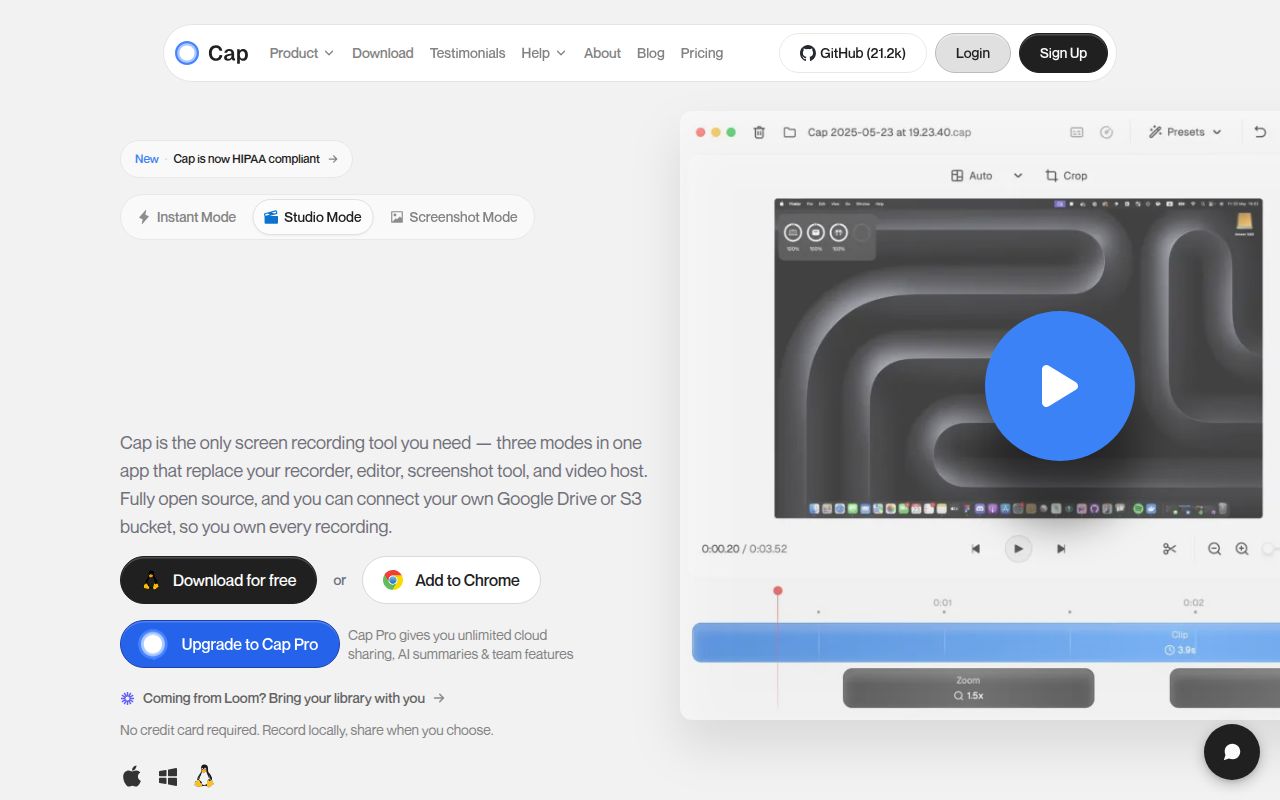
Cap covers more of the Loom workflow than a plain screen recorder. Its desktop app captures the screen, camera, and microphone. Instant Mode uploads during capture so a link is ready when recording stops, while Studio Mode records locally and opens an editor with trimming, backgrounds, zooms, captions, and export controls. The web side adds comments, reactions, transcripts, viewer analytics, team workspaces, passwords, and custom domains.
Storage choice is the main reason to consider it over a closed hosted recorder. A team can use Cap Cloud, attach an S3-compatible bucket, keep recordings local, or operate the whole service. The README names AWS S3, Cloudflare R2, Backblaze B2, MinIO, and Wasabi. That lets an organization decide where video files live without giving up share pages and feedback.
The desktop app is simpler than the 3,630-file codebase
Most users should download the macOS or Windows app, sign in, choose Instant or Studio Mode, and record. Contributors meet a much larger system. The checkout at commit aa93b22 contained 3,630 files, about 776,120 source lines, and 155.9 MB before dependencies. It is a Turborepo with Rust capture and media crates, Tauri, SolidStart, Next.js, Drizzle, MySQL, shared packages, a CLI, and a separate media server.
The README documents the pieces well. Node 20 or newer, pnpm 10.5.2, Rust 1.88 or newer, and Docker are required for local development. MySQL, MinIO, environment setup, and Cap-specific setup sit behind the initial package install. A developer touching the recorder SDK may need a different slice of that stack from someone working on share pages, but the root build still crosses workspace boundaries.
What happened when we ran it
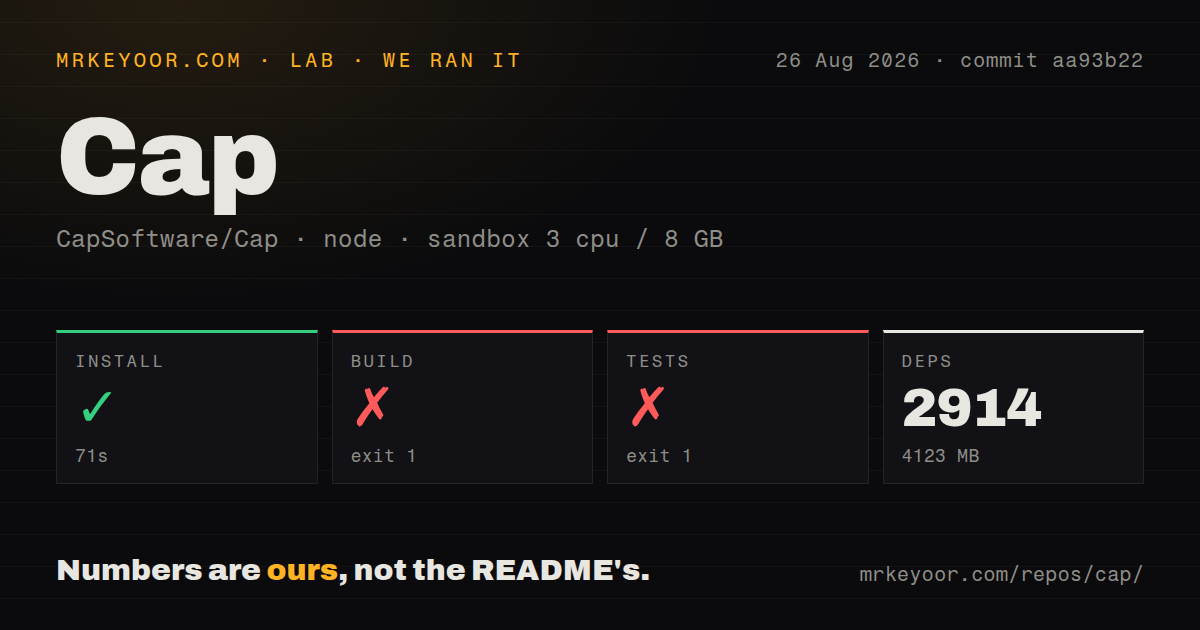
Our sandbox installed 2,914 packages in 71 seconds and left 4,123 MB on disk. The build then failed with exit code 1 after 11 seconds. Five of 10 tasks completed before @cap/sdk-recorder stopped while generating TypeScript declaration files. The final log identifies a declaration build error, but it does not show enough context to assign a cause.
Tests also failed, this time after 7 seconds and before any successful workspace task was reported. The media-server test script tried to execute bun, and the fresh Debian container answered bun: not found. That is a direct environment requirement exposed by the repository command. The supplied README requirements list Node, pnpm, Rust, and Docker, but the test log shows this path also expects Bun to be available.
These results cover commit aa93b22 in an unprivileged container with 3 CPUs, 8 GB of RAM, Node 22, and no secrets. They do not measure recorder quality, export speed, upload throughput, or the Docker Compose deployment. The useful conclusion is narrower: installation worked, while the advertised workspace build and root test commands did not complete in that stated environment.
Self-hosting still depends on several services and secrets
The quick self-hosting route is docker compose up -d, with Cap available on port 3000. If email is absent, login links appear in service logs. That is convenient for one operator testing locally, yet awkward for a real team. Issue 1766 says invitations and magic links currently depend on Resend rather than generic SMTP, leaving existing mail infrastructure unused.
Production adds public Cap and S3 URLs, new secrets, SSL, object storage, the database, and the media service. AI features can require Deepgram, OpenAI, Groq, or Anthropic credentials. Issue 1996 asks for custom base URLs because the documented providers do not let a self-hoster direct transcription and summaries to its own compatible model servers. Teams choosing Cap for data control should separate storage ownership from AI processing before making a policy claim.
Secrets deserve a deployment test of their own. Issue 2114 describes the Railway template accepting a database encryption key in the wrong format. The error appeared later, when a user tried to password-protect a recording, rather than during startup. Generate the documented 32-byte value, test password protection, invitation delivery, uploads, and retrieval before inviting a team.
Current capture reports justify a workflow trial
Release 0.5.9 arrived on August 11, 2026. Its notes describe fixes for memory growth on macOS, damaged microphone tracks, camera encoder errors, disk-space protection, pause and resume, and timestamp collisions that could stop recordings on macOS or Windows. GitHub recorded another push on August 26 and listed 314 combined issues and pull requests, so development and user reporting are both active.
Current reports also touch the output users care about. Issue 2144 says the cursor gradually drifts out of sync with video during recordings longer than about 5 minutes on a Mac running version 0.5.9. Issue 2116 reports a zero-byte camera track when an iPhone camera supplied frames at a different size from the initialized encoder. These are individual reports, not failure rates, but both warrant reproducing your normal recording length and camera setup.
Choose Cap for ownership with collaboration attached
OBS Studio remains the better choice for complex local scenes and live production. Screenity is lighter when a browser extension and annotations solve the job. Kap gives Mac users a smaller capture utility. Cap earns its extra machinery when the recording has to become a controlled share page with comments, transcripts, workspace access, analytics, and storage chosen by the operator.
That machinery has a real cost. Our 4,123 MB dependency result, failed declaration build, and missing Bun test command make the contributor experience less tidy than the consumer app. Cap is worth trialing against Loom for a team that will use both Studio editing and shared feedback. Run that trial on each supported desktop platform, then decide whether Cap Cloud, your own bucket, or the full self-hosted service matches the amount of infrastructure you want to own.