Saving a Lexical document makes its node types your responsibility
A Lexical document saved as JSON needs the same node types registered when you restore it. The editor-state documentation makes that requirement explicit. For a team introducing custom nodes, adoption includes keeping stored content readable as the application changes.
Lexical's core is framework agnostic, with official React bindings. Its README lists plugins, history, serialization and Yjs collaboration. The React quick start composes a contenteditable surface with plain-text behavior and history. Your team supplies the application's controls and persistence decisions.
That makes Lexical worth evaluating when you need custom editing behavior and can maintain the resulting integration. Teams seeking a finished publishing interface should account for the work beyond the quick start. The repository run below helps estimate contributor setup; it does not assess your document design.
What happened when we ran it
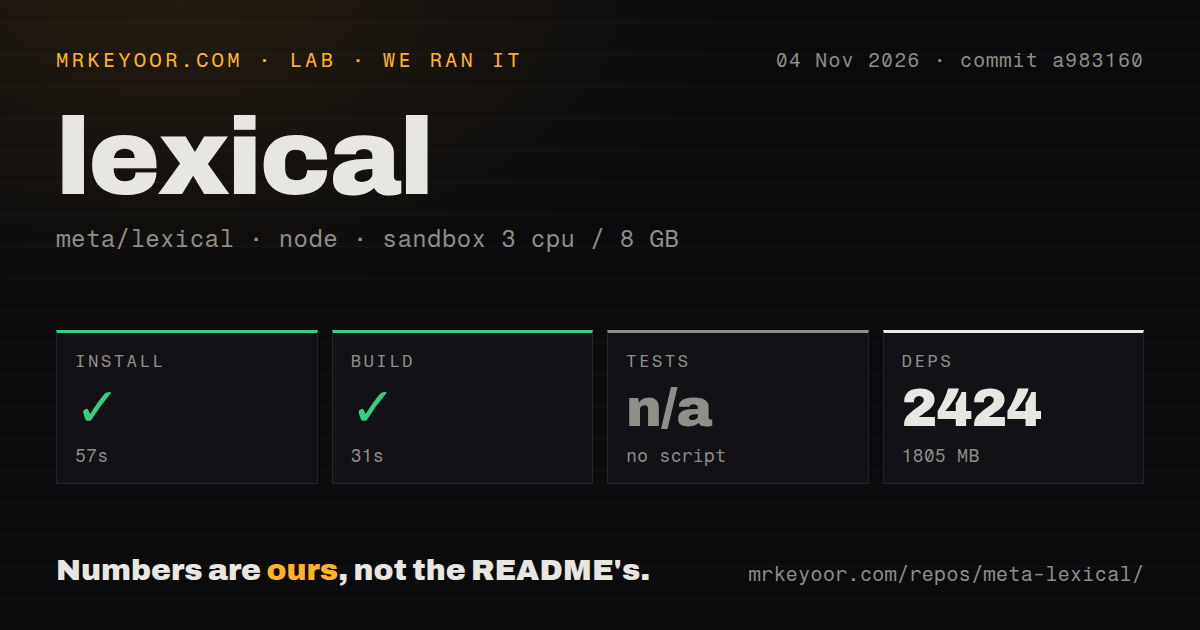
The supplied sandbox run installed Lexical's pnpm workspace in 57 seconds and built it in 31 seconds at commit a983160 on November 4, 2026. It recorded 2,424 dependencies occupying 1,805 MB on disk. These figures cover the repository workspace. They do not establish an application's installed dependency footprint or shipped JavaScript size.
Tests were skipped. The measurement records "no tests script/target, skipped"; it does not explain how a target was selected or establish that Lexical lacks tests. The README separately lists contributor commands for unit tests, Chromium end-to-end tests, linting and type checks. Those commands are not passing results from this run.
The checkout contained 3,135 files, approximately 657,111 source lines and 28.7 MB. The scan recorded monorepo workspaces and 15 CI workflow files, with no Dockerfile or tests directory detected. Those file flags do not establish test coverage or CI success.
The sandbox configuration specified 3 CPUs, 8 GB RAM and image lab-node:22. The image name alone establishes neither the runtime nor operating-system version. Browser editing, accessibility, collaboration and persistence round trips were not measured.
The practical finding is a successful contributor install and build. Allow space for that workspace if you intend to contribute; the 1,805 MB figure says nothing about a browser download.
Document JSON omits selection and runtime node keys
Lexical maintains an underlying editor state as its source of truth. Its documentation describes state snapshots becoming immutable after updates. The state contains the node tree and selection, but serialization preserves a narrower set of information.
The toJSON method serializes the document tree only, excluding selection and runtime node keys. To restore saved content, the documentation instructs developers to parse the JSON and apply the resulting state with the same node types registered. Reopening at a particular caret position therefore requires more than storing document JSON alone.
Dollar-prefixed helpers operate inside synchronous read or update callbacks. The documentation says to finish asynchronous work first, then enter an update with the result. This lifecycle matters when adding remote content or custom editing behavior.
Before adopting custom nodes, keep a saved document containing the types you expect to ship. Reload it with the intended registrations, edit it and save it again. Repeat that check during upgrades. This is a proposed acceptance check, not a persistence result from the supplied sandbox.
Version 0.53.0 includes migration obligations
The supplied release metadata identifies v0.53.0, published October 28, 2026. The v0.53.0 notes remove extensions deprecated as of v0.52.0 and unchecked node type arguments. For affected traversal and lookup calls, they instruct developers to remove the type argument and narrow the result with a node guard. The notes describe runtime behavior for that type-argument change as unchanged.
The release also changes how experimental @lexical/mdast tables store column alignment. Its notes say editor states serialized with the old state lose column alignment on load. Teams using that experimental feature should include alignment in their saved-document checks; the warning does not apply to every Lexical document.
The release lists fixes for input composition, selection and iOS interactions. These are maintainer-reported changes, not behaviors verified by the sandbox build. Similarly, the README's accessibility claims do not assess an application's toolbar labels, dialogs or custom nodes.
The measured checkout is identified by commit a983160. The supplied evidence does not establish that this checkout is the v0.53.0 release tag. The release notes and the workspace measurements answer separate questions.
Compare the document model and required features
Tiptap describes a headless editor extended through extensions. Its README says Pro Extensions need a valid subscription. Check the exact extensions your product requires and whether they belong to the paid offering. The supplied lab run provides no cost or performance comparison with Tiptap.
Slate documents a schema-less core, nested documents and React integration. Its README labels the project beta and warns that APIs will have breaking changes. Evaluate whether that document model suits your application and whether your team can maintain the integration through those changes.
For more detail on the React integration, the supplied existing @lexical/react page covers version 0.49.0. Its version differs from the v0.53.0 release notes discussed here.
Lexical's supplied public metadata records a push on November 10, 2026. That is evidence of a recent repository update; it does not establish support response times or application reliability. Those dimensions remain unassessed.
Before committing stored content to Lexical, keep a representative document, a paste sample and the keyboard flow your users need. Require an upgrade to pass those checks before applying it to production content.