@lexical/react review
`@lexical/react` 0.49.0 is Meta's React binding for the Lexical document editor. Its subpath exports provide the composer context, content-editable surface, error boundary, hooks, and plugins for history, rich text, lists, links, tables, menus, Markdown shortcuts, collaboration, and other editor behavior. Lexical stores an immutable node tree as editor state and reconciles that tree to the DOM; React mounts plugins around it rather than passing a controlled `value` prop. Version 0.49.0 moves built-in nodes to the `$config()` protocol, makes command payload types invariant, adds an optional sticky scrollbar for wide tables, and fixes node cloning, compiled-build recursion, selection, HTML import, and Markdown behavior.
@lexical/react 0.49.0 took 14.1 seconds and 31 MB to install 38 packages in our sandbox, while root imports and the blanket browser bundle check failed; use its documented subpaths and budget for editor engineering. It suits teams building a specific editing product, and it is excessive for a formatted field that another editor can supply out of the box.
We installed it
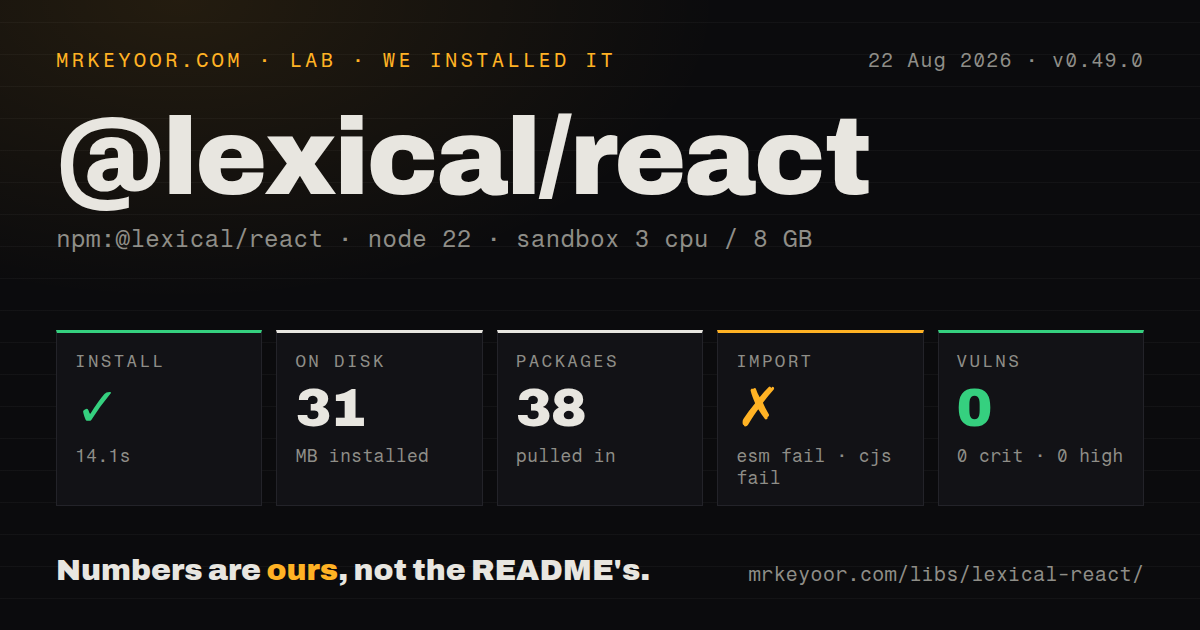
| Install | ✓ · 14.1s | 38 packages on disk · 31 MB |
| Import | ✗ | ESM import fails · require() fails · CommonJS package with exports map |
| Browser | n/a | could not be bundled for the browser (Node-only code, most likely) |
| Types | ✓ | TypeScript types bundled |
| Known vulns | 0 | 0 critical · 0 high · 0 moderate · 0 low (npm audit) |
Answers from our run
Does @lexical/react install cleanly?
Yes. In a fresh container with an empty cache, npm install @lexical/react finished in 14 seconds, leaving 38 packages and 31 MB on disk. npm audit reported no known vulnerabilities.
Can @lexical/react run in a browser?
Not directly: esbuild could not bundle it for the browser in our run, which normally means it depends on Node built-ins. Use it on the server, or find a browser-targeted alternative.
Does @lexical/react work with both ESM and CommonJS?
Neither plain import nor require succeeded in our sandbox, so it needs a bundler or extra setup.
Does @lexical/react include TypeScript types?
Yes, type declarations ship inside the package, so no @types install is needed.
@lexical/react or @tiptap/react: which should you use?
@tiptap/react: Choose it for a ProseMirror-based editor with a larger packaged extension catalog and a higher-level chainable command API. @lexical/react 0.49.0 took 14.1 seconds and 31 MB to install 38 packages in our sandbox, while root imports and the blanket browser bundle check failed; use its documented subpaths and budget for editor engineering.
When should you not use @lexical/react?
You expect an installed package to produce a finished editor. The playground demonstrates UI, but product styling, toolbars, media handling, persistence, migrations, and accessibility testing remain application work.
Use it if
- Your React product needs a custom editor schema, commands, toolbar, serialization, and node UI rather than a preassembled writing screen.
- Canonical content should be structured editor JSON, with selected HTML or Markdown import and export paths around it.
- The document needs application-specific nodes such as mentions, embeds, tokens, tables, or nested editors.
- Collaborative editing will use Yjs and your team can supply the provider, authorization, storage, and retention rules.
- You expect an installed package to produce a finished editor. The playground demonstrates UI, but product styling, toolbars, media handling, persistence, migrations, and accessibility testing remain application work.
- The field is plain text or a short comment. A textarea avoids 38 installed packages, editor-state serialization, node registration, selection plumbing, and contenteditable browser behavior.
- Your dependency policy requires a 1.x compatibility line. Release 0.49.0 includes breaking changes to built-in node static methods and command typing, and monthly releases continue to alter editor internals.
- The project cannot satisfy React 18, React DOM 18, TypeScript 5.2, and Yjs 13.5.22 minimum peers declared by this package.
- Arbitrary HTML must round-trip with every inline style intact. Import and export are node conversion systems; custom CSS fidelity can require replacing TextNode and defining conversion rules.
Setup reality
We installed @lexical/react 0.49.0 in a fresh Node 22 sandbox. npm took 14.1 seconds, installed 38 packages, and used 31 MB. The package itself has 20 direct dependencies, 4 peer dependencies, 3016 KB unpacked, bundled TypeScript types, and an MIT license. npm audit reported zero known vulnerabilities. Both root require() and root ESM import failed on Node 22.23.2, and our browser bundle attempt failed too. Import documented subpaths such as @lexical/react/LexicalComposer; there is no general root entry for application code.
A working editor needs lexical, React 18 or newer, React DOM 18 or newer, TypeScript 5.2 or newer, and Yjs 13.5.22 or newer. initialConfig needs a namespace and error handler. Register every custom or feature node before parsing saved state, then mount the matching plugins under LexicalComposer. The package supplies no default product styling, and rich text does not appear until you add RichTextPlugin, its editable surface, an error boundary, and required node packages.
initialConfig.editorState is consumed once. Later prop changes do not replace the document; parse JSON and call editor.setEditorState() instead. Save serialized EditorState, debounce network writes, and version custom-node data so older documents remain readable. Collaboration uses editorState: null because Yjs owns initialization. The React plugin does not operate a provider, authenticate a room, or persist shared updates.
Dollar-prefixed helpers must execute inside editor.update() or a read closure. Reconciliation usually happens asynchronously, so code that updates and immediately serializes on a server may need a discrete update. Registration methods return cleanup functions; return those from React effects. HTML import needs DOM APIs and a sanitizer policy. SSR should keep the interactive editor in a client boundary so server markup does not fight the one-time initial state.
Patterns
Mount a plain-text editor create-plain-text-editor
import {LexicalComposer} from '@lexical/react/LexicalComposer';
import {PlainTextPlugin} from '@lexical/react/LexicalPlainTextPlugin';
import {ContentEditable} from '@lexical/react/LexicalContentEditable';
import {HistoryPlugin} from '@lexical/react/LexicalHistoryPlugin';
import {LexicalErrorBoundary} from '@lexical/react/LexicalErrorBoundary';

const initialConfig = {
  namespace: 'CommentEditor',
  onError(error) { throw error; },
};

export function CommentEditor() {
  return (
    <LexicalComposer initialConfig={initialConfig}>
      <PlainTextPlugin
        contentEditable={<ContentEditable aria-label="Comment" />}
        placeholder={<span>Write a comment</span>}
        ErrorBoundary={LexicalErrorBoundary}
      />
      <HistoryPlugin />
    </LexicalComposer>
  );
}
This creates behavior and state, not finished styling. Add visible focus, placeholder, disabled, and error states in application CSS.
Configure a rich-text schema register-rich-text-nodes
import {HeadingNode, QuoteNode} from '@lexical/rich-text';
import {ListItemNode, ListNode} from '@lexical/list';
import {LinkNode} from '@lexical/link';

const initialConfig = {
  namespace: 'ArticleEditor',
  nodes: [HeadingNode, QuoteNode, ListNode, ListItemNode, LinkNode],
  theme,
  onError(error) { reportEditorError(error); },
};
A plugin cannot create an unregistered node type. Keep every Lexical package on version 0.49.0 to avoid schema and command mismatches.
Use the editor from a plugin access-composer-editor
import {useEffect} from 'react';
import {useLexicalComposerContext} from '@lexical/react/LexicalComposerContext';

function FocusPlugin() {
  const [editor] = useLexicalComposerContext();
  useEffect(() => { editor.focus(); }, [editor]);
  return null;
}
The composer hook only works below `LexicalComposer`. Put editor side effects in plugin components.
Save serialized editor state persist-editor-json
import {OnChangePlugin} from '@lexical/react/LexicalOnChangePlugin';

function PersistPlugin({queueSave}) {
  return (
    <OnChangePlugin
      ignoreSelectionChange
      onChange={(state) => queueSave(JSON.stringify(state))}
    />
  );
}
Debounce remote writes and store a document schema version. Loading later requires every referenced custom node to be registered.
Load JSON during editor creation initialize-saved-state
const initialConfig = {
  namespace: 'ArticleEditor',
  editorState: savedJson ?? undefined,
  nodes: articleNodes,
  onError(error) { throw error; },
};

<LexicalComposer initialConfig={initialConfig}>
  <ArticlePlugins />
</LexicalComposer>
The composer reads `editorState` once. Use `null` only when collaboration will initialize the root.
Apply a different document after mount replace-open-document
function loadJson(editor, json) {
  const state = editor.parseEditorState(json);
  editor.setEditorState(state);
}
Changing `initialConfig` after mount has no effect. Validate untrusted or versioned JSON before replacing the live state.
Create nodes inside an update append-model-content
import {$createParagraphNode, $createTextNode, $getRoot} from 'lexical';

editor.update(() => {
  const paragraph = $createParagraphNode();
  paragraph.append($createTextNode('Hello from Lexical'));
  $getRoot().append(paragraph);
});
Lexical's dollar-prefixed helpers require an active read or update context. Calling them during ordinary React render throws.
Format the current selection dispatch-bold-command
import {FORMAT_TEXT_COMMAND} from 'lexical';

<button
  type="button"
  onMouseDown={(event) => event.preventDefault()}
  onClick={() => editor.dispatchCommand(FORMAT_TEXT_COMMAND, 'bold')}
>
  Bold
</button>
Preventing the mouse-down default keeps focus and selection in the editor before the click dispatches the command.
Add a command from a React effect register-typed-command
const INSERT_TOKEN = createCommand<string>('INSERT_TOKEN');

useEffect(() => editor.registerCommand(
  INSERT_TOKEN,
  (label) => {
    $insertNodes([$createTextNode(`{{${label}}}`)]);
    return true;
  },
  COMMAND_PRIORITY_EDITOR,
), [editor]);
The registration function is also the cleanup function returned by the effect. Version 0.49.0 enforces invariant command payload types.
Generate HTML from the current state export-editor-html
import {$generateHtmlFromNodes} from '@lexical/html';

const html = editor.getEditorState().read(() =>
  $generateHtmlFromNodes(editor, null),
);
Custom nodes decide their HTML representation. Keep JSON as canonical storage when application data cannot survive HTML conversion.
Convert sanitized HTML into nodes import-sanitized-html
import {$generateNodesFromDOM} from '@lexical/html';
import {$getRoot, $insertNodes} from 'lexical';

const dom = new DOMParser().parseFromString(cleanHtml, 'text/html');
editor.update(() => {
  const nodes = $generateNodesFromDOM(editor, dom);
  $getRoot().select();
  $insertNodes(nodes);
});
Sanitize hostile markup before conversion. Imported styles and elements survive only when registered node rules accept them.
Let a Yjs room initialize the editor start-yjs-collaboration
const initialConfig = {
  namespace: 'SharedDoc',
  editorState: null,
  nodes: sharedNodes,
  onError(error) { throw error; },
};

<CollaborationPlugin
  id={documentId}
  providerFactory={providerFactory}
  shouldBootstrap
/>
The provider remains your responsibility. Authenticate document IDs, persist Yjs updates, define awareness behavior, and test reconnect conflicts.
Alternatives
| Package | Registry | Pick it when |
|---|---|---|
| @tiptap/react | npm | Choose it for a ProseMirror-based editor with a larger packaged extension catalog and a higher-level chainable command API. |
| slate-react | npm | Use it when React rendering and application-defined normalization over a JSON tree matter more than Lexical's command and plugin model. |
| react-quill | npm | Use it for an established Quill toolbar and Delta document model when deep custom-node behavior is unnecessary. |
More web frontend guides
postcss · react · react-dom · tailwindcss · clsx · htmlparser2 · the whole shelf →
Related reading
How this guide is made: grounded in the library's documentation, release notes, changelog, and issue history, on a fixed rubric — not a hands-on install of every release. The 50 most-downloaded entries are additionally install-verified in clean containers. Corrections: contact the desk.